Mochos Esenciales (Essentials)
- By
Essentials with real screens instead of commands: players and friend groups, homes and warps, land claims, a Ceitil coin economy with bank and shop, a new chat with commands, Markdown help pages and a full admin panel.
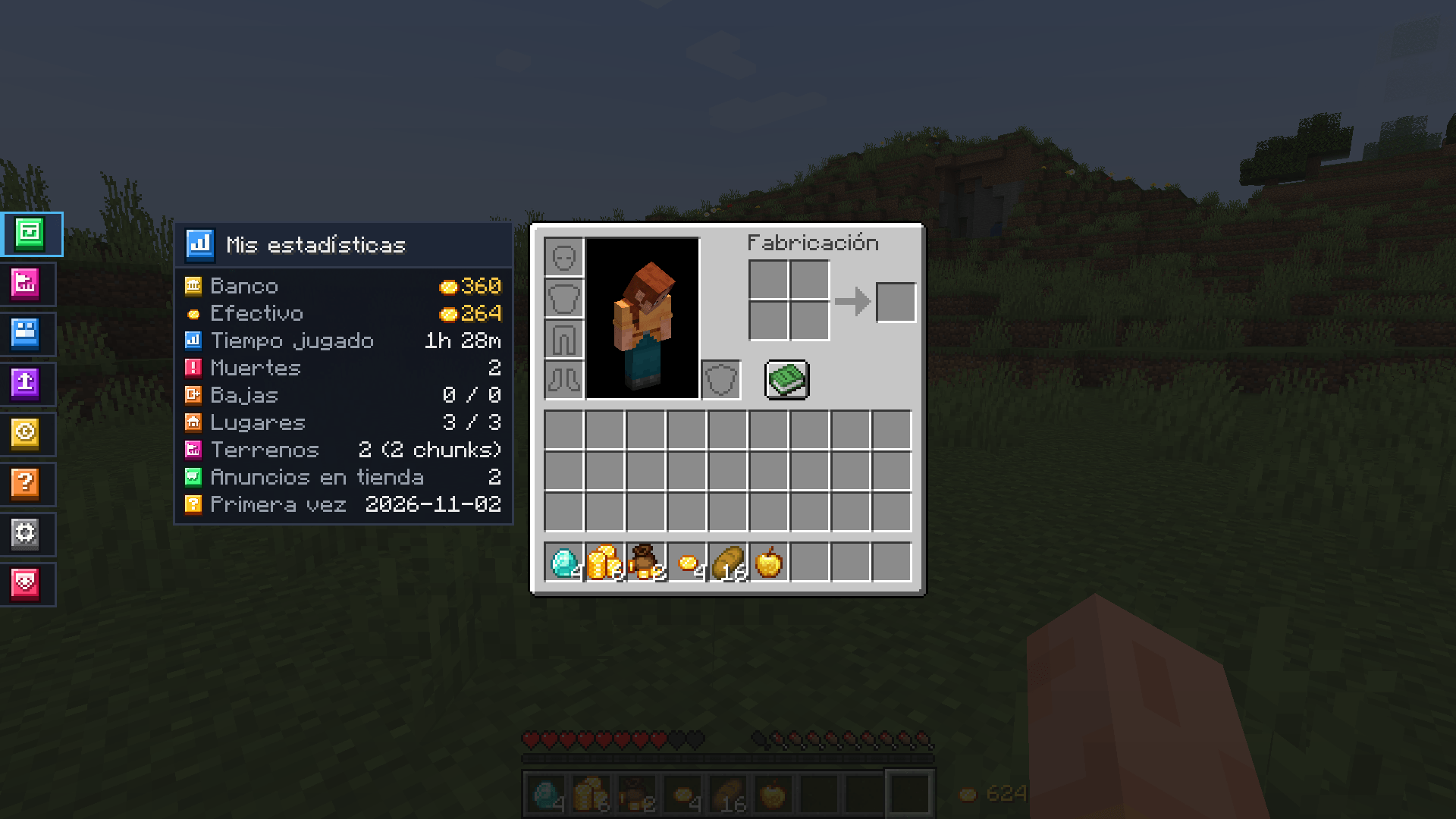
Every feature one click away from the inventory.
Description
Mochos Esenciales
Everything other essentials mods do with commands, done with real screens. Players, friend groups, homes and warps, land claims, a coin economy with a bank and a shop, a new chat, help pages and a full admin panel — all one click away from your inventory.

Mochos Esenciales is a quality-of-life mod for NeoForge 1.21.1 servers (and singleplayer). Open your inventory and a column of tabs appears on the left. Every screen adapts to any window size and GUI scale.
Tabs
- 🎒 Inventory — the usual inventory, with the tabs next to it and your statistics on the left (money, play time, deaths, places, claims…).
- 🗺️ Map — opens the Diorama map with the tabs on top (if Diorama is installed). The map shows claims, what others explored, shared waypoints and far-away players of your groups. In Settings you choose whether to see claims on the map and on the minimap, and whether to share your location and what you explore. Each waypoint can stay private, be made public or be shared with one of your groups from its own screen.
- 🏡 Claims — claim and protect chunks from a map of the real terrain: click or drag to claim or release, several named claims, friends with templates and per-player permissions, public permissions, formatted welcome and farewell notifications and a visitor alarm for the owner and members.
Gkey or/claims menu. - 👥 Players — who's online, search, sort by distance or name. Direct chat, travel requests and group invites. Block direct messages or travel requests from anyone. Friend groups: create, invite, kick, rename, pick a colour, leave.
- 🧭 Travel — server warps (with optional name, icon and description) and your own places (name, dimension and coordinates). Click or press the travel button; move, rename and delete in a drop-down. Price and cooldown per travel type.
- 💰 Economy — bank (deposit, withdraw, transfer with player suggestions, a deposit slot and slots to group or split coins), a shop with search (by item or seller), sell your items and My shop: your listings with their own stock inventory and a sales history (who bought, what, and what you earned). Admins run a server shop with infinite stock that can also buy from players.
- ❓ Help — pages written by the admin in Markdown: headings, bold, italics, strikethrough, code, lists (nested and task lists), quotes, tables, links and images from URLs (PNG, JPG, GIF) at the width you choose (
{width=120}). In-game editor with live preview. - ⚙️ Settings — who can send you travel requests, messages or invites (everyone / friends only / nobody), auto-accept travel from friends, hide your distance, payment notices, sound and volume per chat, notifications, chat timestamps, close the chat after sending a message or a command, lines, width, opacity and duration, your money next to the hotbar and your statistics next to the inventory.
- 🛡️ Administration (operators only) — toggle every module (Claims and Map too), travel prices and cooldowns, places per player, claim limits (chunks, claims and friends), starting money, shop fee, chat limits and direct message history; broadcast announcements (in the chat, as a title or as a notification, for everyone or some players, at once or every N minutes); server texts (join, leave and welcome messages, currency name); tab order; difficulty, PvP, MOTD and game rules; bans (also temporary) and whitelist. Per-player tools: stats (with money), view inventory and ender chest, go to / bring, heal, game mode, mute in the global chat, kick, ban, add or set money and their own settings for travel and claims (prices, cooldowns, places and limits that differ from the server's). A global admin mode switch to see the server as a regular player.
A brand-new chat
Replaces the vanilla chat (T) and only takes the bottom-left corner. Global, Groups and Direct tabs with unread counters: hovering one lists its conversations. Direct chats can be removed from the list without losing their history, kept by the server. Markdown messages with clickable links, pop-up notifications and a sound per chat type. Travel requests and group invites arrive in the direct chat with Accept / Decline buttons. Tab switches conversation. Commands are typed in the same chat (the / key opens it too), with vanilla's autocomplete and suggestions.
The Ceitil, a real coin
| Item | Value |
|---|---|
| Ceitil | 1 |
| Stack of Ceitiles | 10 |
| Bag of Ceitiles | 100 |
Cash is made of items; the bank keeps your balance. Withdrawing gives you the fewest coins; paying gives you change. In the crafting table a stack breaks into 10 ceitiles and a bag into 10 stacks (the bank's converter groups and splits as many as you want). The currency name can be changed.
Formatted texts
Announcements, join and leave messages and claim notifications take Markdown and Minecraft colours (&a, &6, &#FF8800…), with a live preview and placeholders such as {player} or {online}.

Quick commands
| Command | What it does |
|---|---|
/home [name] · /sethome [name] · /delhome <name> |
Your places |
/warp <name> |
Travel to a server warp |
/tpa <player> |
Ask to travel to a player |
/balance · /pay <player> <amount> |
Money |
/claim · /unclaim · /claims menu |
Claim or release the chunk you stand in, open the claims screen |
/eco give|take|set <player> <amount> |
Admin: change a player's money |
Works great with
- Diorama (optional, client) — the Map tab opens Diorama's map with the tabs on top, and the map shows claims, a shared explored map, shared waypoints (public or per group) and the players of your groups even when they are far away. Works with Diorama 0.6.0, 0.6.1 and 0.7.0.
- Simple Voice Chat (optional) — its main options, its groups and the volume of each player from the Settings tab.
Installation
| Where | Needed? |
|---|---|
| Server | Required |
| Client | Required (the mod adds items and screens) |
Requires Minecraft 1.21.1 and NeoForge 21.1.265 or newer. No other mods required: claims and the map are built in. If you used Diorama Addons: Claims or Client Map, remove them; your claims and their settings are kept, and map groups become friend groups.
- Server config:
config/mochos_esenciales-server.toml(also editable from the Administration tab). - Claims:
config/mochos_esenciales-claims-server.toml(limits also from Administration → Claims). - Map:
config/mochos_esenciales-clientmap-common.toml. - Personal config:
config/mochos_esenciales-client.toml(from the Settings tab). - Help pages:
config/mochos_esenciales/help/*.md— ordered by file prefix (01-…), titled by their first heading. Four example pages are created on first run.
Languages: English and Spanish. Screenshots show the Spanish interface.
About
Not affiliated with or endorsed by the authors of Diorama.
Mochos Esenciales (Essentials) Team