Mob Spawn Overlay
- By
Press F7 to see red and yellow marks on every block where hostile mobs can spawn - light up your base properly in seconds. - Client Side
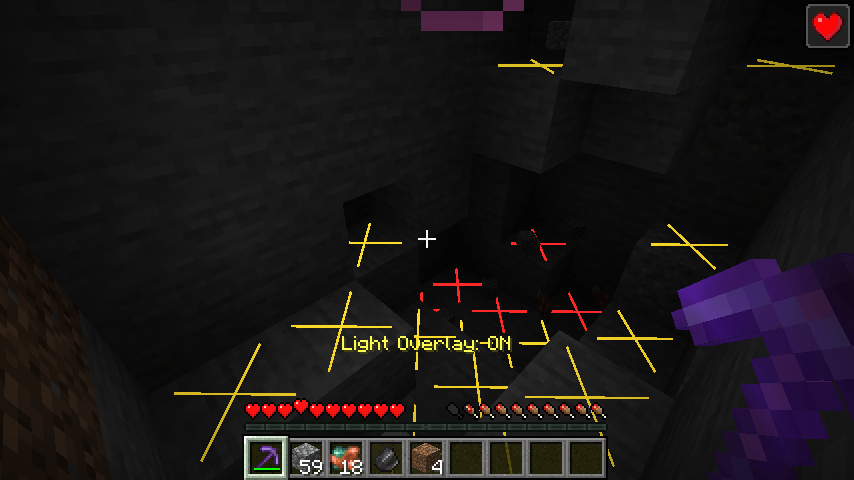
2026-11-08_14.08.30.png
Description
## Find the dark spots before the creepers do
You built a beautiful base, placed torches everywhere... and a creeper still spawns behind your house. Somewhere, a block is too dark - but which one?
**Light Level Overlay** shows it instantly. Press **F7** and every block where a hostile mob could spawn gets a mark:
- **Red X** - mobs can spawn here **any time** (it's dark, even at noon)
- **Yellow X** - mobs can spawn here **at night** (only daylight keeps it safe)
- **No mark** - safe: lit by a torch/lantern, or mobs can't stand there
## Features
- **Press F7 to toggle** - "Light Overlay: ON/OFF" in the action bar.
- **Real spawn rules** - uses the game's own checks: the block must allow spawning (no glass, slabs, leaves...), there must be room for a mob, and block light must be 0 (Minecraft 1.18+ rules).
- **Red vs yellow** - see the difference between always-dark spots and spots that only need a torch for the night.
- **Updates live** - place a torch and the marks disappear within half a second.
- **Light on performance** - only checks around you (16 blocks sideways, 8 up/down by default), twice per second.
- **Works in caves, bases, farms and mob-proofing projects.**
## Controls
| Key | Action |
|---|---|
| F7 | Turn the overlay on/off |
Change it in Options > Controls > Key Binds. The key works even if another mod uses the same key.
## Settings
The file `config/lightleveloverlay.properties` is created on first launch:
- `radius` - how far around you to check, sideways (default: 16, max 48)
- `verticalRadius` - how far up/down (default: 8)
- `showYellow` - show yellow "night only" marks (default: true)
- `rememberState` - keep the overlay on after restarting (default: false)
## Works on servers
This is a **client-side only** mod. It looks at the blocks and light levels your game already knows (the same data you see in F3) and draws marks only on your screen. Works in singleplayer, on Realms and on any multiplayer server.
## Honest limitations
- Checked with the rules for a normal mob (zombie size). Some special spawns (slimes in slime chunks, mobs in structures, spawners, mushroom islands where nothing spawns) follow their own rules and aren't shown separately.
- Marks are drawn on blocks you can see; they don't show through walls.
- Very large radius settings can cost some FPS on slower PCs.
- The settings are in a config file; there is no in-game settings screen yet.
## Requirements
- Minecraft 1.21 / 1.21.1
- Fabric Loader 0.16 or newer
- Fabric API
- Java 21
## Installation
1. Install Fabric Loader for Minecraft 1.21.1.
2. Put **Fabric API** and **Light Level Overlay** in your `mods` folder.
3. Start the game.
## Modpacks
You are welcome to include this mod in any modpack. No need to ask.
## Also by this author
- **Clean Chat Heads** - player faces next to chat messages, optional timestamps
- **Clean Ping Display** - real ping numbers in the Tab list
- **Clean Horse Stats** - a horse's speed, jump and health at a glance
- **Clean Info HUD** - coordinates, facing, biome and FPS in a tidy panel
- **Status Effect Timers** - your potion effects as a clean list with countdowns
- **Death Location Helper** - an on-screen arrow back to where you died
- **Item Pickup Notifier** - see everything you pick up at the side of the screen
- **Smooth Zoom** - hold a key to zoom, scroll to change the zoom level
- **Item Container Preview** - see Shulker Box contents in the tooltip
- **Clean Tooltip Enchants** - color-coded enchantments with (MAX) tags
- **Smart Torch Placer** - place torches with one key, optional Auto-Light for mining
- **Smart Crop Harvest** - right-click ripe crops to harvest and replant
- **Floating Damage Indicators** - damage, heal and crit numbers above mobs
- **Smart Tool Safety** - durability warnings and tool break protection
- **Smart Chest Organizer** - sort buttons and quick deposit for chests
- **Dynamic Armor HUD** - armor, held item and arrow durability on screen
- **Smart Auto-Trash** - quickly trash or auto-throw junk items
- **Dynamic Item Glow** - rarity colors and glow for items
## About the images
The project logo is an illustration created with AI assistance; it is not an in-game screenshot. The screenshots in the gallery are real, unedited in-game captures.
Mob Spawn Overlay Team