Clean Keystrokes
- By
Show your WASD keys, mouse buttons and clicks per second on screen - clean and light, perfect for PvP, tutorials and streams. - client side
2026-11-12_10.38.13.png
Description
## Show what you press
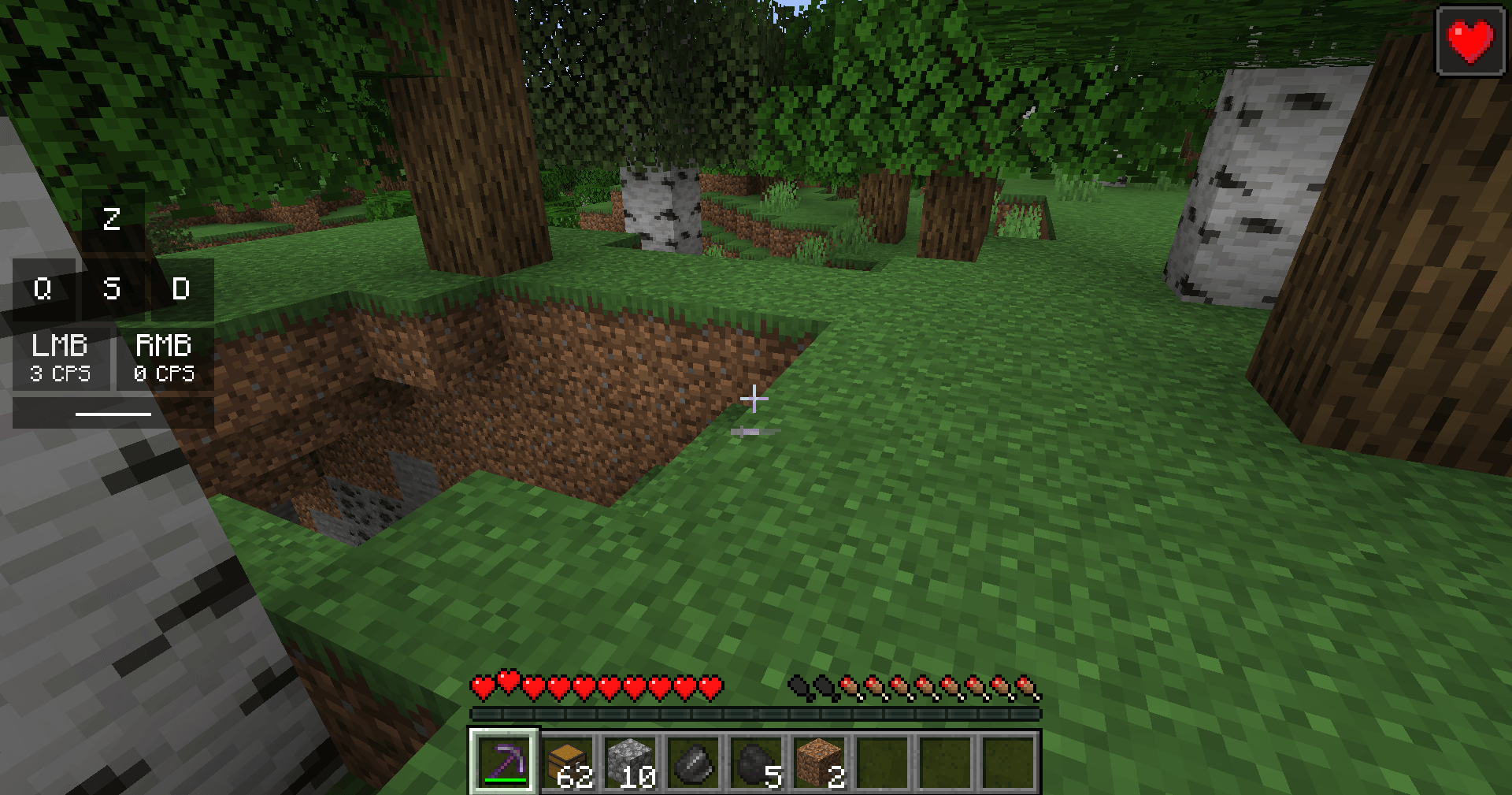
Recording a parkour tutorial, streaming PvP, or just curious how fast you click? **Clean Keystrokes** shows a small panel with your movement keys, mouse buttons, clicks per second (CPS) and the space bar - lighting up as you press them.
## Features
- **W A S D** keys that light up when pressed, with a short fade when you let go.
- **LMB / RMB** with live **CPS** (clicks per second) for both mouse buttons.
- **Space bar** for jumps.
- **Your own key bindings** - if you play with Z Q S D (AZERTY) or custom keys, the panel shows those letters.
- **Any corner, any size** - top-left by default (just under Clean Info HUD if you use both), scale 0.5x to 3x.
- **Custom colors** - background, pressed color and text colors, with transparency.
- **Hides with F1 and F3** like the rest of the HUD.
No key bindings of its own - nothing to set up and no conflicts with other mods.
## Settings
The file `config/cleankeystrokes.properties` is created on first launch. Colors are `#AARRGGBB` or `#RRGGBB`:
- `enabled` (true), `corner` (top_left / top_right / bottom_left / bottom_right), `offsetX` (4), `offsetY` (60), `scale` (1.0)
- `showMouse` (true), `showCps` (true), `showSpace` (true)
- `keyColor` (#80000000), `pressedColor` (#DDFFFFFF), `textColor` (#FFFFFFFF), `pressedTextColor` (#FF000000)
## Works on servers
This is a **client-side only** mod. It only **shows** the keys and clicks you make - it never presses, holds or repeats anything, and gives no gameplay advantage. Allowed on PvP servers that allow keystroke displays (most do); check the rules of competitive servers.
## Honest limitations
- CPS only counts clicks while no menu is open.
- Very long key names (like "Left Shift") are shrunk to fit their box.
- The settings are in a config file; there is no in-game settings screen yet.
## Requirements
- Minecraft 1.21 / 1.21.1
- Fabric Loader 0.16 or newer
- Fabric API
- Java 21
## Installation
1. Install Fabric Loader for Minecraft 1.21.1.
2. Put **Fabric API** and **Clean Keystrokes** in your `mods` folder.
3. Start the game.
## Modpacks
You are welcome to include this mod in any modpack. No need to ask.
## Also by this author
- **Clean Auto Reconnect** - automatically rejoins the server after a disconnect
- **Clean Item Mover** - Shift + drag and scroll to move items faster in any inventory
- **Clean Outline** - custom block outline and crosshair: color, thickness, rainbow
- **Clean Chat Heads** - player faces next to chat messages, optional timestamps
- **Light Level Overlay** - press F7 to see where mobs can spawn
- **Clean Ping Display** - real ping numbers in the Tab list
- **Clean Horse Stats** - a horse's speed, jump and health at a glance
- **Clean Info HUD** - coordinates, facing, biome and FPS in a tidy panel
- **Status Effect Timers** - your potion effects as a clean list with countdowns
- **Death Location Helper** - an on-screen arrow back to where you died
- **Item Pickup Notifier** - see everything you pick up at the side of the screen
- **Smooth Zoom** - hold a key to zoom, scroll to change the zoom level
- **Item Container Preview** - see Shulker Box contents in the tooltip
- **Clean Tooltip Enchants** - color-coded enchantments with (MAX) tags
- **Smart Torch Placer** - place torches with one key, optional Auto-Light for mining
- **Smart Crop Harvest** - right-click ripe crops to harvest and replant
- **Floating Damage Indicators** - damage, heal and crit numbers above mobs
- **Smart Tool Safety** - durability warnings and tool break protection
- **Smart Chest Organizer** - sort buttons and quick deposit for chests
- **Dynamic Armor HUD** - armor, held item and arrow durability on screen
- **Smart Auto-Trash** - quickly trash or auto-throw junk items
- **Dynamic Item Glow** - rarity colors and glow for items
## About the images
The project logo is an illustration created with AI assistance; it is not an in-game screenshot. The screenshots in the gallery are real, unedited in-game captures.
Clean Keystrokes Team