Mana Flask: Animated Mana HUD for Iron's Spells & Ars Nouveau
- By
Your mana as a sloshing glass flask instead of a bar - with runes around the crosshair and a breathing edge glow. For Iron's Spells 'n Spellbooks and Ars Nouveau. Client-side.
Description
Mana Flask
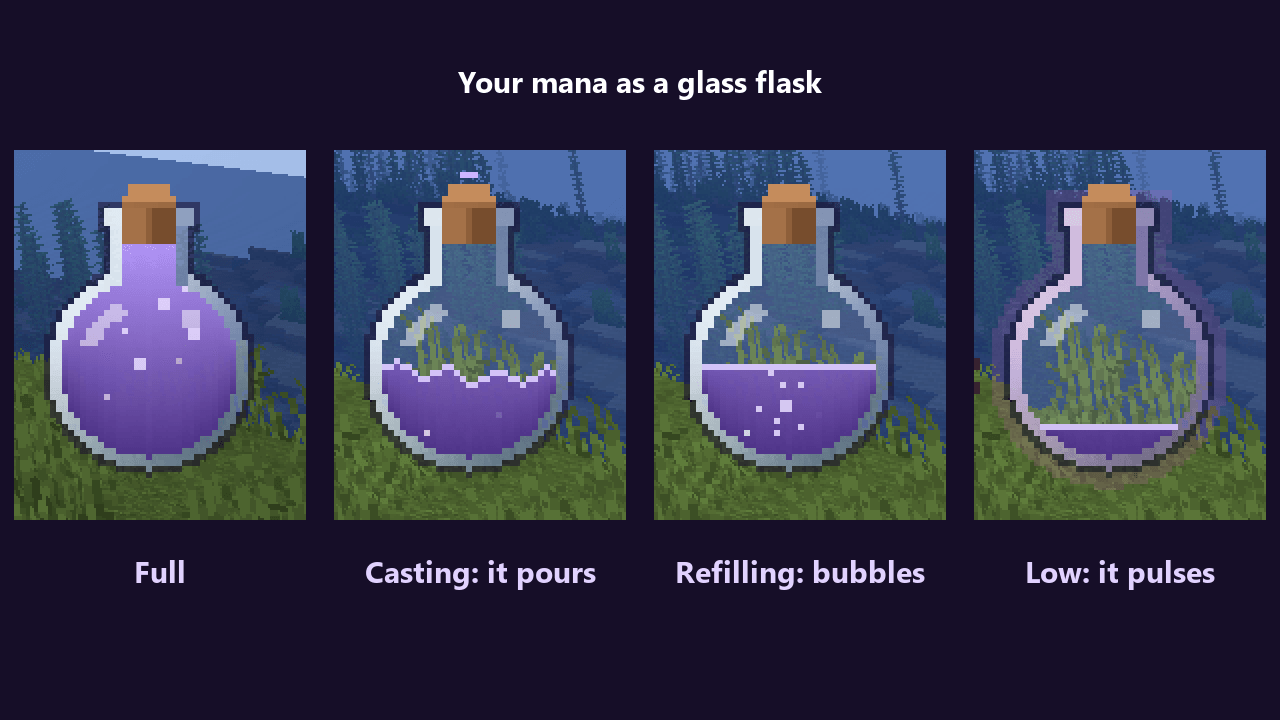
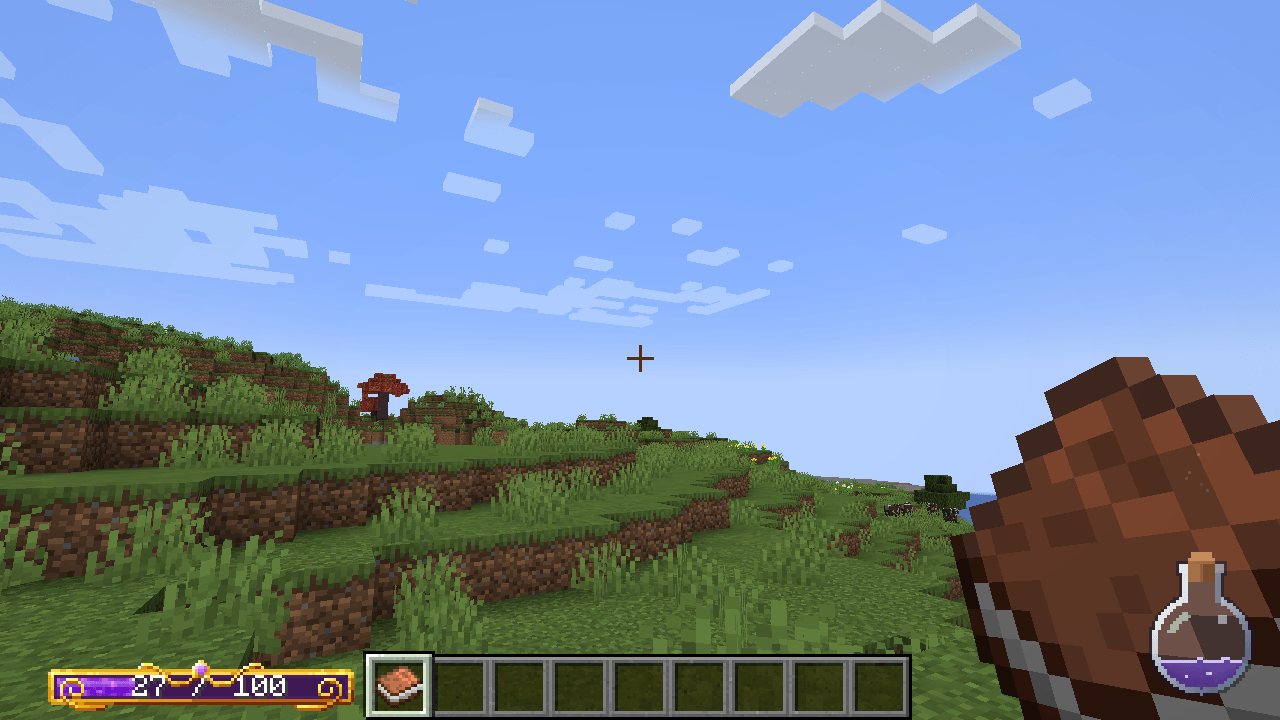
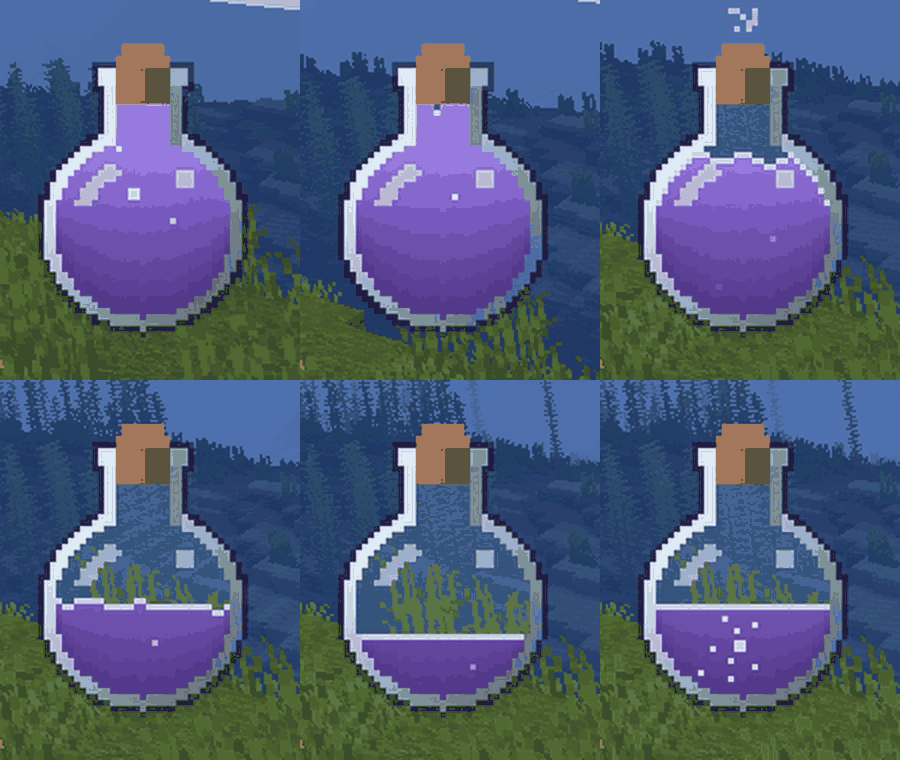
Your mana as a glass flask instead of a bar. The liquid sloshes when you turn, jump and run, bubbles rise while it refills, it pours away with a spark when you cast, and the glass pulses softly when you are running low. It reads the real mana of Iron's Spells 'n Spellbooks or Ars Nouveau.
Three ways to see your mana
- Flask (on by default): a round glass flask in a corner of the screen. The level is the share of the glass, not its height, so 10% mana really looks like 10% of the bulb.
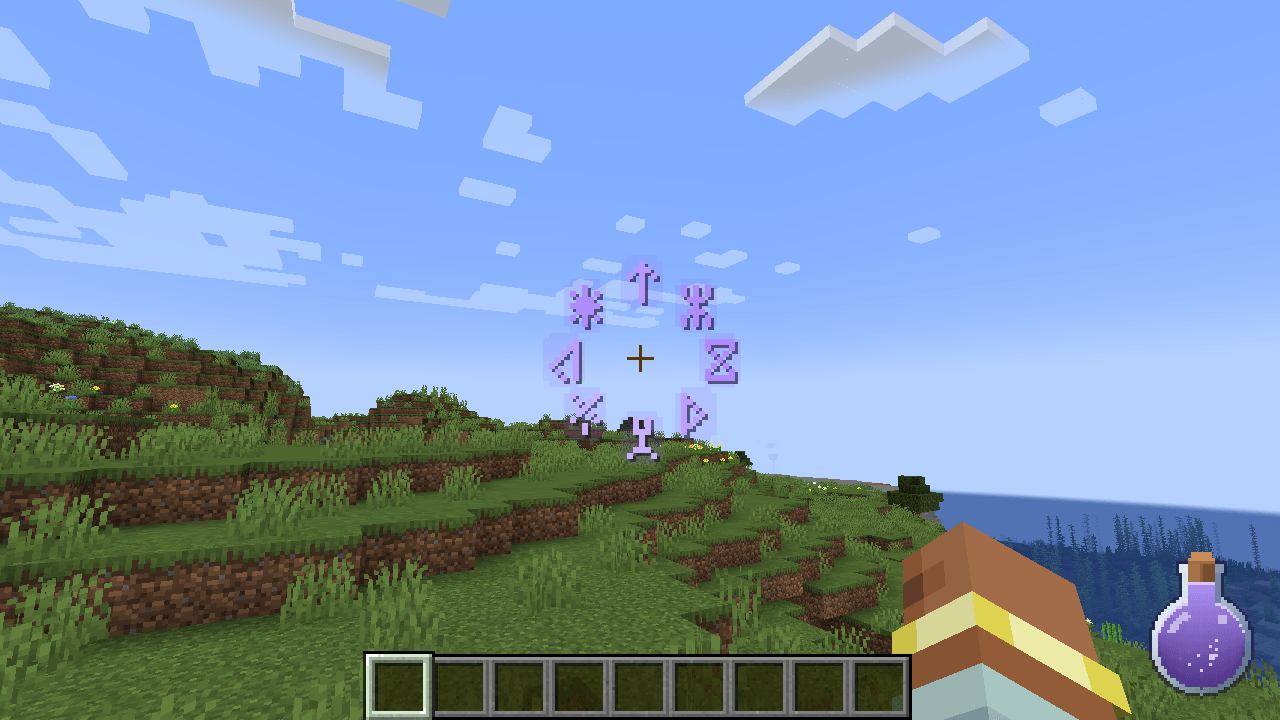
- Runes (optional): a ring of runes around the crosshair that go dark one by one as mana drains. Good for fights, where your eyes stay in the middle.
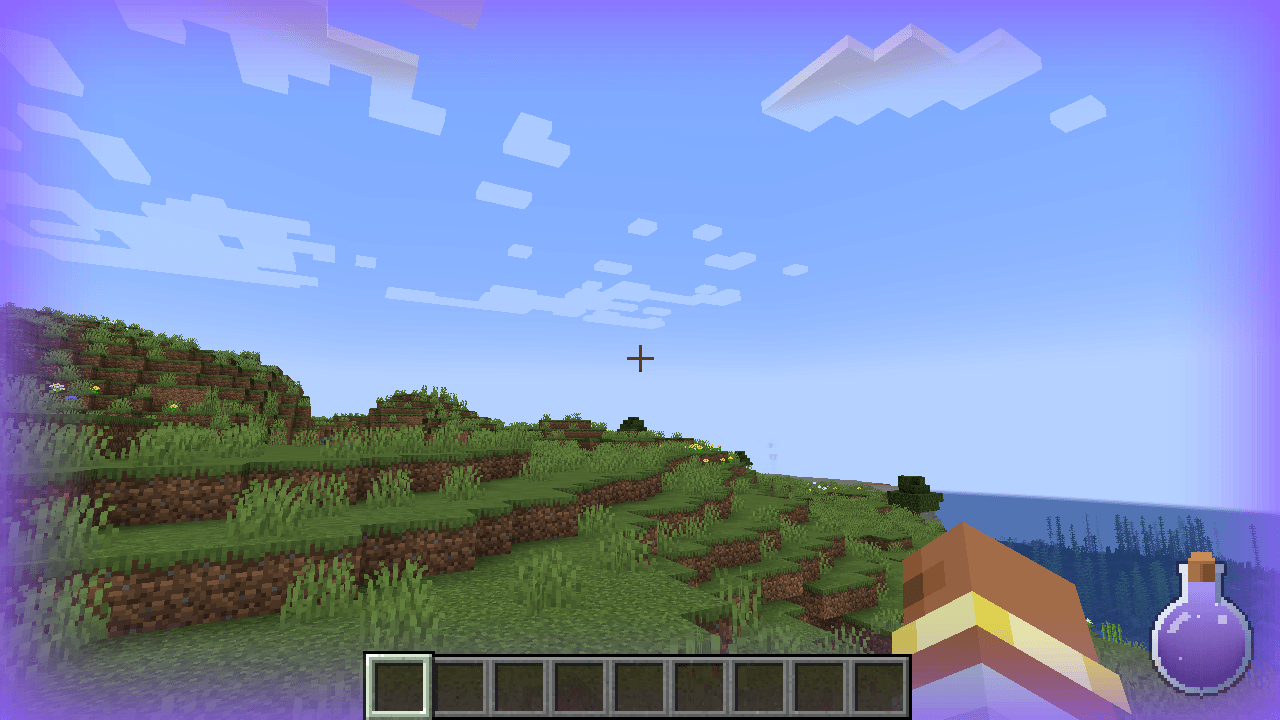
- Edge glow (optional): a soft glow of the mana colour at the screen edges that breathes in and out; the emptier the pool, the fainter the breath.
Use one, two or all three.
What it shows
- The level eases after your real mana: it falls fast when you cast (a short pour, a dip in the surface and sparks out of the neck) and rises gently while you regenerate, with bubbles.
- Sloshing: turning tilts the surface, starting, stopping, jumping and landing shake it.
- Low mana warning: below 20% (configurable) the glass glows and pulses.
- Optional number next to the flask.
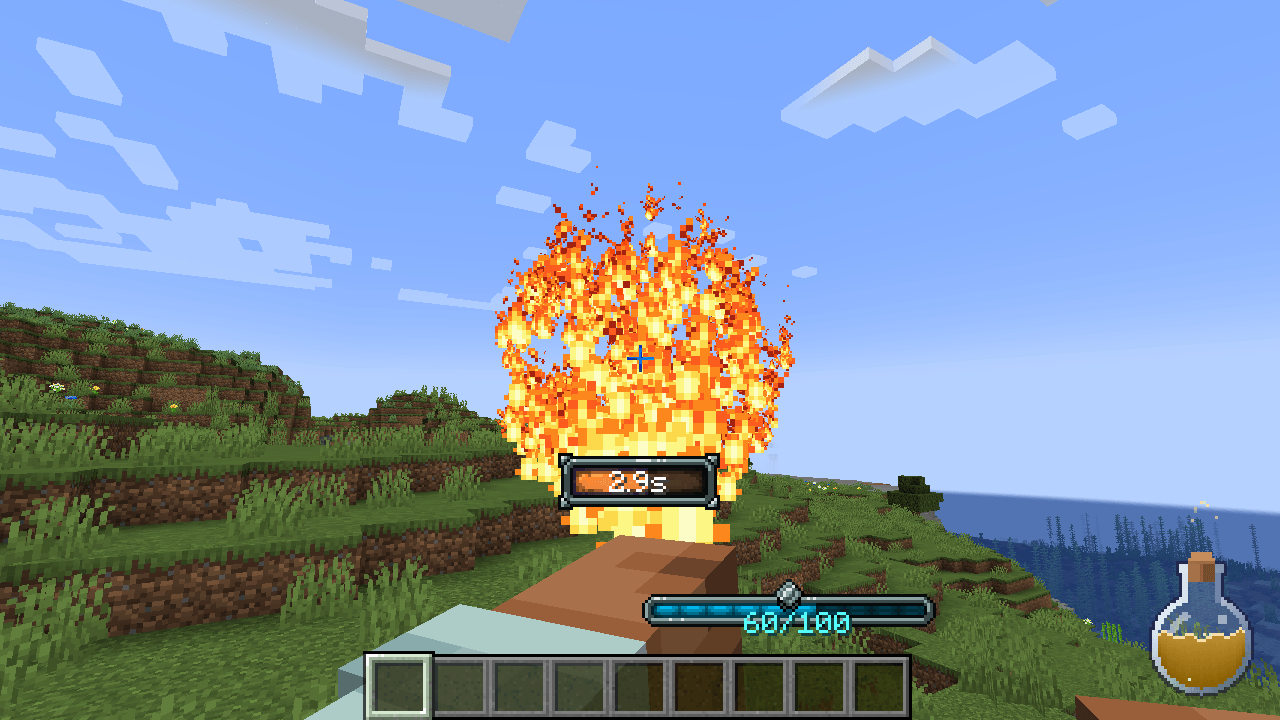
- Optional: while you cast an Iron's spell, the mana takes the colour of its school (fire, ice, holy, ender...).
Options
NeoForge 1.21.1: Mods > Mana Flask > Config in game. Forge 1.20.1: config/manaflask-client.toml (or in game with a config-screen mod such as Configured).
| Option | Default | What it does |
|---|---|---|
| General | ||
| source | AUTO | Where the mana comes from: AUTO (Iron's if installed, otherwise Ars), IRONS_SPELLBOOKS or ARS_NOUVEAU |
| color | #8F5BFF | Colour of the mana (#RRGGBB) |
| opacity | 100 | Opacity of everything, in percent |
| hideWhenFull | false | Fade out after a few seconds at full mana, back as soon as you spend some |
| lowThreshold | 20 | Below this percent the flask pulses |
| Flask | ||
| flask | true | Show the flask |
| corner | BOTTOM_RIGHT | Which corner of the screen |
| offsetX / offsetY | 8 / 8 | Distance from the screen edges, in GUI pixels |
| size | 48 | Height of the flask (24 to 160) |
| showNumber | false | Show the mana as a number |
| slosh | 100 | How much the liquid sloshes, in percent (0 = still) |
| bubbles | true | Bubbles while refilling |
| lowPulse | true | Glow and pulse when low |
| liquidTint | true | Tint the liquid texture with the mana colour (turn off to keep a resource pack's own liquid colours) |
| Runes | ||
| runes | false | Show the ring of runes around the crosshair |
| runeCount | 8 | How many runes (6 to 12) |
| runeRadius | 26 | Distance from the crosshair |
| runeSize | 2 | 1 = small, 2 = normal, 3 = large |
| Edge glow | ||
| edge | false | Show the breathing edge glow |
| edgeStrength | 70 | How strong, in percent |
| edgeWidth | 40 | How far it reaches into the screen |
| Iron's Spells and Ars Nouveau | ||
| ironsSchoolColor | false | While casting an Iron's spell, the mana takes the colour of its school |
| hideIronsBar | AUTO | Iron's own mana bar: AUTO hides it while the flask shows Iron's mana, HIDE also for runes or edge only, SHOW always shows it |
| hideArsBar | AUTO | Ars Nouveau's own mana bar: AUTO, HIDE or SHOW, as above |
The original mana bar
You will not see two mana displays: while the flask is on and showing Iron's (or Ars) mana, that mod's own bar is hidden. Turn the flask off, or show the other mod's mana, and the original bar comes back by itself. Want both? Set hideIronsBar / hideArsBar to SHOW. Using only the runes or the edge glow? HIDE hides the bar for them too.
Retexture with a resource pack
Everything Mana Flask draws is a texture, so a resource pack can change any of it: the glass, the cork, the liquid, even the shape of the flask. All files are in assets/manaflask/textures/gui/.
The flask is six layers on one canvas (43x54 by default; 2x or 4x packs work too, all layers the same size), drawn in this order:
flask/back.png: the glass interior, behind the liquid.flask/liquid_mask.png: where the liquid may be (white = liquid). Not drawn; it decides the shape of the liquid.flask/liquid.png(tinted with the mana colour, so keep it grey/white; it may be a pattern) andflask/liquid_shade.png(light and shadow, not tinted): both cut by the mask. The level fills the mask from the bottom up by area (50% mana = half of the white pixels), and the sloshing surface stays inside it.flask/glass.png: outline, glass walls and cork, over the liquid.flask/pulse.png: the low-mana glow (tinted).flask/shine.png: the highlight on the glass.
Small sprites: flask/bubble.png (2x2, only inside the mask), flask/spark.png (1x1), flask/surface.png (1x1, the line on the liquid), all tinted. Runes: runes.png (60x7, twelve 5x7 glyphs) and rune_halo.png (7x9). Edge glow: edge.png (20x1, left = screen edge). Tinted textures are multiplied by the mana colour; draw them in white or grey.
To keep your liquid's own colours, put {"manaflask": {"tint": false}} in flask/liquid.png.mcmeta (or set liquidTint = false). The canvas layers can be animated with a standard .png.mcmeta ({"animation": {"frametime": 4}}, frames stacked vertically), like a block texture.
For example, a pack with only a new liquid_mask.png, glass.png, back.png, shine.png and pulse.png turns the round flask into a tall square bottle, and the liquid fills and sloshes inside the new shape.
Supported mods and versions
- Minecraft 1.20.1 - Forge (47.x): Iron's Spells 'n Spellbooks 3.x, Ars Nouveau 4.x.
- Minecraft 1.21.1 - NeoForge (21.1.x): Iron's Spells 'n Spellbooks 3.x, Ars Nouveau 5.x.
Both magic mods are optional: Mana Flask reads them when they are there. With neither installed it simply shows nothing. Tested in game with Iron's Spells 'n Spellbooks 3.16.3 and Ars Nouveau (4.12.7 on 1.20.1, 5.13.5 on 1.21.1).
Client-side only
Install it on your game only. It works on any server, including servers that do not have it; the server never needs it. All the art is the mod's own (and can be replaced by a resource pack); nothing is taken from other mods.
Modpacks
Feel free to include it in any modpack, no need to ask!
Made by an indie dev with help from AI tools; every version is tested in game.

Like the mod? You can support future updates and new mods on Ko-fi. Totally optional, everything stays free.
Mana Flask: Animated Mana HUD for Iron's Spells & Ars Nouveau Team

Owner