Logbook Companion
- By
An optional moderator client for Logbook with in-world evidence inspection, ghost blocks and visual rewind previews.
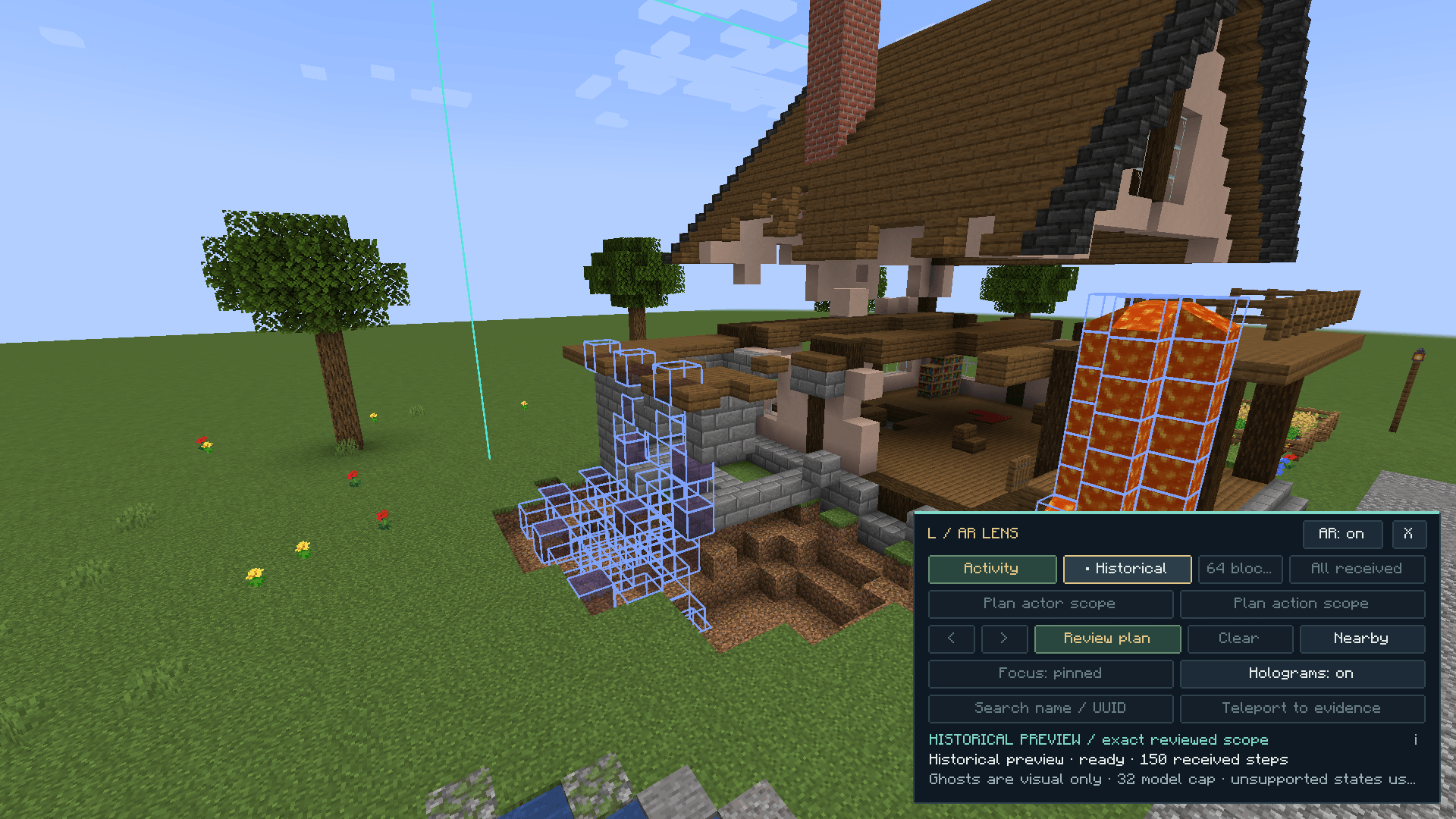
Historical ghost blocks show the proposed repair over the TNT crater and lava. The preview does not change live blocks.
Description
Logbook Companion
See recorded changes where they happened.
Logbook Companion is an optional client mod for moderators using a Logbook server. Open an inspector beside the world, search nearby activity, and view captured block states as holograms while investigating a report.
Investigate in the world
- F8: Open the inspector. Choose Refine to set the area, time, player and action, then press Search activity.
- F9: Inspect where you are looking. Request evidence around a nearby block.
- F10: Open the hologram lens. After a nearby investigation, see received evidence at its recorded locations.
- Follow a player. Group received activity by actor, inspect a record, or submit a new search for that player.
- Read the details. Every activity row includes coordinates. The detail panel starts with who, what, when, where and captured before and after states. Open Technical details when you need the underlying identifiers and metadata.
- Use the evidence map. Find recorded locations in a top-down view and highlight them in the world.
The dock leaves the world visible. Expand it when you need more room for filters, evidence or rollback review.
Ghost blocks and rollback review
The activity lens displays captured block states as cyan holograms. Breaks and explosion damage use the recorded before state; placements use the recorded after state. Filters help you focus on a player or action within the received evidence.
Choose Rollback from the search results to carry their area and filters into a scope review. Press Preview rollback to request a fresh server preview. Review the historical target, latest logged state and current block before confirming the server's exact plan. Historical ghost models appear in violet, with amber outlines for overwrite differences. The preview can include recorded lava spread and blast damage. Load additional review pages to receive more of the plan for the in-world overlay. You can also select an area using two corners.
The gallery shows the in-world activity inspector, the historical rewind overlay over a TNT crater, the lava-removal plan, and the restored house. These are live captures from the same incident used to test the mod.
Holograms do not change the world. Rendering uses a bounded number of nearby models and markers from received evidence; it does not fetch an entire world history each frame. Missing states or assets use labelled markers. Rollback restores supported recorded block states, not inventories, block-entity contents, entities or entire storage networks.
More staff tools
- Bookmark records with notes and export received evidence locally.
- Use server case holds to preserve evidence for a report.
- Review a server-proposed landing before teleporting to evidence, when the server supports this feature.
- Check source coverage and operation progress, including incomplete results and skipped changes.
Modded evidence
Companion displays the evidence provided by Logbook, including its supported Create, AE2, Refined Storage, Carry On, FTB Chunks, FTB Teams, Open Parties and Claims, Waystones, Cobblemon and Sable-related integrations. Capture support belongs to the server mod and varies by installed version and action.
Historical identifiers remain readable even when the original mod is absent from the client. Detailed holograms require the relevant block assets; unavailable models use markers.
Installation
Install Companion in the moderator client's mods folder. The server must run compatible Logbook, and the moderator needs permission level 4. Ordinary players do not need Companion.
- Minecraft 1.20.1: Fabric or Forge, Java 17 or newer.
- Minecraft 1.21.1: Fabric or NeoForge, Java 21 or newer.
Choose the exact Minecraft and loader build. Fabric API and Architectury API are not required by Companion. Key bindings can be changed in Minecraft Controls.
Companion sends no telemetry. Local bookmarks and exports are written only when requested, to the Minecraft instance's logbook-companion folder.
Credits
Companion works with Logbook, originally developed by KaptainWutax for Craft Down Under and later updated and adapted for public release. Credit to KaptainWutax for building the original Logbook mod.
The Logbook Companion Team


Owner