Living Decks
Walkable, buildable decks on the backs of giant creatures that carry you, your blocks, chests and mobs as they walk, turn and animate.
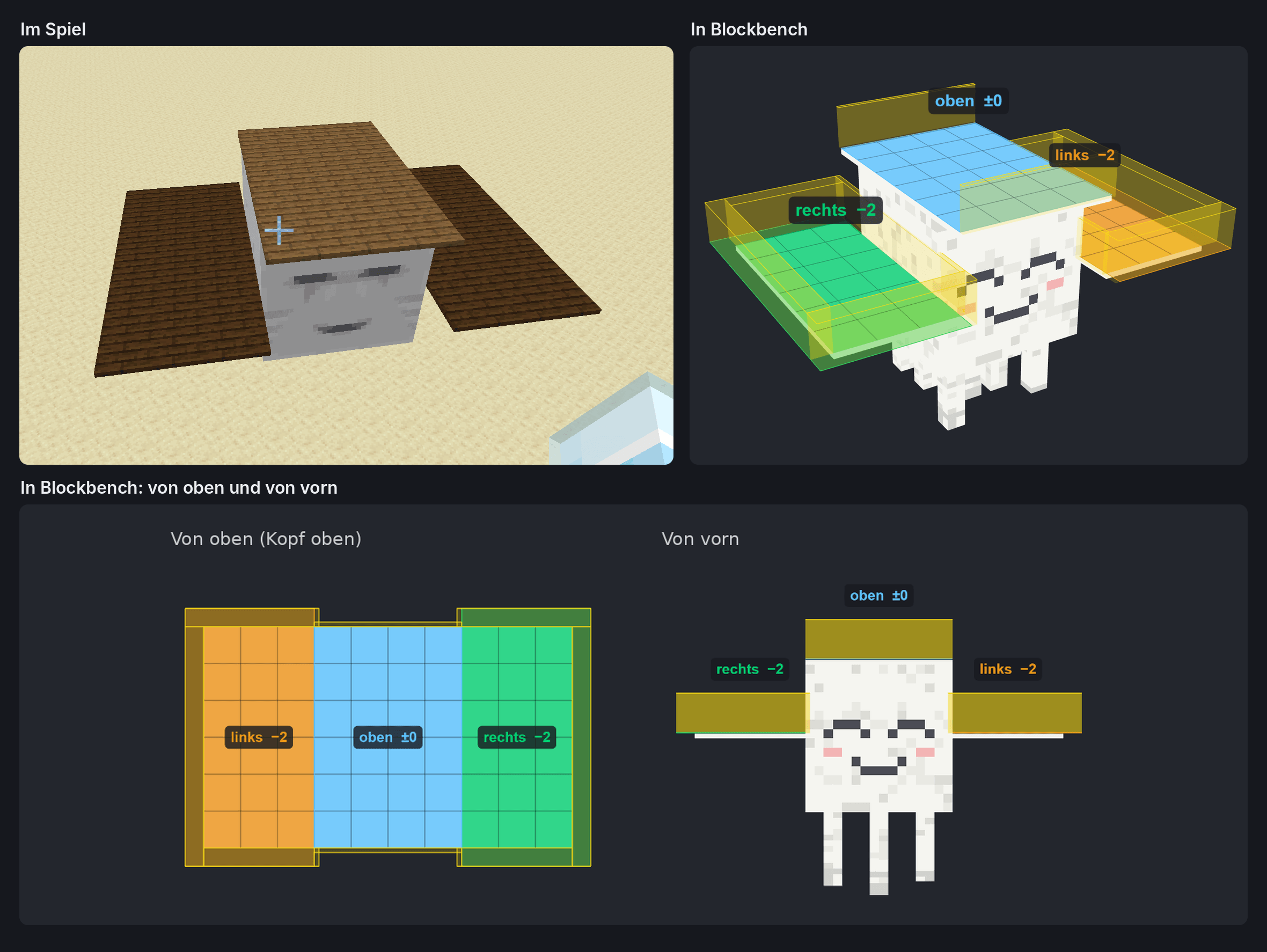
living_decks_spiel_und_blockbench_mit_ansichten.png
Description
Living Decks
Ever wanted to build a house on the back of a giant and go along for the ride? Living Decks gives big creatures a deck: you stand on it, it carries you while the creature walks, turns, charges or tilts, and you can build on it: a hut, a watchtower, a whole fortress. Your blocks, chests, beds, mobs and dropped items ride along.
Available for NeoForge 26.1.2. Needed on client and server.
⚠️ Living Decks adds no creatures of its own. Mods and data packs decide which creatures get a deck, with one JSON file each (see For Mod Authors and Data Packs). The first one is the Ravager King from my upcoming boss mod Kristallbosse: a six-legged giant that spawns with a fortress of over 2,500 blocks on its back.
🧪 Alpha: this is an early test version. Back up your worlds.
🚶 Stand and Ride Along
- Walk on the deck, on its towers and on everything you build. An invisible railing keeps you from stepping off by accident, but you can jump over it.
- The deck carries you while the creature walks, turns, charges, attacks, dances or collapses when it dies. Your view turns with it.
- With GeckoLib and one line in the deck file, the deck follows the creature's animation: it bobs with every step and breath, and so do you.
- Mobs, animals, items and XP orbs on the deck ride along too.
- Arrows and other projectiles hit the deck. A hit on the deck hurts the creature.
- When the creature dies, everyone on its deck gets Slow Falling.
🧱 Build on It
- Place and break blocks like in the world: stairs, slabs, doors, trapdoors, fence gates, logs, torches, ladders and lanterns face the right way. Fences, walls and panes connect.
- In Survival, mining takes time and shows cracks, with sounds and drops. Pick Block works too.
- Open doors, trapdoors and fence gates, climb ladders and vines, use spawn eggs.
- Every deck has its own build area and block limit. The Ravager King: 16 × 26 blocks, 20 layers, up to 4,096 blocks.
- A creature can have several platforms on different levels (its back, its flanks, a gallery around the body) and extra decks on moving parts: one on the head that turns with the head, or a gondola below a ghast.
- Everything is saved with the creature. When it dies, your build goes with it.
🛏️ Sleep on It
- Place a bed and sleep through the night while the creature keeps walking. You wake up next to your bed on the deck.
- Your spawn point is the bed on the creature, not a place in the world. After death you respawn next to it, wherever the creature has gone, even in another dimension.
- Not on monsters: a hostile creature counts as "monsters nearby", so you can neither sleep nor set your spawn on it until its mod says it is tamed.
- If the bed is broken or the creature dies, the spawn point is lost, like in the world.
💡 Light
- Torches, lanterns, glowstone and every other light source light up the deck and everything on it: blocks, players, mobs and items.
- Redstone lamps and copper bulbs are switched on and off with a right-click. Candles are lit with flint and steel.
🛠️ Working Blocks
All of them work while the creature keeps walking:
- Crafting table, smithing table, grindstone, cartography table, stonecutter and loom with their normal menus
- Anvil: repair, enchant and rename. It wears down like in the world.
- Chests (also double and copper chests) and barrels: shared inventories, the lid opens for everyone. When the creature dies, their contents drop.
- Banners with all their patterns, waving in the wind
- Lecterns: put down a book, read it, take it back
🐴 Platform Saddle
Inspired by the platform saddles in ARK: a deck can require a saddle. No saddle, no deck: no floor, no building, nothing to see.
- Put it on: right-click the creature with the saddle (not on babies). A saddled creature no longer despawns.
- Take it off: right-click with shears, but only when nothing is built on the deck anymore.
- Death: the saddle drops.
- Recipe: 3 planks on top, below them leather, saddle, leather. It shows up in the recipe book once you have a saddle.
- Mods can use their own saddle item or tag, let only the owner of a tamed creature saddle it, or let a boss wear its saddle from the start.
⚡ Made for Big Builds
- The blocks of a deck sit on the graphics card as a finished mesh. Each frame only sends where the deck is.
- Light from the world is updated once per tick, not every frame. Lamp light on a deck is only recomputed when a block on it changes.
- Banner patterns are merged into one texture. Chests, banners, lecterns and beds are only drawn when you can see them.
- The mesh, the banner merge, the culling and the deck light can each be switched off in
config/livingdecks-client.toml, e.g. if a deck looks wrong with a shader pack.
🧩 For Mod Authors and Data Packs
A deck is one JSON file in data/<namespace>/livingdecks/decks/<name>.json, in your mod's resources or in a data pack. You need no code and no dependency: without Living Decks, nobody reads the file.
Example: the Happy Ghast gets a 6 × 6 deck with a visible plank floor, only while it wears a platform saddle.
{
  "entity": "minecraft:happy_ghast",
  "floor": { "y": 4.125, "from": [-3.5, -3.5], "to": [3.5, 3.5], "block": "minecraft:spruce_planks" },
  "build": { "from": [-3, -3], "to": [3, 3], "max_height": 6, "max_blocks": 216 },
  "rim": true,
  "saddle": true
}
What a deck file can describe:
- The deck: floor, build area, build height and block limit, an invisible railing, solid boxes for towers and walls of the model
- Zones: several build areas with their own shape (rectangle or a pattern of
#and.) on their own level - Parts: more decks on the same creature, each with its own grid and its own bone
- Animation: the GeckoLib bone the deck sits on. The deck follows it, no code needed.
- Saddle: the platform saddle, your own item or a
#tag, only for the owner, or worn from the start - Starting build: a structure file (
.nbt) the creature spawns with. Chests and barrels keep their items or loot table.
Optional code hooks, each as an IMC message (no dependency) or through LivingDecksApi: a body pose for the server, access rules (who may place, break, use, open, saddle or sleep) and the saddle (show it on your own model, or put it on from your own inventory screen).
📘 Guide and 🧰 Blockbench plugin: GITHUB_LINK
- The guide explains every field of the deck file, saddles and your own saddle model, access rules and the API, with examples.
- The Blockbench plugin lets you mark the deck right in the model of your creature. It shows what the mod makes of it, checks the rules and writes the deck file or a ready-to-use data pack. It can open the model of a creature straight from the
.jarof its mod.
Good to know:
- F3+B shows the deck's floor, railing and boxes.
/reloadapplies changed files right away. - A data pack can replace a deck file, or switch it off with
neoforge:conditions. - The block tags
#livingdecks:not_buildableand#livingdecks:buildabledecide what can be built.
📥 Installation
- Install NeoForge 26.1.2 (26.1.2.122 or newer).
- Put Living Decks into your
modsfolder, on the client and on the server. - Add a mod or data pack that gives creatures a deck.
- Optional: GeckoLib 5.5.2 or newer on the client, so decks follow the animated body.
🧪 Known Limits of the Alpha
- No redstone, liquids, falling blocks or plant growth on decks. Levers and buttons can be placed but switch nothing yet. Explosions go through deck blocks.
- Not placeable yet: furnaces, hoppers, signs, ender chests, shulker boxes, trapped chests, heads and bells. Chests from other mods don't work yet.
- Lamps light the deck, not the world around the creature. Deck blocks cast no shadows, and a roof does not keep out sunlight.
- Beds are not tested with several players yet. Villagers don't sleep in beds on decks.
- On a deck that sits on a moving part (a head), mobs and items can be a little off while that part moves a lot.
- Decks don't bump into other decks. A mount you ride is not carried yet.
- Not tested on a dedicated server or with shader packs yet.
❓ FAQ
I installed it, but nothing happens. Living Decks has no creatures of its own. Install a mod with deck creatures, or add a deck file with a data pack (see the example above).
How do I get up onto a creature? For now: fly, throw an ender pearl or build up next to it.
Can I give a creature from another mod a deck? Yes, with a data pack. No code needed, and the Blockbench plugin helps with the numbers.
A deck looks wrong with my shader pack.
Set deck.gpu_mesh = false in config/livingdecks-client.toml.
Can I use it in my modpack? Yes. Please link to this page and don't re-upload the file somewhere else.
Forge, Fabric, older versions? NeoForge 26.1.2 first. Ports to 1.21.1 and Forge 1.20.1 are planned, no date yet.
🔮 Planned
- Redstone on decks: levers, buttons and pressure plates that switch lamps, doors and trapdoors on the same deck
- Testing on dedicated servers
- Decks on moving parts that are exact for mobs and items too
- More working blocks: furnaces that keep smelting while the creature walks, signs, ender chests, shulker boxes, heads, bells
- Water on decks
- Roofs that keep out sunlight, flames on torches and candles
- Glass and other see-through blocks on the graphics card too
Found a bug or have an idea? Let me know in the comments!
Living Decks is my idea and my design; Claude, Anthropic’s AI assistant, helped me with the code.
Living Decks Team