Last Words
- By
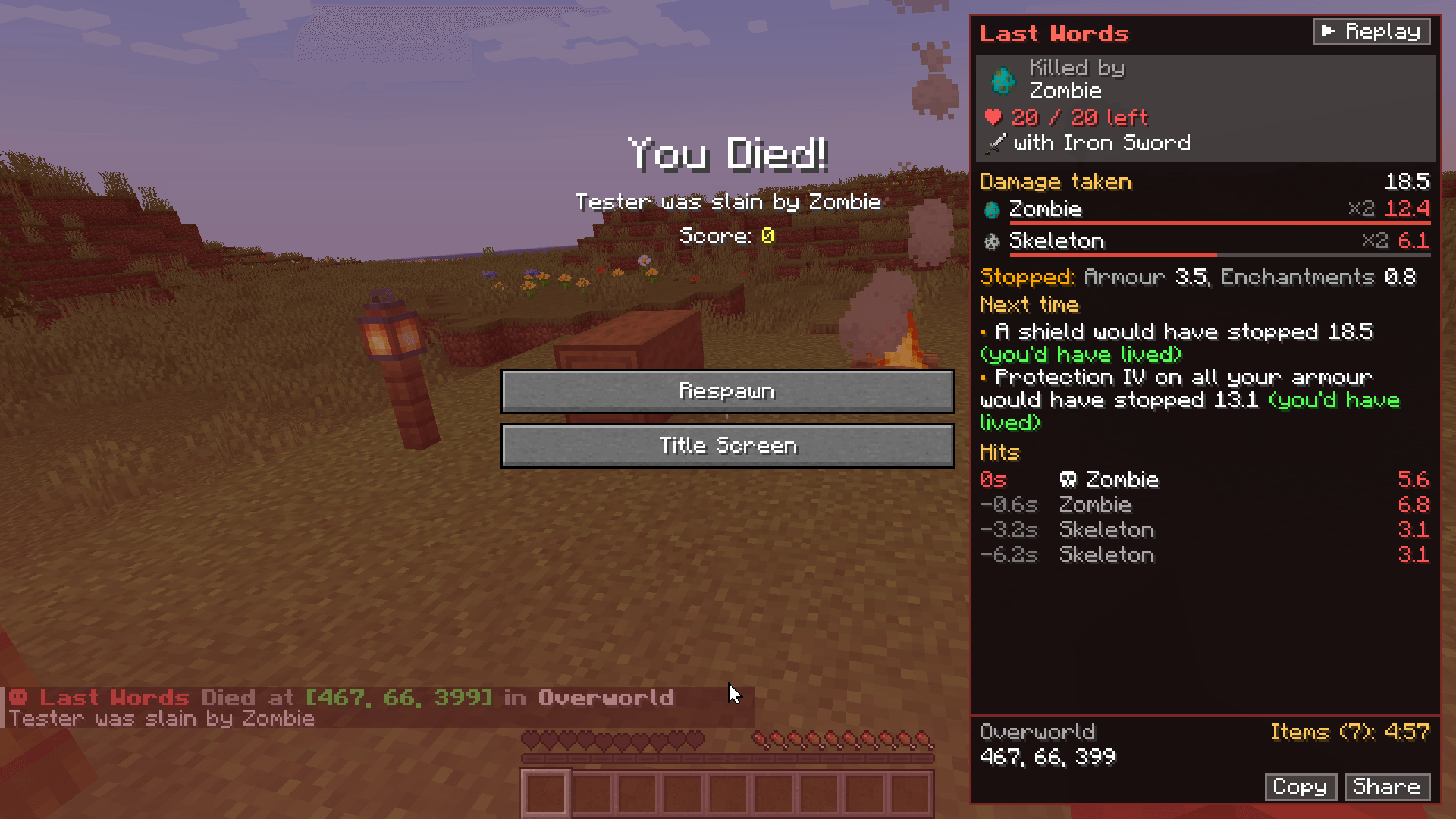
A death recap: see who killed you, every hit, what your armour stopped and what would have saved you, then follow the arrow back to your stuff.
01_recap.png
02_every_hit.png
03_replay.png
04_arrow_back.png
05_grave.png
Description
When you die, find out why. Last Words turns the death screen into a recap of your last seconds: who killed you, with what, and how much health they had left; every hit you took and how much your armour stopped; what you dealt back; and a tip or two on what would have saved you. Then, after you respawn, an arrow points you back to your stuff (or your grave) with a countdown until your items despawn.
It's in the spirit of the death recaps in League of Legends and Dark Souls, and it works in any modpack: modded mobs, modded damage and grave mods included. It's optional on the server and on the client.
Full guide: hardlineinteractive.com/mods/last-words
What you see when you die
The recap opens beside the death screen's buttons. On a small window there isn't room, so a ☠ Last Words tab in the top corner opens it over the screen instead.
- Killed by: who killed you (a player's face, a mob's spawn egg, or an icon for the damage), the weapon they used (hover it for its tooltip), and the health they had left. Fell, burned or hit the void after being knocked about? The mob or player who set it up is blamed, as vanilla does, and the card says what finished you off ("Finished off while fighting Zombie, Final blow: Lava").
- Damage taken: the total, and a bar per source. Each player and each named mob gets its own line, unnamed mobs are grouped by kind (three zombies are one "Zombie" line), and damage with no one behind it is grouped by type (Fall, Lava, a modded type). Hover a line for its hits.
- Stopped: what your armour, enchantments (Protection and the like), effects (Resistance), shield and other mods' resistances stopped, and what absorption hearts soaked up.
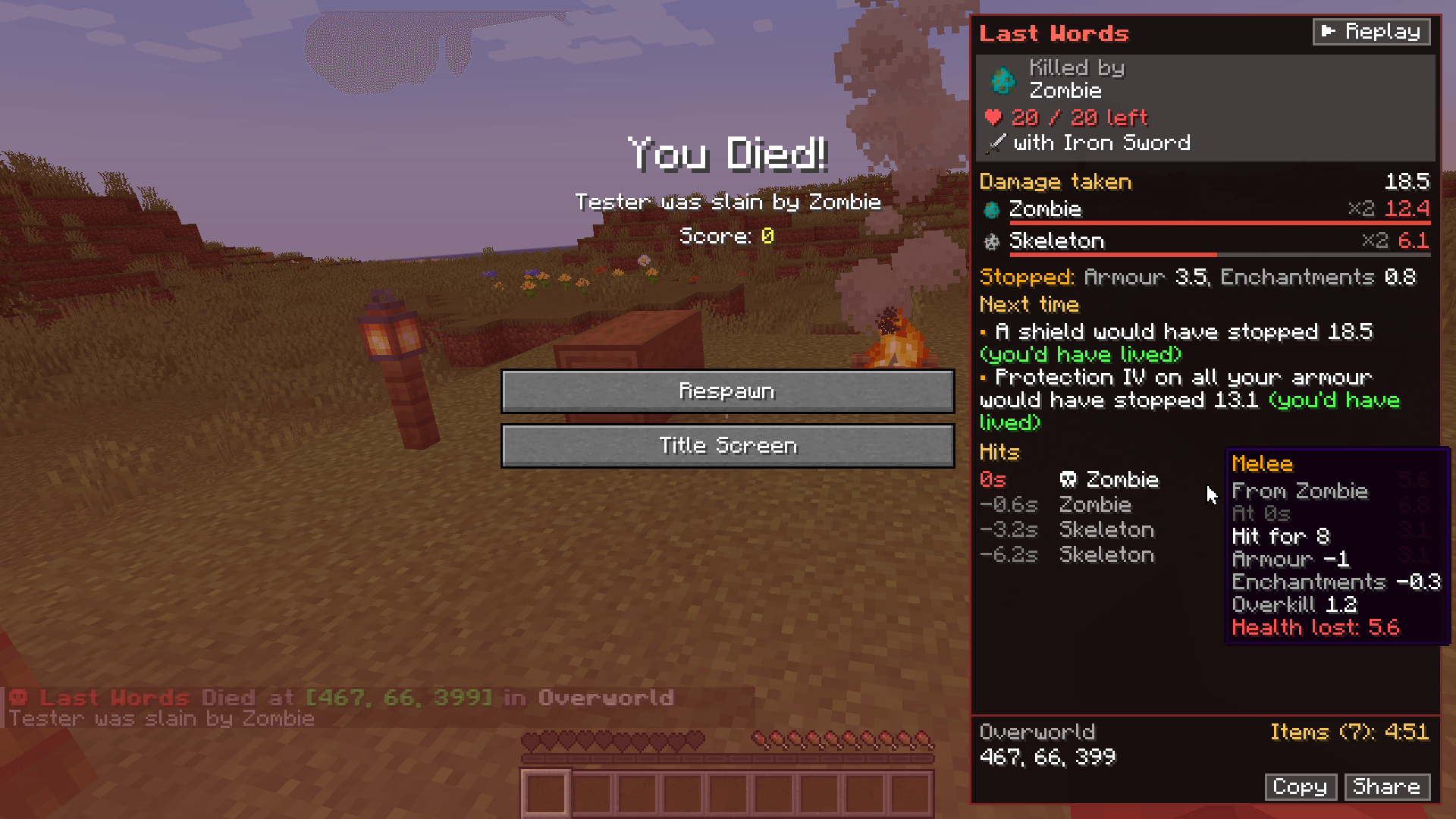
- Hits: every hit, newest first, with how long before your death it landed. Hover one for the full breakdown: how hard it hit, each thing that stopped some of it, anything other mods changed, and the health it took.
- Damage you dealt: what you did back, to your killer (on the card) and to everything else you hit.
- Where you died: the dimension and coordinates with a Copy button, how many item stacks you dropped and how long until they despawn. A chat line that only you see has the coordinates too: click to copy.
The recap covers the last 10 seconds by default (you can choose 1 to 30).
Next time: what would have saved you
Up to two tips per death, worked out with vanilla's own formulas from the hits you really took:
- Feather Falling IV, Fire Resistance, Blast or Projectile Protection IV, Protection IV on all your armour, a full set of iron armour, a shield (or "blocking with your shield" if you had one), Water Breathing, eating, or a golden apple's absorption hearts.
- Each says how much it would have stopped (at most what you lost), and (you'd have lived) if it would have been enough. Those come first.
- They're estimates: each tip is worked out on its own, and health you regained between hits is left out.
Back to your stuff
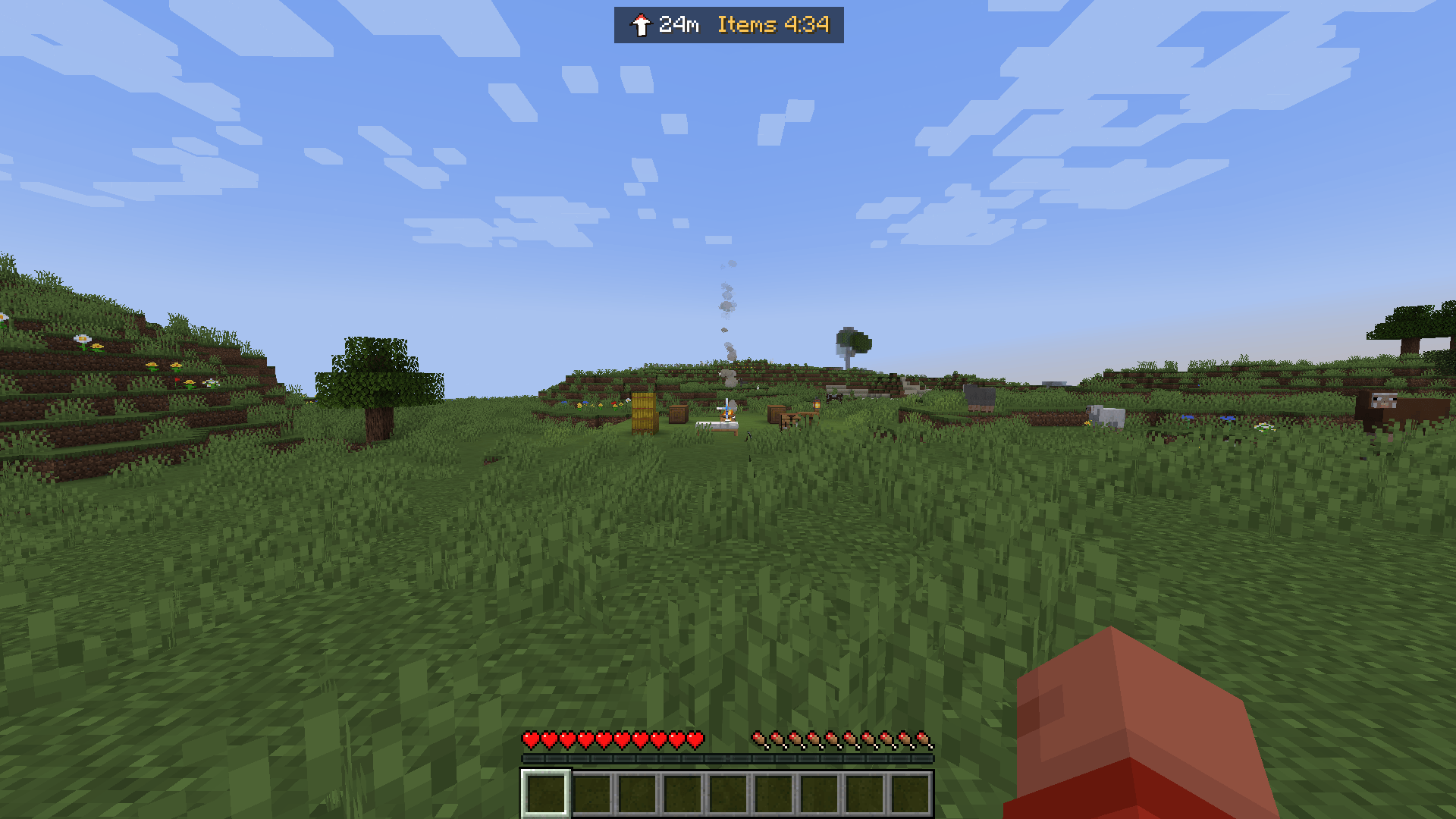
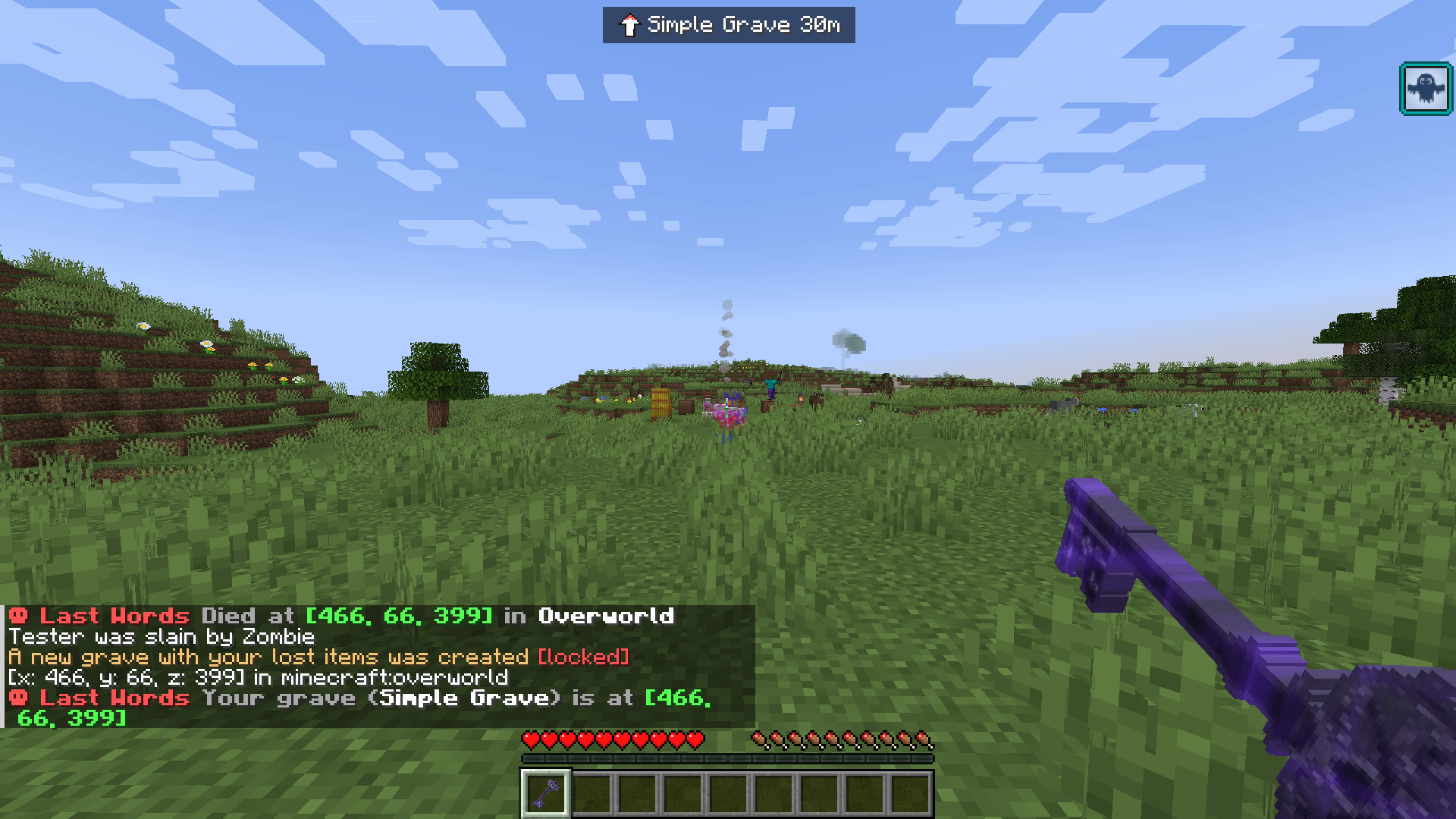
After you respawn, a small bar at the top of the screen points back to where you died: an arrow, the distance (and how far up or down), and Items 4:12, the time left before your dropped items despawn.
- Items only age while their area is loaded, so the timer pauses (and says so) while you're too far away.
- In another dimension, it says which one you died in.
- It goes away once you're within 3 blocks, at your next death, or with
/lastwords hide.
Grave mods
If a grave mod makes a grave for your death, the arrow points at the grave instead ("Grave 26m"), the recap's footer says where it is, and a chat line names it with coordinates you can click to copy (players without Last Words get that line too).
No grave mod is special-cased. After a death, the server notes the graves already nearby, then looks again over the next two seconds for a new one: anything in the #tglastwords:graves block or entity tag, or named like a grave ("gravestone", "tomb", "corpse", "death chest", "headstone"). It looks across graveSearchRadius blocks at any height, because grave mods move graves out of lava or up from the void. A datapack can add a grave with any other name to the tags.
Checked with GraveStone and Corail Tombstone in an automated test; You're in Grave Danger, Corpse and death chest mods are covered by the same rules.
Share your death
The Share button (or /lastwords share) posts your death to chat for everyone. On a server with Last Words it's one line, such as "Taylor died to Zombie with Iron Sword (15/20) - 22 damage in 3 hits [details]", with the whole recap in the hover. It's made from the server's own copy of your death, so it can't be faked, and a cooldown stops anyone spamming it. Anywhere else, it's an ordinary chat message from you.
Your death history
/lastwords opens your last 10 deaths in this world or on this server, newest first. Page back with the arrows; underneath, it says who or what has killed you most. It's also how you see your last recap again any time.
With the doImmediateRespawn game rule there's no death screen, so the chat line has a [Recap] link instead.
For server admins: why did they die?
/lastwords <player> shows an operator another player's last death since the server started, even if they've logged off: on the recap screen if you have the mod, or in chat if you don't. Handy for "why did I die?" on modded servers. The permission level is a server setting.
The death replay
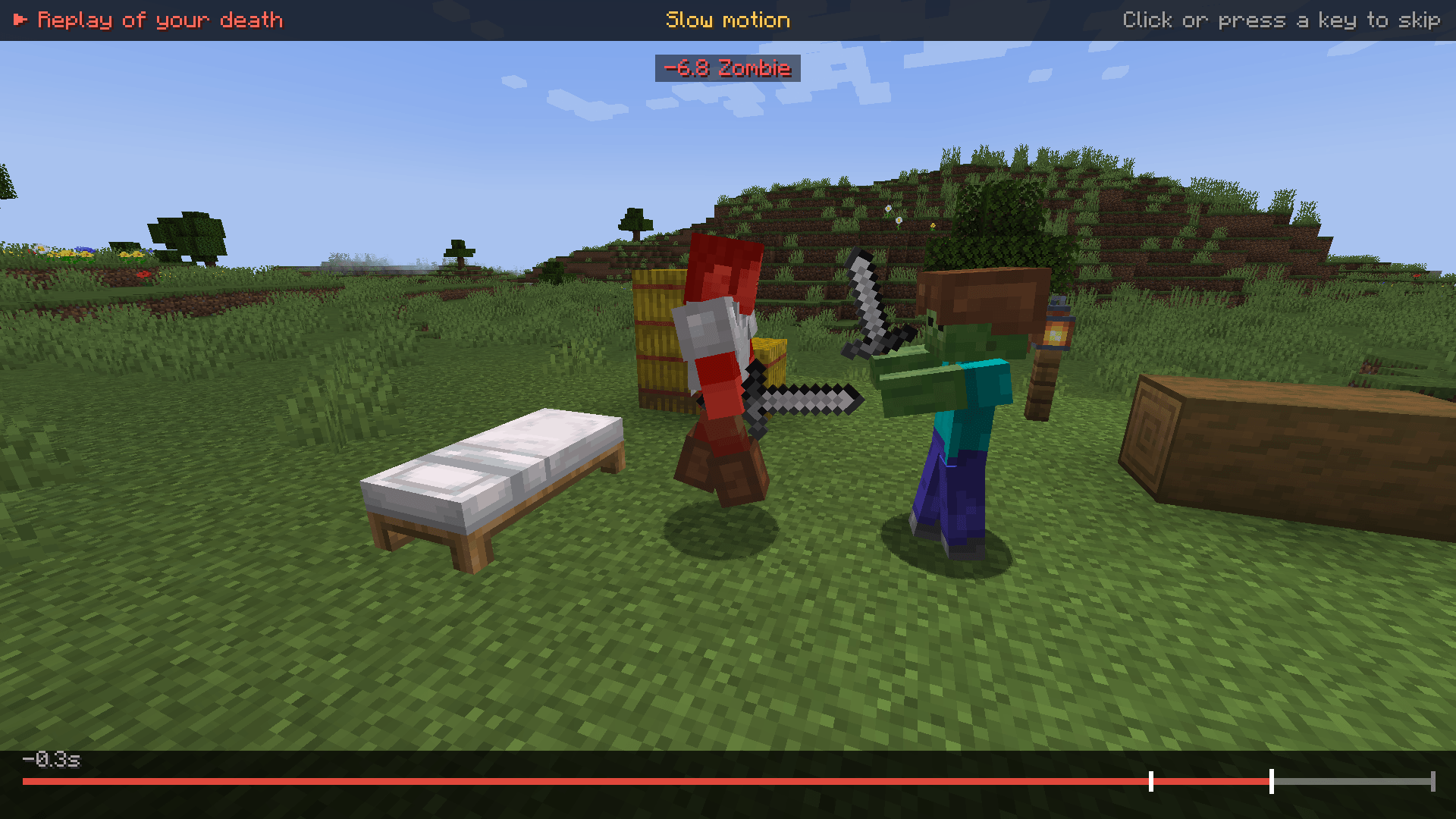
The recap's ▶ Replay button plays back the last 3 seconds before you died: the final half second in slow motion, then a short hold, then back to the death screen. Each hit pops up as it lands ("-4.3 Zombie") and a timeline along the bottom marks them. Click or press any key to skip.
- Your game keeps the last few seconds of you and the mobs, players and projectiles (arrows, tridents, fireballs, potions...) around you, and the blocks that changed nearby. It's only kept in memory, never saved to disk.
- The replay is played with copies on your screen only, through its own camera: one steady shot, side-on to you and your killer, or from behind you if they were far away.
- Blocks that changed are rewound and changed again as they did, then put back exactly as they really are now. Only your game sees this: nothing in the world is changed. Blocks with contents (chests, signs, furnaces) are left alone.
- It all happens in your own game, so it works on any server, with or without Last Words there.
- Replays are of your latest death. The
replayclient setting turns the recording off.
Works with any modpack
- Optional on both sides. Players without Last Words can join a server that has it, and Last Words players can join servers without it.
- Modded mobs and damage types need nothing special. Names come from the mob itself (custom names included) or from the damage type; with no name to go on, one is made from its id (
mekanism:radiationreads "Radiation"). Mobs show their spawn eggs, modded eggs too, and damage types get an icon picked from their name (anything with "burn" gets fire, "radiation" or "acid" a spider eye, "explosion" TNT), else a skull. A mod or resource pack can name its damage types properly with a language key,tglastwords.damage.<namespace>.<path>. - Other mods' armour and resistances are counted. The recap shows what they stopped, and what other mods changed about a hit.
- Any grave mod, found by tag or by name (see above). Checked with GraveStone and Corail Tombstone.
- Light on the server. It only looks at hits involving a player (mobs fighting mobs cost nothing), keeps at most 128 hits each way per player for the recap window, and builds each recap once, when the player dies.
Settings
Your settings (in game: /lastwords settings, or on NeoForge Mods, Last Words, Config; or config/tglastwords-client.toml): show the recap or not, how many seconds to show (1 to 30, default 10), which side of the screen, damage in hearts instead of health points, the list of hits, the chat line, the arrow back, and the replay.
Server settings (config/tglastwords-server.toml in the server folder; in singleplayer also in the settings screen):
| Setting | Default | What it does |
|---|---|---|
enabled |
true | Measure damage and make recaps at all. |
windowSeconds |
10 (3-30) | How far back recaps go. Players can show less, not more. |
sendToClients |
true | Send the full recap to players who have the mod. Off: their game shows what it measured itself. |
chatSummary |
PLAYERS_WITHOUT_MOD |
A short recap in chat (only the player who died sees it): OFF, PLAYERS_WITHOUT_MOD or EVERYONE. |
shareKillerHealth |
true | Tell players how much health their killer had left. |
shareLocation |
true | Tell players where they died. |
showTips |
true | Add the "what would have saved you" tips. |
allowSharing |
true | Let players share their death with everyone. |
shareCooldownSeconds |
30 (0-3600) | Time between one player's shares. |
adminPermission |
2 (0-4) | Permission level for /lastwords <player>. |
findGraves |
true | Look for the grave a grave mod makes and point players to it. |
graveSearchRadius |
32 (4-128) | How far across from the death spot to look. |
Commands
| Command | What it does |
|---|---|
/lastwords |
Your recent deaths here (the last 10), newest first, with who killed you most. Without the mod on your side, the server answers with your last death in chat. |
/lastwords hide |
Takes the arrow back to where you died away. |
/lastwords share |
The same as the Share button. |
/lastwords settings |
Opens the settings screen. |
/lastwords <player> |
Operators (adminPermission): another player's last death since the server started. |
FAQ
Do I need it on the server, the client, or both?
| Server | Your game | What you get |
|---|---|---|
| Has it | Has it | Everything. The server measures every hit, so what armour, enchantments, effects, shields and absorption stopped is exact, and you get the killer's weapon and health, the damage you dealt, the tips, the items timer, and Share with the full recap in its hover. |
| Has it | Doesn't | A short recap in chat: the total and top sources (hover for what was stopped), the killer with their health and weapon, what you dealt back, the tips, and where you died (click to copy). /lastwords and /lastwords share work too. English only, since your game has no Last Words language files. |
| Doesn't | Has it | Your game measures what it can from what the server sends every game: who killed you, their weapon and health, every hit and its source, where you died, the arrow back, your history, the replay, and Share (as a plain chat message). What armour and the like stopped, the damage you dealt, the tips and the items timer aren't known, and the recap says so. |
| Doesn't | Doesn't | Nothing, of course. |
In singleplayer, your game is both, so you get everything.
Can players fake a shared death? Not on a server with Last Words: the shared line is made from the server's own copy of the death.
I run a PvP server. Can I keep the killer's health or the death spot secret? Yes: turn off shareKillerHealth or shareLocation. You can turn off the tips, sharing and the grave finder too.
Does the replay change my world? No. It plays on your screen only, and every block is put back as it really is when it ends.
My grave mod isn't found. Most are found by name. If yours calls its graves something else, add its block or entity to the #tglastwords:graves tag with a datapack, and check graveSearchRadius.
Where is my death history kept? In tglastwords/history/ in your game folder: your last 10 deaths for each world and server.
Fabric? Yes: the Fabric files need Fabric API and Fabric Loader 0.19 or newer (your launcher can update the loader in one click).
Versions
NeoForge and Fabric on Minecraft 1.21.1, 1.21.11 and 26.2, plus Fabric on 26.3.
Made with AI
Last Words is made by Hardline Interactive (Taylor Gibbs) and vibe coded with Claude Code, Anthropic's AI coding assistant. Claude wrote the code, the icon and arrow art (drawn by scripts it wrote), the automated tests and the guide, under Taylor's direction. We'd rather you knew.
Licence
All Rights Reserved. You're welcome to use Last Words in modpacks and to stream and make videos with it.
Last Words Team