Last Used


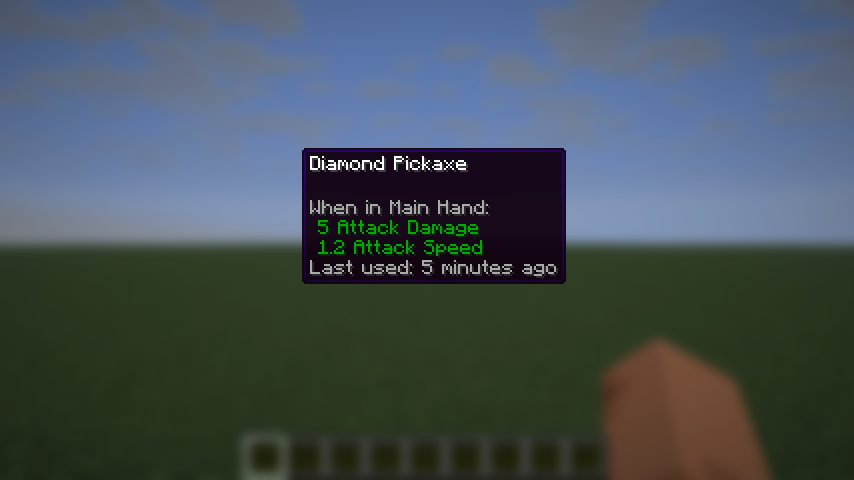
See at a glance when you last used an item. Hover a tool, weapon, armor piece or other item and its tooltip shows "Last used: 12 minutes ago" – or "Last used: never". For Fabric and NeoForge.
Based on the concept of Last Use Tooltip by perusi. Independently developed for Minecraft 26.3 Fabric and NeoForge. Last Used is a new implementation and is not affiliated with the original author.
Why Last Used?
- Find the pickaxe you actually mine with, the sword you have not touched in weeks, the backup armor in the chest.
- Works right after installation: no GUI, no commands, no setup.
- One quiet gray line in the normal tooltip; all other tooltip lines stay as they are.
- Correct in multiplayer: the server records the uses, clients only display them.
What you see
- Last used: just now
- Last used: 5 minutes ago
- Last used: 2 hours ago
- Last used: 3 days ago
- Last used: never
- German: "Zuletzt benutzt: vor 5 Minuten", "Noch nie benutzt"
- Optional: absolute date and time, second precision, a small clock symbol
What counts as a use
- Right-click with the item (bow, shield, food, ender pearl, fishing rod, …) when the game accepts it
- Using the item on a block (placing, tilling, stripping, lighting, buckets, composter, jukebox, …)
- Using the item on a mob (name tag, dye, saddle, …)
- Hitting a mob, breaking a block with a tool
- Durability use: shield blocks, armor absorbing hits, elytra flight, shears, flint and steel
- Not counted: eating while full, a bow without arrows, actions blocked by protection or other mods, opening a chest or door while holding the item, a left click that breaks nothing
Item stacks – no inventory mess
- Minecraft never merges two stacks with different data, so Last Used tracks unstackable items (tools, weapons, armor, shields, bows, potions, …) by default.
- Stackable items (blocks, food, arrows, …) are left alone and show no line; server owners can turn them on in the config, accepting that used and unused stacks then stay separate.
- Splitting a stack copies its timestamp; crafting gives a new, never used item.
- The timestamp is stored on the item (real-world time): it survives restarts, chests, hoppers, death, dropping and handing items to other players.
Installation
- Minecraft 26.3
- Fabric: Fabric Loader 0.20.1+ and Fabric API 0.166.2+26.3
- NeoForge: 26.3.0.109+
- Install on client and server (single player: just your game). On a server, every player needs Last Used.
Configuration
- File
config/lastused.properties, created on first start - Tooltip on/off, "never" line, relative/absolute time, date pattern, seconds, clock symbol
- Server: tracking on/off, stackable items, update interval, per-group switches (shields, ranged, consumables, weapons, armor, tools, blocks, other)
Performance
- Purely event-based: no inventory scans, no per-tick work, no background threads, no file access after startup
- One small packet per login; the age is calculated only while a tooltip is visible
- No benchmark numbers are claimed
Credits and license
Concept: Last Use Tooltip by perusi (Modrinth, Forge, MIT). Last Used is an independent reimplementation – no code or assets of the original were used – and has no official connection to its author. License: MIT, the same license as the original; modpacks welcome.
Links
Last Used Team