Kuronami's Quest Tree
- By
Open quests and skill trees on one map, share progress with your team, and import existing FTB Quests or Pufferfish books.
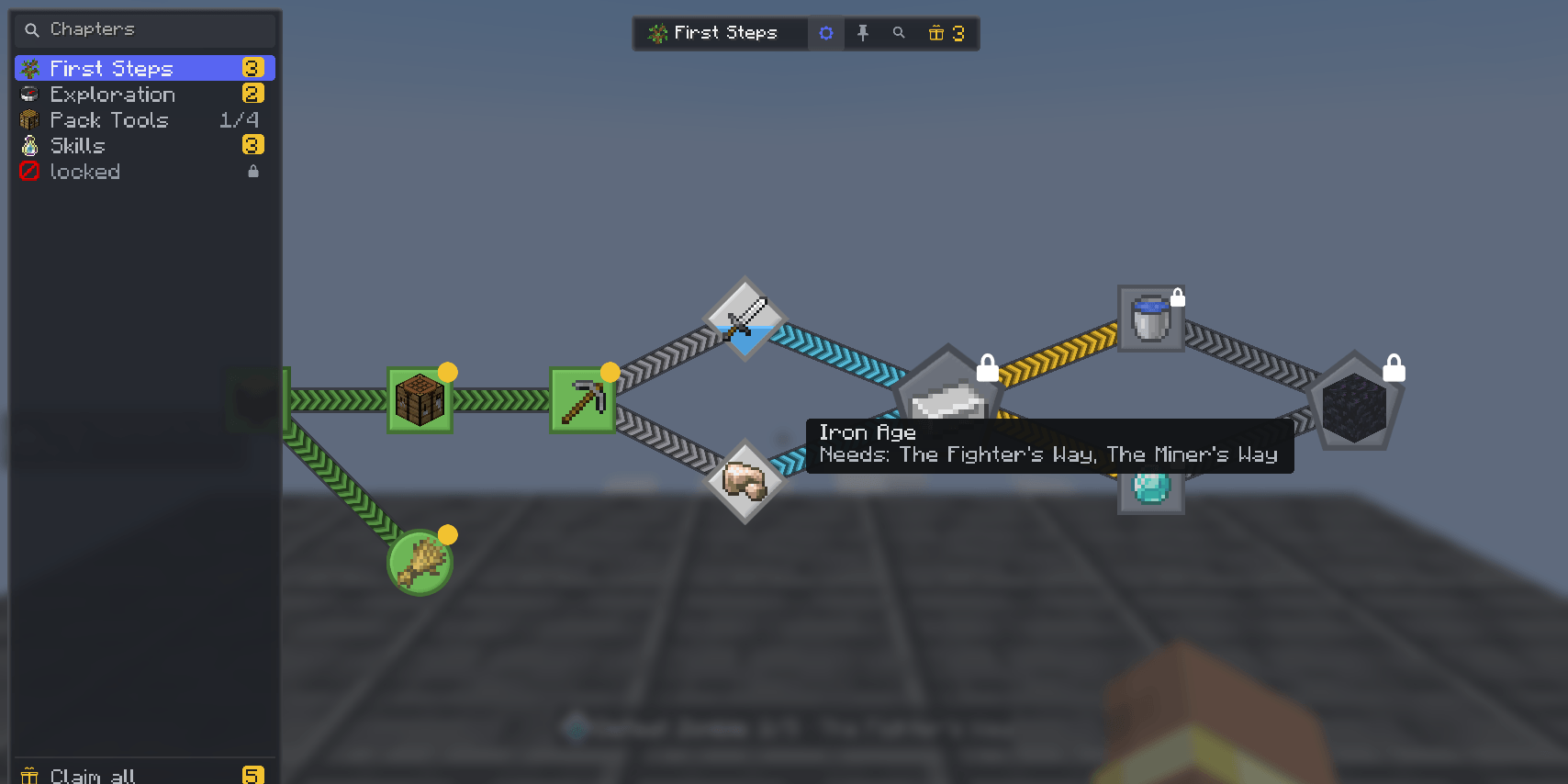
A quest chapter drawn as a connected tree, with the chapter list on the left and quests in done, open and locked states.
Description
Open quests and skill trees on one map, share progress with your team, and keep both halves of a pack in one place.
Quest books and skill trees usually come from separate mods and live in separate screens. Kuronami's Quest Tree reads both from data packs and draws them together: chapters, dependencies, tasks, rewards, skill points and ranks sit on the same map, with the same search, zoom, pins and item tooltips.
What the screen does
- Quests and skills together — a quest chapter and a skill chapter are both chapters. Dependencies, optional tasks, exclusive branches, repeatable quests and point costs work the same way in either.
- Progress while you play — press J to show the tracker beside the game screen. It lists the quests you pinned and, in its full mode, the next quest in the chapter you have open. When a task moves, a notice above the hotbar shows the quest, the task and the count, or how many you are holding, on the same card as the quest screen.
- Team progress — use the FTB Teams party a pack already has, or the built-in party commands when FTB Teams is not installed. A team shares completion; claimed rewards stay with the player who claimed them.
- In-game authoring — turn edit mode on, add and move nodes, edit tasks, rewards, conditions, chapters and reward tables, then export the book as a data pack. The editor validates before it writes, and refuses an edit based on an older revision instead of overwriting another author.
- Import and migration — convert an existing FTB Quests book or Pufferfish's Skills trees into a data pack, and copy players' existing progress into the team records. Settings that cannot be carried over are listed instead of guessed. Tasks and rewards from other FTB add-ons are kept as written, so a mod that handles that type can pick them up; until then they do not hold the quest back.
- Recipe viewers and tooltips — JEI, REI and EMI draw quests and loot crates as cards in the quest screen's style: a quest card shows the quest's name, chapter and state and marks whether the item is needed or rewarded, a crate card shows its reward table and the rewards it can roll, and long names end in an ellipsis inside the card instead of running off it. A recipe viewer can open a quest from an item; descriptions can open a recipe, another quest or a link. Item tooltips show which quests need the item.
- Crate odds and a floor — a crate card shows the chance of each reward in JEI, REI and EMI, and a reward table can guarantee an entry after a run of misses.
- A paper theme — the settings screen switches the whole screen to a light paper look. Text, and the colour codes in imported names and descriptions, are darkened on the light ground until they read. A theme is a set of resource-pack files, so a pack can restyle it.
- Restrictions — a pack can hold an item or a block shut until a quest, a stage, a score, an item, an advancement or a party size says otherwise. A held item cannot be equipped, used, attacked with, placed, broken or crafted in a crafting grid, and the reason appears above the hotbar.
- Extension points — other mods can register task, reward and condition types, choose how their rows look on the quest screen, declare the fields the in-game editor shows for them, and listen for completion, claim and task events. A type with no declared fields is edited as JSON. KubeJS scripts can do the same on NeoForge.
A quest book item opens the screen from the inventory. In the world, a quest block opens one quest, a barrier block gates progress, a detector block turns a redstone pulse into progress for every player nearby, and task screens take item, fluid and energy hand-ins from other mods' pipes. A loot crate is an item a pack fills with a reward table: use it to roll the table, or sneak to roll the whole stack; a crate opener takes crates from a hopper, rolls them and keeps the output for a hopper to pull. With Jade installed, a quest barrier's overlay shows what it asks for and whether you may pass.
Data and commands
Chapters, reward tables, groups, patches and translations live under data/<namespace>/progression/. A pack can ship its own book, or patch a chapter another pack or mod ships without copying the whole file.
Commands a pack author uses most:
/quest_tree import ftbquests [namespace]and/quest_tree import puffish [namespace]— write the converted book into the world's data packs and reload./quest_tree edit— turn the in-game editor on or off for yourself./quest_tree migrate ftbquests [namespace] dry_runthenapply— copy existing player progress into the team records. The same pair exists for Pufferfish's Skills./quest_tree validate— list errors and warnings, including quests this pack cannot complete, grouped by chapter.
The original FTB Quests and Pufferfish's Skills files are only read. The import writes a separate data pack, and migration keeps a backup of the progress file before it changes anything.
Dependencies and limits
- FTB Teams is optional. Without it, players can form a party with
/quest_tree party; without a party a player progresses alone. - A
currencyreward needs an economy mod that registers a provider with FTB Library. Atrophyreward needs Kuronami's Trophies; without it the reward does nothing and does not block the other rewards on the quest. - Migration is a merge. It unites sets and keeps the larger counter; it does not remove progress. A second apply of the same source is refused unless you force it, because replaying it could restore state that was cleared on purpose.
- KubeJS integration is NeoForge only.
- A stage this book grants works on both loaders. A stage another mod or a command sets needs Pack Stages, which is NeoForge only on 1.21.1.
- Energy tasks need an energy API: NeoForge has one, and on Fabric they need Team Reborn Energy.
- Importing, migrating and editing write into the world. Make a copy of the world before using them on a pack people already play.



All Rights Reserved. Free to put in any modpack, on any platform, monetised or not - no permission needed, no credit required. Other mods may use the public API to build addons; do not bundle this mod's jar inside them. Data packs, resource packs, quest books, translations, configs and KubeJS scripts for this mod may be made and shared, including in paid packs. Source is published so you can read exactly what it does.
Bugs and questions: comment on the CurseForge page, or DM @kuronami333 on X.
Kuronami's Quest Tree Team

Owner