Kinda Enough Items
- By
Every recipe and every use of every item, in Minecraft's own style: search, click, craft. Growth times, drops and other mods' machines included.
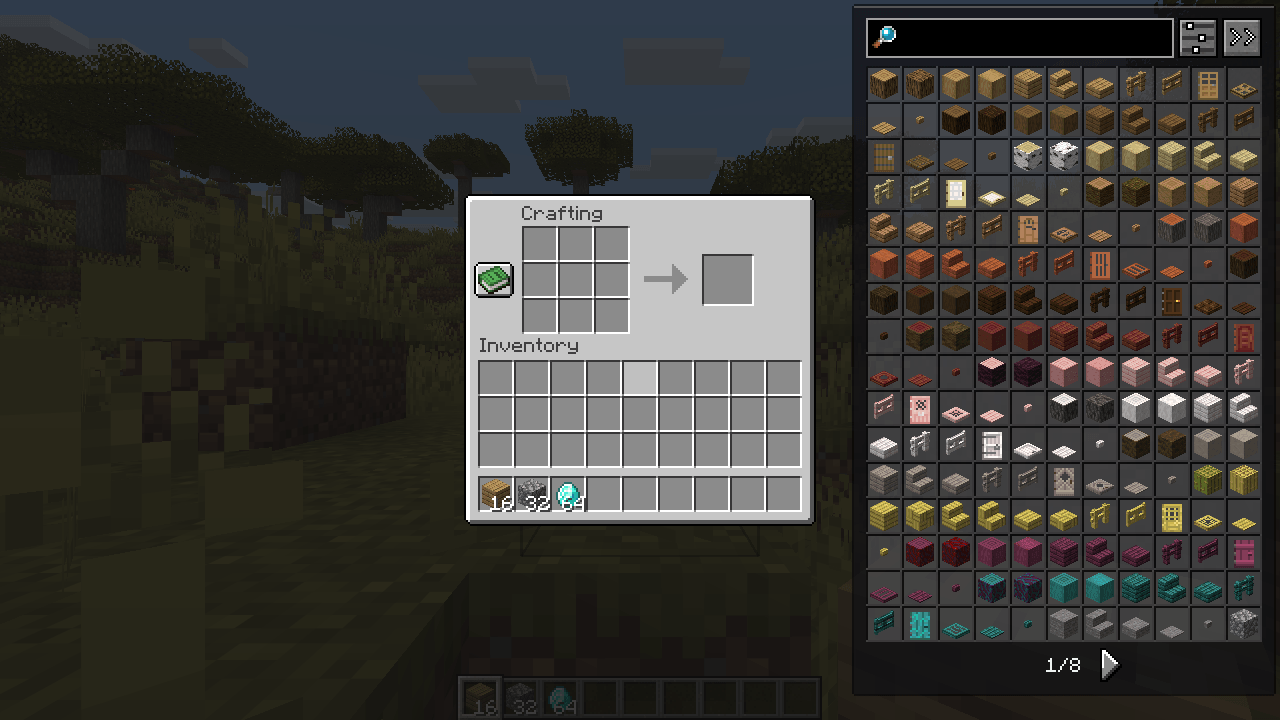
The item list beside a crafting table, turned page by page, in the glass look.
Description

Every recipe of every item, in Minecraft's own style. Open any inventory and the item list sits beside it. Click an item to see how it is made, right-click to see what it is for.

Glass windows let the world show through, with the game's own buttons, tabs and font. The classic Minecraft look and a dark one are a click away in the settings.

Categories are tabs on top of the recipe window, like the creative inventory: crafting, smelting, blasting, smoking, campfire, stonecutting, smithing (trims too), brewing, fuel and composting. Furnaces burn and their arrows fill up. The workstations sit at the window's edge; click one to see everything it makes. One button flips between how to get it and what it is for, Backspace walks you back.


Type to search, in your language or by item id. @mod, #tag, $tooltip text, &id and %tab narrow it down, -word leaves things out, a | b finds either. The 16 colours of a block, every potion, enchanted book and spawn egg are folded into one slot until you open them. The list turns page by page with the wheel or the arrows under it, or scrolls if you prefer.


The + next to a recipe moves its ingredients from your inventory into the crafting grid, your 2×2 grid or a furnace. Shift-click fills as many as you can. While something is missing the button is grey and the missing slots light up red.


Seeds, saplings, sugar cane, bamboo, berries, cocoa and nether wart show their stages, the light they need, the average growth time on wet and dry farmland and what the ripe plant drops. Switch on drops in the settings and blocks, mobs and loot chests list what they drop with the chance of each, and every item tells you what drops it.


Every item has an information page: its id and mod, stack size, durability, food, burn time, compost chance, hardness and the tool it needs, blast resistance, light level and its tags. Click a tag to list every item that has it.


KEI reads the recipes of other mods by itself, without plugins: their machines get a tab with the machine's icon. Unusual recipe types are shown as ingredients, an arrow and the result.

Switch on the bookmarks in the settings, then press A over an item or drag it to the other side to bookmark it; the items you looked at last can wait below them. In creative mode (or as an operator) cheat mode in the settings makes a click give you a stack.


The sliders button next to the search field opens the settings, made of the game's own checkboxes, sliders and buttons. Sort the list by mod, name or creative tab, turn its pages or scroll it, show only what you can craft right now, put it on the left or the right and choose its width, switch the bookmarks, history and drops on, hide recipe tabs you never use, slow down the ingredient switching or show every recipe's id. Windows come in three looks: glass (the default), classic and dark. The arrows button next to it tucks the list away into a small tab at the screen edge.


- Install NeoForge for your Minecraft version and put the KEI jar into the
modsfolder. - Open your inventory: the item list is on the right.
- R shows recipes and U uses of the item under the mouse, or of the block or mob you look at in the world. A bookmarks, Ctrl+F searches, Ctrl+O hides the list. All keys are in Controls, everything else in the settings next to the search field.

- One jar for NeoForge on Minecraft 1.21.1, 1.21.3, 1.21.4, 1.21.5, 1.21.8, 1.21.10, 1.21.11, 26.1.2, 26.2 and 26.3.
- Needed on the client. On a server it is optional: with KEI there too you get recipes in multiplayer from 1.21.4 on (Minecraft stopped sending them to players in 1.21.2), the + button and cheat mode without operator commands.
- Growth times and drops are worked out in single player; drops, bookmarks and history start switched off.
- In 29 languages.
- JEI and REI plugins of other mods are not loaded; KEI reads their recipes from the game instead.
License: MDFL 1.0 · ✅ Modpacks · ✅ Videos & streams · ✅ Compatibility addons · ❌ Reuploads · ❌ Modified copies
All the creative work and in-game testing are done by the mod's creator. AI is just a handy tool working in the background to help generate code and support the project.
Kinda Enough Items Team