![[JEI] Fuel Tab for Create Aeronautics logo](https://media.forgecdn.net/avatars/thumbnails/1950/279/64/64/639209114134475457.png)
[JEI] Fuel Tab for Create Aeronautics
- By
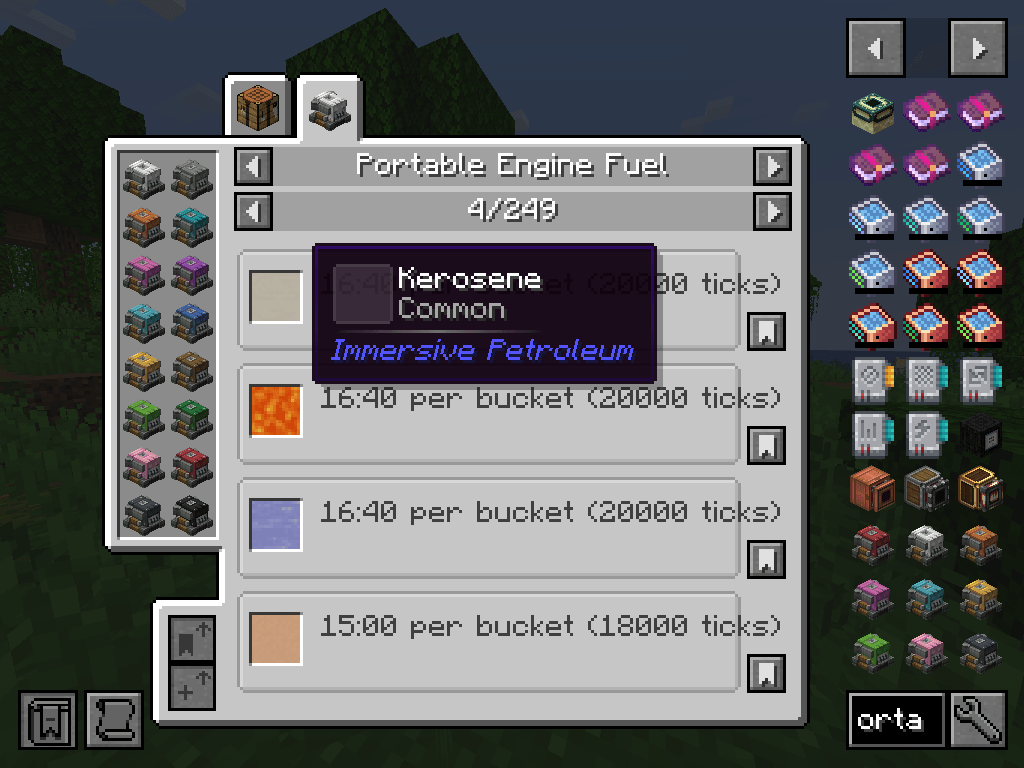
Adds all fuels (liquid and solid) accepted by the Portable Engine to a new JEI tab.
dta2fn8.png
Description
Portable Engine Fuel (JEI)
Every fuel the Portable Engine accepts, and how long each one really burns — in one JEI tab.
The Create: Aeronautics Portable Engine will happily eat coal, blaze cake, diesel, plant oil or lava, and it tells you nothing about which of those is worth putting in it. This mod adds a Portable Engine Fuel tab to JEI that lists every accepted fuel, ranked, with the burn time the engine will actually give you.
Click any Portable Engine in JEI to open it.

What you get
- One tab, every fuel. Liquid fuels and item fuels side by side in the same list, instead of scattered across the furnace fuel category and nowhere at all.
- Ranked best to worst. Liquids first, then items, each sorted by burn time descending. "Which fuel should I use" is answered by reading down the page.
- Real burn times. Not the number written in the data map — the number the engine actually honours. See below; the two are not always the same.
- Sensible units. Liquids are shown per bucket, because the engine's tank holds exactly one bucket and drains it whole. Items are shown per item.
- Times in both forms.
20:00 per bucket (24000 ticks)— minutes and seconds for planning, ticks for comparing. - Superheated fuels called out. Fuels that run the engine superheated get their own labelled line, so you can tell at a glance which ones double its generated speed.
- All sixteen dyed engines are catalysts. Whichever colour you happen to be holding opens the same tab.
- Nothing is hardcoded. The list is built from the live data maps at runtime. Retune your fuels, or install a pack that retunes them for you, and the tab follows.
- Updates on
/reload. Edit a fuel value, reload, reopen the tab — the new numbers are there, no restart. - Works on dedicated servers. This is the hard part, and it is handled; see Multiplayer below.
- Fails gracefully. No liquid fuel mod installed? The tab lists item fuels only. Joining a server that does not have this mod? You still connect, and still get the item half of the tab.
Why the burn times differ from the data map
Liquid fuel support does not burn a fluid for the burn_time written in its data map entry. It converts that value into ticks-per-millibucket first, with integer division, and then burns a whole bucket's worth:
ticksPerMb = max(1, burn_time / 1000)
burnTime   = 1000 * ticksPerMb
Any burn_time that is not a whole multiple of 1000 quietly loses its remainder:
Defined burn_time |
Actually burns | Lost |
|---|---|---|
| 24000 | 24000 | — |
| 26400 | 26000 | 400 ticks |
| 9600 | 9000 | 600 ticks |
| 4800 | 4000 | 800 ticks |
A tab that simply printed the configured values would tell you a fuel is up to 17% better than it is, and would rank two fuels wrongly against each other. This one reproduces the engine's own arithmetic instead, and that arithmetic is covered by unit tests.
Superheated fuels
Some fuels run the engine superheated, which doubles its generated speed. The tab marks these on their own line.
Worth knowing: superheating changes the engine's output, not the fuel's duration. A superheated fuel does not last longer — it does twice as much work in the same time. Fuels are ranked by burn time, so check the superheated marker before assuming the top of the list is the best choice for your build.
Where the numbers come from
| Fuel type | Burn time read from | Superheated when |
|---|---|---|
| Liquids | the engine_fuel and super_engine_fuel fluid data maps, with super_engine_fuel taking precedence |
the entry came from super_engine_fuel |
| Items | the item's smelting burn time — the same value the engine's own fuel slot checks | Create's superheated blaze burner fuel data map has an entry for it |
These are the exact sources the engine reads when it decides what to do with what you fed it, which is why the tab cannot drift out of sync with the game.
Two behaviours the tab reflects but does not repeat on every row: item fuel takes priority over liquid fuel, and while the tank holds any fluid at all, items cannot be inserted.
Multiplayer
Install the jar on the server as well as on the client.
The burn times live in data maps that are not synchronised to clients. In single player that goes unnoticed, because the client and the integrated server share the same registries. On a dedicated server the client genuinely has no way to read them, and any mod that tries to build this tab client-side alone will show you an empty category.
So the server builds the fuel table and sends it to each player on login, and again whenever the datapacks are reloaded. The client caches it and hands it to JEI.
The sync packet is registered as optional, which means a client carrying this mod is never refused by a server that lacks it — you simply get the item fuels, which need no server support.
Requirements
- Minecraft 1.21.1, NeoForge 21.1+
- Create — required
- Create Simulated — required; ships inside Create: Aeronautics, and owns the Portable Engine itself
- JEI — optional in the loading sense, but there is no tab without it
- Create Aeronautics: Portable Engine Liquid Fuel (by XenraO) — optional; provides the liquid fuel support whose data maps this mod reads. Without it the tab lists item fuels only
Client and server side both. No configuration files, no commands, no keybinds — install it and the tab is there.
Credits
Liquid fuel support for the Portable Engine is the work of XenraO, in Create Aeronautics: Portable Engine Liquid Fuel. This mod adds no fuel behaviour of its own whatsoever — it reads what that mod and Create already define, and shows it to you. The Portable Engine is from Create Simulated, part of Create: Aeronautics.
Released under the MIT License. Source and issues on GitHub.
<sub>Originally written for a private Create warships modpack, where telling diesel from creosote at a glance mattered rather a lot. It has no pack-specific behaviour and works anywhere the Portable Engine does.</sub>
[JEI] Fuel Tab for Create Aeronautics Team