ItemScope
ItemScope is a client-side Fabric mod that makes it easier to find valuable items in chests, auction houses, shops, storage menus, and other container-based interfaces.
Instead of manually checking every item, you can create detailed filters and let the mod highlight matching stacks directly inside the container. It can search by item name, enchantments, enchantment levels, durability, item ID, and stack size.
The mod can also inspect the contents of shulker boxes, allowing matching items hidden inside them to be detected without opening each shulker manually.
Features
- Search items by displayed or standard item name
- Filter by one or multiple enchantments
- Require an exact enchantment level
- Search normal enchanted equipment and enchanted books
- Filter by durability condition
- Search using namespaced item IDs
- Require a minimum stack size
- Inspect items stored inside shulker boxes
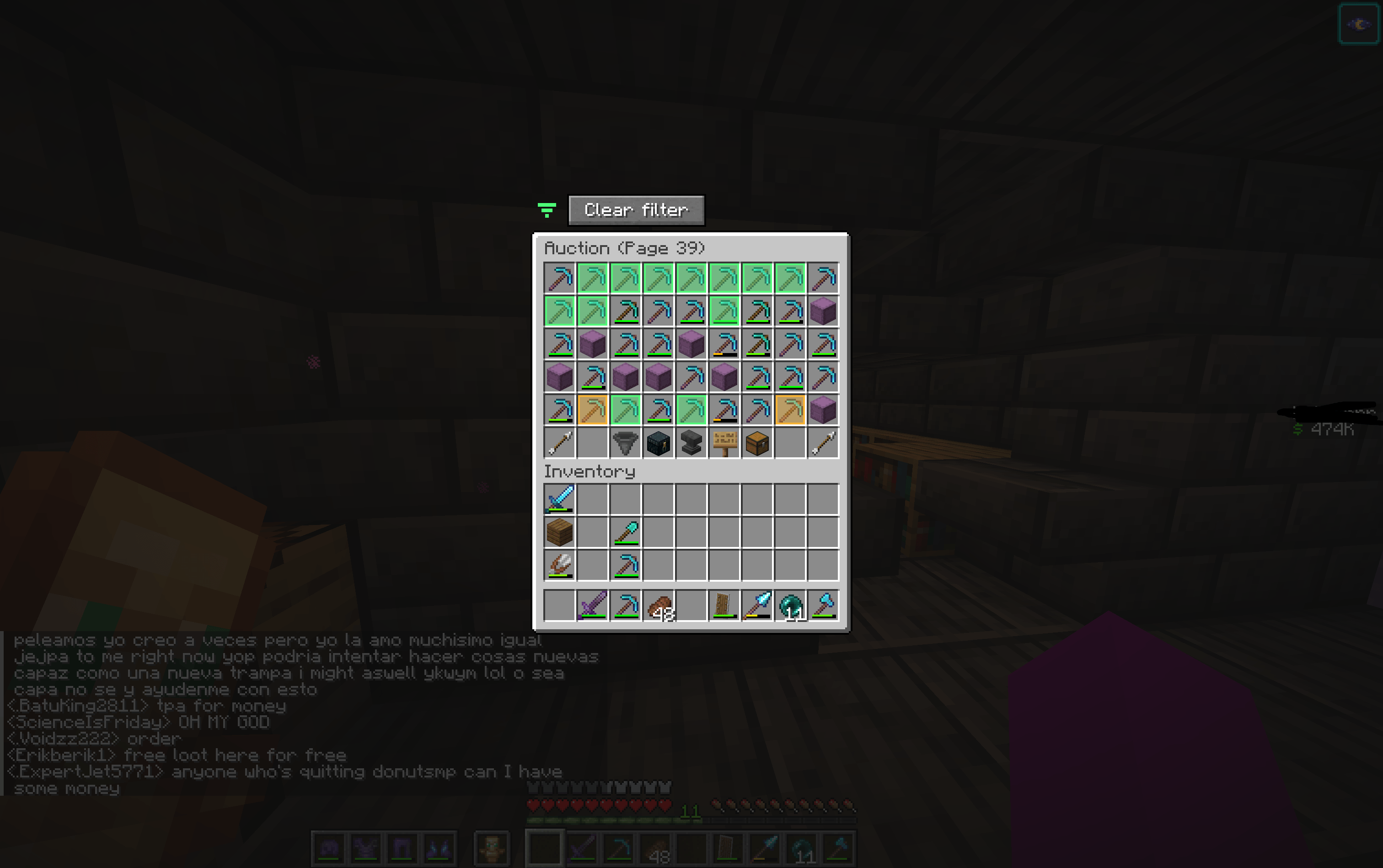
- Colour-coded full and partial matches
- Customisable highlight colours and opacity
- Optional Mod Menu integration
- Entirely client-side
- No server installation required
Match Colours
Items are highlighted according to how well they match your active filters:
- Green: The item satisfies every confirmed filter.
- Amber: The item satisfies at least one filter, but not all of them.
- No highlight: The item does not satisfy any filter.
The filter button also changes colour:
- Green: At least one full match exists.
- Amber: Partial matches exist, but there are no full matches.
- Red: Nothing in the container matches.
- Grey: No filter is currently active.
The default colours and highlight opacity can be changed through the mod’s Mod Menu settings page.
How to Use
- Open a chest, auction house, shop, or another container menu.
- Select the filter icon above the container.
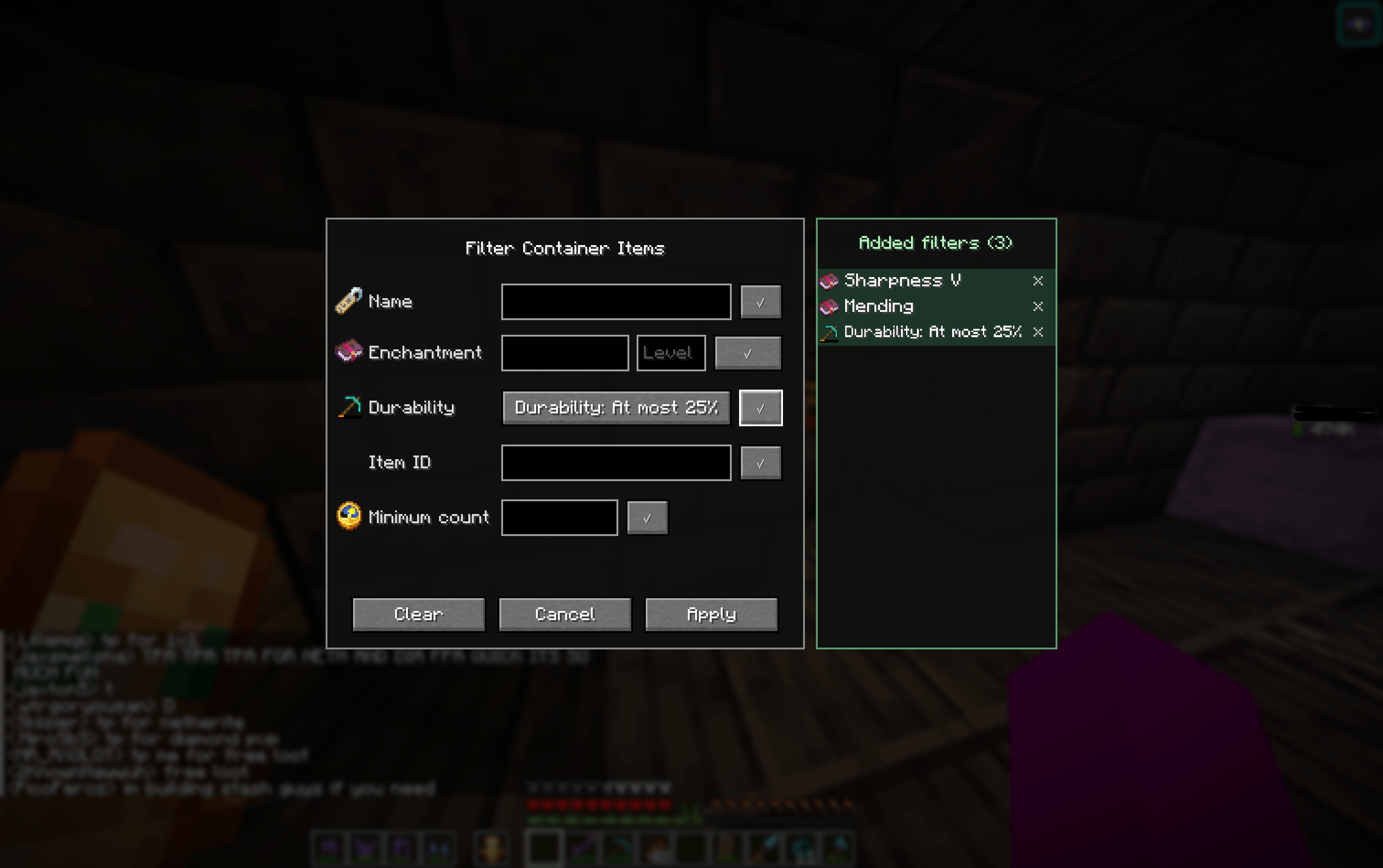
- Enter the filters you want to use.
- Confirm each filter using the checkmark beside it.
- Select Apply.
- Matching items will be highlighted in the container.
Use Clear filter beside the filter icon when you want to remove the active search.
All confirmed filters are combined. An item must satisfy every confirmed condition to receive the full-match highlight.
Enchantment Filtering
Begin typing an enchantment’s name in the enchantment field. The mod displays suggestions from the current world’s enchantment registry.
Select the desired enchantment, optionally enter an exact level, and press the checkmark to add it to the active filters.
Leaving the level field empty matches the enchantment at any level.
Example: Find Any Mending Item
Enter:
Enchantment: Mending
Level: [leave empty]
This fully matches any item containing Mending, regardless of its other enchantments.
It also detects Mending enchanted books because stored enchantments are supported.
Example: Find Sharpness V Weapons
Enter:
Enchantment: Sharpness
Level: 5
Only items containing exactly Sharpness V receive a full match.
A Sharpness IV sword will not fully satisfy this filter.
Example: Find Mending and Unbreaking III
Add both requirements:
Enchantment: Mending
Level: [leave empty]
Enchantment: Unbreaking
Level: 3
An item must contain both Mending and Unbreaking III to receive the full-match colour.
An item containing only Mending or only Unbreaking III receives the partial-match colour.
Example: Find a Fully Enchanted Pickaxe
Combine name and enchantment filters:
Name: Pickaxe
Enchantment: Efficiency — Level 5
Enchantment: Unbreaking — Level 3
Enchantment: Fortune — Level 3
Enchantment: Mending — Any level
A pickaxe containing every listed enchantment receives the full-match highlight.
A pickaxe that has only some of the requested enchantments is highlighted as a partial match, making it easy to see which listings are close to what you want.
Example: Find Specific Enchanted Books
Enter:
Item ID: minecraft:enchanted_book
Enchantment: Protection
Level: 4
This searches specifically for enchanted books containing Protection IV.
You can replace Protection with another enchantment, such as:
Efficiency
Sharpness
Fortune
Silk Touch
Feather Falling
Depth Strider
Swift Sneak
Soul Speed
Example: Search Using an Enchantment ID
Enchantment names and namespaced IDs are both supported:
minecraft:mending
minecraft:sharpness
Partial searches are supported as well, so entering:
sharp
can locate Sharpness in the suggestion list.
Combining Different Filters
You can combine enchantment requirements with every other filter type.
For example:
Name: Diamond Sword
Enchantment: Sharpness — Level 5
Enchantment: Mending — Any level
Durability: At least 75%
A diamond sword must satisfy all four conditions to receive a full match.
Another example:
Item ID: minecraft:diamond_pickaxe
Enchantment: Fortune — Level 3
Minimum count: 1
This finds diamond pickaxes with exactly Fortune III.
Shulker Box Searching
ItemScope also examines items stored inside shulker boxes.
If a contained item fully satisfies the active filters, the shulker box receives the full-match highlight. If the strongest contained result is only a partial match, the shulker receives the partial-match highlight.
Each contained stack is evaluated independently. Filters are never combined across separate items inside the same shulker.
For example, with these filters:
Enchantment: Efficiency — Level 5
Enchantment: Mending — Any level
A shulker containing one pickaxe with Efficiency V and Mending is a full match.
A shulker containing one Efficiency V pickaxe and a separate Mending book is only a partial match because neither individual item satisfies every filter.
Durability Filters
Available durability conditions include:
- Any
- Full
- Damaged
- At least 75%
- At most 25%
Durability filters are useful when searching for equipment that is ready to use or discounted damaged equipment that you intend to repair.
Mod Menu Support
When Mod Menu is installed, select the settings button beside ItemScope to configure:
- Full-match highlight colour
- Partial-match highlight colour
- Highlight opacity
- Reset to default settings
These preferences are saved in the Minecraft configuration folder and persist after closing or restarting the game.
Mod Menu is optional. ItemScope continues to work normally without it.
Compatibility
- Minecraft Java Edition 1.21.11
- Fabric Loader 0.19.3 or newer
- Fabric API
- Client-side only
The server does not need to install the mod.
ItemScope works with standard handled container screens. Compatibility with heavily customised server interfaces may depend on how those interfaces represent their items and shulker contents.