[INDL] EMERGENCY OP: Controlled Emergency Operator Access
Grant temporary OP safely. INDL Emergency OP is a server/client-side security mod that lets trusted admins grant themselves temporary operator status using a daily rotating password. Every single action during the session is recorded in a full blackbox audit log — commands, blocks, items, containers — nothing goes unnoticed.
Why choose INDL Emergency OP?
Giving OP to a player is one of the most dangerous actions on a server. INDL Emergency OP makes it safe and accountable — sessions are time-limited, critical commands are blocked, inventories are isolated, and every action is logged with forensic detail.
No permanent OP. No trust issues. Full accountability.
The password system is deterministic and offline — no internet required, no database to hack.
Password = SHA-256(secretWord + DDMMYYYY) → INDL-XXXXXXXX
| Concept |
Description |
| Secret Word |
A shared secret between server and admin. Set in the config file. |
| Date |
Today's date in DDMMYYYY format. The password changes every day. |
| Hash |
SHA-256 produces a unique 64-char hex string. Only the first 8 chars are used. |
| Format |
INDL- + 8 hex characters (e.g., INDL-a3f7b2c1) |
How it works
Admin knows: secretWord = "MyS3cretK3y"
Today's date: 16022026

SHA-256("MyS3cretK3y16022026") → "a3f7b2c1e4d5..."
Password = INDL-a3f7b2c1
Even if someone sees today's password, it's useless tomorrow. And without the secret word, they can't predict the next one.
Cipher Generator Tool
A standalone HTML tool is included to calculate the daily password without needing access to the server. Simply enter the secret word and today's date.
🔗 Try it live →
Clean Room — Anti-Duplication System
When a session starts, the player's inventory is completely saved and cleared. They begin the emergency session with an empty inventory.
Session Start ───→ Inventory saved ───→ Inventory cleared ───→ OP granted
                                                                │
Session End ←──── Inventory restored ←──── OP removed ←────────┘
This prevents every duplication vector:
- ✅ Items traded to other players → irrelevant, original inventory returns
- ✅ Creative mode items → tracked and logged, then removed
Full Blackbox Audit
Every action during an emergency OP session is recorded with millisecond timestamps to a JSON log file. The audit log is a forensic record of exactly what happened.
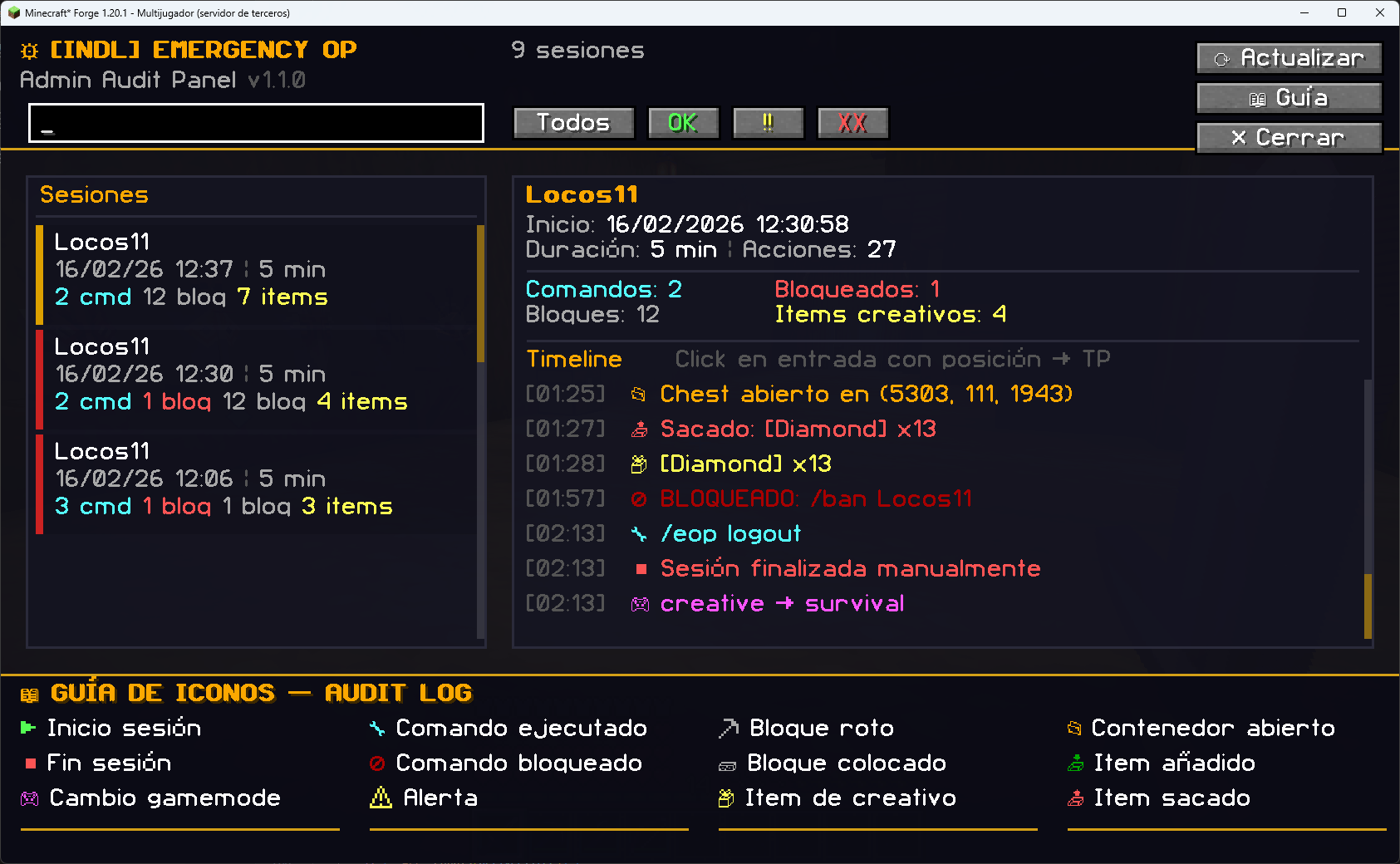
Tracked Events
| Icon |
Event |
Description |
| ▶ |
Session Start |
Session initiated with duration |
| ■ |
Session End |
Session ended (manual or timeout) |
| 🔧 |
Command |
Any command executed |
| 🚫 |
Command Blocked |
Blacklisted command attempt |
| 📦 |
Creative Item |
Items taken from Creative mode |
| ⛏ |
Block Break |
Block broken with position |
| 🧱 |
Block Place |
Block placed with position |
| 📂 |
Container Open |
Chest/barrel/hopper opened |
| 📥 |
Container Add |
Items added to a container |
| 📤 |
Container Remove |
Items taken from a container |
| 📁 |
Container Close |
Container closed |
| 🎮 |
Gamemode Change |
Creative/Survival/Adventure switch |
| ⚠ |
Alert |
Security alert or anomaly |
Example Log Entry
{
  "playerName": "Admin123",
  "startTime": 1708100000000,
  "durationMinutes": 5,
  "events": [
    { "timestamp": 0, "type": "SESSION_START", "details": "Sesión iniciada - Duración: 5 min" },
    { "timestamp": 5230, "type": "COMMAND", "details": "/gamemode creative", "x": 100, "y": 64, "z": 200 },
    { "timestamp": 12450, "type": "BLOCK_PLACE", "details": "minecraft:diamond_block", "x": 101, "y": 65, "z": 201 },
    { "timestamp": 300000, "type": "SESSION_END", "details": "Sesión finalizada (timeout)" }
  ]
}
Admin Audit Panel (GUI)
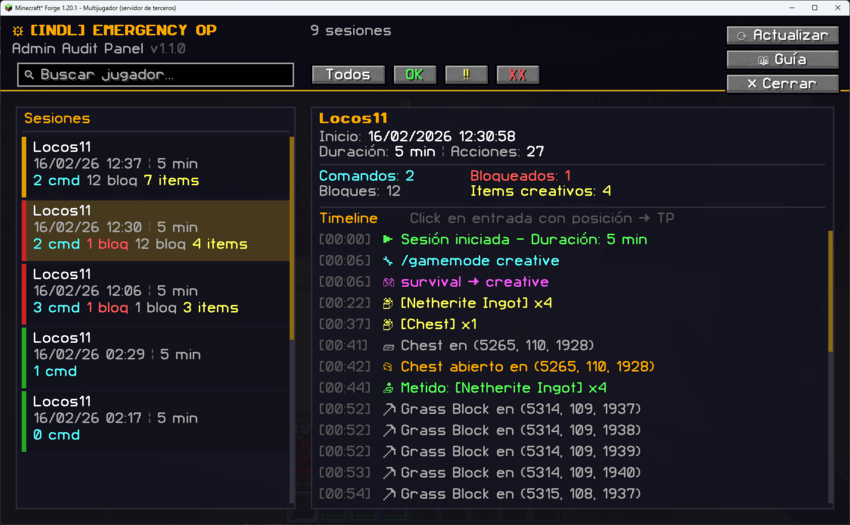
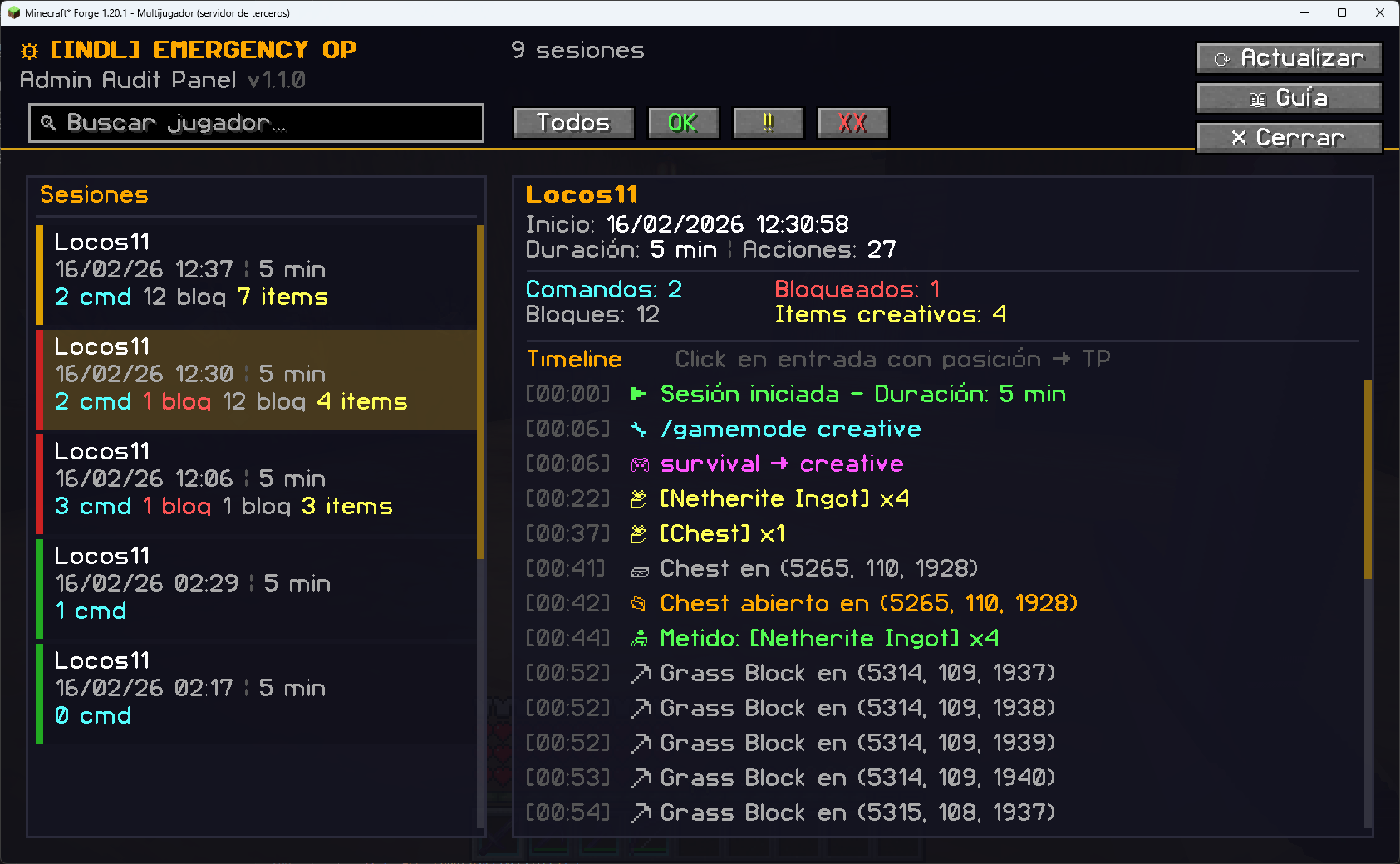
Open the Admin Panel with /eop gui for a visual inspection of all sessions and their timeline.
Features:
- Session list with colored risk badges (✅ Clean, ⚠ Warning, ❌ Danger)
- Full event timeline with icons, timestamps, and details
- Click-to-teleport — click any entry with coordinates to teleport there
- Search and filter — find sessions by player name or risk level
- Interactive guide — built-in icon reference panel
- Refresh button — live data from the server
Risk Classification
| Badge |
Condition |
| ✅ Clean |
No blocked commands, fewer than 5 creative items, fewer than 50 blocks modified |
| ⚠ Warning |
More than 5 creative items or more than 50 blocks modified |
| ❌ Danger |
One or more blocked commands attempted |
Command Blacklist
Critical commands are blocked during emergency OP sessions, even with full operator permissions:
/stop, /op, /deop, /ban, /ban-ip, /pardon, /pardon-ip, /emergencyop, /eop, /whitelist
All blocked attempts are logged as COMMAND_BLOCKED events. The blacklist is fully configurable.
Key Features
- ✅ Time-Limited Sessions — Auto-expires after configurable duration (default: 5 min)
- ✅ Daily Rotating Passwords — SHA-256 based Hybrid Cipher, changes every day
- ✅ Full Blackbox Audit — Every action logged with timestamps and positions
- ✅ Command Blacklist — Critical commands blocked even with OP
- ✅ Clean Room Inventory — Anti-duplication: inventory saved, cleared, and restored
- ✅ Admin GUI Panel — Visual session inspector with click-to-teleport
- ✅ Creative Item Tracking — Detects items taken from Creative menu
- ✅ Container Tracking — Logs every item added/removed from chests
- ✅ Block Tracking — Logs every block broken or placed with coordinates
- ✅ Admin Notifications — All OPs receive real-time session alerts
- ✅ Cipher Generator Tool — Standalone HTML page to calculate passwords
- ✅ Fully Configurable — Duration, blacklist, audit granularity, and more
Commands & Permissions
| Command |
Alias |
Permission |
Description |
/emergencyop login <password> |
/eop login |
Level 0 |
Start emergency OP session (validated by cipher) |
/emergencyop logout |
/eop logout |
Level 0 |
End your own session early |
/emergencyop help |
/eop help |
OP (2) |
Show help menu |
/emergencyop gui |
/eop gui |
OP (2) |
Open the Admin Audit Panel |
/emergencyop status |
/eop status |
OP (2) |
View active sessions and today's password |
/emergencyop history |
/eop history |
OP (2) |
View recent session summaries |
Note: login and logout are accessible by ANY player (level 0), but are validated by the Hybrid Cipher password. All other commands require OP Level 2.
Configuration
File: config/indl-emergencyop-common.toml
The mod is highly configurable. You control session behavior, password generation, security policies, and audit granularity.
#=== Session Settings ===
[session]
    # Duration of emergency OP session in minutes (1-60, default: 5)
    sessionDurationMinutes = 5

    # Max concurrent sessions (1-5, default: 1)
    maxActiveSessions = 1

#=== Hybrid Cipher Settings ===
[cipher]
    # Secret word for password generation. Share only with trusted admins.
    # Set to 'AUTO_GENERATE' to create a random 10-char string on first boot.
    secretWord = "AUTO_GENERATE"

    # Number of hex characters from the SHA-256 hash (4-16, default: 8)
    hashLength = 8

#=== Security Settings ===
[security]
    # Commands blocked during emergency OP sessions
    commandBlacklist = ["/stop", "/op", "/deop", "/ban", "/ban-ip", "/pardon",
                        "/pardon-ip", "/emergencyop", "/eop", "/whitelist"]

    # Allow switching to Creative mode during session
    allowCreativeMode = true

    # Save and restore inventory on session start/end (Clean Room system)
    restoreInventoryOnEnd = true

#=== Audit / Blackbox Settings ===
[audit]
    # Save session logs to config/indl-emergencyop/sessions/
    logToFile = true

    # Log events to server console in real-time
    logToConsole = true

    # Log block breaks and placements
    logBlockChanges = true

    # Log container interactions (chests, barrels, hoppers)
    logContainerAccess = true

    # Log items taken from Creative menu
    logCreativeItems = true
File Structure
The mod generates the following files in config/indl-emergencyop/:
| File / Directory |
Description |
indl-emergencyop-common.toml |
Main configuration file |
sessions/ |
JSON audit logs, one per session |
inventory_snapshots/ |
Saved inventories (Clean Room system) |
Example session filename:
Admin123_2026-02-16_12-30-00.json
Important Notes
- The secret word is critical. Anyone who knows it can calculate today's password. Store it securely and share only with trusted admins.
- Changing the secret word invalidates all current passwords. Useful for emergency revocation.
- Session logs are permanent. Even if the mod is removed, the JSON files remain as forensic evidence.
- The Clean Room system prevents ALL duplication vectors. The player starts with an empty inventory and gets their original back when the session ends.
- Blocked commands are logged, not silently dropped. Admins can see exactly what was attempted.
Links
![[INDL] EMERGENCY OP logo](https://media.forgecdn.net/avatars/thumbnails/1681/411/64/64/639068409209397044.png)

![[INDL] DEATHREPLAY: Cinematic Killcam project image](https://media.forgecdn.net/avatars/thumbnails/2019/600/256/256/639238031866375910.png)

![[INDL] XRAY DETECTED project image](https://media.forgecdn.net/avatars/thumbnails/1665/592/256/256/639060318877019491.png)
![[INDL] MOD-HACK DETECTED project image](https://media.forgecdn.net/avatars/thumbnails/1681/424/256/256/639068416875634553.png)