iMoung Flat Worldgen
- By
Stop fighting JSON files just to make a flat world. Custom layers, ores, cave spawns, and survival rules right in-game.
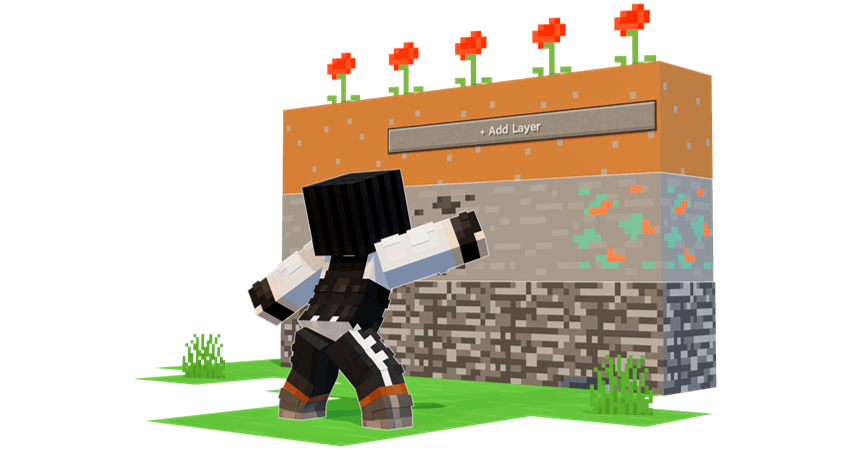
iMoung Flat Worldgen
Let's be real for a second. Making a custom superflat world in vanilla Minecraft is pain. You want deep ores? Gotta write datapacks. Want a flat Nether or End? Good luck. Want a proper survival challenge without typing five gamerule commands every time you start a new world? Yeah, no thanks.
iMoung Flat Worldgen fixes all of that by slapping a native 4th tab called iMoung Studio right into the Create New World screen. No weird external tools, no fighting broken JSON files by hand, and zero Mixins so it plays nice with your modpack.
Everything you configure is saved as clean JSON presets inside your config folder, so you can build your dream flat world once and ship it straight in your modpack.

1. One Dashboard to Remember Everything (iMoung Studio)
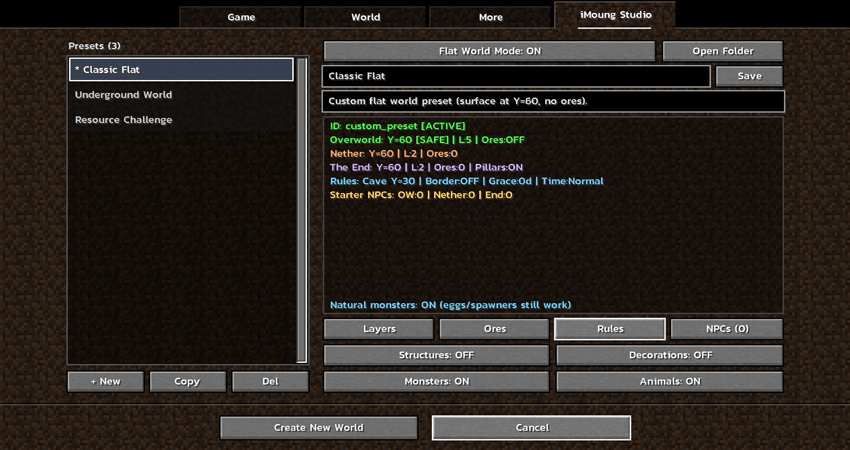 This mod has a lot of knobs and switches, and let's be honest, nobody remembers what they turned on 20 minutes ago. That is why the main iMoung Studio tab gives you a live summary box right in the middle of the screen.
- Native 4th Tab: Sits right next to Game, World, and More with vanilla styling and full
Ctrl + Tabsupport. - Live Overview: Check your Overworld surface Y-level (with a slime spawn warning), Nether and End layer counts, ore status, world rules, and starter NPC counts at a single glance.
- Easy Preset Management: Create, copy, edit, or delete presets on the fly. Every preset auto-saves to
config/imoungflatworldgen/presets/and you can open the folder with one click. - Bilingual UI: Comes with full English and Thai translations out of the box.
2. Custom Layers & Ores Across All 3 Dimensions
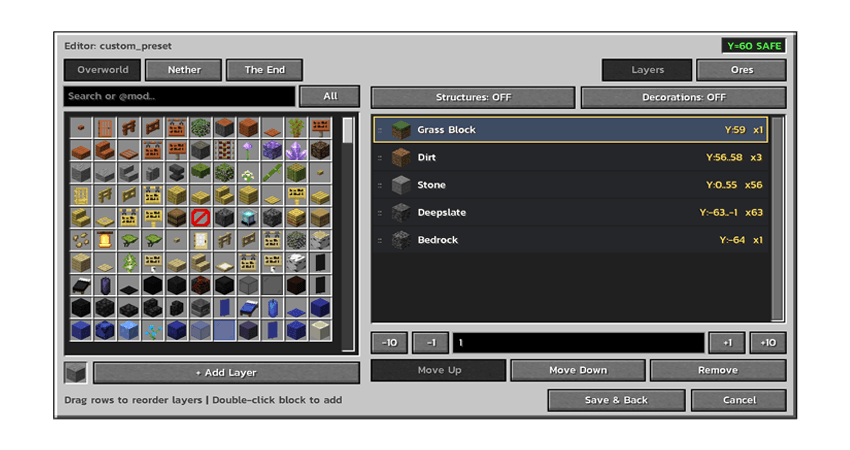 Open the Dimension Editor to build completely separate flat worlds for the Overworld, Nether, and The End.
- Visual Block Browser: Scroll through every real block from vanilla and installed mods, or search fast using
@modid(like@minecraftor@create). Double-click any block to add it. - Drag-and-Drop Layers: Reorder layers by dragging them, tweak thickness with quick buttons (
-10,-1,+1,+10), and check the Slime-Safe Indicator at the top right (Y=60 SAFEvsSLIME!) so your peaceful world does not turn into a slime apocalypse. - Double-Height Plants & Modded Blocks: Supports tall grass, double flowers, and modded blocks cleanly.
- Custom Ore Scatter Rules: Add ore veins by depth below surface or absolute Y-level, filter for ore blocks in one click, or wipe all ore rules completely if you want a strict resource survival world.
- Dimension Toggles: Toggle Structures, Decorations, and End Obsidian Pillars per dimension, plus control natural Monster and Animal spawns without breaking Spawn Eggs, Spawners, or Breeding.
3. World Rules & Underground Cave Spawns
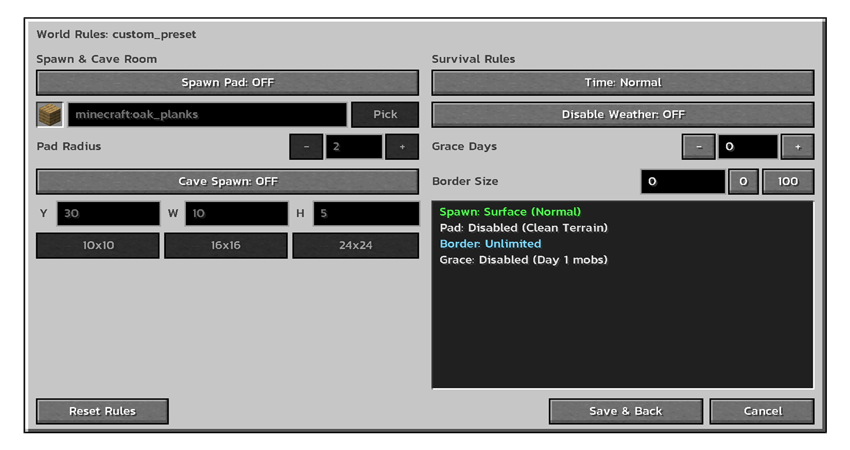 Tired of telling players to turn on cheats just to set up the rules? Bake the rules directly into your world preset under World Rules.
- Spawn Pad (Optional): Disabled by default to keep normal terrain clean, or turn it ON and pick any block and radius to build a safe starter platform over tricky surfaces like water, lava, or void layers.
- Underground Cave Spawn: Want players to start trapped underground inside a solid world instead of on top of the sky? Turn on Cave Spawn, pick the spawn Y-level, room width (
5x5up to32x32with quick10x10,16x16,24x24presets), and ceiling height. The mod carves the starter room automatically and makes sure players spawn and respawn inside the cave facing North, never getting kicked up onto the roof. - World Border: Lock the playable area to any block diameter from day one.
- Grace Period Days: Give players a few safe days before natural monsters start hunting, complete with chat countdown reminders and an alert when the safe window ends.
- Time & Weather Locks: Pick between Normal time, Always Day, or Always Night, plus an option to disable rain and storms permanently.
4. Optional Integration: iMoung Flat Controller
 Important: This mod works 100% standalone. You do not need any other mods to use everything listed above.
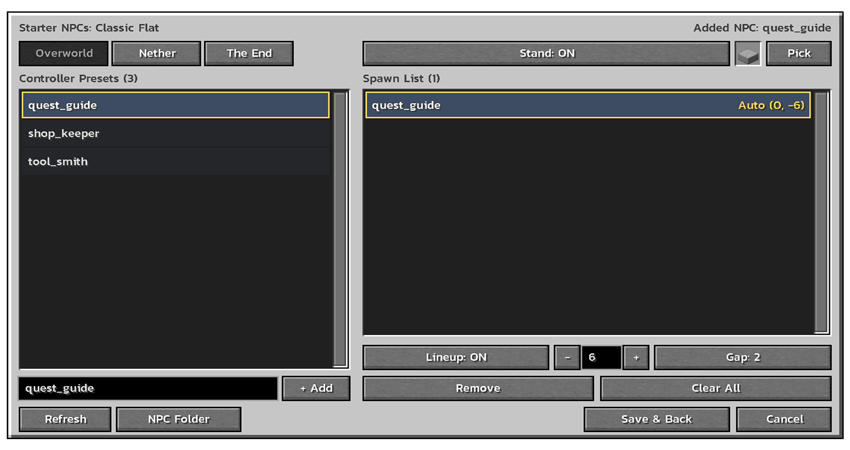
However, if you drop my companion mod iMoung Flat Controller into your mods folder, an extra NPCs button automatically unlocks inside the studio tab.
- Multi-Dimension Starter NPCs: Set up starter NPCs separately for the Overworld, Nether, and The End.
- Direct Preset Sync: Save any custom villager NPC inside iMoung Flat Controller, then click NPC Folder or Refresh here to pull those
.nbtfiles straight into your world preset. - Auto-Lineup & Custom Stands: Pick any slab or full block through the block browser (1 slab per NPC, no weird extra slabs hanging off the sides). NPCs line up neatly in front of the player or first portal entry, face straight ahead squarely on their blocks, and even carve a clean walkway if your Nether or End spawn is buried in solid blocks.
🔒Modpack Creator Lock Mode
Building a survival modpack for friends or viewers and do not want them messing with your custom world layers? Open config/imoungflatworldgen-common.toml and flip these switches:
showStudioButtonInCreateWorld = false(hides the 4th tab completely)enableEditMode = false(locks presets to read-only)modpackLockEnabled = true(forces new worlds to use youractivePresetIdand shows a clean locked label on the Game tab)
🎬Permissions & Usage
- Modpacks: Yes, throw it into any modpack you want. No need to ask.
- Videos & Streams: Go wild, feel free to showcase it or use it in 100-day series.
- Reposting: Please do not re-upload the
.jarfile to other sites. Link back to CurseForge or Modrinth instead.
📢Note From the Author
Built and tested by iMoung (Pound). For full transparency, AI assistance was used as a coding partner during Java development, while all mod design, gameplay ideas, in game testing, bug hunting, and all visual assets were designed and created manually by me. If you run into any issues or have ideas for future updates, feel free to leave a comment below!
iMoung Flat Worldgen Team