HT's TreeChop Recontinued + Polymer
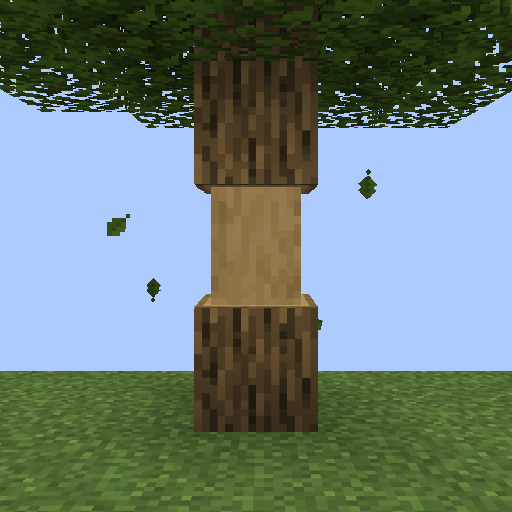
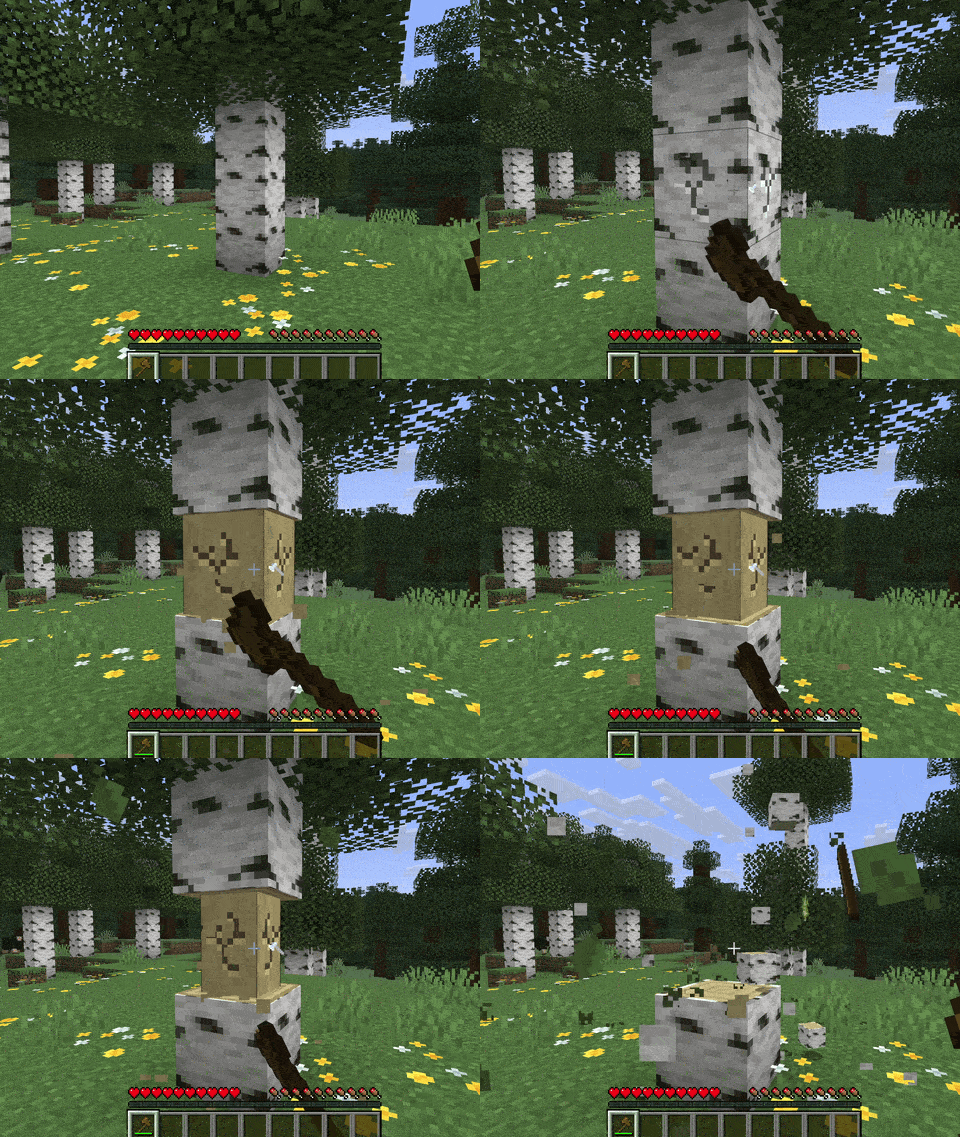
Allows trees to be chopped down by repeatedly breaking a single block. The whole tree will only break after a certain number of chops, and bigger trees require more chops. Inspired by mods like Treecapitator.
Recontinued for modern Minecraft (Fabric & NeoForge) by MagicJinn. Original mod by hammertater.
Features
- Doesn't get too loud when breaking big trees
- Works on mushrooms and fungi
- Intelligently breaks leaves
- Compatible with most modded trees
- Fabric servers can use Polymer so vanilla clients can still join
Things to consider when lumberjacking
- Chopping trees doesn't require an axe, but will take a while without one
- Chopping different blocks of the same tree will all contribute to bringing down the tree
- Players can work together to chop down those big trees
- Bigger trees require more total chops, but fewer chops per block
- Hold sneak when breaking a log block to break it normally
By default, the number of chops required to fell a tree is computed logarithmically. Some example numbers are below. The number of chops can also be configured to scale linearly with the number of blocks (for example, one chop per block, or a flat number of chops per tree). See Configuring chop counting.
| Tree blocks |
Chops required |
| 1 |
1 |
| 3 |
3 |
| 5 |
4 |
| 10 |
7 |
| 20 |
12 |
| 50 |
19 |
| 100 |
25 |
Polymer (Fabric servers)
On Fabric, add Polymer to the server and vanilla clients can join and chop trees with you. Polymer makes the mod accessible to vanilla clients via a resource pack, so players without TreeChop still see and mine chopped logs properly. Players who already have TreeChop keep the full mod experience either way.
Compatibility
Special support for:
- Jade: show number of log blocks in trees and the number of chops needed to fell
- Polymer (Fabric): vanilla-client support on dedicated servers
Want to make your mod compatible with TreeChop? See the wiki and docs/compatibility.md.
Known issues
FAQ
1. How do I turn off chopping?
Press n to open TreeChop's in-game settings, then toggle off the "chopping" setting. A key can also be bound to toggle chopping without opening the settings screen; go to Options > Controls and find the section labeled "HT's TreeChop".
2. How do I keep chopping off and only turn it on while sneaking?
By default, sneaking inverts your current chop setting, so just toggle chopping off (press n) so that chopping will be enabled by sneaking.
3. How do I keep chopping even when sneaking?
Press n to open TreeChop's in-game settings, then toggle off the "Sneaking inverts chopping" setting.
4. How do I keep from chopping my house down?
There's a setting to disable chopping if the "tree" is not connected to leaves. Press n, then toggle "trees must have leaves".
5. I started chopping my house down. How do I stop?
Break the block while sneaking, or toggle off chopping (n).
6. I was chopping something and the game crashed
Probably the item you used doesn't play nice with TreeChop. Go to [your minecraft folder]/config/treechop-common.toml and add the item's registry name to choppingToolsBlacklist (or ask the server owner to), and report the conflict if you can.
7. Why can't I chop anymore?
Maybe chopping is turned off; press n and toggle "chopping" on. If chopping is enabled and changing tools doesn't help, there might be a conflict with another mod. A recent log helps a lot.
8. Why do some trees leave behind floating leaves when felled?
Either (a) it's a modded tree and its leaves aren't set up properly (tell us which tree), or (b) there are too many leaves. Increase maxLeavesBlocks in treechop-common.toml.
9. Why do some trees leave behind floating logs when felled?
Either (a) it's a weirdly shaped modded tree (tell us which), or (b) the tree is too big. Increase maxTreeBlocks in treechop-common.toml.
10. How do I disable mushroom and fungus chopping?
In treechop-common.toml, change:
blockTagForDetectingLogs = "treechop:choppables"
to:
blockTagForDetectingLogs = "treechop:choppables_except_mushrooms"
For finer control, make a datapack and edit the block tags.
11. Can I include this in a modpack?
Yes!
Configuring chop counting
The number of chops required to fell a tree can depend on the size of the tree (the number of log blocks it contains), and is very configurable. Options below are found in /[your minecraft folder]/config/treechop-common.toml after starting Minecraft with TreeChop installed at least once.
The algorithm used to determine the number of chops can be set to any of the options below, where each comes with its own set of parameters.
Linear
algorithm = "LINEAR"
The linear algorithm follows the function

where chopsPerBlock and baseNumChops are configurable and the actual number of chops required is rounded either UP, DOWN, or to the NEAREST whole number depending on the chopCountRounding configuration.
If chopsPerBlock > 1 or baseNumChops > 0, then you should consider the setting for canRequireMoreChopsThanBlocks, which determines whether the number of chops required to fell a tree can exceed the number of blocks in the tree. For example, setting baseNumChops = 8, chopsPerBlock = 0, and canRequireMoreChopsThanBlocks = true would mean that all trees fall after exactly 8 chops (the number of chops needed to whittle a single log block down to nothing).
Logarithmic
algorithm = "LOGARITHMIC"
The logarithmic algorithm follows the function

where the parameter a is configurable and controls the steepness of the curve as the tree size (#blocks) increases.
The figure and tables below show how a affects the number of chops required for different tree sizes. The default value a = 10 results in the gray curve. At the extremes, if a = 0, then any size tree will only require one chop, and if a = ∞, then felling a tree will require the same amount of chops as there are blocks (the red curve).
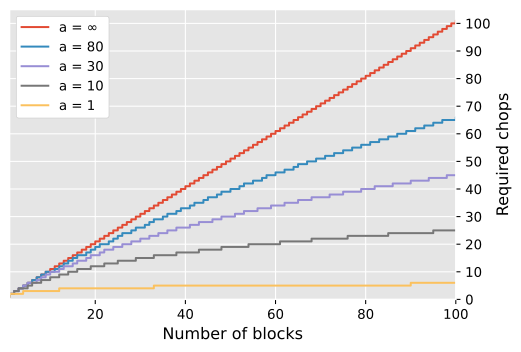
The actual number of chops required depends on the rounding method (chopCountRounding), which may be DOWN, NEAREST, or UP.
Rounding: DOWN
| Number of blocks |
1 |
2 |
3 |
5 |
8 |
10 |
20 |
50 |
100 |
200 |
1000 |
| Required chops (a = 1) |
1 |
1 |
2 |
2 |
3 |
3 |
3 |
4 |
5 |
6 |
7 |
| Required chops (a = 10) |
1 |
1 |
2 |
4 |
6 |
7 |
11 |
18 |
24 |
31 |
47 |
| Required chops (a = 30) |
1 |
1 |
2 |
4 |
7 |
8 |
15 |
30 |
44 |
61 |
107 |
| Required chops (a = 80) |
1 |
1 |
2 |
4 |
7 |
9 |
18 |
39 |
65 |
100 |
209 |
| Required chops (a = ∞) |
1 |
2 |
3 |
5 |
8 |
10 |
20 |
50 |
100 |
200 |
1000 |
Rounding: NEAREST
| Number of blocks |
1 |
2 |
3 |
5 |
8 |
10 |
20 |
50 |
100 |
200 |
1000 |
| Required chops (a = 1) |
1 |
2 |
2 |
3 |
3 |
3 |
4 |
5 |
6 |
6 |
8 |
| Required chops (a = 10) |
1 |
2 |
3 |
4 |
6 |
7 |
12 |
19 |
25 |
31 |
47 |
| Required chops (a = 30) |
1 |
2 |
3 |
5 |
7 |
9 |
16 |
30 |
45 |
62 |
107 |
| Required chops (a = 80) |
1 |
2 |
3 |
5 |
8 |
10 |
18 |
39 |
65 |
101 |
209 |
| Required chops (a = ∞) |
1 |
2 |
3 |
5 |
8 |
10 |
20 |
50 |
100 |
200 |
1000 |
Rounding: UP
| Number of blocks |
1 |
2 |
3 |
5 |
8 |
10 |
20 |
50 |
100 |
200 |
1000 |
| Required chops (a = 1) |
1 |
2 |
3 |
3 |
4 |
4 |
4 |
5 |
6 |
7 |
8 |
| Required chops (a = 10) |
1 |
2 |
3 |
5 |
7 |
8 |
12 |
19 |
25 |
32 |
48 |
| Required chops (a = 30) |
1 |
2 |
3 |
5 |
8 |
9 |
16 |
31 |
45 |
62 |
108 |
| Required chops (a = 80) |
1 |
2 |
3 |
5 |
8 |
10 |
19 |
40 |
66 |
101 |
210 |
| Required chops (a = ∞) |
1 |
2 |
3 |
5 |
8 |
10 |
20 |
50 |
100 |
200 |
1000 |