


Hinterix's Builders Dimension
- By
Builders Dimension is a flat dimension for builders. Pixel-art-like and an part of "Over the Mountain 2.0."
ErythroCraft
Create a server, get 25% off your first month

Builders Dimension
Current Version
Version: 1.9
What's New in 1.9
- Added separate Creative and Survival inventories.
- Survival inventory is automatically saved when entering a Creative Builders Dimension.
- Creative inventory is automatically cleared when returning to a Survival world.
- Previously saved Survival inventory is automatically restored.
- Prevents Creative items from being transferred into Survival gameplay.
Builders Dimension is a flat dimension designed for builders, pixel artists, and creative projects. Originally created as part of Over the Mountain 2.0, it provides a dedicated space for large-scale construction without cluttering your main world.
With this mod, you don't need to link portals above the Nether roof anymore.
Simply connect your Overworld portals directly to the Builders Dimension.
Have you ever searched for a dimension dedicated entirely to building, pixel art, or large Chisel & Bits creations? Or perhaps you're the kind of player who keeps creating new worlds and eventually loses track of where everything is located.
Builders Dimension offers a simple solution.
The dimension generates as a completely flat white building surface, making it ideal for:
- Pixel Art
- Chisel & Bits creations
- Server builds
- Adventure maps
- Creative testing environments
- Organized construction projects
You can access the dimension by constructing the portal or by using a compatible portal mod. The portal can be created manually, but for larger projects I highly recommend using the StarGate mod.
Features
- Extremely rare naturally spawning portals in the Overworld.
- Easy to disable by preventing the crafting of the Portal Igniter.
- Separate Creative and Survival inventories (since v1.9).
- Compatible with Star Gate for linking dimensions, maps, and servers through a single gate network.
How to Install
Install the mod like any standard Minecraft Forge mod.
Portal Construction
Step 1: Craft Dimension Blocks
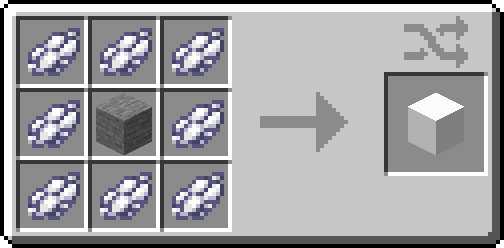
Step 2: Craft Gate Blocks
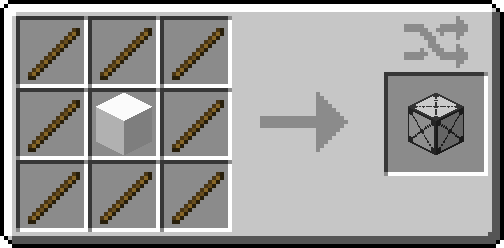
Step 3: Craft the Portal Igniter
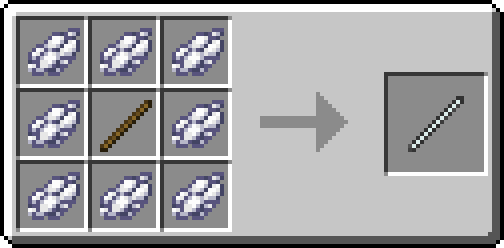
Step 4: Build the Portal
Build the portal frame using Gate Blocks exactly like a Nether Portal frame, then activate it with the Portal Igniter.
Good luck and have fun building!
Hinterix's Builders Dimension Team


Owner


![Groundpack of Over The Mountain [GOTM] project image](https://media.forgecdn.net/avatars/thumbnails/1446/317/256/256/638938168956463740.png)