Functional Tv's & Boomboxes
- By
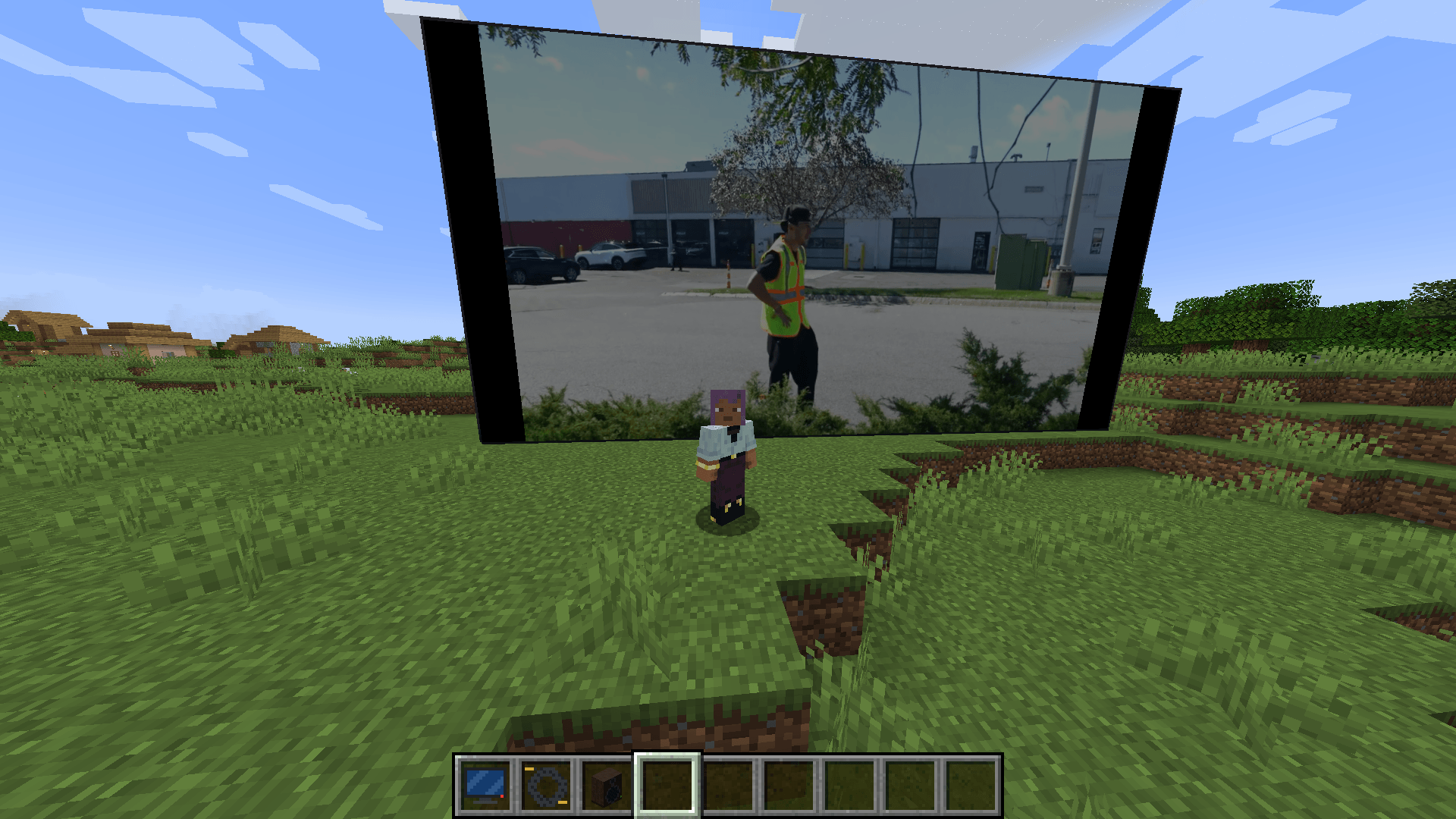
Real televisions and boomboxes for Minecraft. Paste a link — YouTube, TikTok, MP4, a radio stream, a GIF — and it plays. On a screen of *any* size you type in. In sync for everyone.
2026-09-14_12.55.27.png
2026-09-14_12.56.09.png
2026-09-14_12.56.22.png
Description
📺 Functional TVs & Boomboxes
Real televisions and boomboxes for Minecraft. Paste a link — YouTube, TikTok, MP4, a radio stream, a GIF — and it plays. On a screen of any size you type in. In sync for everyone.
NeoForge · Java 21 · Required on client and server
✨ What it does
- Televisions of any size — not presets. Type
16 × 9,40 × 50,3 × 1, anything from 1×1 up to 64×64 blocks. Place it against a wall (a green/red outline shows where it will go) and resize it later without stopping the video. - Plays the real internet — YouTube, TikTok, Instagram, Reddit, Twitter/X, Vimeo, Streamable and ~1000 other sites, plus direct MP4 / MP3 / OGG / WAV / GIF / PNG / JPEG links, MJPEG webcams and — with FFmpeg — live HLS streams.
- Synchronised playback — everyone in range sees the same frame and hears the same beat, including players who walk in halfway through. The server only shares state; every client decodes for itself, so nothing is streamed through the server.
- Boomboxes that never stop — carry it, hold it, drop it, place it, pick it up again: the music keeps going from exactly where it was. Choose whether others hear it while it's in your inventory.
- Positional sound — screens and boomboxes get quieter with distance and muffled behind walls.
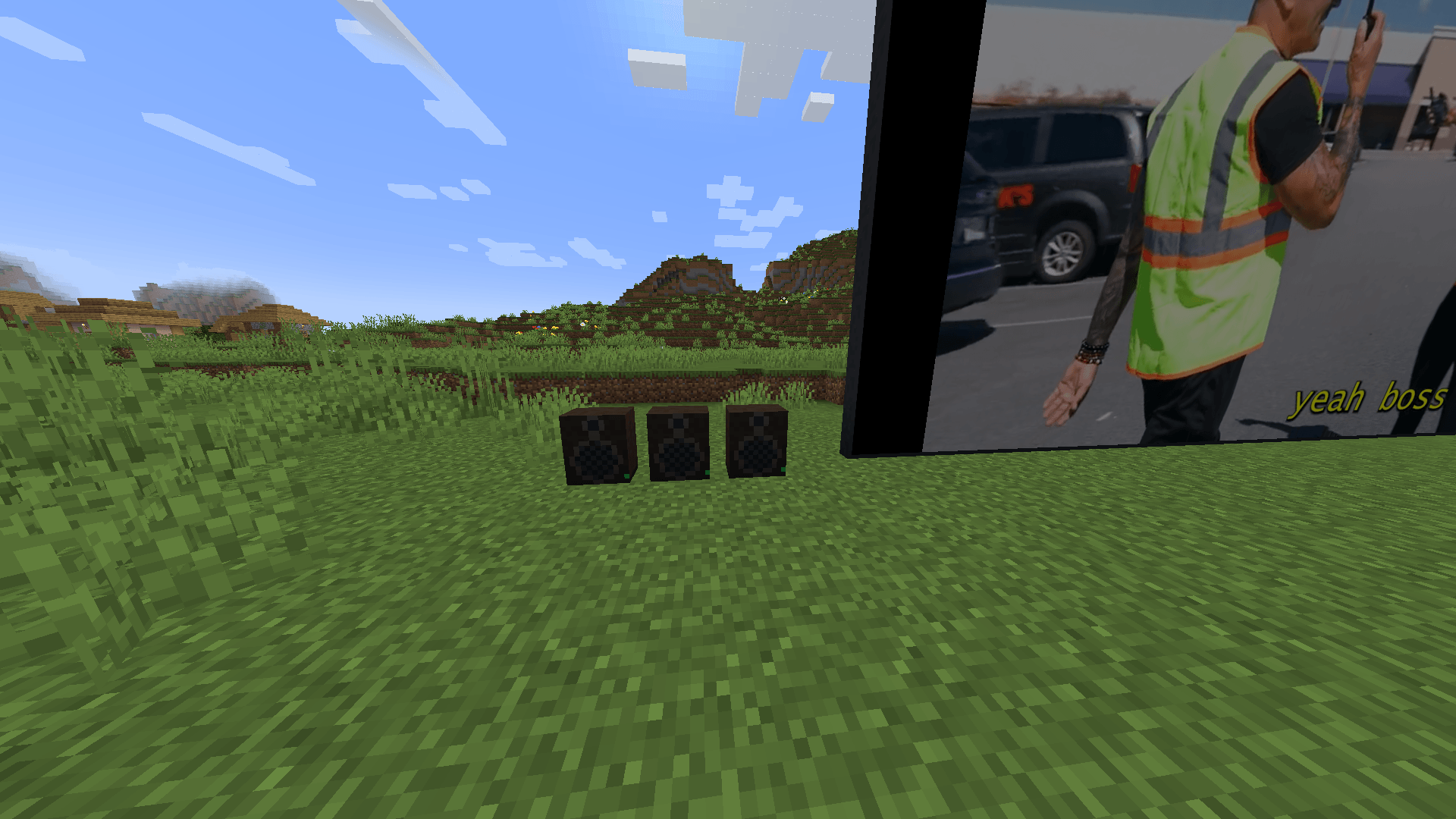
- Speakers — wire Speaker blocks to a screen with a Speaker Cable and the sound comes out of every one of them, sample-accurate, so a stadium screen is heard from the back row.
- 60 fps, up to 1080p — with the one-click FFmpeg install; a pure-Java decoder is built in so it works with nothing extra at all.
- Remote Control — point at a screen from across the room and open its panel.
- Server-owner controls — domain allow/block lists, max screen size, who may control what, ranges, anti-spam.
🚀 Quick start
- Craft a Television and right-click it in the air → type a width and height (presets included if you're in a hurry).
- Place it on a wall. Any block of the screen opens the panel; so does a Remote Control.
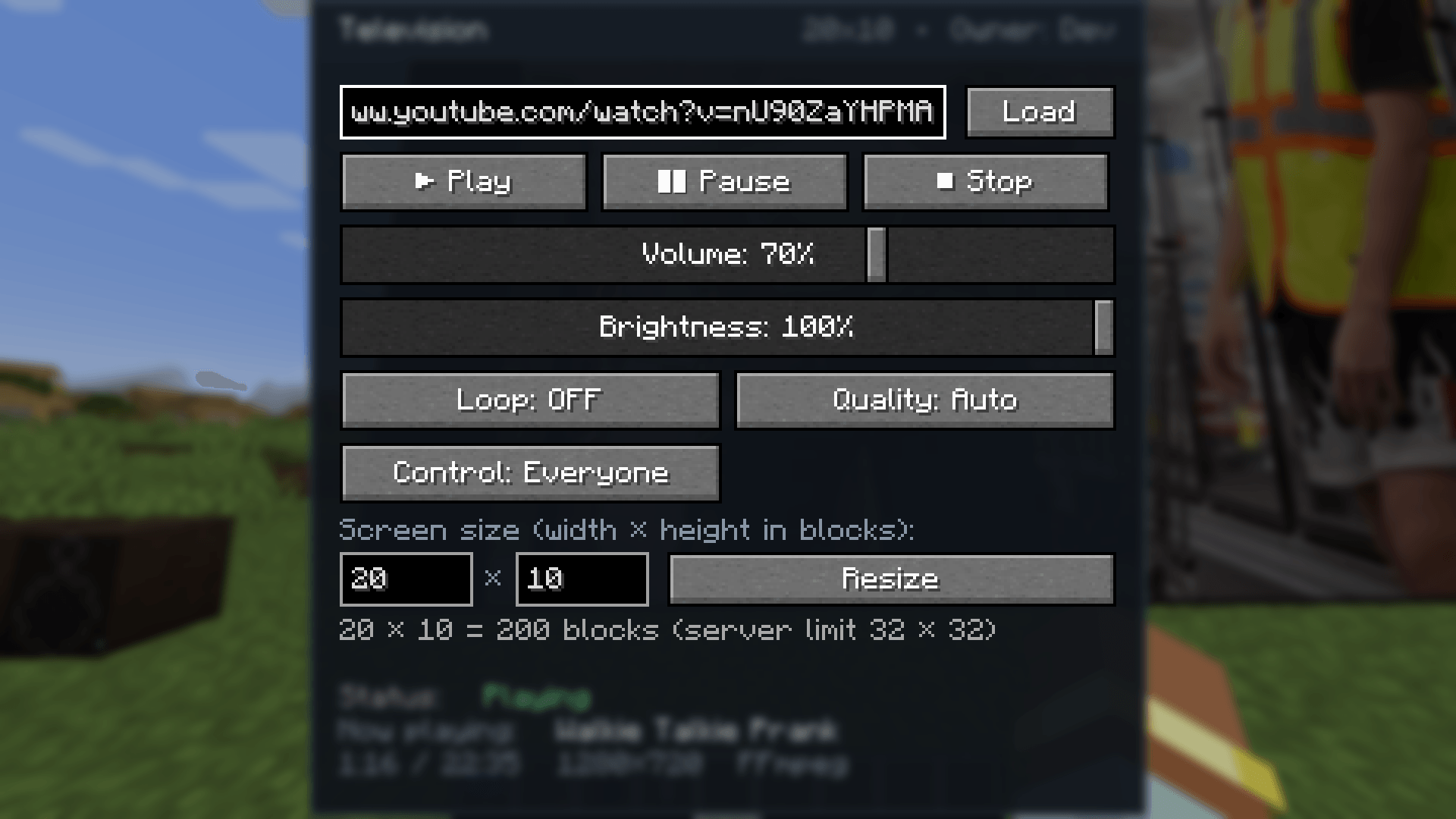
- Paste a link, press Load. Done — an MP4, MP3, GIF or image link plays immediately.
- For YouTube / TikTok / other sites press Install link support the first time. The mod downloads yt-dlp and the Deno runtime from their official GitHub releases (checksum-verified) into
config/functionaltvs/tools. From then on, platform links just play. - For the best picture press Improve quality (FFmpeg) once. Windows: automatic (~110 MB, official gyan.dev build, checksum-verified). Linux/macOS:
apt install ffmpeg/brew install ffmpeg— it's picked up automatically.
Everything else — Play / Pause / Stop, volume, brightness, loop, quality cap, who may control the screen, screen size — is in the same panel.
📺 Televisions
| Feature | Details |
|---|---|
| Size | Free-form, W × H blocks, 1×1 … 64×64 (server default cap 32×32) |
| Resize in place | Change the size of a placed screen from its panel; playback continues |
| Picture | Letterbox or stretch-to-fill, brightness, smooth or crisp (pixel) scaling |
| Quality cap per screen | Auto · 240p · 360p · 480p · 720p · 1080p |
| Control | Everyone or Owner only (operators always can) |
| Sync | Server game-tick clock; late joiners catch up automatically |
| Off state | Dark screen; the panel keeps the last link so one click plays it again |
Breaking any block of a screen drops one Television item that remembers its size.
📻 Boomboxes
- Right-click in the air (or sneak + right-click a block) to open it; right-click a block to place it; sneak + right-click the placed boombox to pick it back up.
- The music never restarts across inventory → hand → ground → block transitions.
- Carried: Everyone hears or Only me while it sits in your inventory.
- Plays MP3, OGG Vorbis, WAV, M4A/MP4 audio, MP3 radio streams, and the audio of any platform link.
🔊 Speakers & sound
- Speaker Cable: click a screen, then click a Speaker to link it (sneak-click to unlink). Up to 16 speakers per screen (server-configurable).
- Every source uses a realistic inverse-distance model with a reference distance and roll-off, fades out at the edge of its range, and gets a low-pass "behind a wall" muffle when the line of sight is blocked.
- Speakers are additional emitters of the same audio stream — no echo, no drift, ever.
- Everything respects the vanilla Records / Jukebox volume slider.
🎞️ What plays
| Media | TV | Boombox |
|---|---|---|
| YouTube, TikTok, Instagram, Reddit, Twitter/X, Vimeo, Streamable, … (~1000 sites via yt-dlp) | video + audio | audio |
| MP4 / M4V / MOV / M4A (progressive and fragmented/DASH) | video + audio | audio |
| MP3 · OGG Vorbis · WAV / AIFF / AU · MP3 radio streams | audio | audio |
| PNG · JPEG · BMP · animated GIF | picture / animation | – |
| MJPEG HTTP streams (IP cameras, public webcams) | live video | – |
| Dropbox / Google Drive / GitHub share links | rewritten to the file automatically | ✔ |
| With FFmpeg: WebM / VP9 / AV1 / HEVC, MKV, HLS & m3u8 live streams, YouTube Live, FLAC, Opus … | video + audio | audio |
DRM content and sites that need a login are never playable — the panel tells you why something failed instead of showing a black screen.
🖼️ Picture quality & frame rate
- FFmpeg decoder (recommended, optional): decodes at the source frame rate up to 60 fps, up to 1080p, Lanczos scaling, every codec. Runs as a separate process so it can't crash your game.
- Built-in Java decoder (always available): H.264 + AAC, comfortable at 480p, nothing to install.
- Frames are paced by their timestamps against the audio clock and uploaded straight to the GPU; the screen texture uses mipmaps and anisotropic filtering, so far-away or angled screens don't shimmer.
- The panel footer shows the current resolution, position and which decoder is in use.
🔒 Safety & privacy — the honest version
- Only your own client decides what runs on your PC. yt-dlp, Deno and FFmpeg are downloaded only when you press the button (or set
autoInstallTools = true), from their official release pages, and every file is SHA-256-verified against the published checksums. A server can never make your client download or execute anything. - The mod never scrapes YouTube or other sites itself; link resolution is delegated to yt-dlp, the actively maintained open-source resolver.
- Only
http/httpslinks; credentials in URLs are rejected; loopback / LAN / private addresses are refused on every redirect hop (opt-in for local media); server-side domain allow/block lists, rate limit, range and permission checks on every request. - Nothing is uploaded anywhere. No accounts, no telemetry.
⚙️ Configuration
Client — config/functionaltvs-client.toml
Max video height (720), decode cap, max fps (60), activation & render distance, simultaneous screens/boomboxes, stream cache size, letterbox vs stretch, smooth scaling, volume multiplier, audio distance model (reference distance, roll-off), occlusion muffling, local-network media, timeouts, user agent, yt-dlp / Deno / FFmpeg paths, useFfmpeg, auto-install, page resolving, Piped instance.
Server — <world>/serverconfig/functionaltvs-server.toml (synced to clients)
External media on/off, allowed & blocked domains, max URL length, max TV width / height (32×32, hard cap 64), default control mode, operator bypass, TV / boombox / speaker audio ranges, control range, speakers per TV, anti-spam cooldown, maximum volume.
🛠️ Recipes
| Item | Recipe |
|---|---|
| Television | Iron ×5 around a Glass Pane, Redstone + Quartz + Redstone on the bottom row |
| Boombox | Iron ×3 top row · Wool, Note Block, Wool · Iron, Redstone, Iron |
| Speaker (×2) | Planks frame · Wool on top, Note Block in the middle, Iron at the bottom |
| Speaker Cable (×2) | 2 Copper Ingots + String (shapeless) |
| Remote Control | Redstone over Iron Ingot over any Button |
All items are in their own creative tab.
❓ FAQ
Does the server need the mod? Yes — it holds the playback state, sync clock and permissions. Servers never download or decode media.
Do I need to install anything? No. Direct files play out of the box. Platform links need yt-dlp (+ Deno for YouTube); the best quality needs FFmpeg. Both are one button in the panel.
Is it heavy? One screen at 480p with the Java decoder costs about as much as a browser tab; with FFmpeg even 1080p60 is light. Screens are one quad each regardless of their size, and only screens near you decode (activationDistance, maxActiveTvs).
YouTube stopped working! YouTube changes constantly; yt-dlp is updated within days. Replace yt-dlp.exe in config/functionaltvs/tools with the newest release or point ytDlpPath at your own install.
Can I use my own resolver or a Piped instance? Yes: resolverCommand and pipedApiInstance in the client config.
Multiplayer sync accuracy? Within about a second of the server clock; positions are re-checked continuously and corrected when they drift.
📦 Requirements
- Minecraft 1.21.1, NeoForge 21.1.234+, Java 21
- Install on both client and server
- Optional: yt-dlp + Deno (link support), FFmpeg (quality) — installed from within the game
📜 License & permissions
All rights reserved. You may use this mod in modpacks (CurseForge and elsewhere) with credit; please do not re-upload the jar to other sites.
Made by Tonicarter. Found a site that doesn't play or a bug? Open an issue with the link and the message the panel shows — it tells you exactly what went wrong.
Functional Tv's & Boomboxes Team