FrameGuard
- By
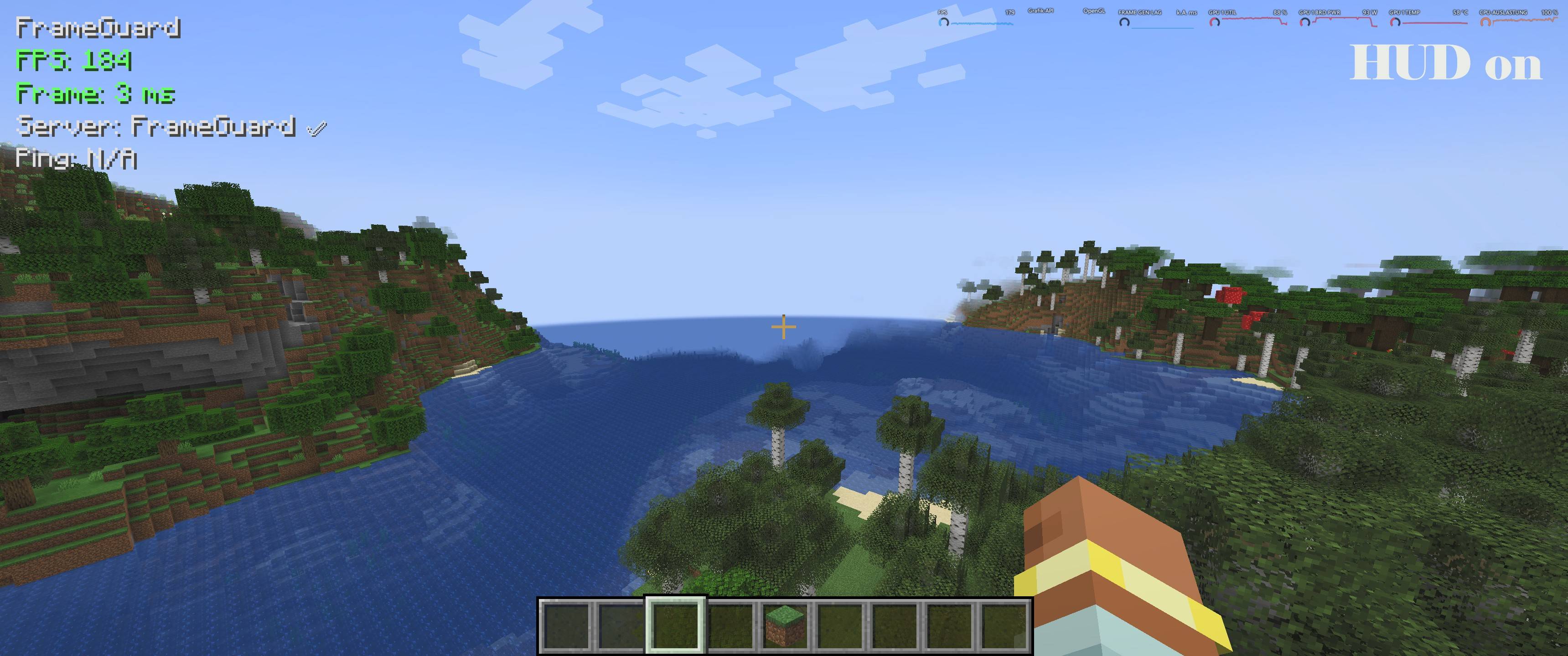
FrameGuard ist eine Client-Performance-Mod für große Modpacks: HUD mit FPS/Frametime/1% Lows & Stutter-Zähler, Hotkeys zum Umschalten und Report-Export in Logs. Hilft Lag-Spikes zu finden und das Spiel flüssiger zu machen.
Screenshot 2026-04-19 200357.jpg
Nachtvisionar | FrameGuard
Create a server, get 25% off your first month

Description
FrameGuard
FrameGuard is a configurable performance, protection, monitoring, and diagnostics mod available for both Minecraft Forge and NeoForge.
It provides independently configurable systems for reducing common sources of server lag, monitoring performance, protecting servers from excessive entity activity, and collecting useful diagnostic information.
FrameGuard is suitable for dedicated servers, multiplayer environments, single-player worlds, and larger modpacks. Server administrators can enable only the systems they need and adjust their behavior through configuration files.
The server-side protection and optimization systems do not require players to install FrameGuard. Installing the appropriate FrameGuard edition on the client additionally provides the performance HUD, client-side FPS controls, rendering protection, configuration screens, and diagnostic export tools.
Available Editions
FrameGuard is available in two separate editions:
-
Forge edition: Minecraft 1.20.1
-
NeoForge edition: Minecraft 1.21.1
Always download the edition that matches your Minecraft version and mod loader. The Forge and NeoForge editions are separate and must not be installed together.
Server Performance and Protection
Dropped Item Optimization
FrameGuard can merge nearby dropped items to reduce the number of active item entities.
The system provides configurable merge distances, scan intervals, stack limits, scan limits, merge limits, and optional protection for recently dropped player items.
A separate cleanup system can remove excessive unprotected dropped items. Configurable warning messages can inform players before cleanup begins.
Experience Orb Optimization
Nearby experience orbs can be combined to reduce entity counts while preserving their accumulated experience.
The merge radius, scan interval, maximum experience per orb, scan limits, and merge limits can be configured.
Entity Cramming Protection
FrameGuard can monitor crowded areas and remove excessive entities when configured limits are exceeded.
Administrators can configure the maximum number of entities, scan intervals, entity exclusions, armor stand handling, and whether dropped items or primed TNT should be ignored by this system.
TPS-Aware TNT Protection
The TNT guard helps prevent excessive amounts of primed TNT from overwhelming the server.
It can limit active TNT, react to low server TPS, and block or remove excessive primed TNT according to the selected configuration and performance profile.
Item Ban System
Server administrators can maintain a configurable list of banned item IDs.
FrameGuard can remove banned items from player inventories and from dropped item entities. Players can optionally receive a notification when an item is removed.
Administrative commands are available for banning items, removing items from the ban list, and displaying the current list.
Performance Profiles
FrameGuard includes configurable performance profiles that allow administrators to select behavior appropriate for their server.
Individual protection and optimization systems remain configurable and can be enabled or disabled separately.
Better World Generation Tools
FrameGuard includes optional diagnostics and safeguards for identifying world-generation and chunk-related performance problems.
World Generation Diagnostics
The diagnostics system can monitor:
-
Slow chunk generation
-
Slow structure generation
-
Unusually high chunk activity
-
Chunk loading and generation activity
-
Potential world-generation performance problems
Reports can be written to the server log and optionally shown to online server operators in chat.
Chunk Save Optimization
FrameGuard can reduce unnecessary chunk saves while protecting important chunks.
Safeguards can prevent newly generated chunks, chunks containing block entities, and chunks containing entities from being skipped. The behavior and protection intervals are configurable.
Structure Spacing Guard
The structure spacing system provides configurable safeguards for vanilla and modded structures.
Administrators can configure:
-
Default structure spacing
-
Vanilla and modded structure handling
-
Bounding-box checks
-
Structure whitelists and blacklists
-
Custom spacing rules for individual structures
These tools are optional and can be adjusted or disabled independently.
Client Performance Monitoring
When the matching FrameGuard edition is installed on the client, it provides an in-game performance HUD with multiple display modes.
Depending on the selected mode and configuration, the HUD can display:
-
Current FPS
-
Frame time
-
Average frame time
-
Maximum frame time
-
99th-percentile frame time
-
1% low FPS
-
Ping
-
Server TPS
-
Server connection status
-
RAM usage
-
CPU usage
-
GPU usage
Warning colors make it easier to identify performance problems. Thresholds, position, spacing, update intervals, displayed values, and resource warnings can be configured.
HUD Controls
The default controls are:
-
F9: Show or hide the performance HUD
-
F10: Switch between Normal, Advanced, and Debug mode
-
Alt + F9: Reset the collected performance statistics
Key bindings can be changed through Minecraft's control settings.
Client FPS Controller
FrameGuard includes configurable FPS controls for different game states.
Separate limits can be applied while Minecraft is running in the background or displaying a menu. In-game FPS can optionally remain unlimited.
Entity Rendering Protection
The client-side entity render guard can limit how many entities are rendered at the same time.
Important entities can be protected from the limit, including:
-
Players
-
Named entities
-
Bosses
-
Tamed entities
-
Entities within a configurable distance
This system is intended to improve client performance in areas containing unusually large numbers of entities.
Diagnostics and Log Export
FrameGuard provides tools for collecting information needed when investigating crashes and performance problems.
The /frameguard exportlogs client command can create a diagnostic ZIP archive containing relevant logs, crash reports, FrameGuard configuration files, filtered log information, and a summary.
Automatic crash exports can also be enabled. Export limits and ignored log patterns are configurable.
Configuration
FrameGuard's major systems can be configured independently. Administrators and players can disable features they do not need without disabling the entire mod.
Server-side settings are stored in the server configuration. Client monitoring and performance settings can be managed through the FrameGuard configuration screen or configuration file.
Installation
Download the FrameGuard edition that matches your Minecraft installation:
-
Use the Forge edition with Minecraft 1.20.1 and Forge.
-
Use the NeoForge edition with Minecraft 1.21.1 and NeoForge.
Place the correct FrameGuard .jar file in the mods folder of the server or client.
For server-side protection and optimization, FrameGuard only needs to be installed on the server. Players can connect without installing FrameGuard on their clients.
The following optional features require FrameGuard to be installed on the client:
-
Performance HUD
-
Client resource monitoring
-
FPS controls
-
Entity rendering protection
-
Client configuration screen
-
Manual diagnostic exports
-
Automatic crash exports
Installing the matching FrameGuard edition on both the server and client allows the client HUD to receive server TPS information.
Requirements
Forge Edition
-
Minecraft 1.20.1
-
Forge 47.4.20 or newer
-
Java 17
NeoForge Edition
-
Minecraft 1.21.1
-
NeoForge 21.1.230 or newer
-
Java 21
License
FrameGuard is released under All Rights Reserved.
You may use FrameGuard on private and public servers. You may also include the unmodified FrameGuard .jar file in free modpacks, as long as the modpack itself is not sold.
You may share modified FrameGuard configuration files, including server-specific performance profiles, limits, protection settings, and diagnostic settings.
Voluntary donations for servers or modpacks using FrameGuard are allowed, as long as a donation is not required to download the modpack or access FrameGuard itself.
You are not allowed to:
-
Sell FrameGuard or modified versions of FrameGuard
-
Redistribute modified FrameGuard
.jarfiles -
Redistribute or publish the FrameGuard source code
-
Publish modified versions of the source code
-
Claim FrameGuard as your own work
In short:
-
Free server use is allowed.
-
Free modpack use with the unmodified
.jaris allowed. -
Sharing custom configuration files is allowed.
-
Voluntary donations are allowed.
-
Selling the mod or modified versions is not allowed.
-
Modifying and redistributing the mod code or
.jaris not allowed.
The FrameGuard Team