FPVCraft
- By
Fly FPV drones with your real RC transmitter: acro and angle mode, Betaflight rates, battery sag and a rolling FPV camera.
FPVCraft
Plug in your real FPV radio. Arm. Punch out over your own Minecraft world.
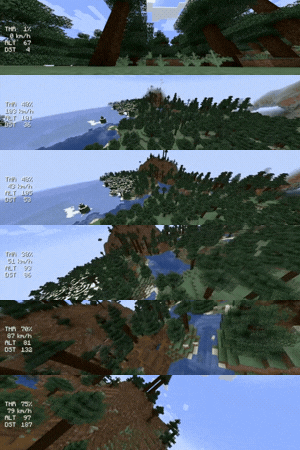
FPVCraft is not a flying camera with a drone skin. It flies like the quad on your bench: acro mode, Betaflight rates, a flight controller that refuses to arm with the throttle up, a LiPo that sags when you punch it, and prop wash when you drop straight into your own air. You look through a tilted FPV camera that rolls with the quad, with a Betaflight-style OSD on top.
No real drone yet? Then this is the most fun way to build stick time: dive the tree line in your survival world, thread a gap under your base, chase your friends on the server.
Early beta. It works, it is fun, and it will get better. Please report anything odd in the comments.
Get flying in 60 seconds
- Radio into USB. On EdgeTX / OpenTX radios choose USB Joystick (HID).
- Press
Oin game. Click Assign next to Roll, Pitch, Yaw, Throttle and Arm and simply move that stick or flip that switch. Hit Calibrate once. - Place the FPV Drone (Tools & Utilities tab) and right-click it. The chat lists every control.
- Throttle down, flip your arm switch (or press
R) and fly.
You start in Angle mode with Beginner rates. When hovering feels boring, switch to Acro with M. That is how real FPV pilots fly.
Your radio, set up in game
- Works with EdgeTX / OpenTX radios (Radiomaster, Jumper, TBS, BetaFPV …) and any other device your PC sees as a joystick
- Assign by moving: no axis numbers to guess
- Live view of every raw axis and button, so you see instantly whether a switch actually reaches the PC
- Calibration, per-function invert, arm switch and angle-mode switch
Switch not showing up? EdgeTX only sends channels your model uses. Add a mix for the switch on CH5 (MDL → MIXES) and it appears in the setup screen.
Flies like Betaflight
- Acro (rate) mode and self-levelling Angle mode
- Actual rates with presets: Beginner, Cinematic, Freestyle (Betaflight defaults 70 / 670 / 0.54), Race
- Real arming checks: throttle down, quad level, battery not empty, switch must be toggled
- Airmode-style control at zero throttle and spinning idle motors for flips and dives
- Failsafe: lose the radio and the quad centres the sticks, cuts throttle and drops after 1.5 s
Physics you can feel
- A 5-inch freestyle quad: 650 g, thrust-to-weight 6, top speed around 120 km/h
- Motor response lag and air drag
- Prop wash: drop straight down into your own wash and the quad shakes, so fly forward out of it like the pros
- Crashes bounce and tumble the quad, and anything hard disarms it
Battery & signal
- 6S LiPo simulation: voltage sags on a punch-out, thrust fades on a tired pack, a few minutes of hard flying per battery
- The drone recharges while it rests (or switch the simulation off)
- Link quality drops with distance and with every block between you and the drone. The picture breaks up before failsafe kicks in, so fly behind a mountain at your own risk
FPV camera & OSD
- Camera rolls with the quad, adjustable uptilt from 0 to 60° and a wide FPV field of view
- OSD with armed state, flight mode, throttle, speed, altitude, distance, cell voltage, mAh, current, link quality, warnings and live stick positions
Multiplayer
- Everyone sees your drone fly in real time
- The server checks the flight data and enforces the radio range, so no teleporting drones
Controls
| Input | Action |
|---|---|
| Right-click drone | Start flying |
| Sneak + right-click | Pick the drone up |
O |
Radio setup |
R |
Arm / disarm (if you have no arm switch) |
M |
Angle ↔ Acro (if you have no mode switch) |
G |
Stop flying |
All keys can be changed under Options → Controls → FPVCraft.
Recipe: 4 iron ingots in the corners, redstone left and right, a glass pane (the camera) in the middle.
FAQ
Do I need a radio? You need something with sticks. A real FPV radio feels best and is exactly what you would use with a real drone. Keyboard flying is not supported, because a quad simply cannot be flown well with on/off keys.
Is this good practice for real FPV? It uses the same rate model, arming logic and failsafe behaviour as Betaflight, so your stick habits carry over. For serious training use a dedicated simulator as well; FPVCraft is where you fly your own worlds with friends.
How far can I fly? Currently as far as your render distance reaches, up to 200 blocks. Longer range is planned.
Server or client? Install it on both.
Requirements
- Minecraft 1.21.1
- NeoForge 21.1 or newer
Coming next
- Long range: the world loads around the drone, not just around you
- Motor sound
- Turtle mode to flip back over after a crash
- A proper drone model, more quads (Whoop, 7-inch) and custom builds
- Forge 1.20.1
- BroadcastCraft integration: the drone as a live camera for your broadcasts
See you in the air.
The FPVCraft Team