(Sodium) Fovea
New in 1.0.5, viewport fix (NeoForge 1.21.1): With render scaling on, water, mobs and clouds no longer drift and stretch across the screen.
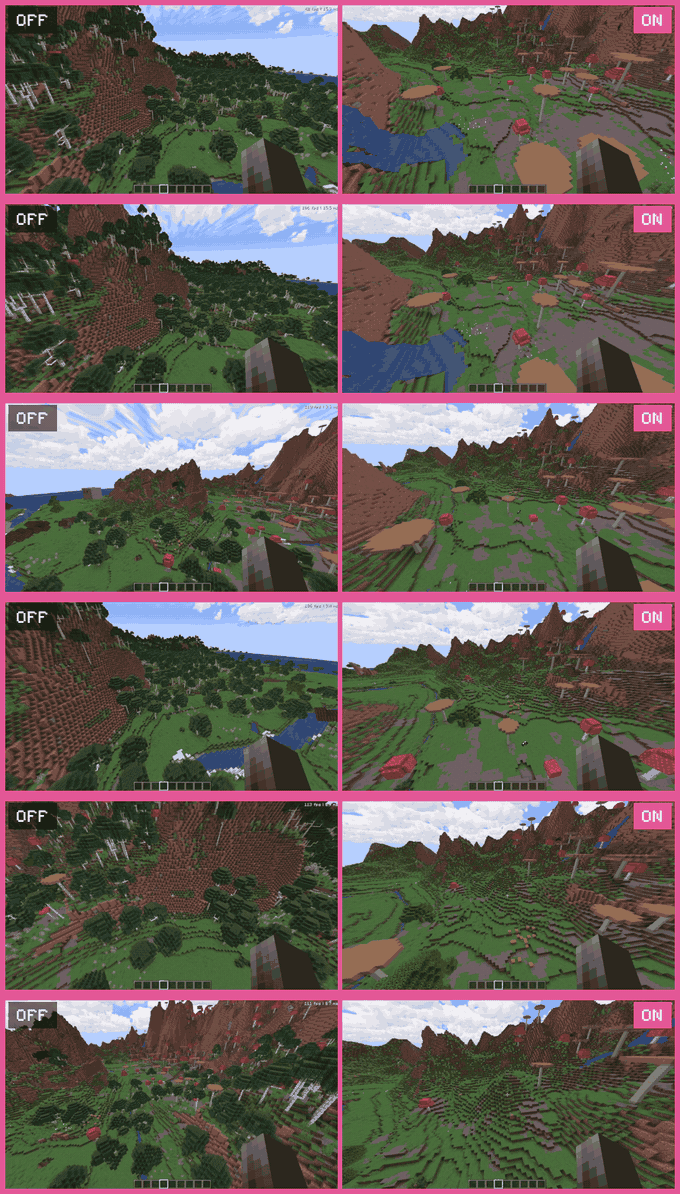
For ultrawide monitors. Fovea renders the world at a lower horizontal resolution and puts the frame back together before the HUD is drawn, taking most of the saving from the sides of the screen, not the middle. Client only.
Render scaling
- Horizontal Resolution is 70% by default (25 to 100%). HUD and menus stay at native resolution.
- Center-Priority Mode, on by default, gives the middle 40% of the screen the most pixels. It trims the outermost degrees of FOV and stretches the edges, up to 2x; raise your FOV to get it back.
- Turned off, the reduction is even: no FOV change, no stretch.
- Motion Adaptation, on by default, strengthens the effect while you move and weakens it while you stand still.
Edge culling
- Entities, block entities and particles keep full render distance in the middle of your view and lose it toward the screen edges, down to 60%.
- Never culled: anything within 32 blocks, glowing entities, anything you ride.
- Terrain culling needs Sodium (Embeddium on Forge), is missing on 26.2 and is off by default: distant chunks pop in on fast turns.
Dynamic resolution and menu throttle
- Dynamic Resolution, off by default, lowers the resolution in 5% steps to hold 90 FPS, never below 50%.
- Behind the pause menu and options screens the world is redrawn at 10 FPS; the menu stays at full rate.
Compatibility
- Iris or Oculus: the whole shaderpack renders at the reduced size, and edge culling pauses during the shadow pass. Not tested on 26.2.
- Fabulous graphics, and Vulkan on 26.2: render scaling switches itself off; culling keeps working.
Requirements
Minecraft 1.20.1 (Forge or Fabric), 1.21.1 or 26.2 (NeoForge or Fabric), on Java 17, 21 and 25 respectively. The Fabric builds need Fabric API. Client only. Sodium is optional: on 1.21.1 and 26.2 the options are in its video settings, otherwise in the config file.
This mod has been abandoned. It works fine, but it will not receive updates.
Related mods
The other performance mods
NeoForge 1.21.1 and 26.2, Fabric 1.20.1, 1.21.1 and 26.2, Forge 1.20.1. Client only. Free to use in modpacks.
(Sodium) Fovea Team

Owner