Forgotten Portal Orion
- By
Discover ancient blue-glazed shrines and build your own fast-travel network with the craftable Orion Summoning Seal.
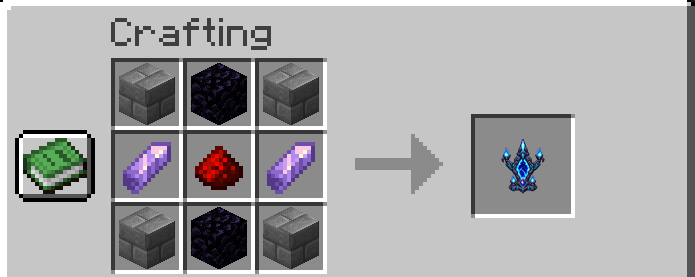
Craft Portal Orion.png
Description
🌀 Forgotten Portal Orion brings ancient magic and exploration-based fast travel to Minecraft.
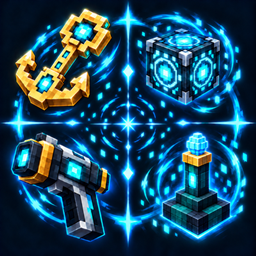
Discover rare shrines across the Overworld, awaken their central altars, and travel between the destinations you have found. Each shrine features a distinctive spearhead-shaped portal, polished blue ceramic blocks, glowing cyan runes, and four eternal blue-flame braziers.
Craft an Orion Summoning Seal to place your own shrines and connect bases, settlements, and distant landmarks.
Features
- Discover ancient shrines: rare structures generate in suitable terrain in new Overworld chunks.
- Create your own network: summon complete shrines using the craftable Orion Summoning Seal.
- Choose your destination: browse discovered shrines through the central altar’s menu, with names, coordinates, and dimensions.
- Personalize your destinations: sneak and right-click a discovered shrine’s central altar to give it a personal name.
- Control portal activity: switch portals ON or OFF without losing your discoveries.
- Protected structures: indestructible blocks and braziers, with protection against building inside the shrine area.
- Persistent discoveries: each player’s destinations and personal names are saved with the world.
- Multiplayer support: players discover shared shrines individually and can assign their own names.
- English and Italian translations.
Getting started
- Right-click a shrine’s central altar to awaken and discover it.
- Find another shrine or summon one with an Orion Summoning Seal.
- Open the altar’s destination menu and select where to travel. Both portals must be switched ON.
Teleportation takes place through the altar menu. Walking into the blue portal veil does not trigger travel.
Right-click the top of the ground with the seal to summon a shrine. Placement requires a clear 13 × 8 area with 12 blocks of height. The structure extends mainly north from the altar position.
A successful placement consumes one seal in Survival and immediately adds the shrine to your discovered destinations. If placement fails, the seal is not consumed. The seal is also available in the Functional Blocks Creative tab.
Requirements
- Minecraft Java Edition 1.20.1
- Java 17
- Install the mod on both the server and all clients for multiplayer.
Forgotten Portal Orion Team