Pocket Tech

Four technology-inspired utility gadgets for Minecraft: mark a location and return to it, project a temporary bridge, measure distances up to 20 blocks, and repel nearby hostile monsters with a visible energy field.
Anchor Craft.png
Anchor Craft.png

Bridge Craft.png

Bridge Craft.png

Finder Craft.png

Finder Craft.png

Jammer Craft.png

Jammer Craft.png

Orion8TV | Pocket Tech
Create a server, get 25% off your first monthaffiliate logo
Create Server
affiliate banner image

Description

⚙️ PocketTech
PocketTech adds four compact technological gadgets for exploration, travel, and keeping hostile monsters at a distance. Each item has its own crafting recipe and can also be found in the Tools & Utilities creative tab.

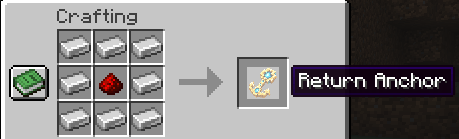
⚓ Return Anchor;

Use the high-tech anchor key once to save your current position. Use it again to return there, as long as you are in the same dimension. After returning, the anchor resets and is ready to save a new location. Each anchor stores its own point.

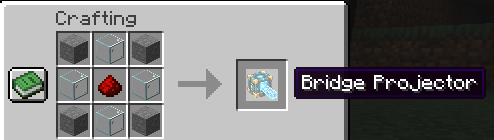
🌉 Bridge Projector;

Use the projector block to create a short walkway of up to five transparent, indestructible blocks in the direction you are facing. You can extend a walkway by using another projector on its temporary blocks. A recovery marker appears above the end of the bridge; right-click it after crossing to retrieve the projector. The bridge and marker disappear after 15 seconds.

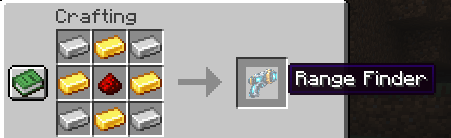
📏 Range Finder;

Aim at a block or entity to see its distance beneath your crosshair. The range finder measures up to 20 blocks.

🛡️ Monsters Jammer;

Place the stepped column and right-click to activate or deactivate it. When active, its cyan-blue energy field shows the protected area and automatically pushes hostile monsters beyond the barrier, leaving one block of clearance. Crouch and right-click to pick it up whenever you like.

For multiplayer, install PocketTech on both the client and the server.

Pocket Tech Team

profile avatar
  • 4
    Followers
  • 10
    Projects
  • 4.7K
    Downloads

More from Orion8TVView all

  • DragonBall Tournament Tenkaichi Budokai project image

    DragonBall Tournament Tenkaichi Budokai

    Build and host the Tenkaichi Budokai! Spawn a Dragon Ball–inspired martial arts arena and let two players fight for the title.

    • 12
    • October 11, 2026
  • Secure Safe project image

    Secure Safe

    A personal, password-protected safe that keeps your items secure—even when you’re offline.

    • 6
    • October 9, 2026
  • Storage Name project image

    Storage Name

    Give your chests custom names and see them at a glance when you look at them.

    • 16
    • October 8, 2026
  • Solo Leveling - OVERLOAD project image

    Solo Leveling - OVERLOAD

    ⚡⬆️Strange gates have appeared in the world of Minecraft, bringing with them unspeakable power and danger. Something strange has happened to your power, your body has begun to overload with potential that you are currently unable to control.⬆️⚡

    • 28.5K
    • August 14, 2026
  • DragonBall Tournament Tenkaichi Budokai project image

    DragonBall Tournament Tenkaichi Budokai

    Build and host the Tenkaichi Budokai! Spawn a Dragon Ball–inspired martial arts arena and let two players fight for the title.

    • 12
    • October 11, 2026
  • Secure Safe project image

    Secure Safe

    A personal, password-protected safe that keeps your items secure—even when you’re offline.

    • 6
    • October 9, 2026
  • Storage Name project image

    Storage Name

    Give your chests custom names and see them at a glance when you look at them.

    • 16
    • October 8, 2026
  • Solo Leveling - OVERLOAD project image

    Solo Leveling - OVERLOAD

    ⚡⬆️Strange gates have appeared in the world of Minecraft, bringing with them unspeakable power and danger. Something strange has happened to your power, your body has begun to overload with potential that you are currently unable to control.⬆️⚡

    • 28.5K
    • August 14, 2026