First Person Pal Expansion
- By
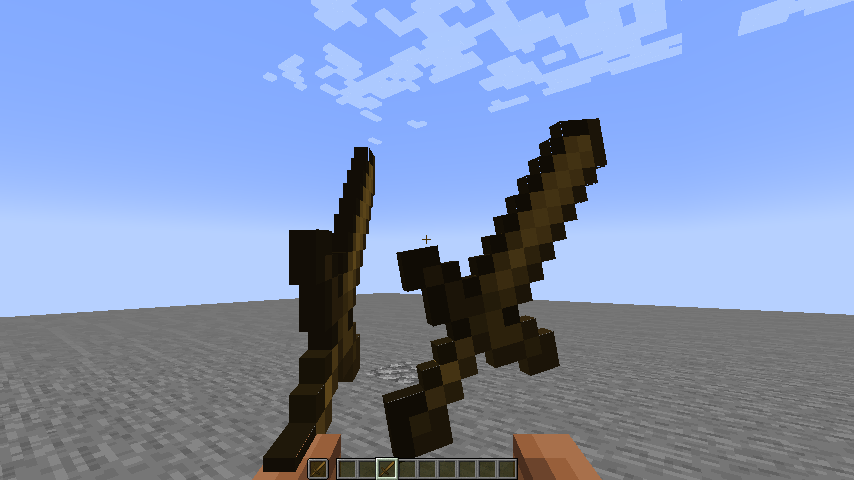
Animate the player's arms and held items in first-person view.
2026-10-25_15.39.54.png
Description
First Person PAL Expansion
Animate the player's arms and held items in first-person view.
"Bring your Blockbench first-person rigs to life in-game."
📖 Description
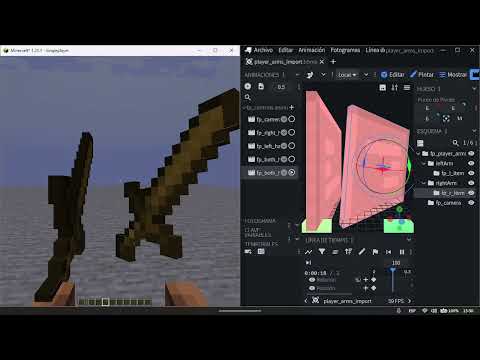
First Person PAL Expansion is an add-on for Player Animation Library (PAL) that lets you animate the player's arms, held items and even the camera directly in first person, using the same Bedrock animation format PAL already uses.
Author your first-person animations in Blockbench, drop them into assets/<namespace>/fp_animations/, and they will drive the vanilla arm mesh, the held items and the view exactly as you see them in the Blockbench preview.
🌟 Features
- First-person arms: the vanilla arm mesh follows your
rightArm/leftArmbones, 1:1 with the Blockbench preview. - First-person items: held items follow the
fp_r_item/fp_l_itembones, so guns, tools and anything else stay glued to the animated hands. - First-person camera: the
fp_camerabone moves and rolls the real view. - Optional item model preview: load a Bedrock
.geo.jsonmodel to render extra details (magazine, slide, flash…) in first person. - AzureLib-compatible rigs: the arm bones use the same names/convention as AzureLib, so existing gun rigs work with minimal changes.
- Auto model resolution:
fp_models/<name>.geo.json+textures/fp/<name>.pngare picked up automatically from the animation. - 3rd-person pairing: pair a third-person animation with its first-person counterpart (
FpSyncRegistry//fp_anim pair). - Lightweight: only runs while a first-person animation is playing.
⚙️ Compatibility
Minecraft Versions: 1.19.2, 1.20.1, 1.20.4, 1.21.1, 1.21.11, 26.1.2, 26.2, 26.3.
Modding Platforms:
- Fabric: ✅ Fully supported!
- Forge: ✅ Fully supported!
- NeoForge: ✅ Fully supported!
Mod Compatibility:
- Requires Player Animation Library (PAL).
- Compatible with AzureLib-style arm rigs (same
leftArm/rightArmbone convention).
📦 Installation
- Download the mod from GitHub Releases or Modrinth.
- Install the dependency: make sure Player Animation Library (PAL) is in your
modsfolder. - Add the mod: drop the
.jarinto themodsfolder. - Launch & test: start Minecraft and run
/fp_anim play <animationID>to preview your first-person animations.
🛠️ Developer API
First Person PAL Expansion is built to be used as an API. Add first-person animations, pair them with third-person animations, and control them programmatically:
// Play a first-person animation on the local player
FpAnimationSystem.playFpAnimation(Minecraft.getInstance().player,
        Identifier.fromNamespaceAndPath("mymod", "fp_reload"));

// Pair a third-person animation with its first-person counterpart
FpAnimationSystem.registerPaired(
        Identifier.fromNamespaceAndPath("mymod", "reload"),
        Identifier.fromNamespaceAndPath("mymod", "fp_reload"));
Full documentation (bones, animation format, extra data, commands and Java API) lives in WIKI.
📝 Contributing & Feedback
Contributions and bug reports are welcome!
- Found a bug? Report it on GitHub Issues.
- Have a feature request? Open an issue or join the Discord.
- Want to contribute? Fork the project and submit a pull request.
📄 License
This mod is licensed under the MIT License. Check the LICENSE file for details.
❤️ Acknowledgments
Created by [RazorPlay01]. Arm rendering is a 1:1 port of AzureLib's AzItemArmRenderUtil (MIT License, Copyright (c) 2024 AzureDoom). Thanks to the PAL team for the animation library this mod builds on.
"Your arms, your items, your camera — all animated, all in first person." 🎯
First Person Pal Expansion Team

Owner