FFItemRarityModifiers
- By
Adds rarities and modifiers to items. Random chances on crafting, looting, trading, fishing, etc. Different tiers have different changes for good/bad modifiers. Highly configurable.
FFItemRarityModifiers
Adds small, randomized modifiers to weapons, armor, and tools, tied to an item's rarity. Highly configurable through data, built to be a light, flavorful addition and not a full gear overhaul.
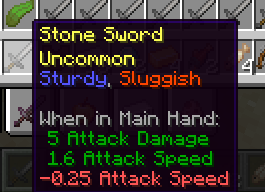
Combine this with FFItemCreationTracker for bragging rights!
Overview
Sometimes an item you've crafted, found, or bought turns out a little special. FFItemRarityModifiers gives single-stack weapons, armor, and tools a chance to come out Uncommon, Rare, or Epic, with small stat modifiers attached, good and bad alike.
- Rarer items can roll more (and stronger) positive modifiers, and fewer negative ones.
- A negative modifier and its positive counterpart (for example, attack damage up and attack damage down) never appear on the same item together.
- An item that receives a rarity roll shows its rarity in the tooltip. Items that have not received a roll show no rarity line. Modifiers are listed concisely, in blue for good and red-orange for bad.
- Hold Shift to see the precise numbers behind each modifier.
- Items can gain rarity and modifiers from crafting, fishing, villager and wandering trader trades, mob drops, and loot tables.
- Datapacks can change that chance and the rarity weights.
- Villager and wandering trader results are determined when an offer appears, so you can inspect the item before trading.
- Set
enableTradingtofalsein the common config to turn this off.
- Set
- Accessory mods can opt in their equippable items through a tag.
- Rarity rolls also cover bows, crossbows, fishing rods, shears, brushes, flint and steel, shields, elytra, and the two riding sticks. Gear only rolls modifiers that match its category and any item-tag restriction; for example, fishing luck is for rods and mining speed is for mining tools and shears.
None of this is required reading to play. Everything below is for people customizing the mod's behavior.
Operator command
Operators can assign a specific rarity to the item a player holds in their main hand. The command rolls fresh modifiers using that rarity's datapack weights and replaces any rarity and modifiers previously assigned by this mod. The item must be an eligible single-stack weapon, armor piece, tool, or opted-in accessory.
/ffitemraritymodifiers apply <common|uncommon|rare|epic> [player]
In game, omit player to target yourself. From the server console, include an online player name, for example ffitemraritymodifiers apply epic Alex.
For datapack makers
Datapacks control how often rarities appear and what their modifiers do under data/<namespace>/ffitemraritymodifiers/.
modifier_type/*.json: defines one modifier (good or bad, eligible gear category, changed attribute or durability, and values by rarity). An optionalrequired_item_tagnarrows a modifier to items in a tag, such asc:tools/fishing_rod; omit it for the whole category. Bundled examples include attack, armor, durability, reach, movement, health, mining speed, fishing luck, and shield modifiers. Positive and negative definitions with the samefamilycannot appear together on one item.rarity_weights/<rarity_id>.json: how many good and bad modifiers an item of that rarity rolls, as a weighted table of amounts. File name must be a vanilla rarity id (common,uncommon,rare,epic).rarity_source/<id>.json: the chance a trigger rolls a rarity at all, and a weighted table of which rarity gets picked, including Common. A successful Common roll is shown on the item. Built-in ids:crafting,fishing,trading,mob_drops,loot_table. Existing packs that overridetrading_beforemust rename that source totrading. Add your own id and reference it from a mod's code, or from an override file below. Asmithing_defaultsource file also ships for future use, but nothing calls it automatically yet.rarity_source_override/mob/*.json: redirects specific mobs (or entity tags, with a#prefix) to a differentrarity_sourcethan the defaultmob_drops.rarity_source_override/loot_table/*.json: same idea, but for loot table ids instead of mobs, redirecting away from the defaultloot_tablesource.data/ffitemraritymodifiers/tags/item/weapons.json,armor.json,tools.json,accessories.json: which single-stack items this mod may touch. Weapons use NeoForge's melee and ranged weapon tags; armor uses#c:armorsand includes elytra. Tools use#c:tools(including rods, shears, brushes, igniters, and shields) plus the two riding sticks. Themining_toolstag includes vanilla mining tools and shears, and takes priority over weapons so axes remain tools. Theaccessoriestag is empty by default; add items or an accessory mod's own tags to opt them in. Use the singulartags/itemdirectory on Minecraft 1.21.1.
See the shipped files for exact formats; they're deliberately kept small and self-explanatory. Automatic item sources assign rarity and modifiers when an item is first obtained and do not replace them later. Operators can replace a roll with the command above.
Modding API
For API documentation and integration examples, click the Wiki link in the sidebar -->
Future Plans
I am expirementing with ways to add "reroll" and "upgrade" mechanics to allow players to get new modifiers for the weapons current rarity, or improve the rarity overall. These options will be disable-able when they're introduced.
What's with the FF prefix?
It stands for Fyxe's Features! Its a clean way to easily find all of my mods when changing configs or creating packs. Mods that are a part of the "FF" system are usually smaller and unintrusive.
Feedback
If you have any ideas for improvements, questions, or concerns, I am open to communicating through email: FyxeINCFeedback@gmail.com
The FFItemRarityModifiers Team