Fastplay
- By
In-game AI assistant for Minecraft. Ask about any item — held, pointed at, or hovered — with a full item and recipe knowledge base. Free built-in API, plus support for your own OpenAI-compatible endpoints.
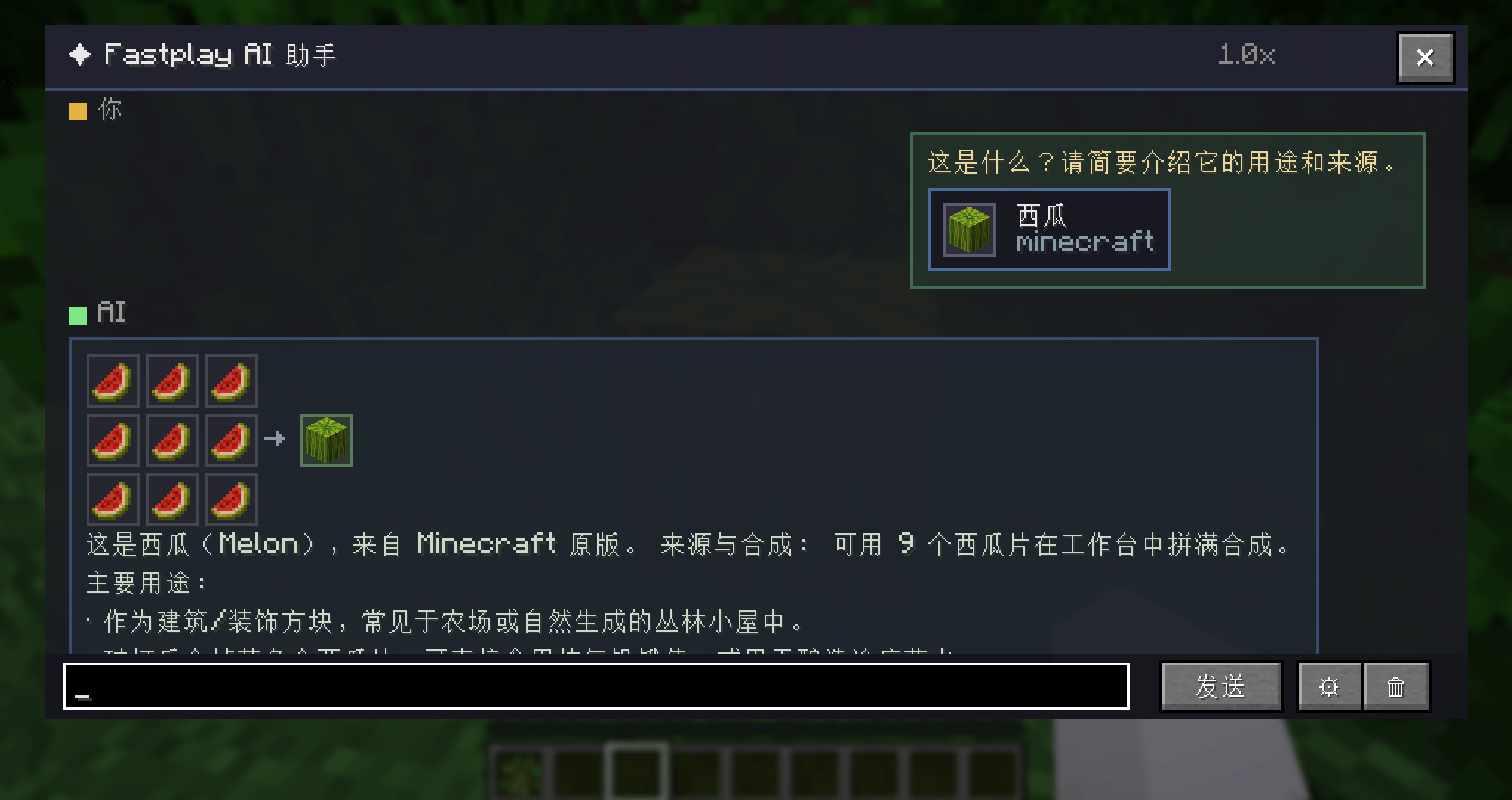
The image shows information about the item aligned in the main world.
Description
Fastplay - In-Game AI Assistant
WHAT IS THIS
Fastplay is an in-game AI assistant mod for Minecraft. It's not just a chatbot - it can actually "see" your game:
Hold a diamond sword and press a key: it will tell you which mod the sword comes from, its base stats, and how to upgrade it. Hover over an item in your inventory and it will explain its uses and crafting recipes using the full item knowledge base, rendering recipes as native 3x3 crafting grid icons right in the reply. Stuck on how to play? It can search the web on its own before answering.
Everything happens inside the game - no window switching, no copy-pasting.
FEATURES
Smart Item Recognition
- Three recognition channels: held item (main hand first, offhand as fallback), block/entity you're looking at, and slots you hover in container/recipe screens
- Rich context injection: automatically attaches an NBT summary, source mod, and crafting recipes to the item, so answers are based on your actual game state
- Visualized recipes: crafting recipes are rendered as 3x3 icon grids directly in the reply - no more counting grid cells in plain text
Powerful AI Chat
- Free built-in API: works out of the box with the fast KIMI/Moonshot model (kimi-k2.7-code-highspeed), roughly 1 second to first token
- Web search: when a question involves the latest versions, mod info, or gameplay guides, the AI searches the web before answering
- Image display: search result images can be cited and rendered in replies (direct image links display inline in the chat bubble)
- Multi-turn conversation with memory: keeps recent chat history for natural follow-ups; replies often end with suggested follow-ups you can tap to dig deeper
- Fully customizable: system prompt, sampling temperature, max reply length, and history size are all adjustable
Full Item Knowledge Base
- Automatically collects every registered item and recipe in the background after you enter a world (including items from other mods you have installed) - no lag
- Each question injects relevant knowledge entries ranked by relevance, so answers are grounded instead of made up
- Supports excluding specific mods and exporting the knowledge base to a JSON file (for debugging and further development)
Free Appearance & Controls
- Translucent floating window; drag the title bar to move it, Ctrl + Scroll to resize text anytime
- Window size, opacity, text scale, and item card highlighting are all configurable
- Fully bilingual interface (English & Chinese)
For Mod Developers
Fastplay exposes a public extension API - other mods can contribute knowledge without modifying Fastplay:
- FastplayEvents.KnowledgeScan: inject custom entries into the knowledge base
- FastplayEvents.BuildItemContext / BuildSystemPrompt: extend item context and the system prompt
- IFastplayKnowledgeSource: register as an extension point to provide knowledge data in bulk
Code example:
@SubscribeEvent
public static void onKnowledgeScan(FastplayEvents.KnowledgeScan event) {
event.results().add(new ItemKnowledge(...));
}
GETTING STARTED
Installation
1. Install NeoForge 26.2 (for Minecraft 26.2, Java 25)
2. Drop the Fastplay jar into your mods folder
3. Launch the game and enter a world (a usage notice is shown on first entry)
Key Bindings
- Mouse Button 5: Open / close the AI assistant window (remappable in Settings)
- Mouse Button 4: Ask about the current item - auto-attaches recognition context (remappable in Settings)
No side buttons on your mouse? Change the bindings to any key in Settings > Controls > Fastplay AI Assistant.
First Use
Press mouse button 5 to open the assistant window - the input box automatically includes the context of the item you're holding. Just type your question; click the trash icon to clear the conversation when switching topics.
CONFIGURATION
Open the full settings screen in-game via Mod List > Fastplay > Config, with 6 tabs:
- AI Endpoint: Built-in / custom endpoint switch, URL, API Key, model name, timeout
- Chat: System prompt, temperature, max reply length, history size, item context toggle
- Item Recognition: Three-channel recognition toggles, NBT / recipe / source mod toggles
- Knowledge Base: Auto-collect toggle, excluded mods, injection limit, JSON export
- Appearance: Window size, opacity, text scale, item cards
- Debug: Debug logging
The config file lives at config/fastplay-client.toml and supports hot reload.
USING YOUR OWN AI ENDPOINT
Fastplay works with any OpenAI Chat Completions endpoint (/v1/chat/completions):
1. Open Settings > AI Endpoint
2. Switch the mode to Custom Endpoint
3. Fill in the endpoint URL (e.g. https://api.deepseek.com/v1), API Key, and model name
4. Save and start chatting - the model list can be fetched with one click
Tip: the built-in endpoint is free but rate-limited; switch to a custom endpoint if you run into busy responses.
PRIVACY & DATA
- Your questions, item info, and chat content are sent to the configured AI endpoint to generate replies (the built-in endpoint is powered by KIMI/Moonshot)
- Please do NOT enter passwords, API keys, addresses, or other sensitive personal information in chat
- All network requests come from the endpoints and image links configured in this mod
- This project has no telemetry or analytics - all config and data stays on your machine
FAQ
Q: "AI service busy (engine overloaded / rate-limited)" - what do I do?
A: The free built-in endpoint can get overloaded during peak hours. Wait a moment and retry, or switch to a custom endpoint.
Q: The answer is inaccurate?
A: AI replies are generated by a large language model and are for in-game reference only. Make sure the knowledge base has finished collecting (wait a bit after entering a world), and enable web search for questions about version differences.
Q: Will it slow down my game?
A: No. The knowledge base collects on a background thread and AI requests run asynchronously - the game never blocks.
Q: Does it conflict with mod X?
A: Fastplay is a client-only mod that only listens to key bindings and item context events. It doesn't modify any game mechanics, so conflicts are unlikely. If you run into issues, please report them on the Issue tracker.
Q: Do I need to install it on the server?
A: No. Fastplay is a client-only mod - installing it on the client is enough.
COMPATIBILITY
- Minecraft 26.2 / NeoForge 26.2 (Java 25)
- Client-only mod; works in singleplayer and on multiplayer clients
- The built-in endpoint requires internet access; make sure custom endpoints are reachable
FEEDBACK & SUPPORT
Found a bug or have a suggestion? Reach out through:
- Issues:
- Homepage / Project page:
- Author: Suger
LICENSE
All Rights Reserved. You may not copy, modify, or redistribute this mod without the author's permission.
Fastplay Team