


Curse Maven Snippet
What's new
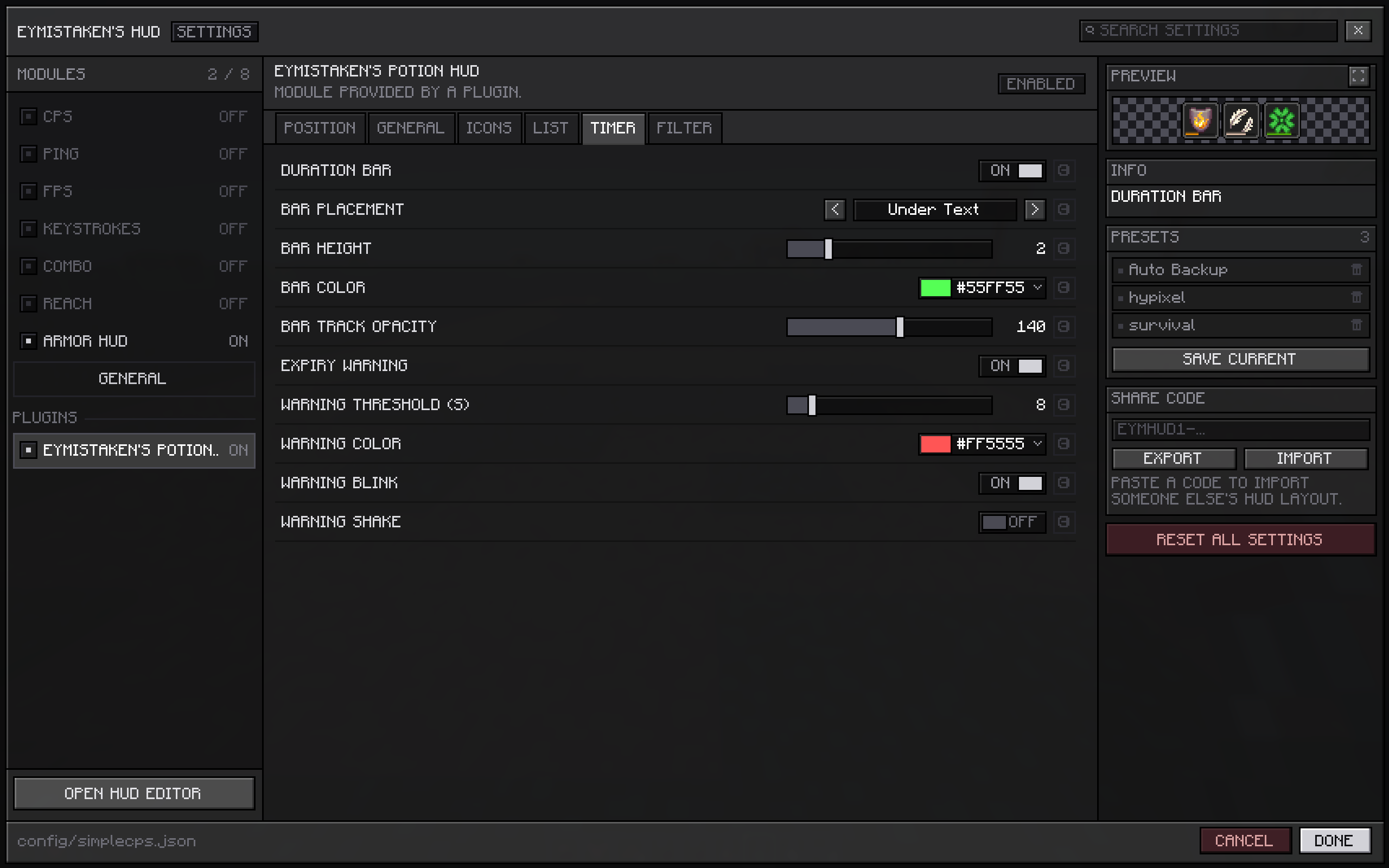
Tuning how your potion display looks no longer means closing the settings screen to find out what you changed. With Eymistaken's HUD installed, its settings page now draws the display live while you edit it.
See your changes as you make them
This mod's page in the HUD settings now opens with a preview card at the top of the right-hand column, drawing the potion display at the size it will really be. Pick a color, drag the bar height, switch the duration format — the card redraws in the same frame. It sits on a checkerboard, so a transparent background reads as transparent instead of looking solid against a dark panel.
The card follows whichever display mode you are on. Both icon modes draw Minecraft's effect grid along with anything the enhanced mode adds on top of it, and the custom mode draws the list with your styling, sorting and filters already applied. Hidden shows no card at all, because there would be nothing to put in it.
You do not need to be in a world, or to have any potions running. With nothing live to show, the card falls back to a set of stand-in effects — one beneficial, one neutral, one harmful, one at level II, and one already inside the expiry warning threshold — so the category colors, the level badge and the warning all have something to demonstrate themselves on. As soon as you have real effects, it shows those instead.
This needs Eymistaken's HUD 1.1.1-9 or newer. On an older version, or without the HUD at all, nothing changes and the mod runs exactly as it did before.
Fixes
Icon spacing, row gap and the two nudge settings now move the effect icons themselves. Until now they moved only the duration bar and the readouts drawn onto those icons, so nudging any of them slid those off the icon they belonged to while the icon stayed where it was. Enhanced icons are drawn by the mod from end to end now, which is what lets those four settings mean anything, and an effect on its last seconds still fades the way it always did.
Plain vanilla icons are untouched by this. That mode still hands the corner straight to Minecraft, and the spacing settings do not apply to it.
This mod has no additional files