Extra Inventory Tab
- By
Add extra inventory pages and easily switch between them using simple tabs.
Description
Extra Inventory Tabs
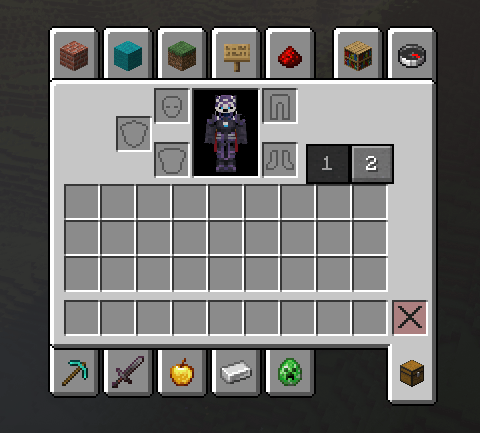
Extra Inventory Tabs expands your Minecraft inventory by adding additional inventory pages that can be accessed through simple tabs directly inside the vanilla inventory screen.
No backpacks, no extra containers, and no complicated menus — just more inventory space while keeping the familiar Minecraft inventory experience.
Features
- Extra inventory page for additional storage
- Simple inventory tabs to switch between pages
- Seamlessly integrated into the vanilla inventory screen
- Your items remain stored in their respective inventory pages
- Fast and intuitive switching
- Lightweight and simple
- Designed to feel like a vanilla Minecraft feature
- Perfect for exploration, mining, building, modpacks, and everyday survival
How It Works
Open your inventory normally and use the new tabs to switch between your inventory pages.
Your original inventory remains unchanged, while the additional tab gives you another page where you can store more items.
No commands or special items are required.
Why Extra Inventory Tabs?
Minecraft inventories can fill up extremely quickly, especially when exploring large modpacks or collecting building materials.
Instead of adding backpacks or completely replacing the inventory system, Extra Inventory Tabs keeps things simple:
Same inventory. More space. One click away.
Perfect For
- Survival worlds
- Exploration
- Large modpacks
- Builders
- Mining sessions
- Players who want more inventory space without backpacks
If you enjoy simple Quality of Life mods that improve Minecraft without changing the core experience, Extra Inventory Tabs is made for you.
Extra Inventory Tab Team

Owner