Entity Counter
A lightweight, client-side HUD that counts nearby entities by type in real time — fully customizable and multiplayer-safe
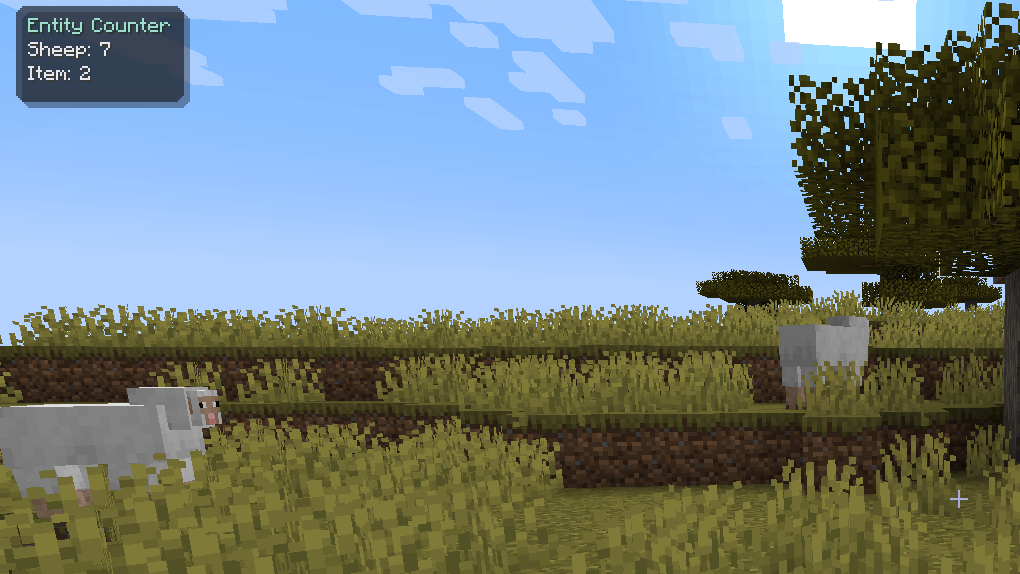
Ever wondered exactly how many zombies there are nearby how many cows are on your farm, or how much your automatic farm is producing? Entity Counter keeps a live, always-updating tally right on your screen, broken down by entity type — no commands, no guessing, no counting on your fingers.
Features
- Live entity counts — see exactly how many of each entity type (mobs, players, dropped items, and more) are currently around you, updated automatically.
- Fully customizable HUD
- Drag it anywhere on screen — not locked to fixed corners.
- Choose from multiple color themes (Teal, Ocean, Sunset, Grape, Monochrome).
- Adjust background opacity and corner roundness to match your style.
- Powerful filtering — a searchable list lets you toggle exactly which entity types show up, so your HUD only shows what you actually care about.
- Rebindable keybind — the settings menu opens with a single key (default
K), and can be rebound to anything through Minecraft's normal Controls menu.
- Performance-friendly by design — entity scanning runs on a throttled tick loop, completely decoupled from rendering, so the HUD costs virtually nothing even at high framerates.
Multiplayer & Server Safety
Entity Counter is 100% client-side. It only reads data your client has already received from the server (the same data used to render mobs, players, and items on your screen) — it never sends extra packets, never queries the server for anything, and never reveals information beyond a normal vanilla client's view distance and tracking range.
In short: it's safe to use on any server, vanilla or modded, without risk of detection as anything other than a standard Fabric client mod.
How to Use
- Install Fabric API alongside this mod (required dependency).
- Launch the game — the HUD appears automatically in the top-left corner by default.
- Press K in-game to open the settings menu, where you can:
- Search and toggle individual entity types on/off
- Drag the HUD to any position on screen
- Customize the HUD's theme, opacity, and corner roundness
- Rebind the menu key
Requirements
- Minecraft 1.21
- Fabric Loader
- Fabric API (required)
Notes for Server Admins
Some servers restrict "radar" or "x-ray adjacent" mods as a matter of fairness policy, even when a mod is technically compliant. Entity Counter uses no server data beyond what's normally visible to a vanilla client, so it's easy to verify — feel free to check the source and judge whether it fits your server's rules.