Engineered Schematics
Overview
Engineered Schematics is an add-on for Immersive Engineering that enhances the multiblock building experience in Minecraft. It introduces Multiblock Schematics, these schematics provides an interactive guide when building complex multiblock structures.
This entire mod is based on a feature implemented in Immersive Geology a massive add-on for Immersive Engineering that overhauls Ore Processing that I've been working on for the past few years.
Features
Interactive Holographic Projection
The core feature of Engineered Schematics is the holographic projection system that helps players visualize and construct multiblocks correctly:
- Green Highlights: When holding the correct block for placement, the hologram shows green highlighting, indicating where to place it
- Red Highlights: Incorrectly placed blocks are highlighted in red, showing errors in the structure
- Yellow Highlights: Blocks with incorrect orientation (such as stairs facing the wrong direction) are highlighted in yellow
- Automatic Schematic Generation: The mod automatically adds new schematics when multiblocks are registered by Immersive Engineering or other compatible add-ons
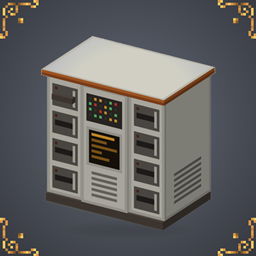
Schematic Table
The central component of the mod is the Schematic Table. This block allows players to select and project holograms of multiblock structures they wish to build.
Getting Started
Using the Schematic Table
- Place the Schematic Table near where you plan to build your multiblock
- Right-click the table to open its interface
- Select a multiblock schematic from the available options
- Add Paper, and Craft a Schematic
- Right Click with Schematic to place the projection grid
- Put the Schematic in your Off Hand to see Block Projection
- Follow the color-coded guidance to complete your structure
Compatibility
Engineered Schematics is designed to work with:
- Minecraft 1.20.4 or 1.20.1
- Neoforge
- Immersive Engineering
- Compatible with other Immersive Engineering add-ons that register multiblocks properly
- Uses the Item Model version to display Multiblocks in the Schematic Menu
IMC
For Mod developers, Engineered Schematics allows IMC to set a Multiblock Schematics Activation Icon (default is the IE Hammer)
ResourceLocation id = multiblock.getUniqueName();
ItemStack formation = new ItemStack(MyItems.SpecialFormationHammer);
InterModComms.sendTo("engineered_schematics", "formation_item", () -> Pair.of(id, formation));
Installation
- Ensure you have Neoforge for Minecraft 1.20.4 installed
- Install Immersive Engineering
- Download Engineered Schematics from CurseForge or Modrinth
- Place the mod file in your
modsfolder - Launch Minecraft and enjoy easier multiblock construction!
Credits
- Mod Author: Muddykat
- Schematic Table Model: Peter
Feedback and Issues
Found a bug or have a suggestion? Visit our GitHub repository to:
- Report issues
- Suggest features
- Contribute to development
"Building complex multiblocks has never been easier!"
Engineered Schematics Team

Owner