Enchantment Shifter
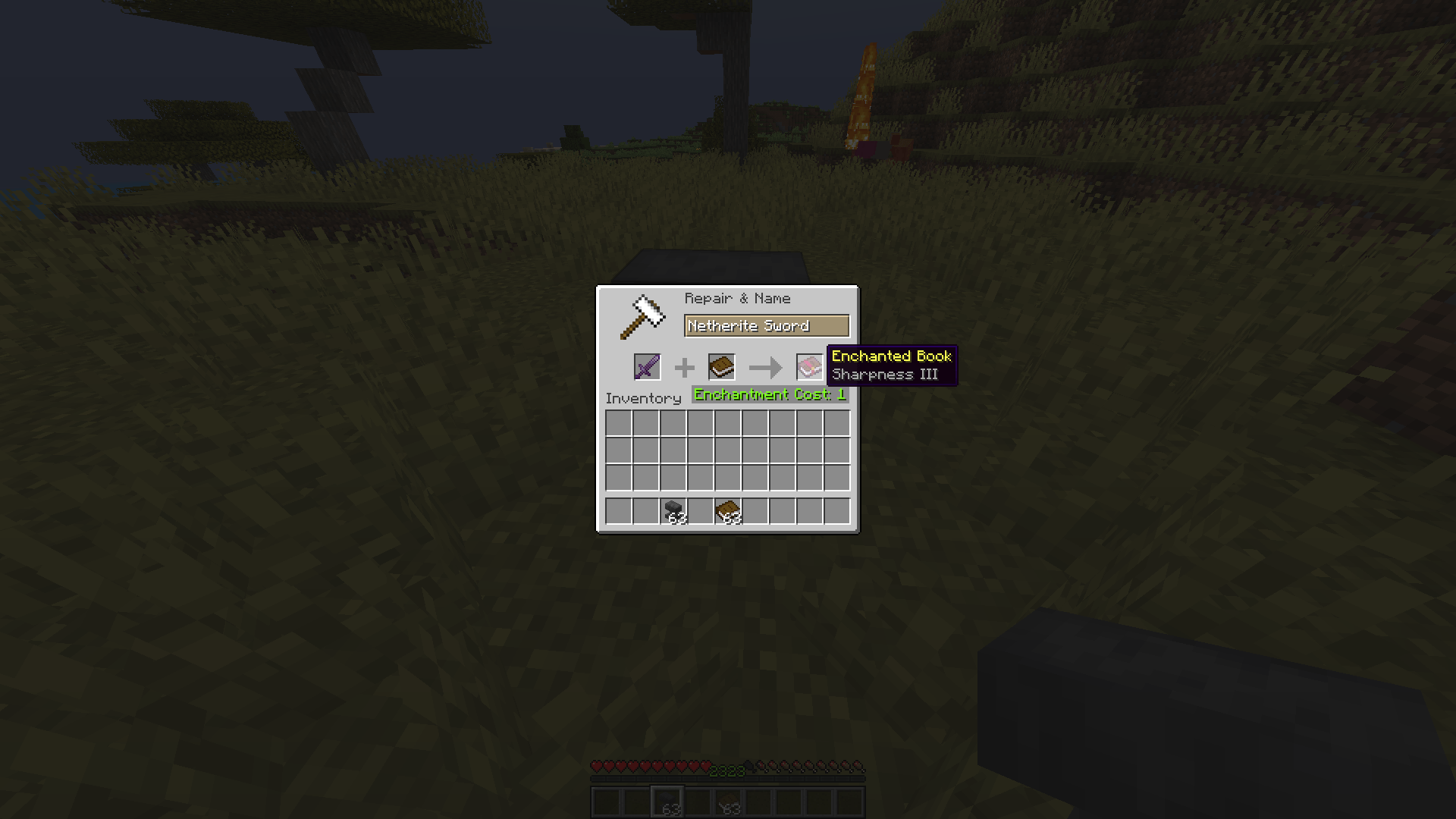
Tired of being stuck with enchantments on items you don't need? Want to move that Fortune III from your old pickaxe to a new one, or turn your enchanted sword into a shiny enchanted book? Enchantment Shifter lets you shift enchantments between items using just an anvil and some XP—no grindstone needed!
What Does It Do?
This mod lets you:
- Extract enchantments from items and turn them into enchanted books
- Transfer enchantments directly from one item to another (if they're compatible)
- Customize the process with your own XP costs and rules
Just place your enchanted item in the first slot, a book or target item in the second slot, and watch the magic happen!
Why You'll Love It
- Balanced & Fair: Uses vanilla anvil XP calculations as a base, but fully tweakable
- No New Blocks or Items: Fits seamlessly into your existing Minecraft world
- Server & Client: Works on servers (install on server for multiplayer)
- Modpack Friendly: Free to use in any modpack
How to Install
- Download the latest version of Enchantment Shifter for your Minecraft version
- Install Fabric Loader for your Minecraft version
- Place the mod JAR file in your
mods folder
- Launch Minecraft with Fabric
How to Configure
Enchantment Shifter uses a simple configuration file. Here's how to set it up:
Step 1: Locate Your Config Folder
Navigate to your Minecraft installation directory:
- Windows:
%APPDATA%\.minecraft\config\
- Mac:
~/Library/Application Support/minecraft/config/
- Linux:
~/.minecraft/config/
Step 2: Find the Config File
Look for a file named enchantment-transfer-config.properties in the config folder.
Step 3: Edit the Configuration
Open the file with any text editor. It should look something like this:
# Enchantment Shifter Configuration
# Last updated: 2024-01-15

# Cost Setting (Default: 1000)
# This sets a fixed XP cost for all enchantment transfers.
# Set to 1000 to disable fixed cost and use the default vanilla calculation.
cost=1000

# Cost Factor (Default: 1.0)
# Multiplies the XP cost by this value.
# Set to 0.5 for half cost, 2.0 for double cost, etc.
factor=1.0

# Enchantment Limit (Default: 0)
# Limits how many enchantments can be transferred at once.
# Set to 0 to disable the limit (transfer all enchantments).
limit=0

# Return Item Setting (Default: 1)
# Controls what happens to the source item after transfer:
#   0 = Source item vanishes (is consumed)
#   1 = Source item returns to you (with enchantments removed)
return=1
Configuration Options Explained
| Setting |
Default |
Description |
cost |
1000 |
Fixed XP cost for transfers. Set to 1000 to use vanilla calculation. |
factor |
1.0 |
Multiplier for XP cost. 0.5 = half cost, 2.0 = double cost. |
limit |
0 |
Max enchantments to transfer per operation. 0 = no limit. |
return |
1 |
Source item behavior: 0 = vanish, 1 = return with enchantments removed. |
Example Configurations
Budget-Friendly Mode:
cost=1000
factor=0.5
limit=0
return=1
How to Use
- Place an enchanted item in the first anvil slot
- Place a book (for extraction) or another item (for transfer) in the second slot
- Take the result from the output slot
- Receive your modified item based on your
return setting
Compatibility Notes
- Item-to-Book: Works with any enchanted item and a regular book
- Item-to-Item: Only works if the enchantments are compatible with the target item
- Enchanted Books: Cannot be used as source items (use grindstone instead)
- Vanilla Enchanting: This mod doesn't interfere with regular enchanting
Support & Feedback
Found a bug? Have a suggestion? Open an issue on the GitHub repository.