AcousticKey
Every keystroke, now with a thock.


A client-side Fabric mod that plays mechanical keyboard and mouse sounds as you type and click. No server install, no background app — just drop it in mods/ and your membrane keyboard starts sounding like a custom build.
Why AcousticKey?
Most "keyboard sound" setups mean running a separate desktop app that fights Minecraft for your audio device. AcousticKey lives inside the game instead: it hooks key and mouse input directly and plays sounds through the game's own audio engine. That gives it three properties a background app can't match:
|
AcousticKey |
External app |
| Setup |
One jar in mods/ |
Install + configure + autostart |
| Latency |
Plays on the input event itself |
OS-level hook, then audio routing |
| Per-game control |
Mute key, volumes, pack picker in-game |
Alt-tab out to change anything |
Controls
Both hotkeys are standard Minecraft keybinds — rebind them like anything else under Options → Controls → AcousticKey.
| Action |
Default |
Notes |
| Open settings |
K |
Works from title, world, or inventory |
| Toggle mute |
M |
Instant, no menu needed |
The settings screen footer always shows your current binds (e.g. J = GUI │ N = Mute), so it never lies after a rebind.
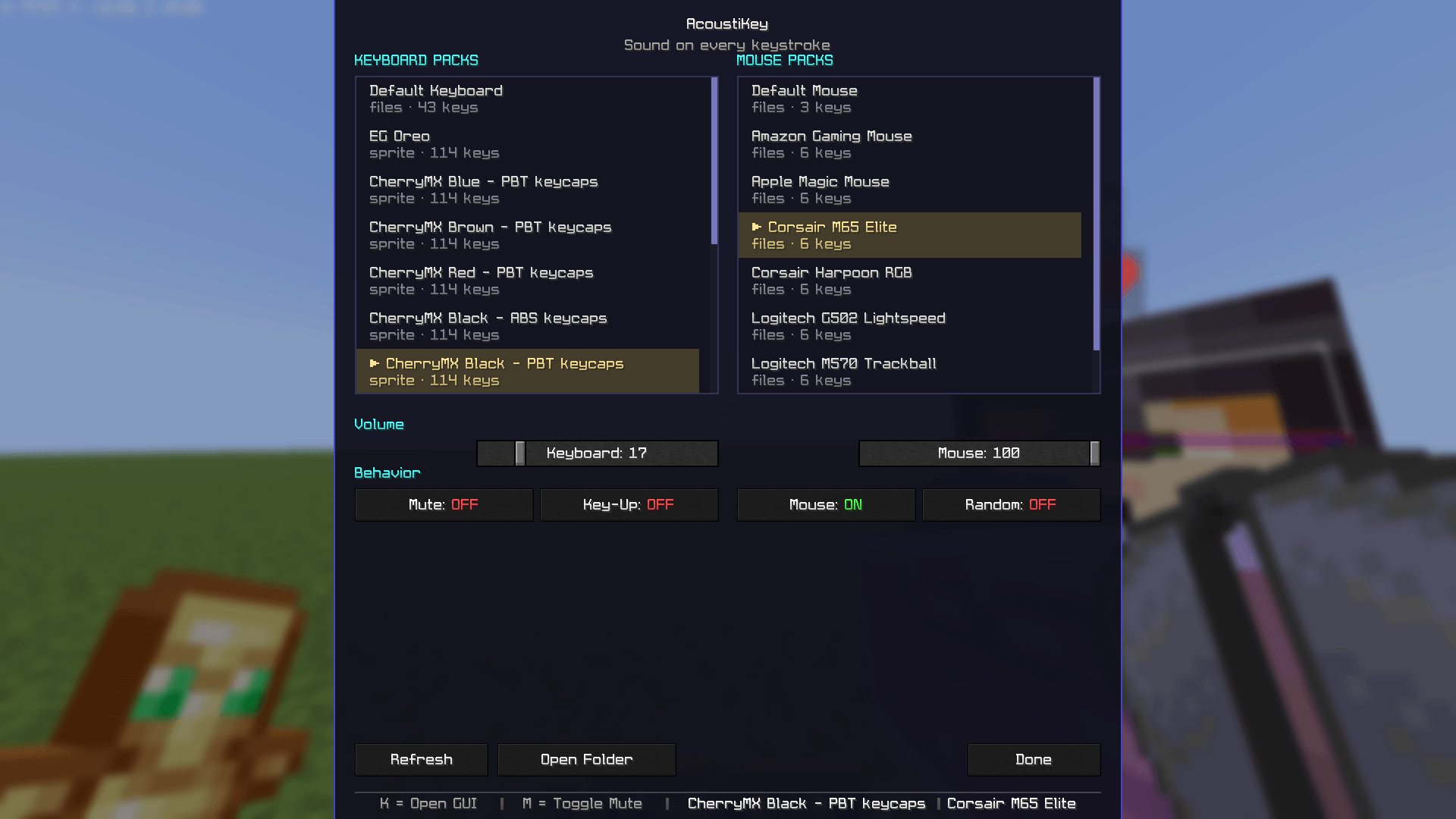
Settings screen
Press K (or your bind) anywhere:
┌─────────────────────────────────────────────────┐
│  AcousticKey — Sound on every keystroke          │
│  [ KEYBOARD PACKS ]      [ MOUSE PACKS ]        │
│  ┌─────────────┐        ┌─────────────┐         │
│  │ • blue-pbt  │        │ • default-  │         │
│  │ • brown-pbt │        │   mouse     │         │
│  │ • oreo      │        │ • creamy    │         │
│  └─────────────┘        └─────────────┘         │
│  Volume  [━━━━━━●━━] 80%                         │
│  [Mute: OFF] [Key-Up: OFF] [Mouse: ON] [Random: OFF] │
│  [Refresh]  [Open Folder]            [Done]     │
└─────────────────────────────────────────────────┘
- Pack lists — click to switch, applies on the next keypress. Scrollable.
- Volume — separate sliders for keyboard and mouse, 0–100.
- Mute — hard mute without touching your volumes.
- Key-Up — extra sound on key release. Off by default; it gets chatty.
- Mouse — kill click sounds without affecting keys.
- Random — slight pitch variation so repeated keys don't sound robotic.
- Refresh — rescan the soundpacks folder after adding a pack.
- Open Folder — opens the soundpacks folder in your file manager.
Everything saves to .minecraft/config/acoustickey.json automatically:
{
  "keyboardPackId": "cherrymx-blue-pbt",
  "mousePackId": "default-mouse",
  "keyboardVolume": 80,
  "mouseVolume": 80,
  "muted": false,
  "keyUpEnabled": false,
  "mouseSoundsEnabled": true,
  "randomSoundsEnabled": false
}
Soundpacks
Included
This mod ships with 4 packs from Mechvibes:
Plus default-keyboard / default-mouse built-in configs. If no pack is selected or a pack's files are missing, nothing plays — never an error sound.
Add your own
- Press
K → Open Folder (or open .minecraft/config/acoustickey/soundpacks/)
- Drop in a folder with a MechVibes++-style
config.json plus its audio files
- Hit Refresh — it appears in the list
Want more? Browse and download packs at https://mechvibes.com/sound-packs/
Format matters: only ogg and wav play. m4a/mp3 files are skipped silently. Convert with Audacity (Export → Ogg) or ffmpeg:
ffmpeg -i sound.m4a -c:a libvorbis sound.ogg
then rename the extension in the pack's config.json to match.
<details> <summary>Where packs live</summary>
Two folders — keyboard packs and mouse packs are kept separate:
.minecraft/
└─ config/
   ├─ acoustickey.json
   └─ acoustickey/
      ├─ soundpacks/      <- keyboard packs
      │  ├─ cherrymx-blue-pbt/
      │  ├─ eg-oreo/
      │  └─ my-pack/
      └─ mousepacks/       <- mouse packs
         ├─ logi-g502/
         └─ my-mouse/
</details>
Installation
Requires: Fabric Loader ≥ 0.19.3 · Java 21 · Fabric API
- Install Fabric Loader for your version.
- Put
fabric-api-*.jar in mods/ (skip if present).
- Put the right
acoustickey-*.jar in mods/:
| File |
Minecraft |
acoustickey-*-mc1.21-1.21.8.jar |
1.21 – 1.21.8 |
acoustickey-*-mc1.21.9-1.21.11.jar |
1.21.9 – 1.21.11 |
- Launch →
Options → Controls → AcousticKey → set your keys → press K.
Singleplayer and servers both fine — the server never needs the mod.
FAQ
<details> <summary>Can I change K / M?</summary>
Yes — Esc → Options → Controls → AcousticKey, click the entry, press the new key. The settings footer updates immediately, no restart.
</details>
<details> <summary>No sound at all?</summary>
Check M (mute) and both volume sliders first. Then check the pack: open its folder and confirm the audio files are ogg/wav — m4a/mp3 are skipped. Try a bundled pack (cherrymx-blue-pbt) to isolate it.
</details>
<details> <summary>Mouse clicks silent but keys work?</summary>
Two causes: Mouse: OFF in the panel, or the selected mouse pack's files are missing/unsupported. Enable Mouse: ON, or switch to default-mouse.
</details>
Credits
- MechVibes — original sound pack project
- MechVibes++ — extended pack format and editor
- OpenAL + custom OGG decoder for playback
License: MIT — see LICENSE.