Every Dragon Mine Z enemy gets real stats, real scaling, and real danger — from Elite mobs and massive zone bosses to whole regions of the map that get tougher the longer you fight in them.
Every DragonMineZ hostile mob gets a real, individually-rolled stat sheet instead of one flat difficulty number — then a whole escalating danger system is built around it: zones that get harder the longer you fight in them, gated bosses, a recurring server-wide World Boss, and a genuinely survivable start for brand-new characters.
DMZ Combat Remade turns Dragon Mine Z's combat from "every enemy of a type hits exactly the same" into a real, scaling fight — enemies stay a threat at every stage of progression, danger builds naturally the longer an area goes unchecked, and a handful of massive scripted encounters (Zone Bosses, the World Boss) give real, memorable checkpoints along the way. Every number behind all of it is exposed in the config and can be retuned or turned off.
🧭 What it does
💪 Real stats for every DMZ mob
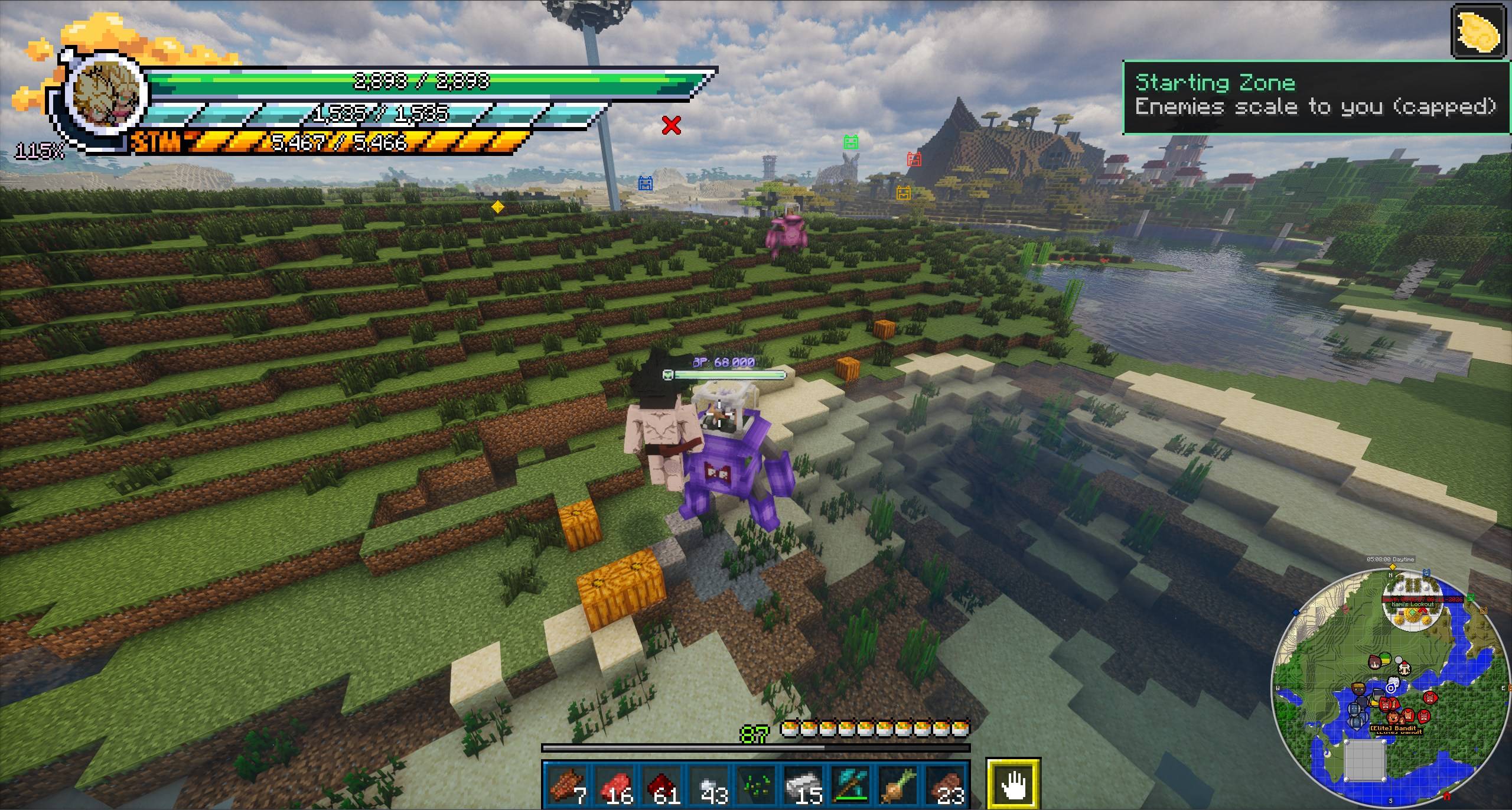
Every DMZ hostile mob (Saibamen, Red Ribbon soldiers/robots, Frieza Soldiers, dinosaurs, sabertooths, and more) rolls its own six-stat sheet — Strength, Strike Power, Resistance, Vitality, Ki Power, and Energy — feeding the exact same Battle Power formula the game already uses for players. Enemies spawn scaled to be at or above the nearest player's own Battle Power (with real variance, so they're not all identical), so they stay a genuine threat instead of falling behind once you've out-leveled DMZ's own flat baseline.
Elite enemies — a small chance for any spawn to roll as a tougher Elite variant with a bonus combat trait (extra power, extra defense, or extra speed) and a glowing aura visual.
🗺️ Zones that build their own danger
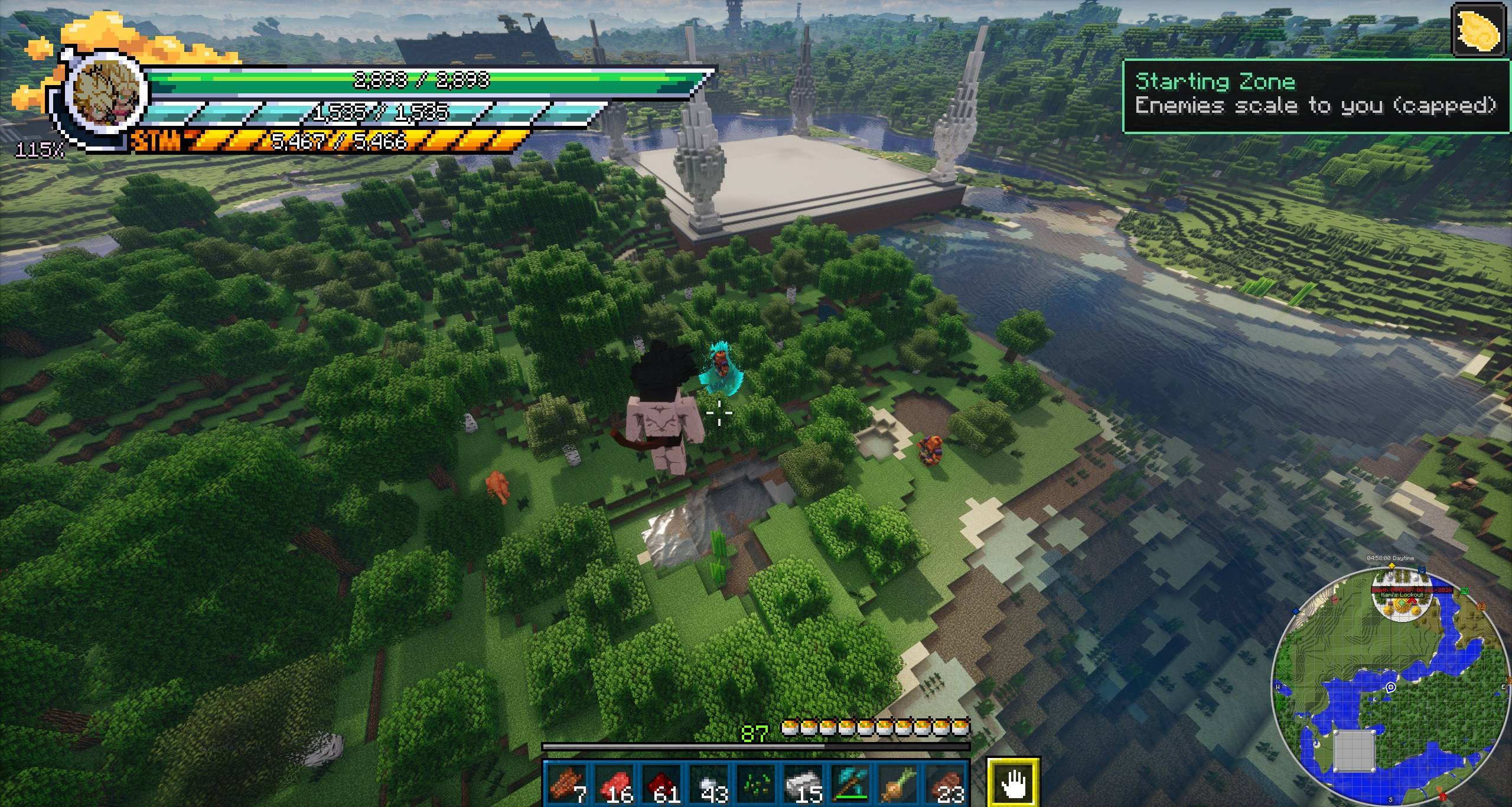
The world beyond a safe starting radius around spawn is split into independent zones, each climbing through 5 escalating danger tiers the more it's actually fought in — not just "how long since it generated," real presence-time. Left alone long enough, a zone naturally cools back down a tier on its own, resetting instantly the moment anyone sets foot back in. Tier 5 has no ceiling at all — a zone fought in long enough can keep climbing indefinitely.
Zone Bosses gate a zone's next tier — a massive, 5x-scaled enemy has to spawn and be defeated before that zone can climb any further, so a zone can't silently get out of control just from mobs idling in the background.
🌌 A shared difficulty scale across every world
With DragonMineZ Plus installed, difficulty no longer resets per dimension - every supported world shares one continuous 19-tier Battle Power scale instead of its own flat 5-level table. The Overworld covers the first 3 tiers, Namek the next 2, then DragonMineZ Plus's own ground planets climb steadily upward, with the Sacred Kai Planet holding the final 2 tiers and no ceiling at all once fully unlocked. Zone bosses, decay, and the zone-up/zone-down wishes all respect wherever a dimension sits on this shared scale automatically. Without DragonMineZ Plus installed, nothing changes - every world keeps the original flat 5-level system exactly as before.
🐉 A recurring, server-wide World Boss
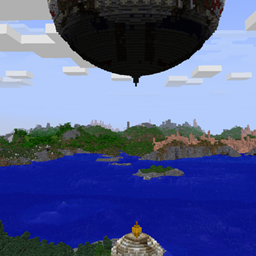
Every few hours (configurable), a massive 10x-scaled World Boss spawns out in real, already-explored wilderness — never underground, underwater, mid-air, or on top of a DMZ structure. It's sized for the whole server: HP and stats are built from every online player's combined combat stats, tuned around roughly a 15-minute fight that takes longer (and more people) the more powerful your server's playerbase actually is. Everyone who helps gets a share of guaranteed rewards on its death — no kill-credit requirement — and its exact position tracks live on the map the entire time it's alive, from any distance.
It spawns independently in every supported dimension, so the Overworld, Namek, Sacred Kai Planet, and DragonMineZ Plus's ground planets (if installed) can each have their own World Boss alive at once.
⚖️ A starting zone that's actually survivable
The safe area around spawn eases difficulty specifically for whichever online player currently has the lowest Battle Power, instead of scaling generically — a strong player being online never makes the spawn area unbeatable for someone brand new. Incoming damage from starting-zone enemies ramps up smoothly as that player's own power grows (roughly 7% of their health bar every 2-3 hits at the very start) instead of jumping straight to full-strength hits, and enemy health starts out somewhat lower too — both ease back to completely normal as that player's power grows, so fights still take real effort to win without dragging on forever for a fresh character.
🐺 Optional: scale vanilla mobs too
Zombies, Skeletons, Creepers, Spiders, and every other vanilla hostile can optionally get the exact same treatment as DMZ's own mobs — rolled stats, zone/heat scaling, Elite rolls, capsule loot, boss-gate participation, all of it, through the exact same system. Off by default; one config toggle turns it on for every vanilla hostile at once. DMZ's own named story bosses (Raditz, Cell, Frieza, Buu, and the rest) are never touched by any of this, regardless of settings — they stay exactly as DMZ's own quest/saga system intends.
🎁 Loot & progression
Zone Capsules — new roll-based stat-bonus items exclusive to this mod, dropped from kills in the highest-tier zones, with better odds and bigger rolls from Elites and a guaranteed multi-drop from a Zone Boss kill.
Dragon Wishes — two new wishes through Shenron and Porunga: lower every zone's danger tier by one, or raise every zone up a tier.
🌠 Know what you're flying into
While flying near a tracked planet in deep space (DragonMineZ Plus required), a popup shows that planet's real danger rating as a Dragon Ball icon (1-5 stars), its Battle Power range, and its Zone Tiers, so there are no surprises before you even land - or a plain "Safe Zone" label for a planet with no combat data at all. Fully repositionable in-game from the same kind of settings screen as the Zone Heat panel below, and clears automatically the instant a tracked planet is destroyed.
🗺️ Map integration (JourneyMap)
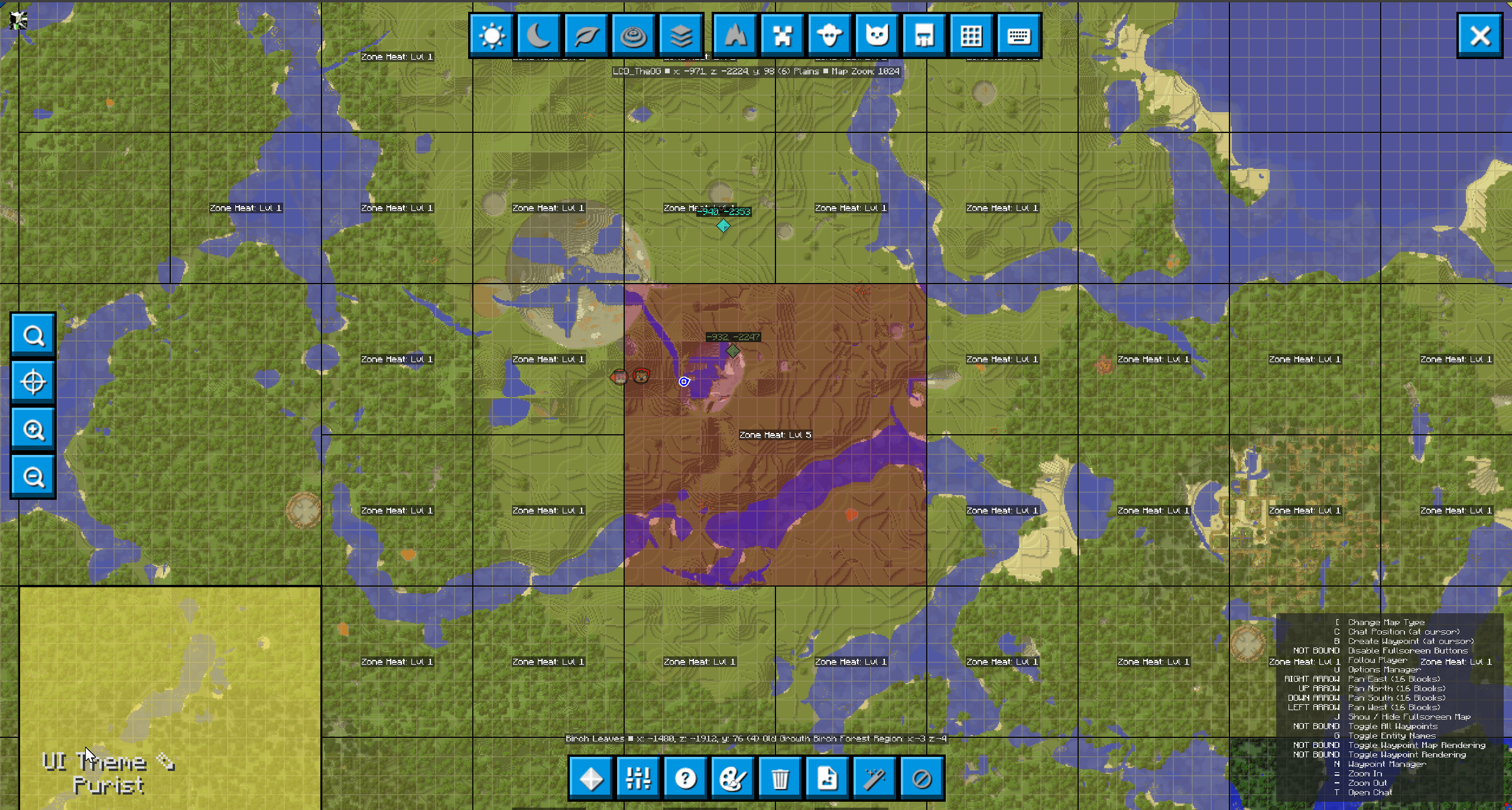
Zone boundaries and danger levels show directly on JourneyMap automatically, no setup needed - colored by danger tier, with a clear outline separating adjacent zones so nothing blurs together.
Zone heat also shows as live text labels right on the map (capped at a configurable number visible at once - default 25, always whichever zones are nearest to you - so a heavily-explored world doesn't turn into a wall of overlapping text), plus a live World Boss position tracker while one's alive, and left-click Favoriting per zone so an important one's label always stays visible no matter how far away you wander or how many other zones are competing for the cap. Favorites are saved permanently with your character. A toggle button on the fullscreen map's own toolbar lets any player hide the entire zone overlay (fullscreen map and minimap both) for themselves with one click, remembered across sessions and affecting nothing but that player's own view.
🖥️ A real settings screen for the HUD
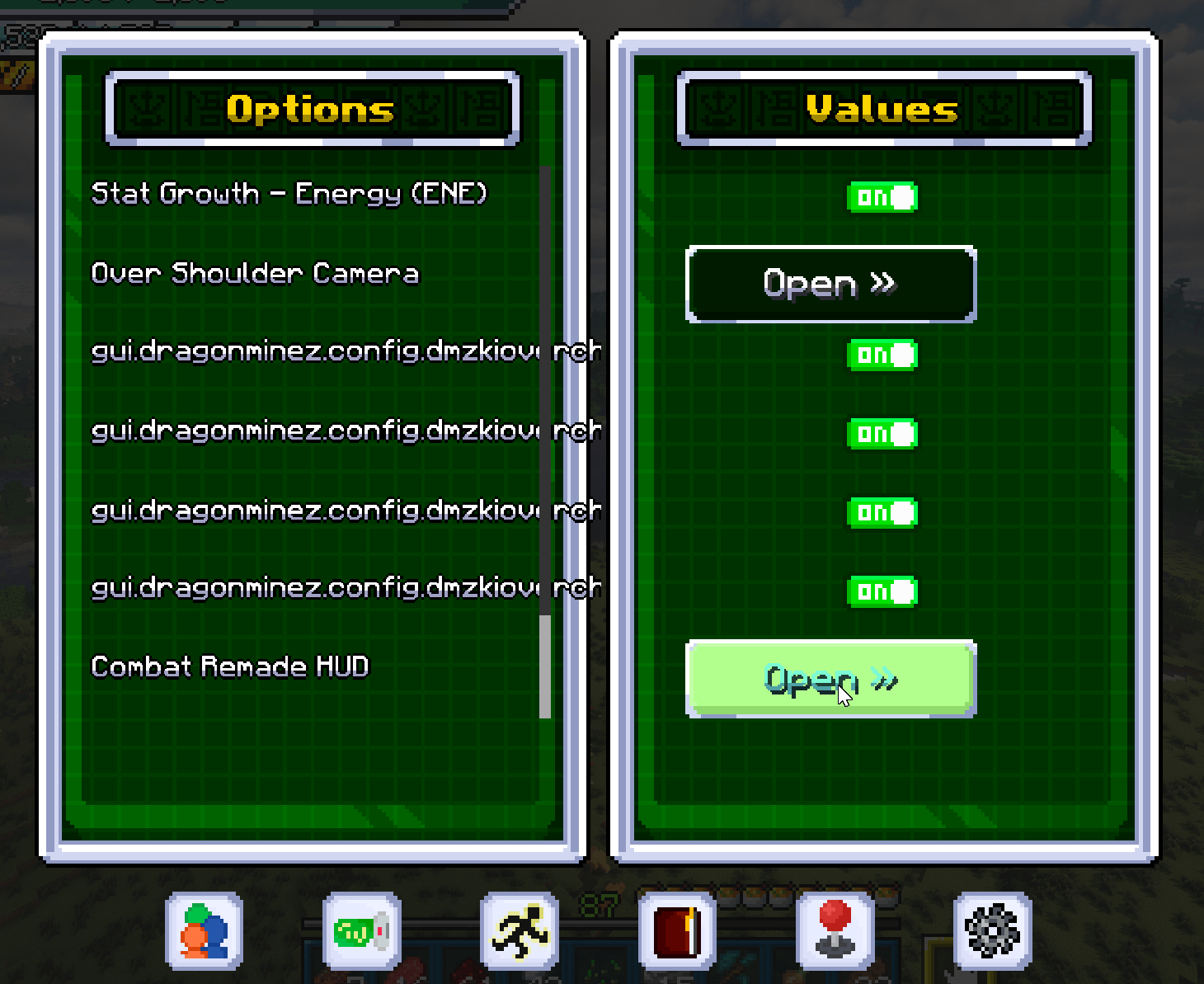
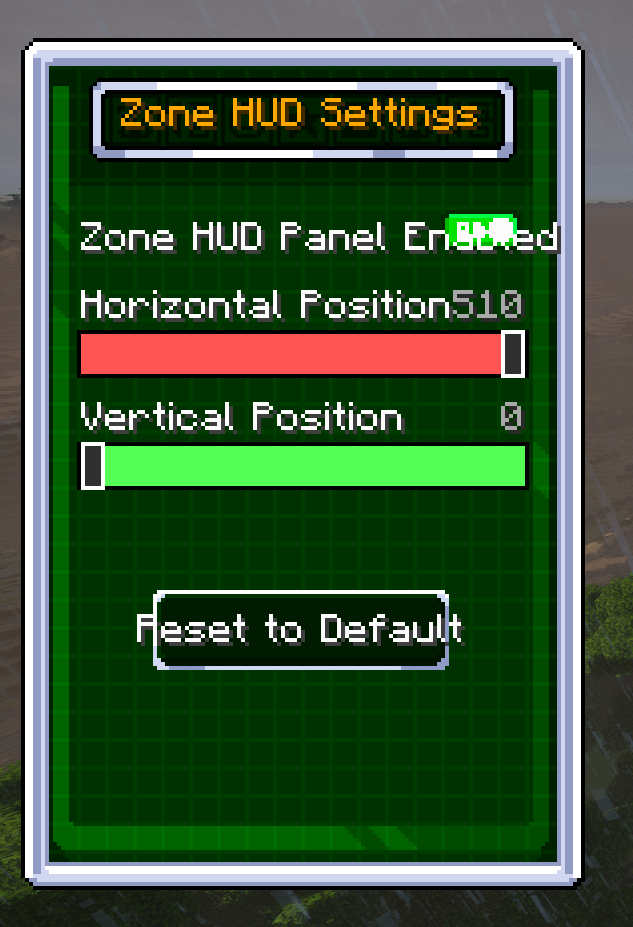
A small "Zone Heat" panel sits in the corner of your screen showing your current zone's danger level (or a calm "Starting Zone" indicator near spawn). It's fully repositionable now, in-game, from a proper settings screen — press V to open DragonMineZ's own Options menu, then find "Combat Remade HUD" in the list: drag sliders to move the panel live and watch it update in real time, or switch it off entirely from the same screen.
🧩 Every planet is just a config file
Every dimension this mod manages, including ones added by other mods entirely, can join the full zone/heat/tier/boss-gate system with nothing more than a single, self-contained config file - roster, tier range, pacing, tier floors, and loot ranges all live together in one place. No code changes, no rebuild, no update required.
⌨️ Usage
Everything above runs automatically the moment the mod is installed — no setup required to start seeing scaled enemies, zones, and (eventually) a World Boss. The two things worth knowing:
Press V (DragonMineZ's own Options menu) → Combat Remade HUD to reposition or hide the zone status panel.
If you use JourneyMap, left-click any colored zone on the fullscreen map to Favorite it (left-click again to unfavorite).
⚙️ Configuration
Every number behind this mod is exposed and retunable, no rebuild needed — spawn scaling, Elite odds, zone sizes/danger curves/decay timing, Zone/World Boss stats and rewards, starting-zone easing, capsule drop odds, vanilla-mob-scaling toggle, JourneyMap's label cap, and more. With DragonMineZ Plus installed, per-tier Battle Power floors are configurable too, and every managed dimension (including ones added by other mods) gets its own self-contained config file for its roster, tier range, and loot. Op-only in-game commands are also available for server owners — purge, inspect, zoneheat, zonereset, zoneup, zonedown, and a full worldboss status/spawn/kill/locate set.
📋 Requirements
Minecraft 1.20.1
Forge 47.4.10+
Dragon Mine Z 2.1.3+ (required, this is an addon for it, not a standalone mod)
DragonMineZ Plus - optional. Unlocks the full 19-tier difficulty scale, the space danger overlay, and six extra managed planets. Works completely fine without it, using the original flat 5-level system instead.
JourneyMap - required. Adds zone boundaries, danger levels, and a live World Boss tracker directly to the map.
Server-side mob scaling/zones + client-side visuals - install on both server and client for the full experience
AI was used in this post and for Coding purposes only
This addon replaces Dragon Mine Z's instant Training Point purchases with a free, usage-based rank system — start weak, grow strong through actually playing, reach the exact same full power the game always had waiting for you
Transformations should feel earned. This addon ties every major Dragon Mine Z transformation to your story progress, so leveling up your form skills means reaching the same point in the story your character just lived through,
A reactive Dragon Ball Z soundtrack for Dragon Mine Z — the music changes with where you are, who's near you, and whether you're fighting, with dedicated boss-battle themes for the real saga villains.
This addon replaces Dragon Mine Z's instant Training Point purchases with a free, usage-based rank system — start weak, grow strong through actually playing, reach the exact same full power the game always had waiting for you
Transformations should feel earned. This addon ties every major Dragon Mine Z transformation to your story progress, so leveling up your form skills means reaching the same point in the story your character just lived through,
A reactive Dragon Ball Z soundtrack for Dragon Mine Z — the music changes with where you are, who's near you, and whether you're fighting, with dedicated boss-battle themes for the real saga villains.