# Custom Waypoints
Create **waypoints, timers, counters, follow labels and mission markers** anywhere in the world, with backgrounds, animations, movement, live distance and more. Use client commands, the new **visual editor**, or control everything from a server with the **Custom Waypoints plugin**.
## **Supported versions**
| Loader | Versions |
|---|---|
| **Fabric** | 1.20.1 · 1.20.4 · 1.21.1 · 1.21.4 · 1.21.5 · 1.21.8 · 1.21.11 · 26.2 |
| **NeoForge** | 1.20.1 · 1.20.4 · 1.21.1 · 1.21.4 · 1.21.5 · 1.21.8 · 1.21.11 · 26.2 *(NEW)* |
| **Forge** | 1.20.1 · 1.20.4 |
## **Base command**
```
/waypoint
```
On **1.21.8 → 26.2** use **`/customwaypoint`** instead, because vanilla Minecraft already has its own `/waypoint`. Everything else is the same.
## **Features**
- Display **waypoints** with text at any position, scale and rotation
- Display **timers** (countdown) and **counters** (count up, optional decimals) with tick sounds, **any sound id** from vanilla or resource packs *(NEW)*
- **Follow waypoints** that stay on a player or entity, and come back when the target loads again *(NEW)*
- **Figures**: GTA-style **mission markers** on the ground (circle, star, arrow, heart...) or any text/number, with walls that fade up or down, and **pitch/roll** to put them on walls *(NEW)*
- **Visual editor** with live preview, sliders, color wheel, undo/redo and history *(NEW)*
- **Move** any waypoint to another position with interpolation presets and custom time
- **Backgrounds** with 4 styles, **opacity** and **fade out** control *(NEW)*
- **Entry / exit animations**: scale, slide, bounce, spin, pixelate, glitch
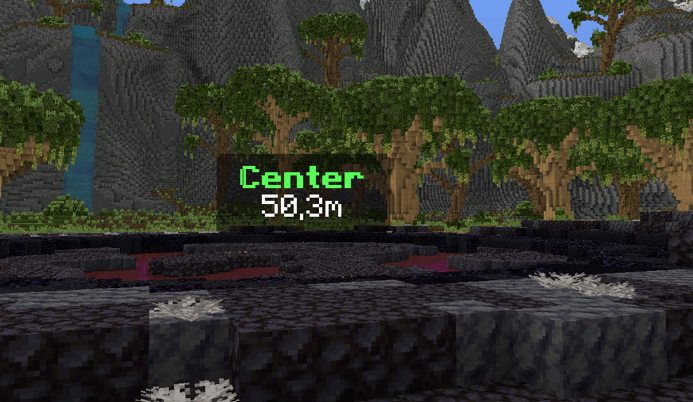
- **Live distance** `{distance}`, **look-to-reveal text** `{on_view_radius:N}` *(NEW)*
- **Inline items and textures** inside text, **HEX colors**, multiline text
- Waypoints are **saved per world and per dimension** *(NEW)*
- **Server control** with the Custom Waypoints plugin (Paper): waypoints for all players, synced timers and **actions when a player reaches or removes a waypoint** *(NEW)*
## **Visual editor** *(NEW)*
![Editor 1]
Press **M** (Controls → Custom Waypoints) or run `/waypoint editor`. Press **N** to open the **Displays** tab directly.
- Edit every waypoint type (text, timer, counter, follow and figure) with **sliders, a color wheel and a live preview** in the world
- **Displays** tab: every active waypoint of your dimension, nearest first, to **Edit** or **Delete**
- The bottom bar shows the **equivalent command**: click it or **Copy command** to use it in chat, command blocks or datapacks
- **Ctrl+Z / Ctrl+Y** undo and redo, and **History** keeps the last 8 saved, overwritten or deleted waypoints (also after restarting)
- The **↺** button puts a slider back to its default value, and holding **Shift** snaps sliders in steps of 5
- **Placeholders** button: click one to insert it in the text
- **Save** creates or updates the waypoint, **New** starts a fresh one at your position with the next free ID
- Works like an overlay: you can **keep walking** while the editor is open
## **Examples**
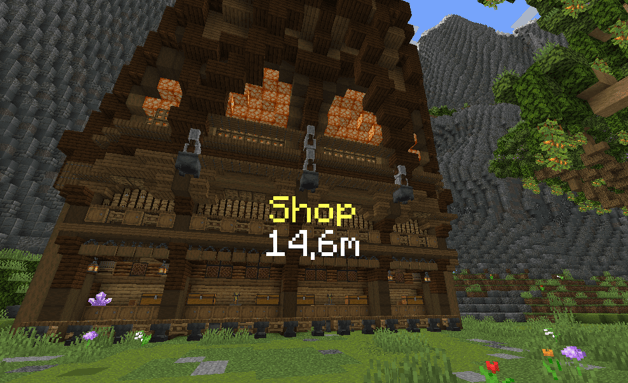
**Shop with distance:**
```
/waypoint set shop 464.49 -51.71 -724.91 9 follow far_front false 20 scale_in scale_out false &eShop/n{distance}m
```
![Shop Waypoint Without Background]
**Text with a rounded background, only revealed when you look at it** *(NEW)*:
```
/waypoint set shop 100 70 100 1 follow behind true black 0.4 1 rounded 10 scale_in scale_out false &6Shop{on_view_radius:2}/n&7Open 24/7{/on_view}
```
**Timer with a sound:**
```
/waypoint timer set raid 100 70 100 1 follow front true black 0.45 1.2 rounded 10 scale_in scale_out block.note_block.pling false Time: &c"01:00:00"
```
**Stopwatch counter with decimals:**
```
/waypoint counter set stopwatch 100 70 100 1 follow behind false 10 scale_in scale_out none true true Time: &a{counter}s/nDistance: {distance}
```
**Label that follows a player** *(NEW: autocompletes online players)*:
```
/waypoint follow boss Steve 0 2.5 0 1 far_front true black 0.5 1 rounded 10 scale_in scale_out false &c{entity_displayname}/n&7{distance}m
```
**Mission marker on the ground** *(NEW)*:
```
/waypoint figure mission1 circle 100 64 100 0 1.5 2 gold 20
```
**Number "2" that turns to face you** *(NEW)*:
```
/waypoint figure step2 2 110 64 100 follow 1 1.5 "#55FFFF" 10
```
**Arrow on a wall, with animations and fade out** *(NEW)*:
```
/waypoint figure door arrow 100 66 100 0 1 0.3 "#FFAA00" 10 20 0.9 scale_in scale_out 90 0
```
**Move a waypoint and bring it back:**
```
/waypoint move shop 470 -50 -720 9 follow smooth 40
/waypoint move_reset shop bounce 20
```
**Remove a waypoint when you walk into it:**
```
/waypoint remove_radius mission1 2 20
```
## **Commands**
```
Base command: /waypoint (1.21.8 → 26.2: /customwaypoint)
Text:
/waypoint set <id> <x> <y> <z> <scale> <rotation> <render> true <bgcolor> <bgopacity> <bgscale> <bgstyle> <fade_in> [<fade_out> <opacity>] <anim_in> <anim_out> <textbackground> <text>
/waypoint set <id> <x> <y> <z> <scale> <rotation> <render> false <fade_in> [<fade_out> <opacity>] <anim_in> <anim_out> <textbackground> <text>
Timer (counts down):
/waypoint timer set <id> <x> <y> <z> <scale> <rotation> <render> true <bgcolor> <bgopacity> <bgscale> <bgstyle> <fade_in> [<fade_out> <opacity>] <anim_in> <anim_out> <sound> <textbackground> <text + "HH:MM:SS">
/waypoint timer set <id> <x> <y> <z> <scale> <rotation> <render> false <fade_in> [<fade_out> <opacity>] <anim_in> <anim_out> <sound> <textbackground> <text + "HH:MM:SS">
/waypoint stoptimer <id>
/waypoint resumetimer <id>
Counter (counts up):
/waypoint counter set <id> <x> <y> <z> <scale> <rotation> <render> true <bgcolor> <bgopacity> <bgscale> <bgstyle> <fade_in> [<fade_out> <opacity>] <anim_in> <anim_out> <sound> <decimals> <textbackground> <text + {counter}>
/waypoint counter set <id> <x> <y> <z> <scale> <rotation> <render> false <fade_in> [<fade_out> <opacity>] <anim_in> <anim_out> <sound> <decimals> <textbackground> <text + {counter}>
/waypoint stoptimer <id>
/waypoint resumetimer <id>
Follow:
/waypoint follow <id> <player|UUID> <offsetX> <offsetY> <offsetZ> <scale> <render> true <bgcolor> <bgopacity> <bgscale> <bgstyle> <fade_in> [<fade_out> <opacity>] <anim_in> <anim_out> <textbackground> <text>
/waypoint follow <id> <player|UUID> <offsetX> <offsetY> <offsetZ> <scale> <render> false <fade_in> [<fade_out> <opacity>] <anim_in> <anim_out> <textbackground> <text>
Figure (NEW):
/waypoint figure <id> <shape> <x> <y> <z> <rotation> <radius> <height> <color> <fade_in> [<fade_out> <opacity> [<anim_in> <anim_out> [<pitch> <roll> [<width_x> <width_z>]]]]
Move:
/waypoint move <id> <x> <y> <z> <scale> <rotation> <interpolation> <time>
/waypoint move_reset <id> <interpolation> <time>
Other:
/waypoint remove <id|all> [fadeout]
/waypoint remove_radius <id> <radius> <fadeout>
/waypoint list
/waypoint editor
```
## **Options**
| Option | Values |
|---|---|
| **scale** | Size of the waypoint |
| **rotation** | `follow` (faces the camera) · `follow_horizontal` · `follow_vertical` / `follow_vertical_<yaw>` · a fixed yaw like `0` `90` `180` `270` |
| **render** | `behind` (hidden by blocks) · `front` (through blocks) · `far_behind` · `far_front` (stay readable from far away) |
| **bgcolor** | `BLACK` `DARK_BLUE` `DARK_GREEN` `DARK_AQUA` `DARK_RED` `DARK_PURPLE` `GOLD` `GRAY` `DARK_GRAY` `BLUE` `GREEN` `AQUA` `RED` `LIGHT_PURPLE` `YELLOW` `WHITE` or HEX `#RRGGBB` |
| **bgopacity / opacity** | `0`–`1` |
| **bgscale** | Size of the background around the text |
| **bgstyle** | `square` `square_small` `rounded` `rounded_small` |
| **fade_in / fade_out** | Ticks (20 ticks = 1 second). `fade_out` and `opacity` are optional and go together *(NEW)* |
| **anim_in** | `none` `scale_in` `left_in` `right_in` `up_in` `down_in` `bounce_in` `spin_in` `pixelate_in` `glitch_in` |
| **anim_out** | `none` `scale_out` `left_out` `right_out` `up_out` `down_out` `bounce_out` `spin_out` `pixelate_out` `glitch_out` |
| **textbackground** | `true` / `false` (vanilla shadow/background behind each letter) |
| **sound** | `none` or any sound id: `block.note_block.pling`, or `"mypack:tick"` with a namespace (in quotes) |
| **decimals** | `true` / `false` (tenths of a second) |
| **interpolation** | `smooth` `linear` `step` `bounce` |
| **time** (move) | Ticks |
| **shape** (figure) | `circle` `square` `star` `triangle` `diamond` `pentagon` `hexagon` `octagon` `heart` `plus` `cross` `arrow` `lightning` `moon` `crown` `check` `question` `exclamation` `pin`, or any text like `1`, `A`, `"10"` |
| **rotation** (figure) | A fixed yaw, `follow` (turns with your position) or `follow_<yaw>` (`follow_180` points an arrow at you) |
| **radius / height** (figure) | Blocks. A **negative height** fades the walls downward |
| **color** (figure) | A color name or `"#RRGGBB"` |
| **pitch / roll** (figure) | Degrees. `pitch 90` stands the figure up like a sign on a wall, `roll` turns it in its own plane |
| **width_x / width_z** (figure) | Stretch a shape to that many blocks instead of `2 × radius` |
## **Tips**
**Text formatting**
- `&a`, `&l`... = Minecraft color and format codes
- `&#RRGGBB`, `<#RRGGBB>`, `#RRGGBB` or `#(RRGGBB)` = HEX color
- `/n` = new line
- `|` = space
**Timers and counters**
- Timer time goes in quotes: `"01:00:00"`. Text around it is kept: `Time: &c"00:10:00" !!!`
- Hours hide under 1 hour (`59:59`) and minutes under 1 minute (`59`)
- In counters, `{counter}` (or `counter`) marks where the value goes
**Inline items**
```
{"diamond"}
{"diamond_sword,scale:1.5"}
{"diamond,scale:1.5,nbt:3"} ← nbt = CustomModelData
{"diamond,s:1.5,n:3"} ← short version
```
**Inline textures**
```
{"assets/minecraft/textures/item/apple.png,s:1"}
{"resourcepack MyPack/assets/minecraft/textures/custom/skull.png,scale:2.5"}
```
**Per world and dimension** *(NEW)*
- Waypoints are saved per singleplayer world or server, and only show in the dimension they were created in
- The same ID can exist in the Overworld and in the Nether
- Figures only render over loaded chunks inside your render distance
**Long texts**
- Chat only allows 256 characters, so use **command blocks** for very long waypoints
## **Placeholders**
| Placeholder | Description |
|---|---|
| `{distance}` | Distance to the waypoint in whole blocks |
| `{distance_decimal}` | Distance with 1 decimal |
| `{counter}` | Live counter value (counters) |
| `"HH:MM:SS"` | Live remaining time (timers) |
| `{entity_displayname}` | Name of the followed player or entity (follow) |
| `{on_view_radius:N}` | Hides the text after it until your crosshair aims within `N` blocks of the waypoint *(NEW)* |
| `{/on_view}` | Ends the `{on_view_radius:N}` section *(NEW)* |
## **Custom Waypoints Plugin (servers)** *(NEW)*
With the plugin on a **Paper** server, send waypoints to players with the mod (Fabric, Forge or NeoForge). Players without the mod can still join normally.
- Every client command, as `/waypointplugin` (alias **`/wpl`**) with a target before the ID: **`@a`** or a **player name**
- Waypoints are **saved on the server** and sent again when players join
- **Timers and counters stay in sync**
- **Waypoint actions**: run console commands when a player walks into a waypoint (`on_step`) or when it is removed (`on_remove`), with radius, waits and **PlaceholderAPI** support, all from the config
- Permission: `customwaypoints.admin` (default: OP)
**Plugin commands**
```
/wpl set <@a|player> <id> <x> <y> <z> ...
/wpl timer set <@a|player> <id> <x> <y> <z> ...
/wpl counter set <@a|player> <id> <x> <y> <z> ...
/wpl follow <@a|player> <id> <target> ...
/wpl figure <@a|player> <id> <shape> <x> <y> <z> ...
/wpl move <@a|player> <id> ...
/wpl move_reset <@a|player> <id> ...
/wpl stoptimer <@a|player> <id>
/wpl resumetimer <@a|player> <id>
/wpl remove <@a|player> <id|all> [fadeout]
/wpl remove_radius <@a|player> <id> <radius> <fadeout>
/wpl list <@a|player>
/wpl reload
```
**Plugin examples**
```
/wpl set @a spawn 0 70 0 1.5 follow far_front true black 0.5 1 rounded 10 scale_in scale_out false &6&lSpawn/n&7{distance}m
/wpl timer set @a event 0 72 0 2 follow front true black 0.5 1.2 rounded 10 scale_in scale_out block.note_block.hat false &eEvent starts in &f"00:05:00"
/wpl figure Steve mission1 star 150 64 -30 0 2 3 gold 20 20 1 scale_in scale_out
/wpl follow @a king Steve 0 2.5 0 1 far_front false 10 scale_in scale_out false &6King: &f{entity_displayname}
/wpl remove_radius Steve mission1 2 20
/wpl remove @a event 20
```
**Waypoint actions (`plugins/CustomWaypoints/config.yml`)**
Everything is set per waypoint id, or `*` for every waypoint. Apply changes with `/wpl reload`.
```yaml
waypoint-actions:
mission1: # waypoint id, or "*" for every waypoint
remove_radius: 4 # removed when a player gets this close
remove_only_for_player: true # true: only for that player / false: for everyone who has it
on_remove:
- "console_command: say %player% completed the mission!"
- "wait: 1" # seconds
- "console_command: give %player% minecraft:diamond 3"
- "wait_ticks: 10" # ticks
- "console_command: title %player% title {\"text\":\"Mission complete\",\"color\":\"gold\"}"
checkpoint:
step_radius: 5 # runs on_step without removing the waypoint
execute_only_once: true # on_step only runs once per player
on_step:
- "console_command: title %player% actionbar {\"text\":\"Checkpoint!\",\"color\":\"aqua\"}"
- "console_command: playsound minecraft:entity.experience_orb.pickup master %player%"
```
- **`remove_radius`**: removes the waypoint when a player walks into it, no extra command needed. `on_remove` runs for the player who reached it.
- **`remove_only_for_player`**: `true` (default) removes it only for that player, `false` removes it for every player
- **`on_remove`** also runs with `/wpl remove`, when a timer ends or when a followed entity dies (once per player that loses the waypoint)
- **`step_radius` + `on_step`**: runs every time a player enters the radius, **without removing the waypoint**
- **`execute_only_once`**: `true` runs `on_step` only once per player, even if they leave and come back (until `/wpl reload`, a restart or setting the waypoint again)
- `console_command: <command>` runs a command as the console
- `wait: <seconds>` / `wait_ticks: <ticks>` wait before the next action
- Placeholders: `%player%`, `%waypoint%` and every **PlaceholderAPI** placeholder
**Mission example:** send the marker, and the config above rewards the player who reaches it:
```
/wpl figure @a mission1 circle 150 64 -30 0 1.5 2 gold 20
```