Custom PNG Crosshair
- By
Load a custom PNG crosshair with high-res scaling, transparency, and reverse color effects.
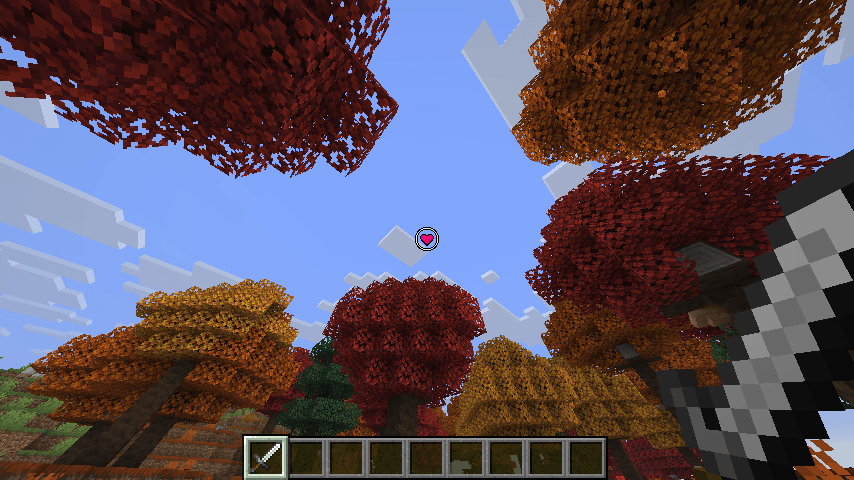
Attribution: Heart Crosshair by Creatype
Description
Tired of the same old crosshair? Custom PNG Crosshair lets you replace Minecraft's default crosshair with any PNG image you want — complete with live previews, high-res scaling, transparency, and vanilla-style color inversion.
Features
- Any PNG as your crosshair – drop images into your crosshair folder and pick one in seconds
- Visual in-game selector (Mod Men Required) – browse all your crosshair PNGs with live rendered thumbnails and select with one click (Mod Menu integration)
- Live config preview – see your crosshair with all effects applied before you even close the menu
- High-res scaling – large images (64×64, 256×256, or anything between) are crisply scaled to a consistent on-screen size
- Size presets – Default (15×15), Medium (30×30) and Large (45×45), plus custom sizes via the config file or /crosshair scale
- Opacity control – fade your crosshair anywhere from fully visible to fully transparent
- Reverse color mode – apply the vanilla color-inverting crosshair effect to your custom image
- Smart attack indicator – automatically repositions below larger crosshairs so it never overlaps
- Instant apply – every change saves and takes effect immediately, no save button needed
- Tab completion – commands autocomplete every PNG in your crosshair folder
- Mod Menu optional – full config screen through Mod Menu, but the mod works perfectly without it
Getting Started
- Launch the game and a
custompngcrosshairfolder is created automatically in your Minecraft root directory. - Drop your crosshair
.pngfiles into that folder. - Pick your crosshair:
- Mod Menu: Mods → Custom PNG Crosshair →
File: ... (Browse)→ click any entry. - Command:
/crosshair load <filename>(press Tab to autocomplete).
- Mod Menu: Mods → Custom PNG Crosshair →
- Tune size, opacity and reverse color to your liking — changes apply instantly.
Commands
/crosshair load <filename>/crosshair reload/crosshair toggle/crosshair status/crosshair scale <height in pixels> <width in pixels>
Note: Does not work with CenteredCrosshair.
The Custom PNG Crosshair Team