Cubeville Companion
- By
A player-made enhancement mod for the Cubeville SMP, featuring quality-of-life tools, navigation aids, and custom interface tweaks.
ignore players.png
quick actions.png
Description
If you encounter any issues or have suggestions, please report them on the Issues tab. Your feedback helps make this mod better!
Cubeville Companion
An unofficial client-side utility mod for the Cubeville SMP Minecraft server.
⚠️ Disclaimer: This mod is not affiliated with, endorsed by, or officially associated with the Cubeville SMP server or its staff. It is an independent, community-made tool created to enhance the player experience. Use it at your own discretion and always follow server rules.
What It Does
Cubeville Companion adds visualization, chat management, command assistance, and quality-of-life tools designed specifically for the Cubeville server.
Everything runs client-side only. No server-side installation is required.
Features
🗺️ Region Visualization
See WorldGuard region boundaries rendered as 3D wireframe boxes in the world. Regions are color-coded by your relationship to them:
- 🟢 Green — You own the region
- 🔵 Blue — You are a member
- 🔴 Red — Someone else owns it
Additional features include:
- Floating region names and owner labels
- Optional semi-transparent region faces
- Block Highlight Mode for coloring individual blocks
📐 WorldEdit Selection Visualizer
Your WorldEdit selections are rendered in real time as 3D wireframes after setting positions with a wooden hoe.
Features include:
- Selection dimensions displayed as width × height × depth
- Warning colors when a selection exceeds a configurable size limit
- Optional block highlighting
- Configurable colors and opacity
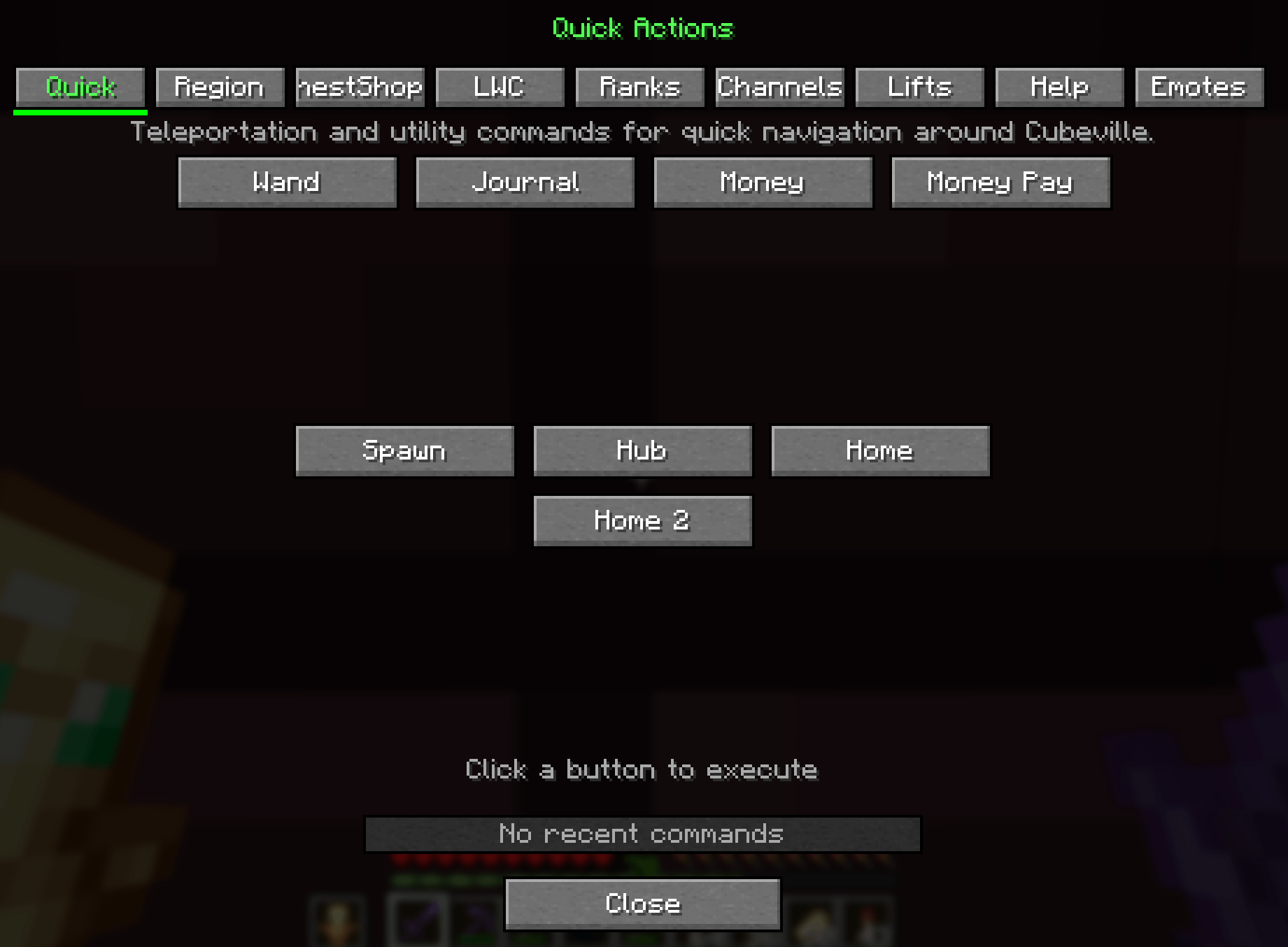
⚡ Quick Action Menu
Press Left Alt to open a tabbed command reference and shortcut menu with nine tabs:
- Quick — One-click access to
/hub,/spawn,/home,//wand,/money,/journal, and other frequently used commands. Also includes recent commands, quick-rank actions, and a live Mob Cap widget. - Region — WorldGuard commands for region information, lists, claims, subzones, flags, owners, and members.
- ChestShop — Step-by-step Shopkeeper chest-shop creation instructions.
- LWC — Lock and protection commands with descriptions and parameter entry screens.
- Ranks — Commands for special ranks such as Doctor, Repairman, Death Hound, and others.
- Channels — Local, shout, group, and private-message commands.
- Lifts — CraftBook elevator sign instructions.
- Help — Expandable documentation for teleportation, information, utility, and staff commands.
- Emotes — Automatically saved
/memessages that can be sent again or removed from your list.
Commands that require a player, region, flag, or other value open an input screen with relevant suggestions.
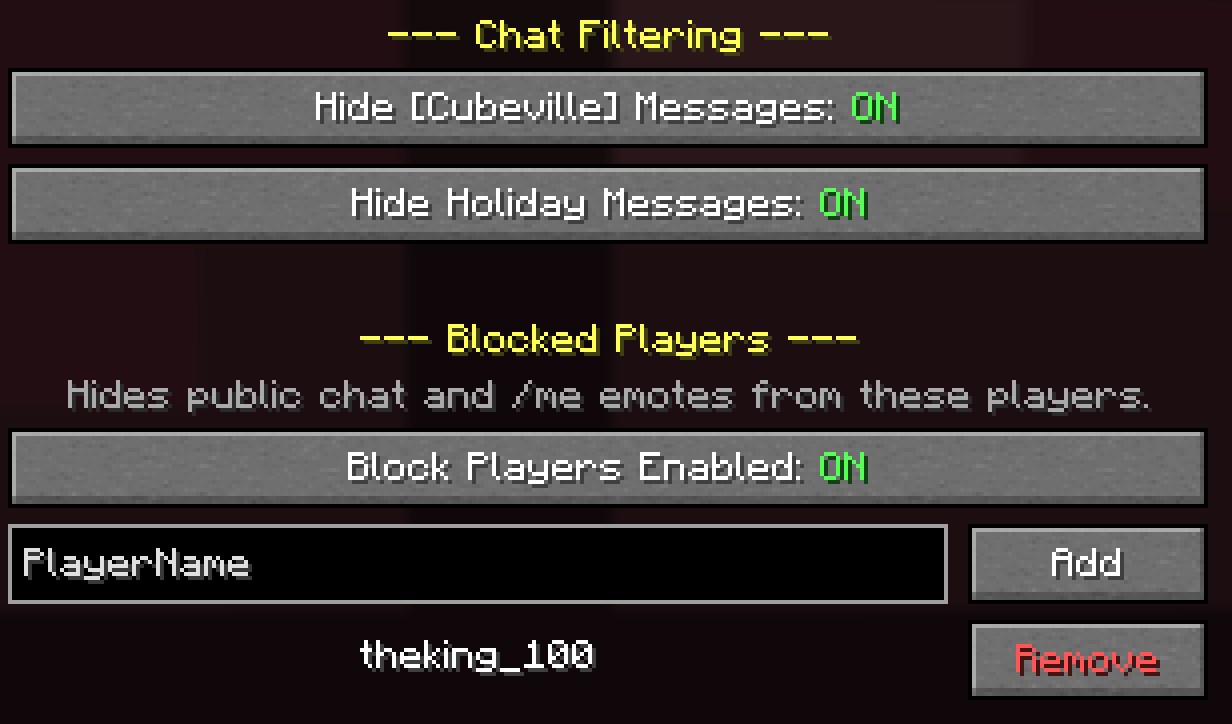
💬 Improved Chat Filtering
Optionally hide:
[Cubeville]server broadcast messages- Seasonal and holiday event announcements
- Public chat messages from ignored players
/meemotes from ignored players
🚫 Player Ignore List
Manage a client-side player ignore list from the configuration screen or with commands:
/companion ignore <player>— Ignore a player/companion unignore <player>— Stop ignoring a player/companion ignorelist— Display your current ignore list
Player-name suggestions are provided automatically. Ignored players are stored in your local configuration and are never sent to the server.
🏪 Shop Sign Generator
Create ChestShop signs using a visual editor with:
- Quantity, buy price, sell price, and item-name fields
- Buy-only and sell-only modes
- Live sign preview
- Copy-to-clipboard support
- Quick access to
/iteminfo
🧠 Command Learning and Auto-Completion
Cubeville Companion learns commands and subcommands from Cubeville chat responses and adds client-side tab-completion suggestions.
Features include:
- Suggestions for learned server commands
- Online-player suggestions where appropriate
- Region-name and flag suggestions
- Suggestions isolated from unrelated servers
- Client-only
/companioncommand completion
No server files or modifications are required.
🎨 Customizable Rendering
Configure colors and opacity for:
- Owned regions
- Member regions
- Foreign regions
- WorldEdit selections
- Oversized-selection warnings
- Region and selection block highlights
Client Commands
| Command | Description |
|---|---|
/companion ignore <player> |
Hide public chat and /me messages from a player |
/companion unignore <player> |
Remove a player from your ignore list |
/companion ignorelist |
Show all currently ignored players |
These commands are handled entirely by the mod and are not sent to the server.
Keybinds
| Key | Action |
|---|---|
| R | Toggle region visualization |
| Left Alt | Open the Quick Action Menu |
| F8 | Open the configuration screen |
Additional keybinds for /hub, /spawn, /home, and the Shop Sign Generator are available but unbound by default.
All keybinds can be changed from Minecraft's Controls screen.
Configuration
Press F8 to open the settings screen with six tabs:
- General — Notifications, debug mode, Quick Action Menu options, and trusted servers
- Regions — Visibility, labels, fill rendering, block highlighting, and automatic polling
- Selection — WorldEdit visualization, dimensions, size warnings, and block highlighting
- Chat — Broadcast filtering and the player ignore list
- Colors — Region, selection, warning, and highlight colors
- Ranks — Quick-rank behavior and availability
Configuration is saved locally to:
.minecraft/config/cubeville-companion.json
Region and rank state are also persisted locally so they can survive restarts.
Supported Loaders
| Loader | Version |
|---|---|
| Fabric | 0.16.13+ |
| NeoForge | 21.8.x |
| Forge | 58.x |
Minecraft: 1.21.8
Java: 21
Environment: Client-side only
Forge compatibility: OptiFine is unsupported because it replaces rendering internals used by Cubeville Companion. Shader packs may affect region and selection overlays.
This mod is a fan-made project. Cubeville™ and related marks belong to their respective owners.
Cubeville Companion Team


Owner