Creative Tab Search
- By
Filter items in the creative search tab by mod using @modname or @modid, and by tags with #tag. Features a vanilla-style autocomplete popup with smooth scrolling and animations.
Creative Tab Search
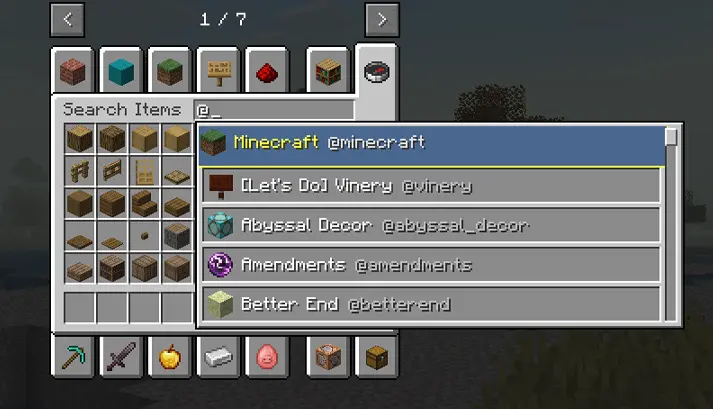
A lightweight, client-side quality-of-life mod for Minecraft that enhances the creative inventory search bar with mod, tag, and registry name filtering, accompanied by a vanilla-styled autocomplete dropdown.
Features
1. Mod Filtering (@)
- Type
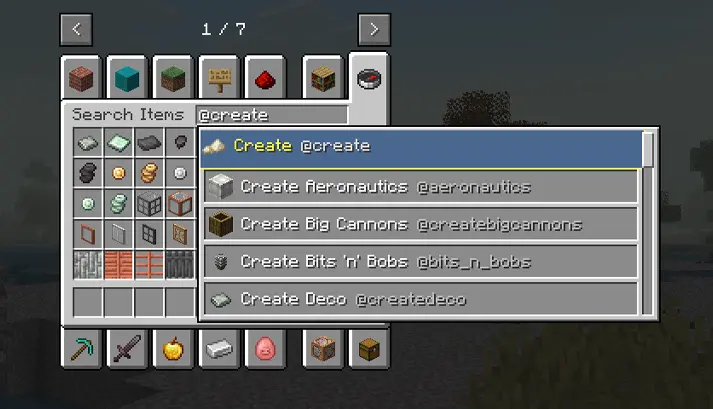
@followed by a mod ID or mod name to display only items from that specific mod (e.g.,@create,@farmersdelight,@minecraft).
2. Tag Filtering (#)
- Type
#followed by a tag name to show items belonging to that tag (e.g.,#tools,#logs,#c:ores).
3. Registry Name Filtering ($)
- Type
$to search directly by item registry ID (e.g.,$diamond_sword).
4. Combined Search
- Combine multiple filters and normal text in a single query (e.g.,
@create #tools,iron @minecraft).
5. Vanilla-Styled Autocomplete Menu
- Typing
@or#opens a dropdown list of available mods or tags. - Item-based index: Only mods that actually add items to the game appear in suggestions (no clutter from pure library/performance mods).
- Vanilla look: Designed to match the standard Minecraft inventory UI (
#C6C6C6container with slot-styled rows and item icons). - Navigation: Use mouse click or
Up/Downarrow keys +Tab/Enterto select,Escto close. - Automatically applies the search immediately upon selection without extra trailing spaces.
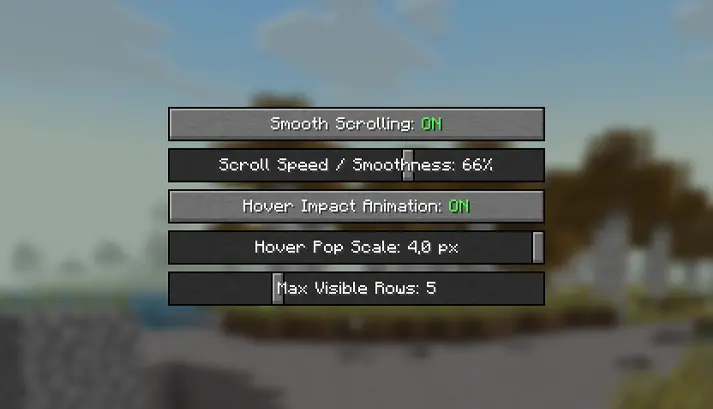
6. Client Configuration Screen
Accessible via the Mod List (Mods -> Creative Tab Search -> Config):
- Smooth Scrolling: Toggle and adjust the smoothness/speed of scrolling in the suggestion list.
- Hover Impact Animation: Toggle and configure the subtle scale pop effect when hovering over suggestion rows.
- Max Visible Rows: Set how many suggestions are displayed at once (from 3 to 10).
Notes
- Client-Side Only: Works in singleplayer and on any vanilla or modded multiplayer server without needing the server to have the mod installed.
- Compatibility: Built for NeoForge 1.21.1.

Creative Tab Search Team