Craft Count
- By
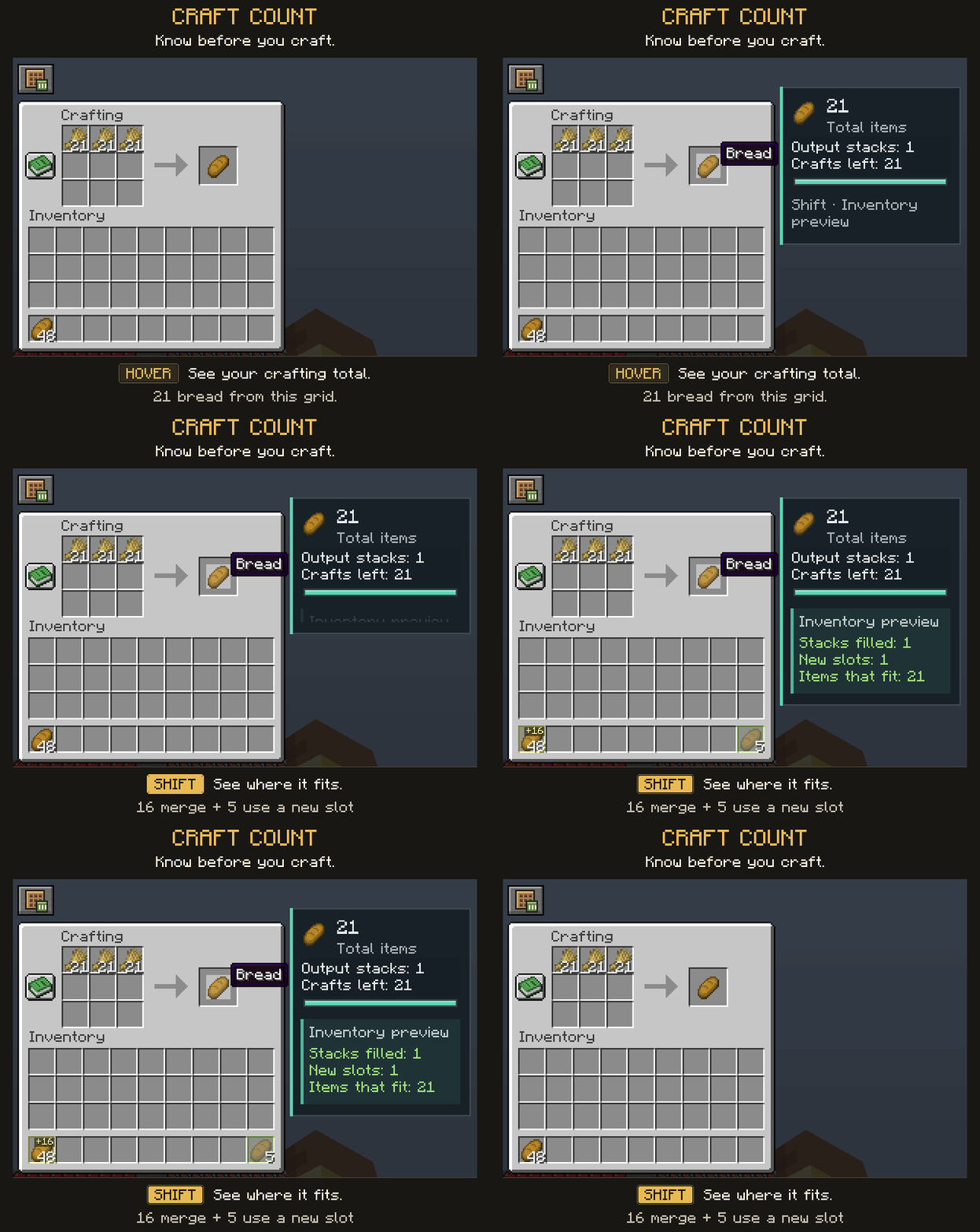
Craft smarter. Plan better. Know before you craft.
Every ingredient matters. Every inventory slot counts. Every craft should be under your control.
Craft Count enhances Minecraft's crafting experience with clear output counters, inventory previews, material planning and customizable tools.
Less guessing. Better planning. More time playing.
💚 HELP ME KEEP BUILDING CRAFT COUNT
Craft Count is an independent project I develop from Iran.
I'm raising money for a PC that can handle the basic development and Minecraft testing this project needs. If Craft Count has been useful to you, please consider helping me work toward that upgrade. Contributions of any size help.
💚 DONATE TOWARD A DEVELOPMENT AND A STREAMING PC →
Due to international payment restrictions, I currently cannot use PayPal, Ko-fi or Buy Me a Coffee, so I'm using Reymit as an alternative.
International supporters: If an International Donation option is available on the donation page, please select it.
You can also support the project by sharing it, reporting bugs and leaving feedback. Thank you for helping me keep building. 💚
✨ KNOW BEFORE YOU CRAFT
📊 Intelligent Craft Counter
Know what your crafting grid can produce before using your ingredients.
- Total output — See the number of items you can craft.
- Craft count — View the number of crafting operations remaining.
- Output stacks — See how many stacks your results will make.
- Visual progress — Track remaining crafts as you use your ingredients.
Useful information, directly inside your crafting interface.
👁️ Preview Before Committing
Hold Shift. See where the results will fit.
Preview your crafting batch before completing it:
- See predicted inventory destinations.
- Preview merging into existing stacks.
- Identify newly occupied slots.
- Check how many items will fit.
- Inspect the preview without changing your actual inventory.
Your items stay untouched until you decide to craft.
Inventory predictions apply to supported crafting screens. Custom menus and connected storage can have different transfer rules.
🎯 CRAFT WITH A PLAN
Goals & Material Planning
Planning a large project? Check how many resources you need and keep track of your progress.
With Craft Count, you can:
- Set a target quantity.
- Monitor crafting progress.
- View required materials.
- Check available resources.
- Identify missing ingredients.
- Pin goals and material lists while you play.
- Receive a notification when a crafting goal is reached.
Set a goal. Gather your materials. Craft with confidence.
🧰 SMALL TOOLS. USEFUL ANSWERS.
Open useful tools directly from your crafting screen.
| Tool | What it does |
|---|---|
| 🎯 Goals | Set targets and track crafting progress. |
| 📖 Materials | See what you have, what you need and what is missing. |
| 🔒 Keep Materials | Reserve ingredient quantities and protect them during supported crafting actions. |
| 🧪 Recipe Sandbox | Experiment in a virtual 3×3 grid without consuming real items. |
| ⏱️ Batch Preview | Plan a chosen number of crafts and check the expected output and inventory space. |
| 📄 Recipe Details | Review ingredients consumed and containers or materials returned by a craft. |
Useful tools, within easy reach.
🎨 YOUR CRAFTING EXPERIENCE, YOUR WAY
Customizable Layout & Appearance
Make Craft Count fit your setup:
- Move and resize crafting-tool buttons and pinned displays.
- Add or remove shortcuts with the visual layout editor.
- Use alignment guides to position elements neatly.
- Adjust colors, scale and opacity.
- Customize animations and sounds.
- Use optional keyboard shortcuts.
Searchable, sectioned settings explain the options, with Save and Cancel controls for your changes.
Choose the look and level of detail that work for you.
🎓 LEARN IT. THEN USE IT.
Interactive Tutorial
Learn through a practical, step-by-step practice tutorial.
Discover how craft counting, inventory previews and the crafting tools work using a sample crafting table and inventory.
Learn at your own pace. Your real items stay untouched.
💎 DESIGNED TO FEEL LIKE MINECRAFT
From everyday recipes to larger crafting projects, Craft Count provides useful information while keeping Minecraft's familiar crafting experience at the center.
Less guesswork. More control. More time playing.
🚀 THE FUTURE OF CRAFT COUNT
Craft Count is an evolving project. Community feedback helps guide improvements, compatibility work, interface refinements and potential new features.
Have an idea? Found a bug? Want to suggest an improvement?
We want to hear from you!
Use the project's comments or available support channels to share your thoughts.
⚒️ CRAFT COUNT
Know before you craft.
More information. Better decisions. Smarter crafting.
Craft Count Team