Control Flex - Controller Support
- By
Control Flex is a controller mod designed for mid-to-large modpacks.
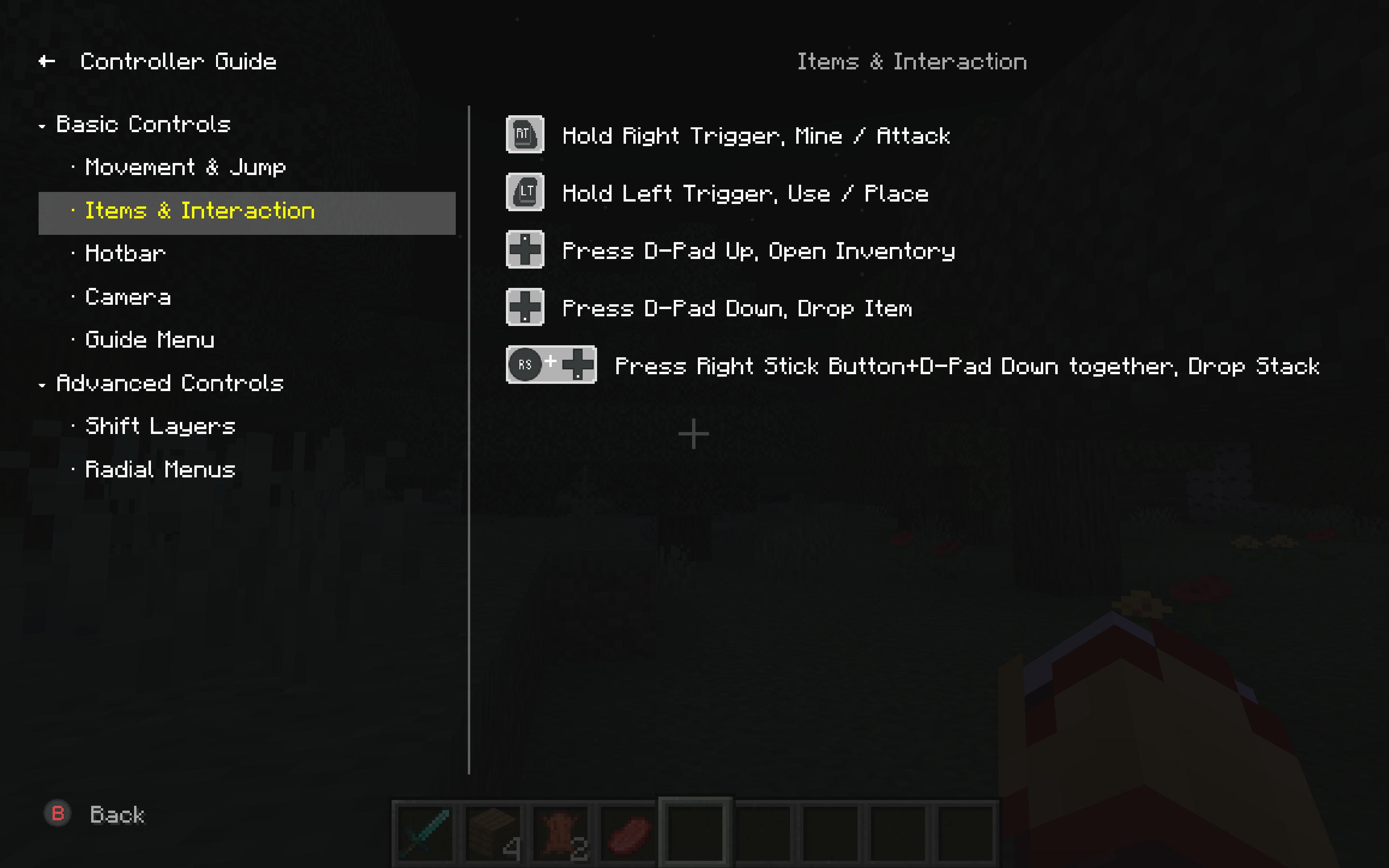
The built-in Controller Guide lists all gameplay bindings by category — movement, combat, inventory, Shift layers, radial menus, and more. Each row shows the actual controller glyphs for your layout, so you can look up any action without leaving the game.
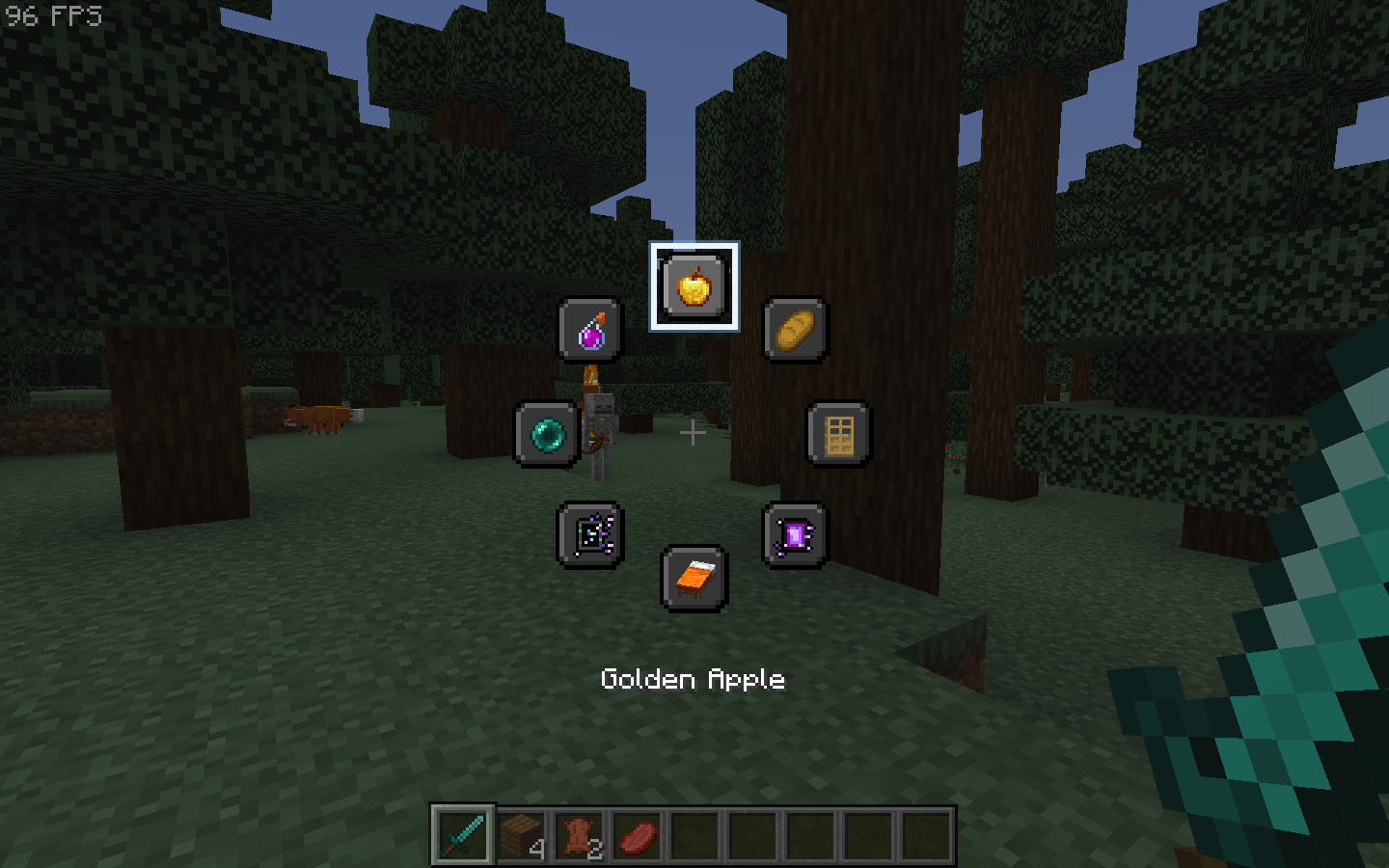
Open a radial menu with Hold (release to close) or Press (tap to open). Each of the 8 slots can be a key binding, a chat command, or use item. Icons can be auto, item-based, or custom. Up to 5 menus can be bound to different buttons and layers.
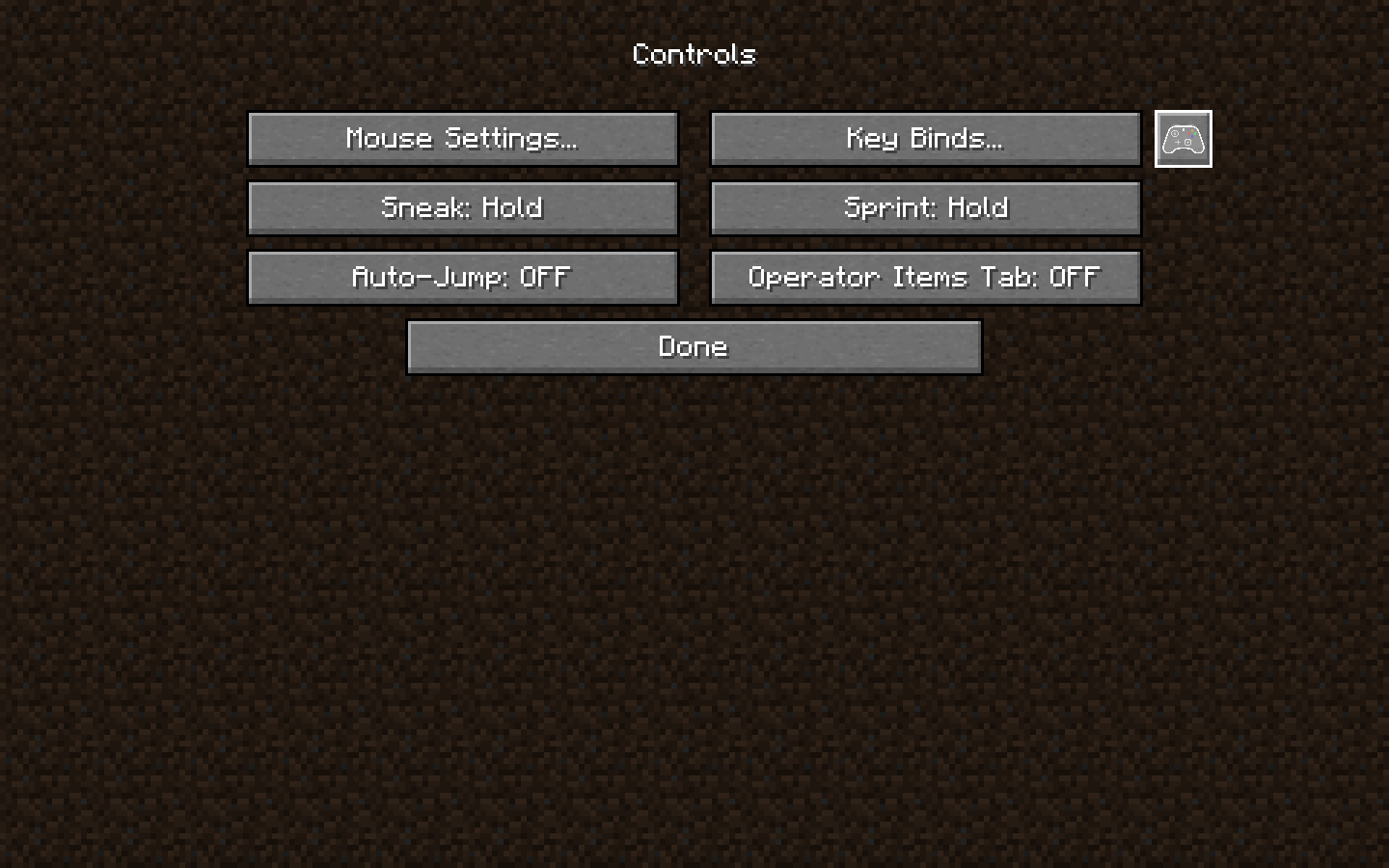
Open Options → Controls in Minecraft. Next to Key Binds..., the gamepad button opens the ControlFlex settings screen.
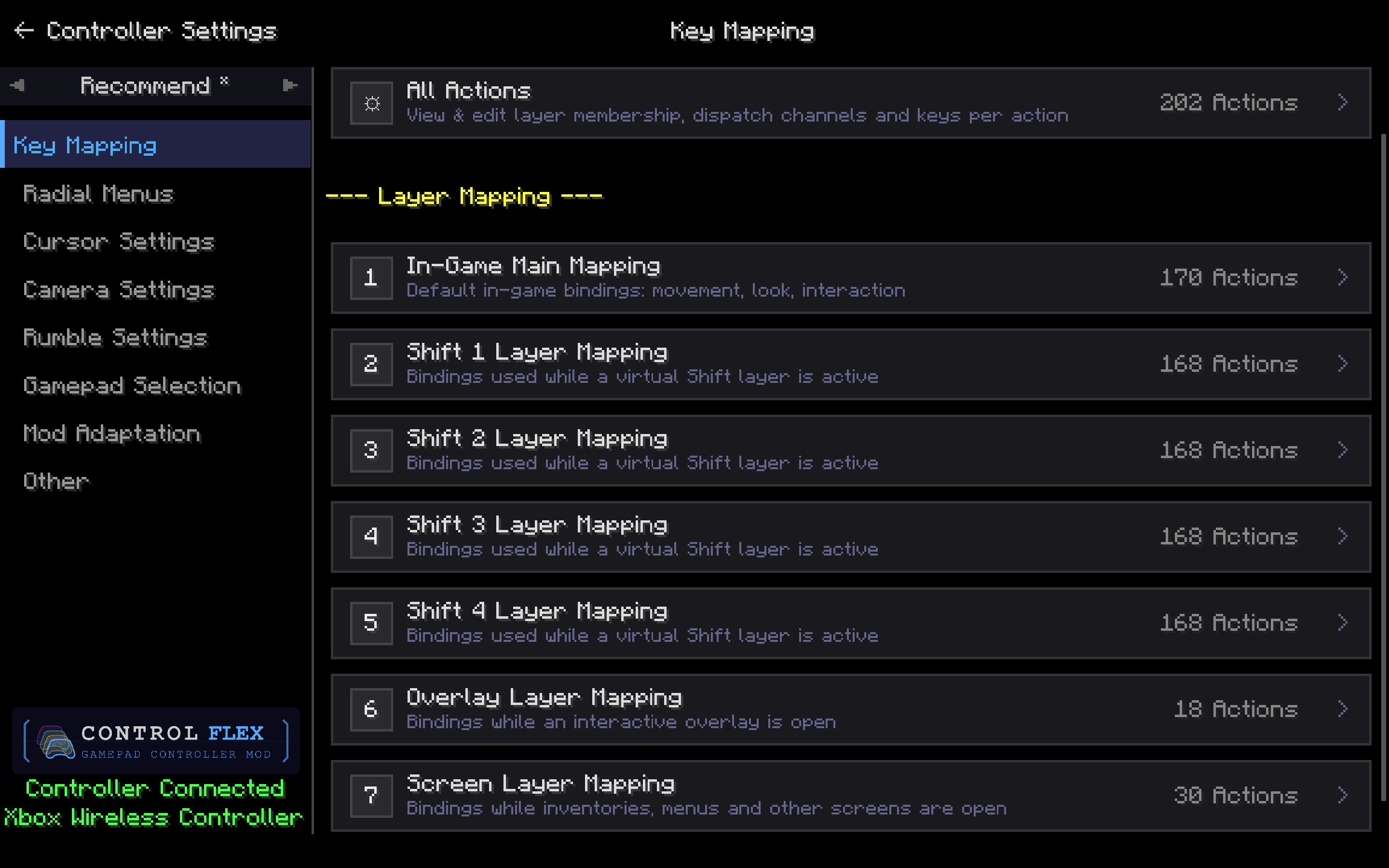
Bind controller buttons across multiple layers: in-game, four virtual Shift layers, overlay, and screen. Open All Actions to edit every mapping, or pick a layer to remap it on its own.
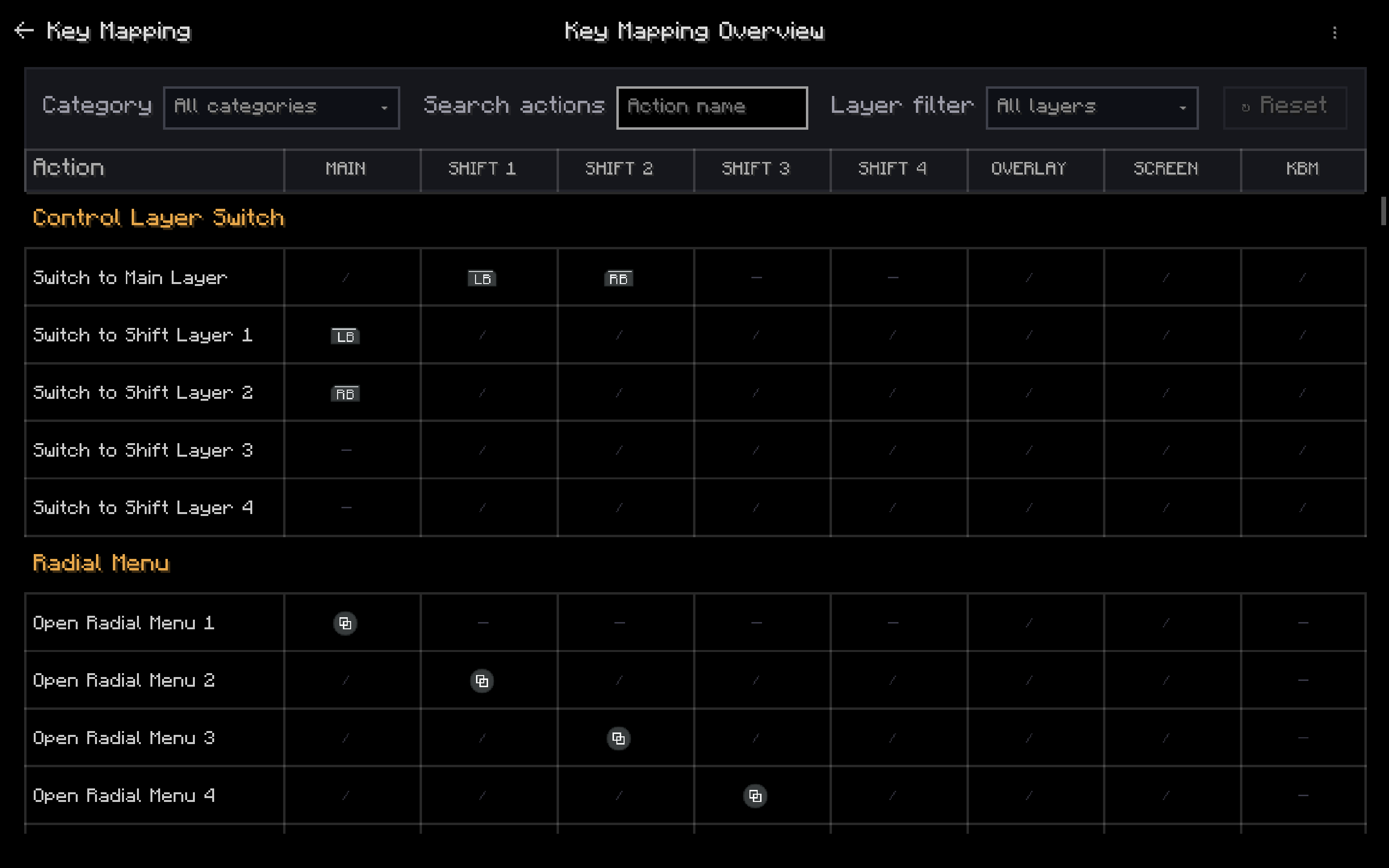
See every action across MAIN, SHIFT 1–4, OVERLAY, SCREEN, and keyboard/mouse. Filter by category or layer, then compare how the same button changes when you hold a Shift layer.
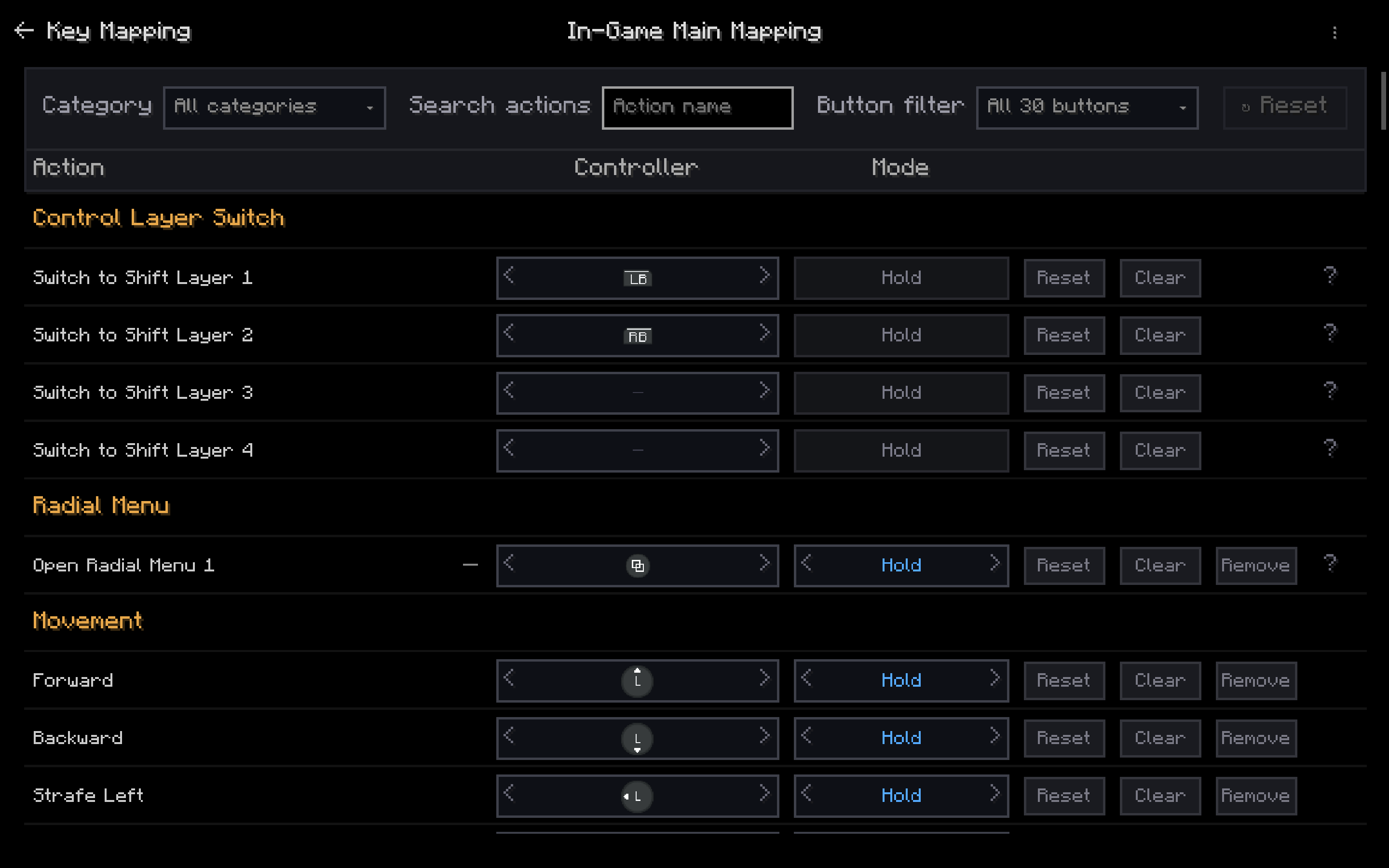
Map each in-game action to a controller button, then choose Hold or Press. Use LB/RB as Shift layers, bind radial menus, and keep movement on the left stick.
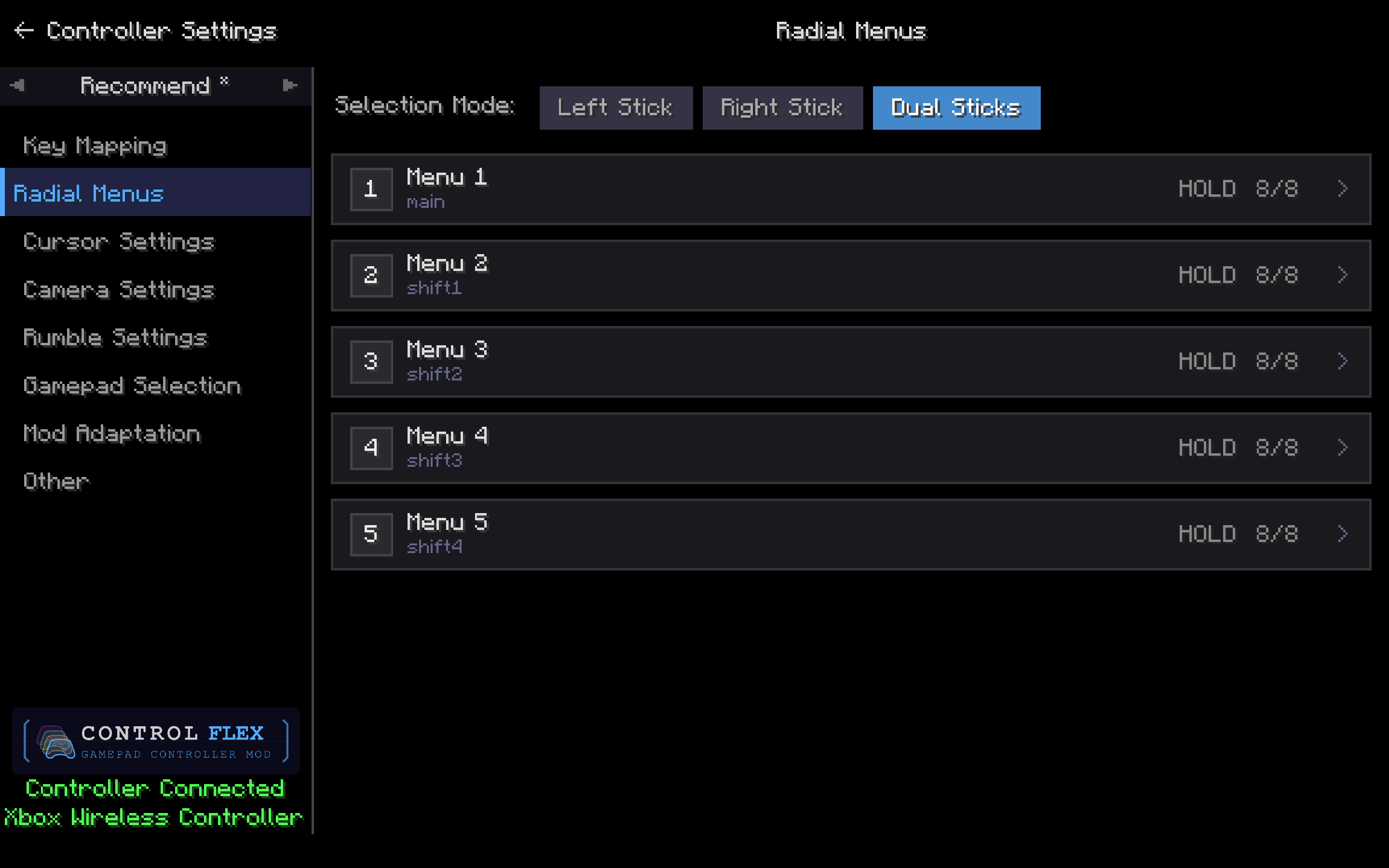
Build up to five radial menus for main play and Shift 1–4. Pick Left Stick, Right Stick, or Dual Sticks to select items, then open a menu to fill its slots.
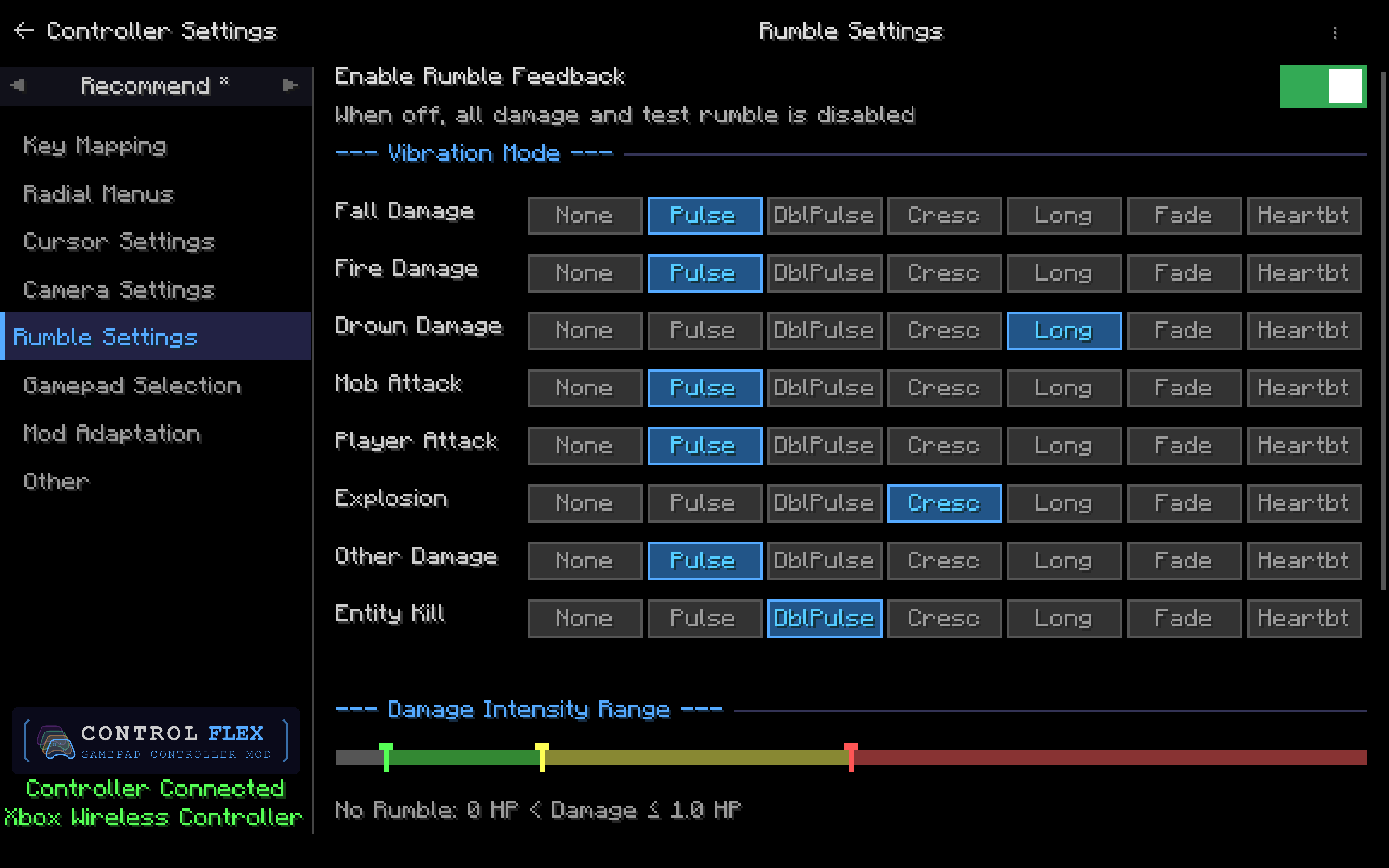
Turn rumble on or off, then assign Pulse, Long, Crescendo, and other patterns to fall, fire, drown, attacks, explosions, and kills. Use the intensity bar to skip tiny hits and ramp up on heavier damage.
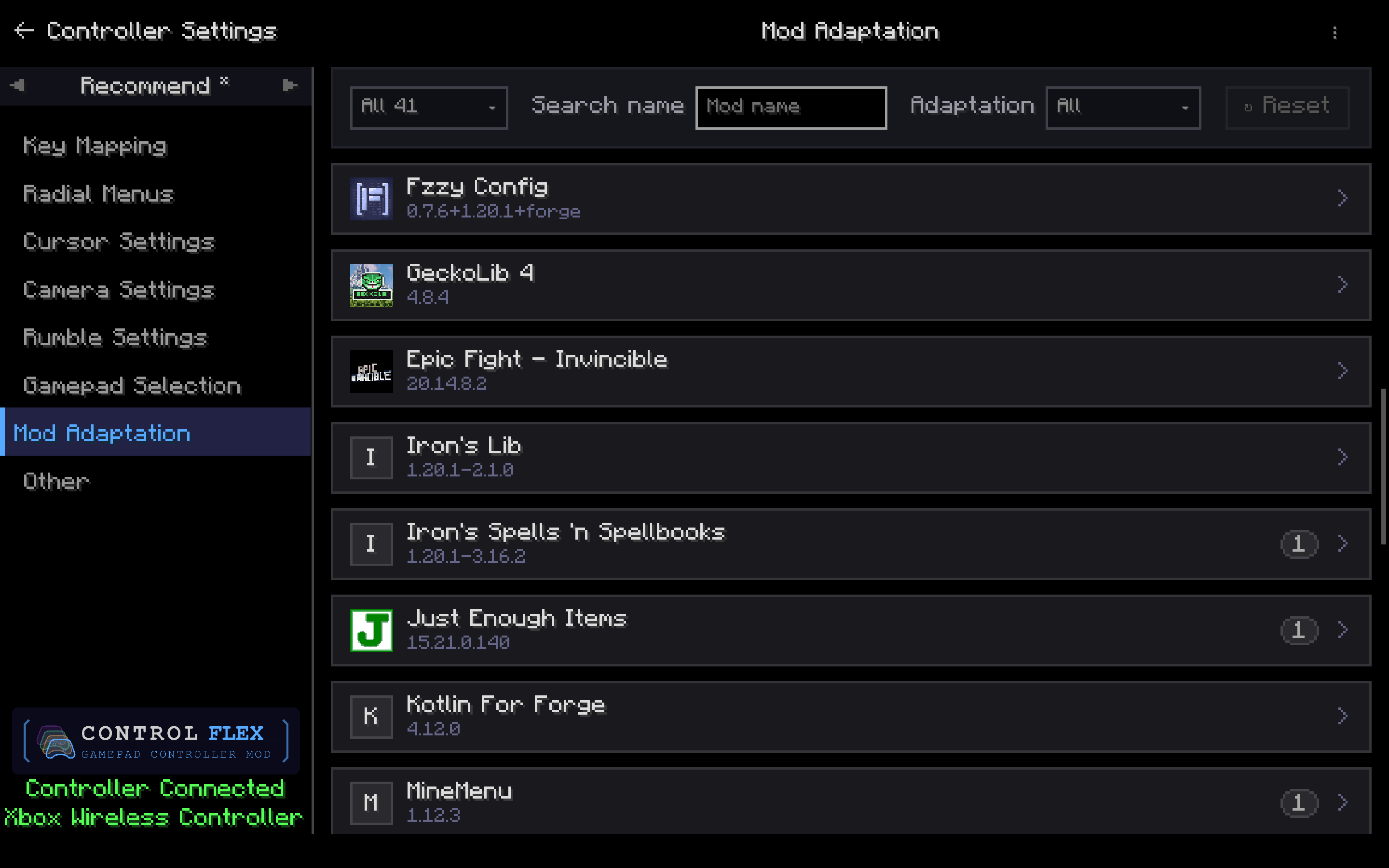
Browse installed mods and apply community adaptations when a badge appears (for example Iron's Spells 'n Spellbooks, JEI, or MineMenu). Search or filter by adaptation status to find what needs a controller setup.
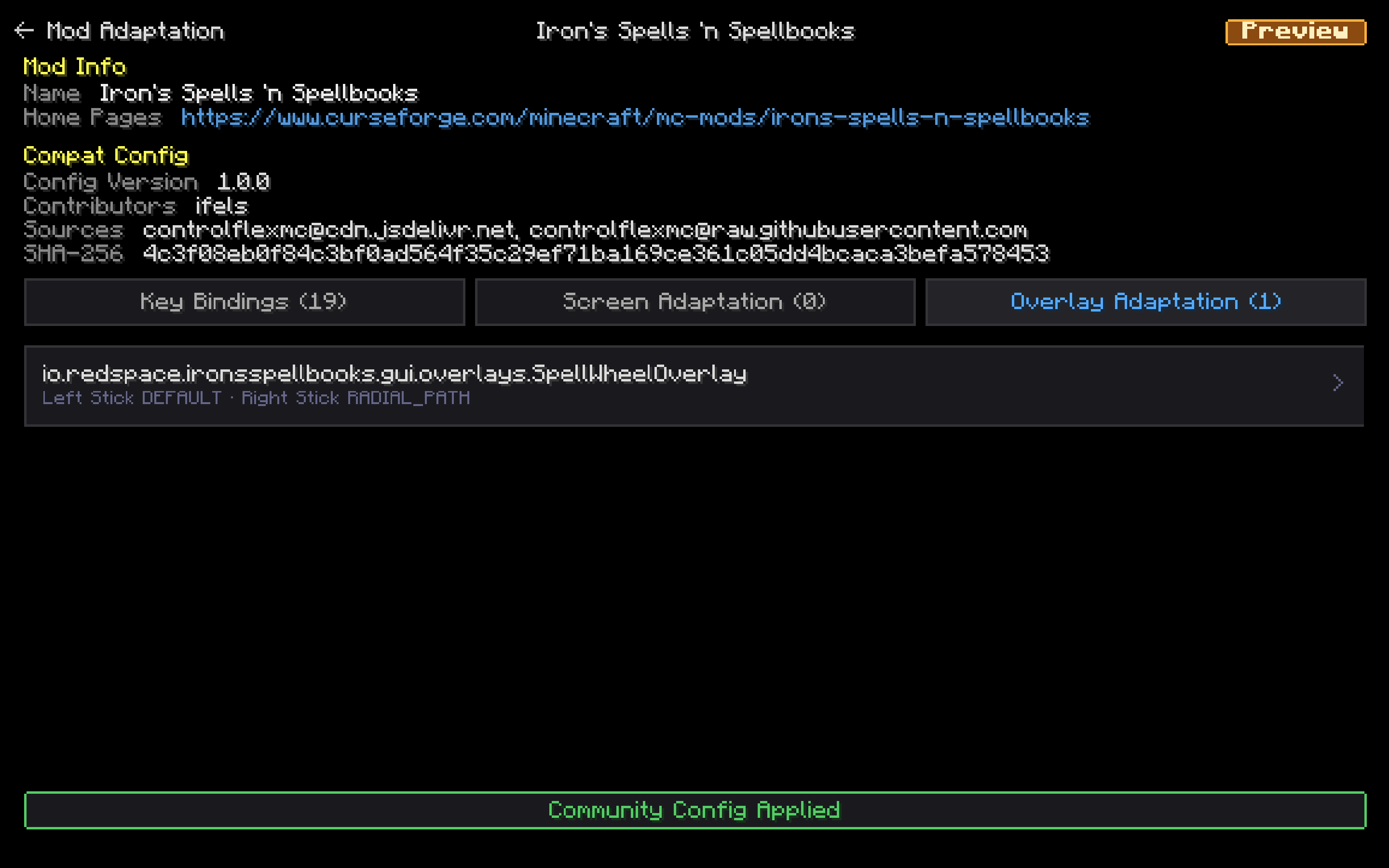
Open a mod to review its key bindings, screen rules, and overlay rules. Apply the community config, then adjust analog-stick behavior for that mod's overlays.
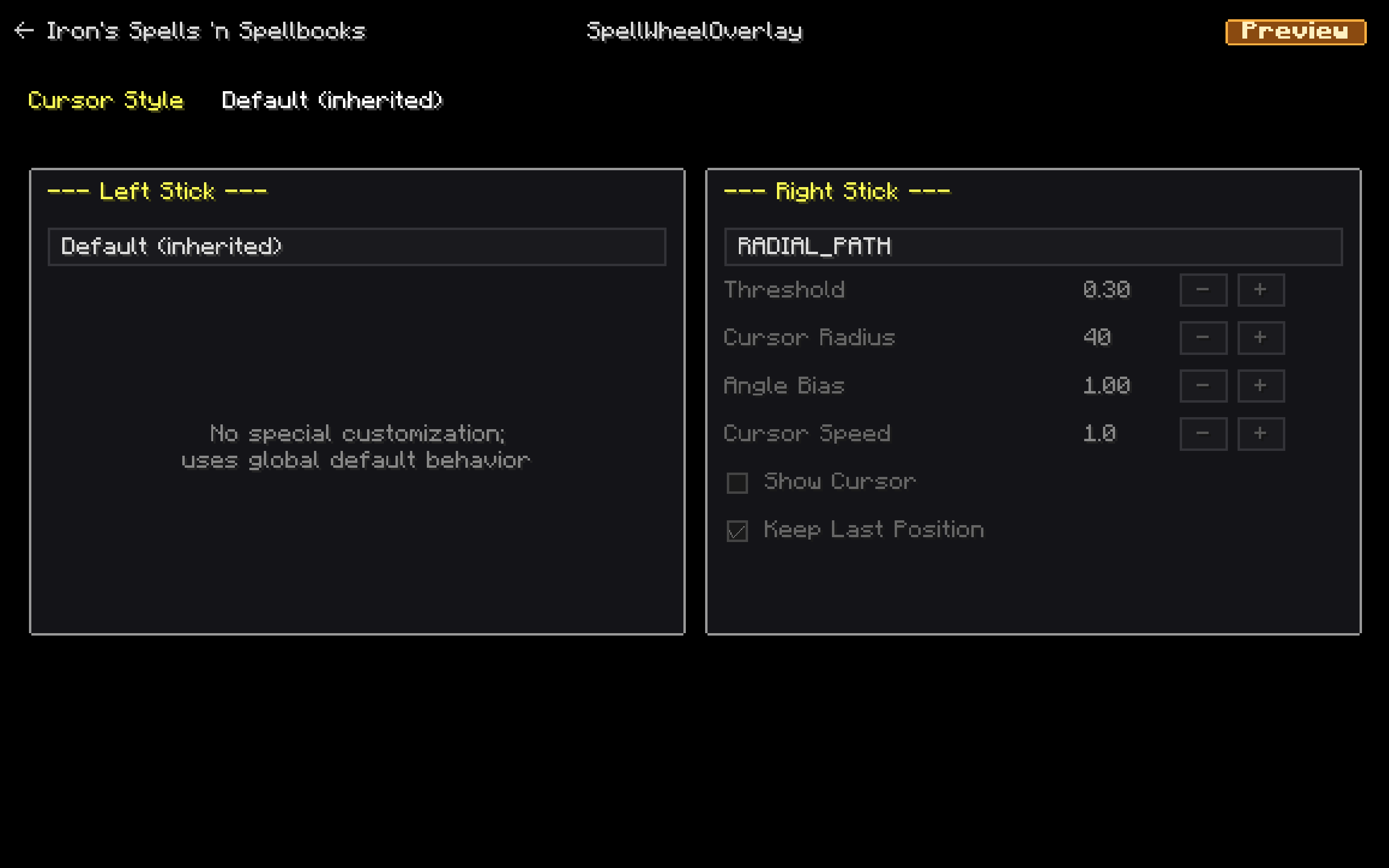
Set how each stick behaves on a specific overlay. Keep the left stick on the global default, or switch the right stick to RADIAL_PATH and tune threshold, radius, and speed.
Description


Control Flex is a client-side controller mod for Minecraft Java Edition, built for players who want full gamepad support — especially in modded packs where vanilla-style bindings are not enough.
What it does
Control Flex maps your controller to Minecraft and mod actions through a flexible binding system:
- Ten trigger modes — Press, Release, Hold, Tap, Long Press, Toggle, plus Double Press / Tap / Hold / Toggle
- Seven layers — Main, Shift 1–4, Screen (menus), and Overlay (interactive HUDs)
- Combo keys — bind multiple buttons to one action
- Radial menus — up to 5 menus × 8 slots (keys, commands, hotbar items)
- Analog movement — 360° left-stick walk, with Analog Smooth or Keyboard-like 8-way
- Virtual keyboard & mouse — inject real keys from the pad when a mod only reads the keyboard
- Camera & cursor — right-stick look, virtual mouse, D-Pad slot jump, optional slot snap
- Split-screen — multi-instance couch co-op (two pads, or one pad plus keyboard and mouse); unfocused windows keep playing
- Rumble — configurable vibration feedback by damage type
- Mod Adaptation — auto-discovers mod keys; in-game Screen / Overlay rules; community configs
Bundled templates (Basic, Bedrock, Recommend) help you get started quickly. Custom templates can be added as JSON files. Open settings with F9 (keyboard) or Back + Start (controller).
1. Ten Trigger Modes — One Button, Many Behaviors
Every binding pairs which button with how it fires. ControlFlex supports ten trigger modes, so the same face button can tap, hold, toggle, double-tap, or release differently per action.
| Mode | When it fires | Typical use |
|---|---|---|
| Press | On button down | One-shot actions, toggles, opening menus |
| Release | On button up | Layer return, “on let go” actions |
| Hold | While held | Movement modifiers, sustained use, Shift layer switches |
| Tap | Short press under threshold | Quick actions without accidental holds |
| Long Press | Held past threshold | Secondary functions on the same button |
| Toggle | First press on, second press off | Persistent state toggles (sprint, walk, POV) |
| Double Press | Second press inside the tap window, fires on down | A second one-shot on the same button as Hold / Press |
| Double Tap | Two short presses; fires on the second release | Confirm / extra action without stealing the first tap |
| Double Hold | Short press, then press-and-hold inside the window | Sprint or sneak only after a tap-then-hold |
| Double Toggle | Same latch as Toggle; flips on the second tap | Toggle sneak / sprint on the same button as the hold version |
Tap and Long Press thresholds are configurable globally (100–2000 ms) in Other Settings. The Tap threshold is also the max gap between the two taps for every Double mode. Toggle (and Double Toggle) work like a light switch — first qualifying press activates, second deactivates — ideal for persistent states like sprint, walk mode, or POV switching.
Double modes can share a button with the matching single-click mode. Bundled templates use that for sneak: Hold to sneak, Double Toggle on the same button to latch sneak (right-stick click; B on the Bedrock template).
Layer switches on Main are designed around Hold; return-to-Main rows on Shift layers use Release. Radial menu open bindings support Press and Hold (tap to open vs. hold to keep open).
Mix modes across layers: Hold LB for Shift 1, Tap X to ping, Long Press Y for a mount/dismount mod key, Double Toggle stick-click to latch sneak — all on the same controller layout.
2. Seven Layers — Multiply Your Buttons Without Multiplying Hardware
A standard controller has roughly a dozen face and shoulder inputs; a modpack can expose hundreds of actions. ControlFlex solves that with a seven-layer binding model, so one physical button can mean different things depending on context.
Main Layer is your default gameplay map — movement, combat, inventory, hotbar, and mod actions you use every day.
Shift Layers 1–4 are modifier planes. Hold a layer-switch binding on Main (for example LB, RB, or Back) to temporarily activate Shift 1–4, each with its own full binding table. Unassigned slots on a Shift layer inherit the matching Main binding, so you only override what you need. Releasing the switch returns you to Main automatically.
Screen Layer activates whenever a screen is open — chests, crafting, mod UIs, and ControlFlex Settings. Confirm, back, tab switch, scroll, D-Pad slot jump, and container helpers (quick-move, take half, etc.) live here, separate from in-world controls, so opening a menu does not fight your gameplay bindings.
Overlay Layer is for interactive HUDs that are neither a full screen nor plain gameplay — spell wheels, third-party radial menus, photo / attachment HUDs, and similar overlays. Overlay bindings are explicit (they do not inherit from Main): unconfigured actions stay silent, so a HUD cannot accidentally fire your combat map. Defaults follow the in-game feel — move, look, jump, attack, use, scroll — with B as back. Layer switches are suppressed while an overlay is open. Mods that need a key to stay held across an overlay (or screen) can be phase-locked so the Game-layer binding continues until you unlock it.
Together, seven layers turn a limited pad into a deep control surface: walk around on Main, hold LB for combat extras, hold RB for utility binds, keep moving when a spell wheel pops up, and get a clean Screen map the moment you open inventory — without re-plugging or swapping profiles.
3. Combo Keys — Chords for Power Users
When one button is not enough, bind multiple buttons together as a single action — for example LB + Back or LT + A.
Binding combos
During capture, press the first button, then add more within 500 ms. The UI shows the full chord; all buttons must match for the action to fire.
Works with every trigger mode
Combos support all ten modes, including Double Press / Tap / Hold / Toggle — same rules as single-key binds.
Smart combo engine
- Upgrade rule: activating a larger combo (e.g. A+B+Y) clears smaller active subsets (A+B) so behavior stays predictable.
- Button sharing: one physical button can participate in several combos via reference counting.
- Shift + combo: hold a Shift modifier first, then press a chord on that layer — useful for radial menus and advanced layouts without eating Main-layer slots.
Combo keys are how you fit “modpack density” onto a gamepad: rare actions stay off the main face buttons until you deliberately chord them.
4. Radial Menus — Eight Slots, Five Wheels, Zero Menu Digging
Radial menus give you up to five independent wheels, each with up to eight slots around the stick — open a wheel, aim with the stick, confirm with A (defaults vary by template).
What a slot can do
- Key binding — fire a vanilla or mod KeyMapping
- Chat command — run
/…(macros, home, warp, etc.) - Use item — switch to and use a hotbar slot (e.g. torches, food, tools)
How you open them
Each menu has its own open binding. Press = tap to open (release does not close). Hold = keep the open button held; release closes. Menus 2–5 can sit on Shift layers so Main stays uncluttered.
Customization
- Selection stick: left, right, or both
- Icons: auto, random, default, item ID, or custom texture path
- Layouts persist in
config/controlflex/radial_menu/radial_menus.json - In-game editor: pick icons, reorder slots, set trigger mode per menu
Radial menus are the fast lane for items and commands you use often but do not want on permanent face buttons — eat, place torches, run /home, trigger JEI or Minemenü-style shortcuts, all without opening full inventory or chat every time.
5. Analog Movement
Vanilla Minecraft only sees WASD as on/off, so a left stick that is converted to keys can only walk in eight directions at full speed. With Analog Movement on, ControlFlex feeds a continuous 360° move vector: any angle, and a light push walks slowly.
Open ControlFlex Settings → Other → Analog Movement.
- Enable Analog Movement (360°) is the master switch. Off restores digital WASD bindings; the policies below then do nothing.
- Analog Smooth — stick direction and magnitude are used as-is (the console-style feel).
- Keyboard-like 8-way — the stick is snapped to eight directions at full speed, which looks like keyboard input on a server.
Defaults follow the connection:
- Singleplayer / LAN → Analog Smooth
- Public servers and Realms → Keyboard-like 8-way, so analog walk is less likely to look like abnormal input
If a remote server should still use Analog Smooth, add it to the whitelist on that same page (host:port, or Realm name). Stick deadzones and movement / camera response curves stay on the Calibration page.
6. Camera & Cursor
- Right-stick look with configurable sensitivity, optional Y-axis invert, and three look modes: Direct Turn, Smooth Turn, and Simulate Mouse (the last routes look through the mouse pipeline for combat mods such as Epic Fight)
- Virtual cursor drives screens with the left stick when a menu is open
- D-Pad slot navigation jumps the cursor between inventory and container slots (cone targeting — works on irregular grids). The left stick still moves the cursor freely.
- Optional slot snap for precise container targeting
7. Rumble
Configurable vibration feedback by damage type — multiple waveform modes, per-type settings, and intensity bands for light / medium / heavy hits.
8. Virtual Keyboard & Mouse
Some mods never register a KeyMapping — they only watch the physical keyboard or mouse. Virtual KBM lets the gamepad inject those real keys (Shift, Escape, Page Up/Down, mouse buttons, scroll wheel) on any layer, without first turning them into ControlFlex actions.
Capture a keyboard/mouse key, then bind a controller combo to it. Tap scrolls the wheel one notch; Hold repeats (default 100 ms, configurable). GUI Back (B) sends physical Escape, so it matches clicking Esc with a mouse. Injected keys do not type into chat or text fields.
9. Split-screen (couch co-op)
Java Edition does not render two players in one window. Couch co-op is two (or more) Minecraft instances on the same PC, joined over Open to LAN. Each instance has its own input: two gamepads, or one gamepad plus keyboard and mouse. ControlFlex is built for that setup: when you turn off Pause on Lost Focus, the background window keeps looking, mining, and using menus.
What you need
- Two or more Minecraft accounts
- Two gamepads, or one gamepad and a keyboard + mouse
- A launcher that can run two instances at once
- ControlFlex in each instance that uses a gamepad
- Optional: Splitscreen Support — window tiling only (it does not handle input)
How to play
- Create one launcher instance per account. Keep both windowed (not fullscreen).
- Install ControlFlex in each gamepad instance. Optionally install Splitscreen Support as well.
- Launch both. For two pads, open ControlFlex Settings → Gamepad Selection in each game and pick a different controller so they do not steal each other. For pad + keyboard, assign the pad only in the gamepad instance; the other player uses keyboard and mouse in their window.
- Press F3+P in each window (or use video options) to disable Pause on Lost Focus. The unfocused window must keep running. If you forget, ControlFlex shows a hint on the pause screen; click the window once, then press F3+P.
- With Splitscreen Support installed, press F11 to cycle half- and quarter-screen layouts. It remembers the last position.
- Host a world on one instance (Open to LAN). Join from the others on the same PC via the LAN game in the multiplayer list, or
localhostplus the port shown when you opened to LAN.
Use Direct Turn or Smooth Turn for look if you play unfocused; Simulate Mouse cannot drive the OS cursor in a background window and falls back to Direct Turn automatically.
10. Mod Compatibility
ControlFlex is built for modpacks. Most mods work with no extra files: at startup it scans Minecraft’s KeyMapping registry and exposes every non-vanilla binding as a bindable action. JEI recipe keys, combat-mod skills, map/minimap hotkeys — if the mod registered a key, it shows up in Key Mapping.
When auto-discovery is not enough (wrong layer, a HUD that needs its own stick behavior, or a mod that never registered keys), 0.8.7 gives you an in-game Mod Adaptation center, a community config repo, optional compat JSON, Virtual KBM, and bridge mods — in that order of effort.
Mod Adaptation (in-game)
Open ControlFlex Settings → Mod Adaptation. Every installed mod is listed with name, icon, and version. Open a mod to work in three tabs:
- Key Bindings — that mod’s discovered actions; assign them to Main / Screen / Overlay and bind gamepad buttons
- Screen Adaptation — per-screen stick mode, Layer Mapping, and cursor rules while that GUI is open
- Overlay Adaptation — the same for interactive HUDs (spell wheels, radial menus, photo HUDs, and similar)
To add a Screen or Overlay rule: open the target GUI or HUD once in-game so ControlFlex records it, then use + Add Screen/Overlay Adaptation. The popup lists recent pages (up to 50). Pick one to create a rule. Entries that could not be matched to a mod can be scanned automatically.
Each stick can use a different behavior for that page:
| Behavior | What it does |
|---|---|
| Independent | Stick directions are actions. Bind them on Layer Mapping. Default on Overlay, and for the Screen right stick |
| Radial Path | Stick traces a path / angle — spell wheels, MineMenu-style rings |
| Virtual Mouse | Stick moves a cursor inside that UI. Default for the Screen left stick |
With no rule, Screen uses Virtual Mouse on the left stick and Independent on the right; Overlay keeps Independent on both (the layer’s four-way bindings). You can also set cursor style (system / Bedrock / hand). Virtual Mouse has cursor speed; Radial Path has threshold, radius, angle bias, show-cursor, and whether the stick restores its last angle.
Edits are copy-on-write: packaged and community files stay read-only. Your changes land under config/controlflex/compat/user/. Reset Config on a mod restores the packaged or applied community default.
Community configs
You do not have to author every rule yourself. ControlFlex can sync shared compatibility files from remote sources (the official source is ControlFlexMC/cfx-compat-configs).
From Mod Adaptation, use Sync Configs, then browse variants, preview Bindings / Screen / Overlay, and Apply. Applying backs up any existing user file first. Extra sources can be added; local JSON can be imported and exported from a mod’s detail page. Pull requests for new mod configs are welcome.
Compat JSON (pack authors & power users)
Declarative JSON is still the shareable unit behind the UI. A config can:
- Put keys on Main, Screen, and/or Overlay (
inGameKeys/screenKeys/overlayKeys) - Choose dispatch channels per key (KeyMapping, Forge event bus, GLFW-compat polling, screen input)
- Ignore unused keys, suppress keys while holding an item, and attach tips
- Declare per-screen / per-overlay stick maps (Independent / Radial Path / Virtual Mouse, same options as the UI)
Drop files in config/controlflex/compat/user/{mod_id}.json. Bridge mods may ship files into compat/mods/ (read-only at runtime). ControlFlex ships a small built-in set in the jar — currently JEI, Epic Fight, and Nightfall — and extracts it on every launch. Everything else is auto-discovered or comes from the community repo.
A config only activates when its target mod_id (and any listed dependencies) are actually loaded, so unused files are skipped cleanly.
Bridge mods
For mods with a custom input system, runtime combat state, or raw gamepad reads, a bridge mod using the IControlFlexPlugin SPI can export compat JSON, push player states, and react to controller lifecycle events. See ControlFlexMC/control-flex-api and the Epic Fight example at ControlFlexMC/cfx-compat-epicfight (the built-in Epic Fight file points you at that bridge).
If a mod still misbehaves
- Check Key Mapping — is the action on the right layer (Screen vs Overlay vs Main)?
- Open Mod Adaptation for that mod — add a Screen/Overlay rule, or apply a community config.
- Use Virtual KBM if the mod only listens for physical keys.
- Hand-edit or share a compat JSON; or write a bridge if the mod bypasses KeyMapping entirely.
11. Templates & Profiles
Bundled layouts: Basic, Bedrock, and Recommend. Switch templates from in-game settings; drop custom JSON files into config/controlflex/templates/ to add your own. Per-template user data is stored under config/controlflex/profiles/.
Upgrading from 0.8.6.x migrates profiles, compat files, and client settings automatically on first launch. Originals are copied under config/controlflex/backup/.
SDL3 is included for Windows, macOS, and Linux — no separate install required.
Supported loaders by Minecraft version:
- 26.3 — NeoForge, Fabric
- 26.2 — NeoForge, Fabric
- 26.1.2 — NeoForge, Fabric
- 1.21.11 — NeoForge, Fabric
- 1.21.1 — NeoForge, Fabric
- 1.20.1 — Forge, Fabric
Report issues: https://github.com/ControlFlexMC/control-flex/issues
Control Flex - Controller Support Team