Chest Vision
- By
Locate chests and containers with clear glowing 3D boxes and wireframe outlines that remain visible through walls, featuring optimized scanning, customizable categories, and server controls.
Chest Vision
Chest Vision is a mod that lets you locate chests and containers in a visual, clear, and non-invasive way. Instead of a classic x-ray that makes the world transparent, the mod draws bright three-dimensional boxes around detected chests and containers, with translucent faces and sharp wireframe outlines. The effect remains visible even through walls, stone, dungeons, or dirt thanks to the depth test being disabled in the render.
The scanner is optimized: it only checks the block entities of chunks already loaded in the player’s area, instead of scanning thousands of blocks every frame. This keeps the performance impact low in most cases. When the chest block is broken, the glow disappears instantly.
Categories and Colors
The mod separates targets into four categories, each with a default color and an individual toggle:
- Vanilla Chests (green #00FF00): normal chests (single and double), trapped chests, barrels, and shulker boxes.
- Ender Chests (dark blue #1E3F8A): End chests.
- Mod Chests (orange #FFA500): chests added by other mods (Iron Chests, Sophisticated Storage, and similar).
- Mod Containers (red #FF2222): other mod blocks that have an inventory or GUI (crates, minecart chests, mod barrels, storage units, etc.).
All colors can be freely changed in the menu.
Controls
A dedicated category called Chest Vision is added to the game’s controls:
- X (default): quickly toggles Chest Vision on/off.
- O (default): opens the settings menu in real time.
Both keys can be remapped in the control options.
Settings Menu
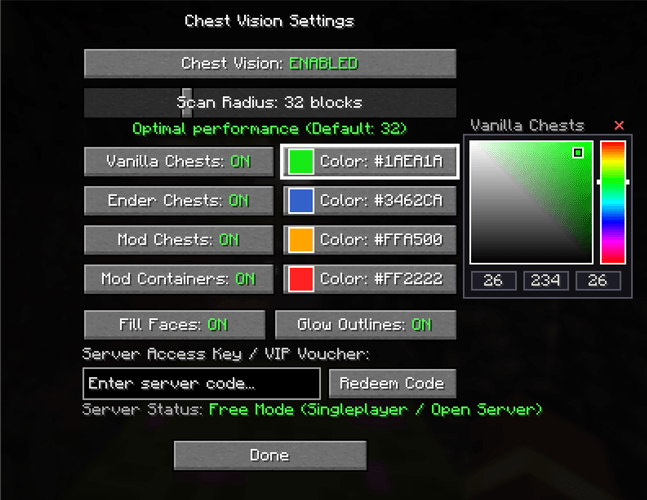
The menu (accessible at any time with the O key) gives full control:
- Master Switch: main button that shows the current state ([Chest Vision: ENABLED / DISABLED]).
- Scan Radius: slider from 8 to 96 blocks (default: 32). The mod warns about performance: up to 32 blocks is considered ideal; 33–48 may reduce FPS on slower systems; above 48 requires good CPU performance.
- Toggles per category: individually enable or disable Vanilla Chests, Ender Chests, Mod Chests, and Mod Containers.
- Color editor: built-in RGB selector on the same screen. Includes a 2D saturation and brightness box (click and drag), vertical hue bar (rainbow), real-time R/G/B values (0–255), and a color button next to each category. Clicking the color button selects that category and loads its current color into the picker for immediate editing.
- Render options:
- Fill Faces: the translucent colored film covering the six faces of the block (bright colored glass effect). On = volumetric fill; Off = 100% transparent interior.
- Glow Outlines: solid bright lines drawn only on the edges and corners of the block (wireframe). On = highlights the exact shape; Off = removes the hard outline.
- Possible combinations: both on (recommended, full visual), outlines only (clean wireframe), faces only (soft glow without lines), or both off.
- Code redemption: text field and button to enter authorization codes on servers.
Server System and Configuration
The mod automatically generates the file config/chestvision-server.json.
- Singleplayer / Free Mode: by default free_mode = true, allowing free and unlimited use when playing alone.
- Server usage: setting "free_mode": false gives the server full control (anti-cheat). You can define rules per player (nickname), including active time (e.g. 60 seconds of vision), cooldown (e.g. 1200 seconds = 20 minutes), allowed categories, and access codes (vouchers/VIPs). When a player types a valid code in the menu and clicks Redeem Code, the server validates it and grants the configured permissions.
- HUD Overlay: on servers with limited time, a discreet HUD timer shows the remaining active vision time and the remaining cooldown time.
Chest Vision was designed to be useful both in singleplayer and on servers that want to offer the feature in a controlled way, without compromising performance or server balance.
Chest Vision Team