Chest & Door Locks — Keypads, Key Fobs & Auto-Lock
- By
Lock chests, doors, storage, and machines with PIN keypads, programmable Key Fobs, Master Fobs, remote locking, Auto-Lock, multi-lock security, and a death-safe Secure Fob Slot. Designed for secure bases, servers, and multiplayer.
Description
Chest & Door Locks
Chest & Door Locks is a security and access-control mod for Minecraft Java that lets you protect chests, doors, storage blocks, machines, and other compatible targets with PIN keypads and programmable Key Fobs.
Built for survival worlds, multiplayer servers, shared bases, and anyone who wants proper access control without turning their base into a redstone project.
Features
- 4-digit PIN keypad locks
- Programmable Key Fobs
- Multi Key Fobs for controlling multiple aligned locks
- Master Key Fobs that combine multiple access profiles
- Remote lock and unlock from up to 20 blocks away
- Configurable Auto-Lock with delays up to 5 minutes
- Passive access while carrying a matching fob
- Secure Fob Slot that protects one fob outside normal inventory
- Secure Fob Slot persists through death
- Multi-lock support for supported storage blocks
- Reset and recovery safeguards
- Built-in Field Manual
- Responsive in-game interfaces
Supported Blocks
Chest & Door Locks can protect:
- Chests
- Trapped Chests
- Ender Chests
- Shulker Boxes
- Barrels
- Furnaces
- Smokers
- Blast Furnaces
- Dispensers
- Droppers
- Hoppers
- Wooden Doors
- Iron Doors
- Trapdoors
- Iron Trapdoors
- Fence Gates
- Compatible inventory block entities from other mods
PIN Keypads
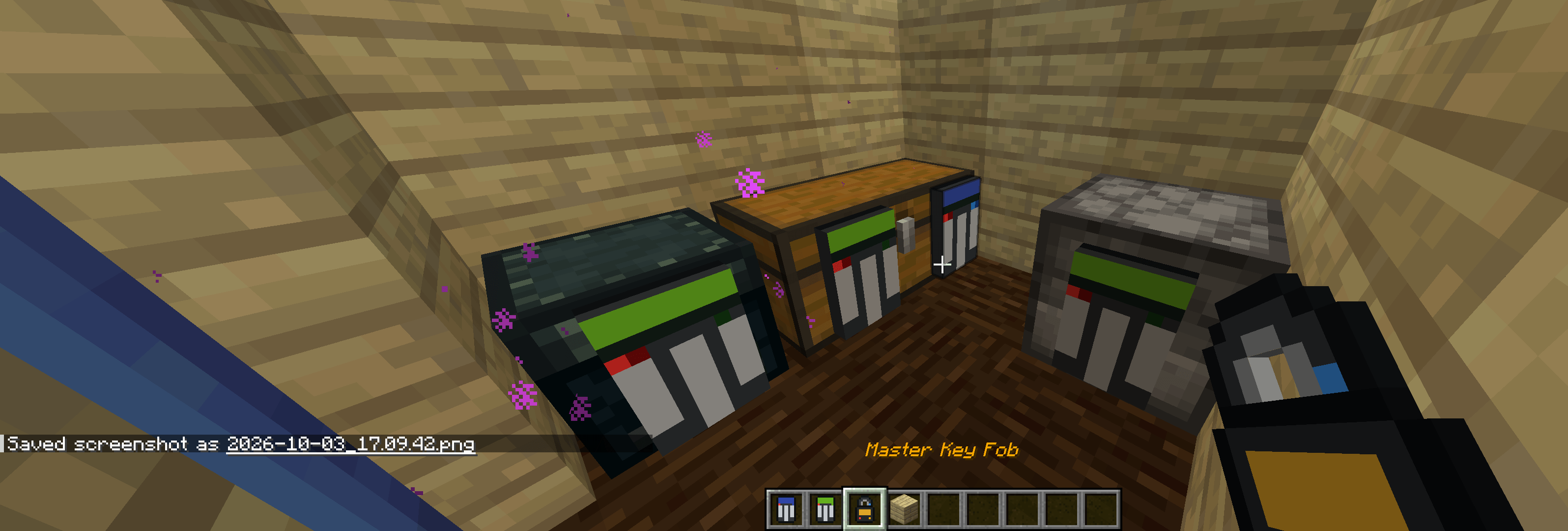
Place a PinLock on a supported block and configure a 4-digit PIN.
Each PinLock also uses an ordered 3-pane security pattern made from vanilla glass panes.
All 17 vanilla pane types are supported, giving you thousands of possible visual security combinations.
The center pane controls the visible accent color of the lock.
Key Fobs
Crafting a PinLock also creates a matching blank Key Fob.
A programmed Key Fob can:
- Grant passive access to matching locks
- Unlock the exact PinLock you are targeting
- Lock the exact PinLock you are targeting
- Work from up to 20 blocks away
- Authorize lock settings and removal
Multi Key Fobs
A Multi Key Fob lets one fob control multiple aligned locks that share the same access profile.
This is useful for:
- Large bases
- Multiple storage rooms
- Groups of doors
- Shared access systems
Master Key Fobs
Combine programmed Key Fobs in an anvil to create a Master Key Fob.
Master Fobs can contain multiple access profiles, allowing a single fob to authorize different groups of locks.
You can also merge additional fobs or other Master Fobs into an existing Master Fob.
Duplicate profiles are automatically ignored.
Remote Locking
While holding a matching Key Fob:
- Left-click the exact PinLock to unlock it
- Right-click the exact PinLock to lock it
Remote access works from up to 20 blocks away and always requires you to target the exact keypad you want to control.
Auto-Lock
Each PinLock can be configured to automatically relock.
You can choose:
- Immediate relocking
- A configurable delay
- Up to 5 minutes
Doors and similar blocks will attempt to close before locking and will retry if something blocks them.
Door Security
PinLocks can be mounted on doors without replacing the vanilla door itself.
The lock remains visually attached to the selected side of the door as it opens and closes.
This works with:
- Wooden Doors
- Iron Doors
- Trapdoors
- Iron Trapdoors
- Fence Gates
Multi-Lock Security
Some blocks support multiple PinLocks.
Examples include:
- Single Chest: up to 4 locks
- Double Chest: up to 6 locks
- Shulker Box: up to 4 locks
- Ender Chest: up to 4 locks
Every locked PinLock attached to the structure must authorize the player.
Secure Fob Slot
Your inventory includes a dedicated Fob Slot button.
Use it to move one Key Fob into PinLock's protected storage.
A fob stored there:
- Still grants passive access
- Is stored outside normal player inventory
- Persists through death
- Is protected from normal inventory drops
- Can be returned to your inventory at any time
This is the recommended place to store your main or Master Key Fob.
Death & Recovery
PinLock is designed to avoid losing important access credentials.
The Secure Fob Slot persists through death.
For normal inventory fobs, PinLock can attempt to move them to the player's Ender Chest before a normal death drop. If recovery storage is needed, Lost Fob recovery is also available.
PinLock also respects keepInventory so it does not unnecessarily move or duplicate fobs when inventory is already being preserved.
Reset & Recovery
If a protected storage block is completely empty, PinLock allows controlled reset options without requiring the old PIN.
This helps prevent abandoned locks while still preventing reset from becoming a storage bypass.
Built-In Field Manual
No external guide mod is required.
Hold a Key Fob and press:
Shift + M
to open the built-in Field Manual.
The manual includes:
- Setup instructions
- Recipes
- Key Fob types
- Master Fob creation
- Bulk programming
- Secure Fob Slot
- Auto-Lock
- Doors
- Multi-lock behavior
- Reset and recovery
- Supported targets
- Controls
Main Recipe
[Glass Pane] [Glass Pane]    [Glass Pane]
[Iron Ingot] [Lightning Rod] [Iron Ingot]
[Redstone]   [Redstone]      [Redstone]
The three panes determine the security pattern.
Crafting a PinLock creates:
- 1 PinLock
- 1 matching blank Key Fob
Requirements
- Minecraft Java Edition 1.21.1
- Fabric Loader
- Fabric API
- Java 21
Compatibility
This release is built and tested specifically for:
Minecraft 1.21.1 + Fabric
Other Minecraft versions should not be assumed compatible unless a dedicated build is released for them.
Great For
Chest & Door Locks is especially useful for:
- Multiplayer servers
- Shared survival bases
- Roleplay servers
- Faction-style gameplay
- Protected storage rooms
- Secure machine rooms
- Private player areas
- Advanced base security
If you want proper PIN-based access control, programmable Key Fobs, remote locking, and secure storage without relying on command blocks or complicated redstone, Chest & Door Locks gives you a complete in-game security system.
Chest & Door Locks — Keypads, Key Fobs & Auto-Lock Team