Celestial Showers
- By
Bring the night sky to life with immersive shooting stars, comets, and meteor showers inspired by real-world astronomy. Plus ruins, secrets, and a touch of celestial magic!
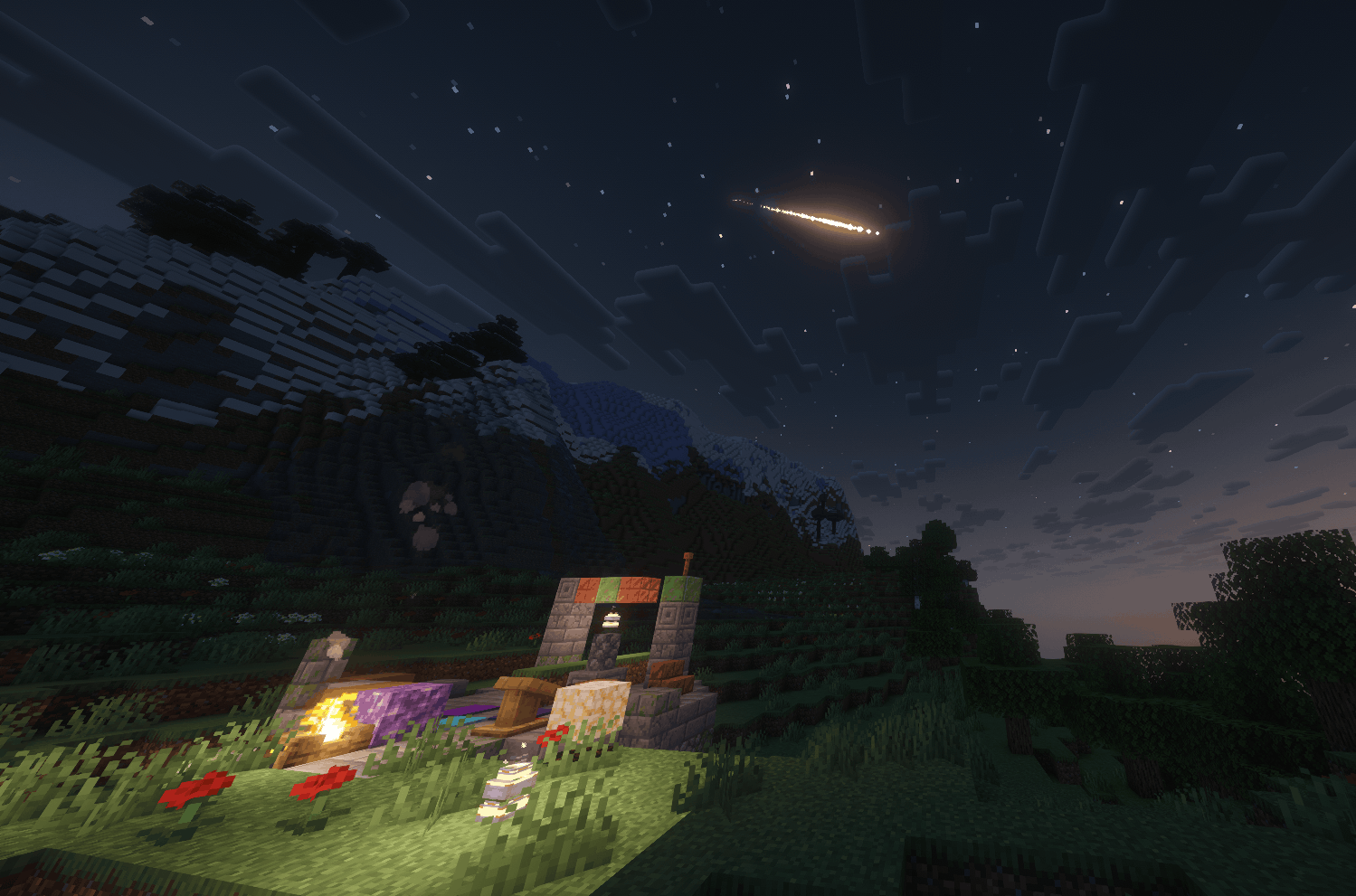
A beautiful shooting star visible over a snowy mountain and stargazer camp ruins.
Description
Celestial Showers
Celestial Showers is a lightweight, vanilla-friendly night-sky mod that adds shooting stars, slow-moving comets, meteor showers, and a few useful discoveries waiting below.
Make a wish, watch the sky through a spyglass, follow a falling meteorite, and bring a little starlight home.
With mountaintop Stargazer Camps, a personal skywatch journal, and glowing decorations, Celestial Showers fits naturally into survival, exploration, and vanilla+ worlds.





Version 0.7.4 Beta
Version 0.7.4 adds Reduced Flashes for softer bright effects and Sky Events: Rare for quieter nights. Meteorite landings keep their own frequency setting.
The reusable Star Chart, glowing Stardust Blocks, and existing skywatching features are all here too!
Available now: Minecraft 1.21.1 for NeoForge and Fabric!!! Choose the download that matches your loader. Fabric also requires Fabric API for Minecraft 1.21.1.
Coming soon: Minecraft 26.2 versions for NeoForge and Fabric.
Features
Shooting stars and comets: Watch bright trails cross clear night skies, including rare blue-and-gold comets.
Rare sky event: A special, rare event for lucky skywatchers.
Make a wish: Look toward a shooting star or comet and right-click with an empty main hand for temporary Luck. Each player can make one successful wish per night.
Meteor showers: Enjoy streaks of light overhead. Choose how many particles you see and whether you want event alerts.
Meteorite discoveries: Meteorites can land nearby, leaving Meteorite Blocks you can mine for Stardust. You can adjust how often they land separately from the light shows above.
Useful Stardust: Use Stardust under open sky at night for five minutes of Night Vision and two minutes of Luck, or save it for crafting.
Star Lanterns and Stardust Blocks: Bring a little starlight into your builds with glowing storage blocks and warm celestial lanterns. Place lanterns on a surface or hang them from above.
Star Chart and skywatch journal: Check the forecast, record observations with a spyglass, and work toward skywatching advancements.
Stargazer Camps: Discover small mountaintop ruins while exploring new terrain. Cartographers can also offer maps to help you find them.
Easy configuration: Change how often events happen, turn meteorite damage on or off, and adjust the visual effects to suit your world. Choose Sky Events: Rare for quieter nights, or Reduced Flashes for softer bright effects. Each player can choose their own visual settings in multiplayer.
How It Works
Head outside on a clear night under open sky and look up. When a shooting star or comet passes, look toward its path and right-click with an empty main hand to make a wish.
Bring a spyglass to watch the sky and fill out your journal. Craft a Star Chart with three paper, one Stardust, and one compass to keep the forecast and journal close at hand. Right-click to read the forecast in chat, or sneak and right-click to read your journal. You can use the chart as many times as you like.
If a meteorite lands nearby, find it and mine it for Stardust. Combine one Stardust and one vanilla lantern to craft a Star Lantern, or craft nine Stardust into a Stardust Block. You can turn the block back into all nine Stardust whenever you need them.
For a longer trip, explore the mountains for a Stargazer Camp and a new place to watch the night sky.
Configuration for Players and Modpack Authors
Choose how often celestial events appear and meteorites land, turn comets and Stardust blessings on or off, and adjust how many particles you see. Sky Events: Rare reduces sky activity. Physical meteorite landings have their own frequency setting.
Turn Reduced Flashes on to soften bright cores and trails and replace the meteor impact flash and flames with gentler effects. It works separately from Visual Density. Neither visual setting changes event timing, rewards, or damage.
NeoForge: Open the mod's settings from the Mods menu.
Fabric: Use /celestialconfig to open the settings. Server owners can also change the server config file and restart the server to apply their changes.
A few handy commands:
/celestialshowers forecastto check the sky forecast./celestialshowers journalto read your skywatch journal./celestialshowers alerts off,/celestialshowers alerts chat, or/celestialshowers alerts actionbarto choose where alerts appear. Alerts start turned off.
Want gentler meteorites? Turn Meteor Impact Damage off to prevent small craters and damage to nearby players and mobs. Meteorites can still leave a block to collect. Set Meteorite Impact Frequency to Off to stop natural meteorite landings while keeping the light shows in the sky.
Land-claim mods aren't directly supported, so turn off physical impacts if you need to keep claimed builds safe.
FAQ
Which Minecraft versions and loaders are available?
Version 0.7.4 Beta is available for Minecraft 1.21.1 on NeoForge and Fabric.
Versions for Minecraft 26.2 on both loaders are coming soon. Choose the download matching your exact Minecraft version and loader.
Do I need NeoForge?
You can use either NeoForge or Fabric. Install one loader and the matching Celestial Showers file.
Does it need any dependencies?
NeoForge: No additional mods are required.
Fabric: Install Fabric API for Minecraft 1.21.1 alongside Celestial Showers.
Both Minecraft 1.21.1 builds require Java 21.
Does it need to be installed on both client and server?
Yes! For multiplayer, the server and every player need the matching version of Celestial Showers installed.
Will meteor showers damage my world?
The light shows in the sky won't damage anything. Meteorites that actually land can cause small craters and nearby damage when enabled. You can turn off their damage or stop natural meteorite landings entirely in the settings.
Can I use this in an existing world?
Yes! Sky events and meteorites can appear in existing worlds. To find Stargazer Camps, explore new areas that haven't been generated yet.
Keep a world backup when trying the beta or changing mod versions.
Does the Star Chart open a menu?
In 0.7.4, the Star Chart displays information in chat. Right-click for the forecast, or sneak and right-click for your skywatch journal.
Can I use this in a modpack?
Yes! Feel free to include it in your modpack and adjust the settings to fit your world.
Beta Notes and Compatibility
Version 0.7.4 is still a beta. Shaders and large modpacks haven't been fully tested.
- Land-claim and protection mods aren't directly supported. Disable physical meteorite impacts if you need to protect claimed builds.
Feedback and Bug Reports
Found a bug or have an idea? Please include your Minecraft version, loader, and Celestial Showers version, along with a quick description of what happened. A log or screenshot helps too!
Feedback is always appreciated. <3 -Parzival000
Celestial Showers Team