🪓 Breaker
A Smart Combat Helper for Minecraft
Stop wasting time switching weapons manually during combat. Breaker helps you handle shield-breaking axe swaps, restore your original weapon, and coordinate optional Stun Slam combos through a clean, custom red settings GUI.
Designed as a focused combat quality-of-life helper, Breaker automates specific weapon-switching and attack-timing tasks while keeping you in control of your settings.
---
⚔️ Key Features
🪓 Automatic Shield Breaker: Detects shield-blocking opponents during combat and automatically switches to an available axe in your hotbar to help break their defense. When the action is finished, Breaker can restore your original hotbar slot after a configurable delay.
💥 Stun Slam Combo: An optional aerial combat feature that coordinates axe-to-mace attacks while falling. Configure the minimum fall distance to control when the combo can activate. Keep an axe and a mace in your hotbar for the intended combo.
🔄 Original Slot Restoration: Automatically returns you to your previous hotbar slot after a weapon swap, helping you continue fighting with your preferred weapon instead of having to switch back manually.
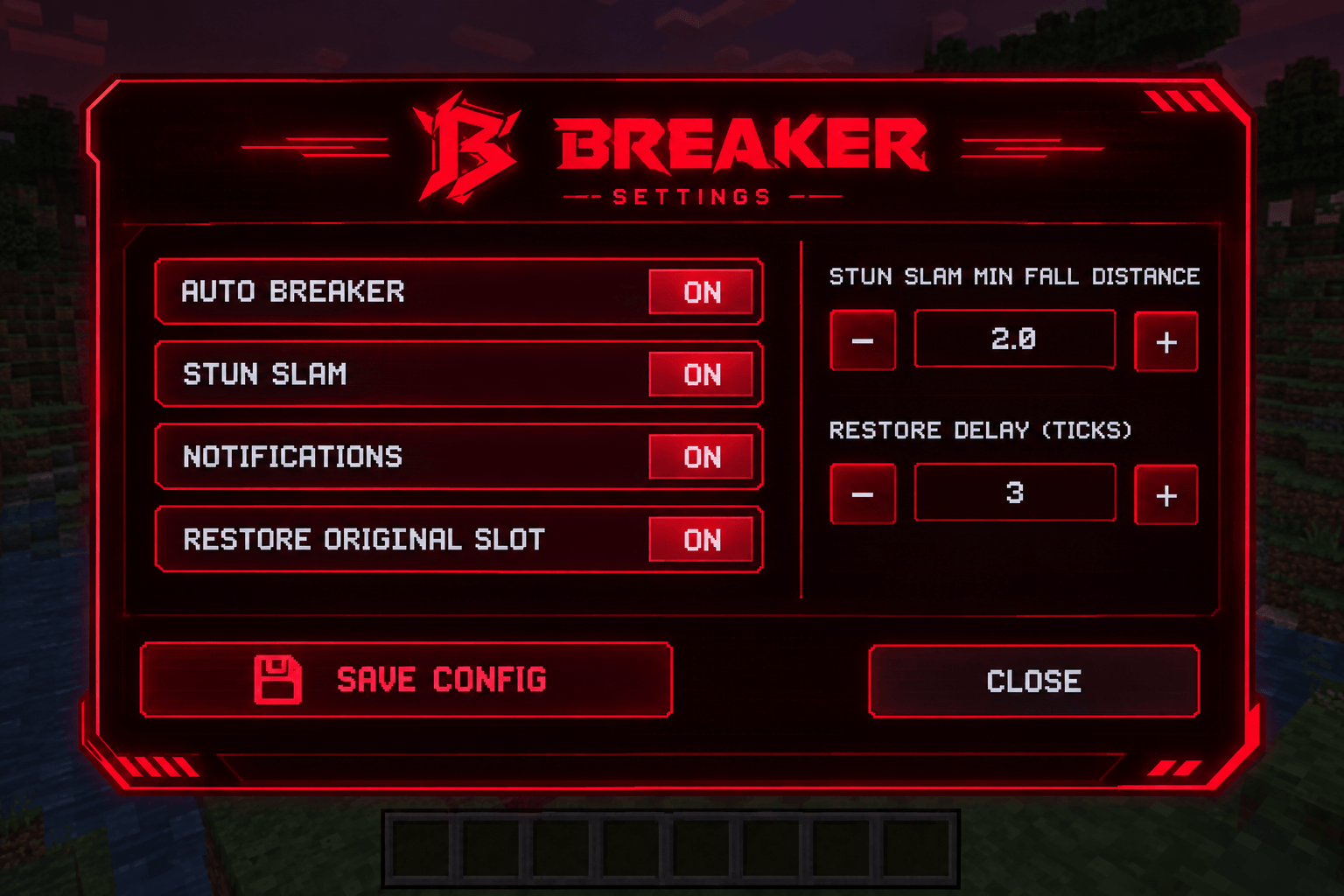
🎛️ Custom BREAKER Settings GUI: Open the distinctive red futuristic interface to manage Auto Breaker, Stun Slam, notifications, original-slot restoration, minimum fall distance, and restore delay.
🔔 Configurable Notifications: Enable or disable in-game notifications for Breaker activity and settings feedback.
⌨️ Quick Controls: Toggle the main feature without opening the GUI, or use the available commands to adjust individual settings while playing.
💾 Persistent Configuration: Save your preferences to "config/breaker.properties" so your settings can be retained between sessions.
⚙️ Configurable Combat Timing: Adjust the restore delay from 1–8 ticks and the Stun Slam minimum fall distance from 1–6 blocks.
---
🎮 Controls & Commands
Keyboard Controls
- Right Ctrl: Open or close the Breaker settings GUI.
- G: Toggle Breaker on or off.
You can change these keybinds through Minecraft's Controls settings if the bindings conflict with another mod.
Commands
All commands below use Breaker's client-side command system.
Command| Function
"/breaker open"| Opens the Breaker settings GUI.
"/breaker toggle"| Toggles Breaker on or off.
"/breaker enabled true"| Enables the main feature.
"/breaker enabled false"| Disables the main feature.
"/breaker stunslam"| Toggles Stun Slam.
"/breaker stunslam true"| Enables Stun Slam.
"/breaker stunslam false"| Disables Stun Slam.
"/breaker notifications"| Toggles notifications.
"/breaker notifications true"| Enables notifications.
"/breaker notifications false"| Disables notifications.
"/breaker restore"| Toggles original-slot restoration.
"/breaker restore true"| Enables original-slot restoration.
"/breaker restore false"| Disables original-slot restoration.
"/breaker delay 3"| Sets the restore delay to 3 ticks. Valid range: 1–8.
"/breaker fall 2.0"| Sets the Stun Slam minimum fall distance to 2 blocks. Valid range: 1–6.
"/breaker status"| Displays the current configuration.
"/breaker save"| Saves the current settings.
"/breaker reload"| Reloads settings from the configuration file.
Tip: Start with the GUI if you prefer a visual interface. Use commands when you want to adjust a setting quickly without navigating the menu.
---
🛡️ Multiplayer & Server Compatibility
Singleplayer / Integrated Server
Breaker is designed to work in singleplayer without requiring a separate dedicated server installation. Its client-side combat features run in your local game.
Multiplayer Servers
Multiplayer behavior depends on the server's support and permission settings. The included compatibility system checks whether the server explicitly allows Shield Breaker functionality.
- Servers must provide compatible server-side opt-in support for the protected combat functionality.
- The server-side allowance defaults to disabled.
- If the server does not support or permit the feature, Breaker cannot simply force it to activate.
- Always check the server's rules before using combat automation, particularly on competitive PvP servers.
Breaker is a client-side Fabric mod, not a standalone server plugin. Installing it on your client alone does not guarantee that every multiplayer server will support its combat features.
---
🤝 A Combat Helper, Not a Hacked Client
Breaker focuses on helping with specific combat actions that would otherwise require quick, precise weapon switching and timing.
It is not designed as an all-purpose hacked client and does not advertise features such as X-ray, reach modification, or aim assistance. Its purpose is to streamline supported combat actions using your available weapons and configurable settings.
Because it automates some combat inputs, individual servers may still classify its use differently under their rules. Server permission and fair-play policies take priority.
---
🚀 How to Get Started
1. Install the compatible Fabric Loader, Fabric API, and Breaker version.
2. Launch Minecraft and enter a singleplayer world or a compatible multiplayer server.
3. Press Right Ctrl to open the Breaker GUI.
4. Enable Auto Breaker and configure Stun Slam, notifications, and weapon restoration as desired.
5. Keep the necessary axe and, for the intended aerial combo, mace in your hotbar.
6. Save your configuration and test the behavior in a safe environment before using it in serious PvP.
---
📋 Compatibility
- Minecraft: 26.2
- Mod Loader: Fabric
- Fabric Loader: 0.19.5 or newer
- Dependency: Fabric API
- Java: 25 or newer
- Environment: Client-side
- Singleplayer: Designed to work locally
- Multiplayer: Requires compatible server-side opt-in support for protected combat functionality
---
Breaker — faster weapon switching, configurable combat timing, and a cleaner fighting experience.