Block ESP
A clean, instant Block ESP for Fabric — Minecraft 1.21.11
Overview
Block ESP is a lightweight, fully configurable Block ESP (Extra Sensory Perception) mod for Minecraft. It draws wireframe outlines around the blocks you choose — ores, chests, shulker boxes, spawners, vaults, suspicious sand, sculk, and any of the ~1200 blocks in the game — visible through walls.
Toggle it with a single key. No chunk reload. No freeze. No client/server lag. Just press X and every block you've selected lights up instantly.
Why this ESP and not another?
- Instant toggle — no chunk re-mesh, no freeze, no waiting for chunks to reload. Press X, ESP is on. Press X again, it's off.
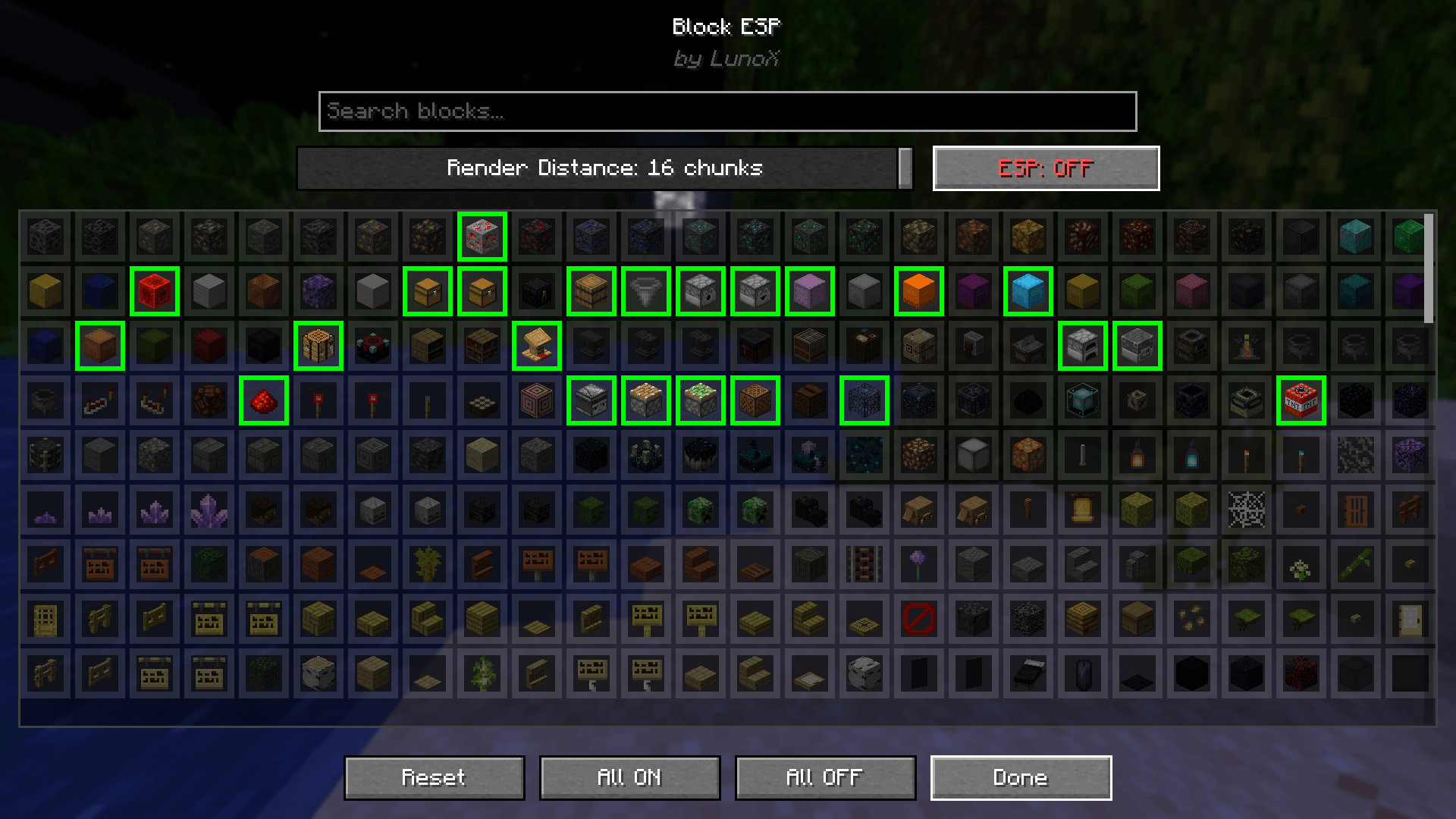
- Pick exactly what you see — a searchable grid of icons exposes the entire Block registry. Search by name in your game's language (English or French), tick what you want.
- Sensible defaults — by default the ESP enables ores (overworld + deepslate + nether), all 17 shulker box variants, chests / barrels / hoppers / dispensers, crafting utility blocks, redstone, spawners, trial spawners, vaults, infested blocks, suspicious sand/gravel, sculk, light sources, amethyst, player heads, end portal frames, dragon egg, beacon, conduit, respawn anchor — and more.
- Color-coded — every default block has a pre-assigned outline color (diamond = cyan, gold = yellow, emerald = green, redstone = red, chests = gold, spawners = light blue, etc.).
- ModMenu integration — a full in-game config screen with a search bar, render-distance slider, ESP ON/OFF toggle, scrollable grid of icons, and Reset / All ON / All OFF / Done buttons.
- Performance-first — the render loop uses a primitive long hashset (no autoboxing), pre-decoded color channels, and a throttled incremental chunk scanner. 100k+ highlighted blocks no longer tanks your FPS.
- Bilingual — English (en_us) and French (fr_fr).
Features
- Toggle with X — instant on/off, no chunk reload.
- Searchable grid of every block in the game (~1200 blocks).
- Render distance slider — 1 to 16 chunks around the player.
- Pre-assigned colors for the catalog blocks (ores, containers, spawners, etc.).
- Background scanner — daemon thread pool, never blocks the render thread.
- Chunks re-scan as the player moves (throttled, distance-sorted queue).
- Connected outlines — adjacent enabled blocks share edges (clean look, fewer vertices).
- HUD toast — a green "✓ ESP ON" or red "✗ ESP OFF" pill appears above the hotbar for ~3s after each toggle.
- ModMenu config screen — search bar + slider + grid + ON/OFF + Reset / All / Done.
- Client-side only — works on any vanilla server. The server doesn't see anything.
Installation
- Install Fabric Loader 0.17.0 or newer for Minecraft 1.21.11.
- Install Fabric API.
- (Optional) Install ModMenu for the in-game config screen.
- Drop blockesp-1.0.0.jar into your
.minecraft/mods/ folder.
- Launch Minecraft 1.21.11 with the Fabric profile.
Usage
|
|
|
| Press X in-game |
Toggle ESP on/off (instant) |
| ModMenu → Block ESP → Configure |
Search bar + render distance slider + ON/OFF + scrollable grid of icons |
| Esc → Options → Controls |
Rebind the key (category "Block ESP") |
<button class="absolute top-1 right-1 z-10 p-1.5 rounded-lg bg-[#f7f7f7] dark:bg-[#272A2F] hover:bg-[#E5E5E5] dark:hover:bg-[#272A2F] opacity-0 group-hover/table:opacity-100 transition-opacity duration-200"></button>
Default highlighted blocks
- Ores — coal, iron, copper, gold, redstone, lapis, diamond, emerald (overworld + deepslate variants), nether quartz, nether gold, ancient debris, gilded blackstone.
- Storage / loot — chest, trapped chest, ender chest, barrel, hopper, dispenser, dropper, all 17 shulker box variants.
- Crafting / utility — crafting table, enchanting table, chiseled bookshelf, bookshelf, lectern, anvil (all states), smithing table, loom, cartography table, fletching table, grindstone, stonecutter, furnace, blast furnace, smoker, brewing stand, cauldron (all variants).
- Redstone — repeater, comparator, redstone lamp, wire, torch, lever, daylight detector, target, observer, piston, sticky piston, note block, jukebox.
- Spawners & special — spawner, trial spawner, vault, dragon egg, beacon, conduit, respawn anchor, end portal frame, end portal, end gateway.
- Dangerous / useful — TNT, obsidian, crying obsidian, reinforced deepslate.
- Infested blocks — all 7 silverfish variants.
- Archaeology — suspicious sand, suspicious gravel.
- Sculk — sculk, shrieker, catalyst, sensor, calibrated sensor, vein.
- Light sources — glowstone, sea lantern, shroomlight, end rod, lantern, soul lantern, torch, soul torch, glow lichen.
- Amethyst — budding, small / medium / large bud, cluster.
- Player heads & skulls — player, skeleton, wither skeleton, zombie, creeper, dragon, piglin (head + wall variants).
- Misc valuable — lightning rod, bell, sponge, wet sponge, cobweb.
Performance
Block ESP is built around a background scanner running on a daemon thread pool, completely decoupled from the render thread. The render loop only reads a pre-built list of targets and draws wireframe outlines — it never touches world data.
The hot path has been heavily optimized:
- Position lookups use a primitive
LongOpenHashSet (fastutil) — no Long autoboxing on the contains() calls.
- Color channels (r, g, b, a) and the packed ARGB int are pre-decoded at scan time inside each
EspTarget record — no per-frame bit-shifting.
- The render thread takes a single per-frame snapshot under a
ReadWriteLock and uses it lock-free.
- The chunk scanner is throttled (max 8 chunks/tick) and sorted by Manhattan distance to the player — the chunks nearest to you light up first.
Math.sqrt removed from the line rasterizer — cube edges are axis-aligned, the normal is already a unit vector.
Compatibility
- Minecraft 1.21.11 (only).
- Fabric Loader 0.17.0+.
- Fabric API (required).
- ModMenu 17.0.1 (optional, but strongly recommended — without it you can't open the config screen).
- Java 21+.
- Client-side only — safe on any vanilla server. Doesn't modify any server behavior.
Frequently Asked Questions
Q: Can I use this on a server? Yes. Block ESP is 100% client-side. The server doesn't even know you have it installed. Works on vanilla servers, Realms, and any modded server that allows client mods.
Q: Will this get me banned? It depends on the server's rules. Block ESP is a "client enhancement" that gives you an unfair advantage — most PvP servers and competitive servers ban it. Survival servers, private servers, and your own worlds are fine. Always check the server's rules before using it.
Q: Can I add my own blocks? Yes. Open ModMenu → Block ESP → Configure, and use the search bar to find any block in the game. Tick the ones you want. User-enabled blocks that aren't in the catalog use white outlines by default.
Q: How do I change the colors? Colors are currently defined in the source code (EspBlocks.java). Edit the catalog and rebuild to change the defaults. A config-screen color picker is planned for a future release.
Q: Why no chunk re-mesh like other ESP mods? Chunk re-meshing causes the freeze you see in older ESP mods. Block ESP draws the outlines as a separate overlay on top of the world, using a custom RenderType with NO_DEPTH_TEST — that's why the outlines are visible through walls and why the toggle is instant.
Credits & License
- Author — LunoX
- License — MIT (free to use, modify, redistribute with attribution)
If you like the mod, please leave a comment / favorite on the project page — it really helps with visibility. Thanks!