Block & Mob Info HUD - What Am I Looking At
- By
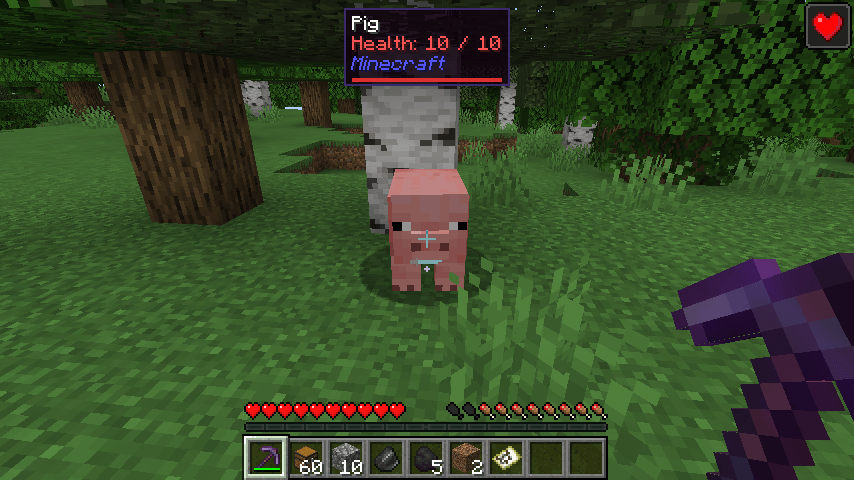
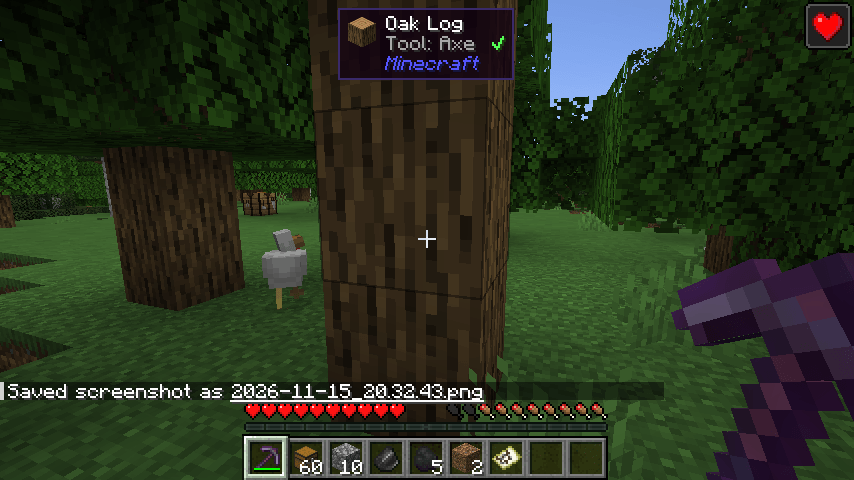
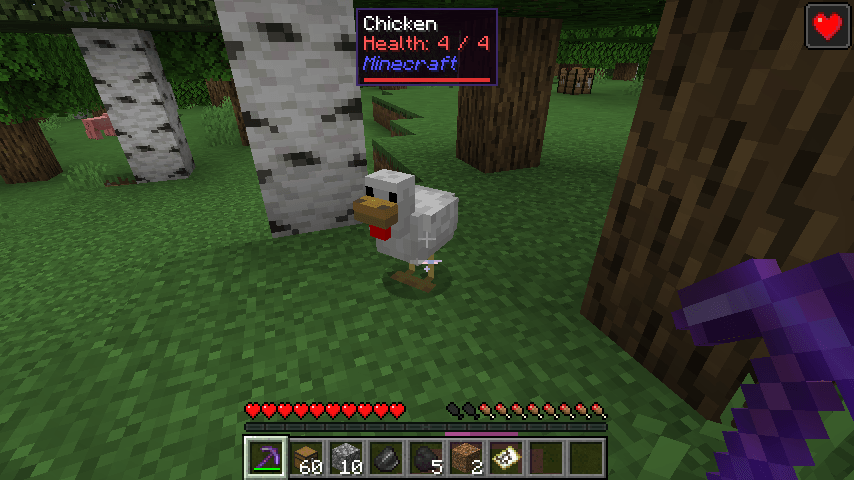
A small panel at the top of your screen tells you which block or mob you're looking at, its health, which tool you need and which mod it comes from. Client side
2026-11-15_20.33.32.png
2026-11-15_20.32.58.png
2026-11-15_20.32.45.png
2026-11-15_20.32.43.png
Description
## What is that block?
Modpacks add hundreds of new blocks and mobs. Is this ore from Create or from a tech mod? Do I need an iron pickaxe? How much health does that mob have left?
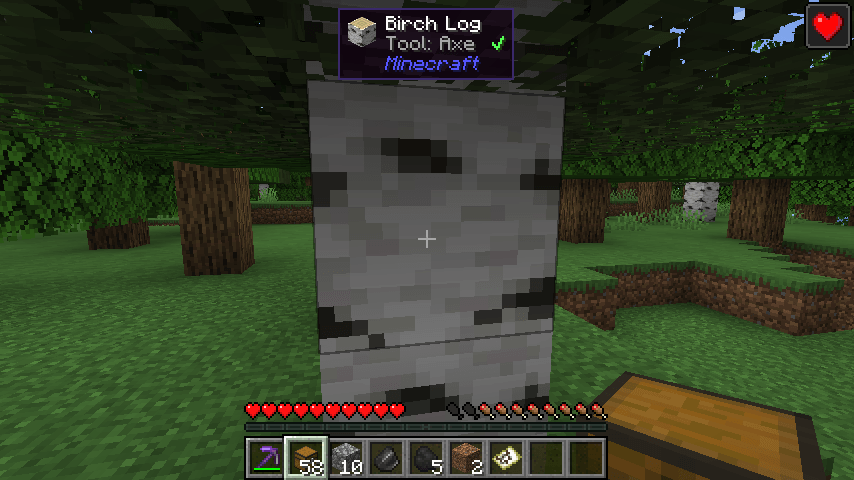
**Block & Mob Info HUD** answers it the moment you look at something. A tidy panel at the top of the screen shows:
## Features
- **Blocks:** item icon, name, and the **tool you need** (pickaxe, axe, shovel, hoe) with a green ✔ if your held item can harvest it or a red ✘ if it can't.
- **Unbreakable** blocks (bedrock, barriers) are labelled as such.
- **Mobs and animals:** name, **health in numbers** ("Health: 14 / 20") and a red health bar.
- **Mod name** under everything, so you always know which mod a block or mob comes from - very handy in big modpacks.
- Hides itself when you press F1, open F3 or open a menu.
- No key needed - just look at something.
## Settings
The file `config/cleanblockinfo.properties` is created on first launch:
- `enabled` (true)
- `showBlocks` / `showMobs` (true)
- `showModName` (true)
- `showTool` (true)
- `offsetY` - distance from the top of the screen (4)
- `scale` - panel size (1.0)
## Works on servers
This is a **client-side only** mod. It shows information about the block or mob your crosshair is already pointing at, using only what your game already knows. It doesn't see through walls or show anything hidden. Works on any server and on Realms.
## Honest limitations
- Mob health comes from your game; on some servers (with plugins that hide health) it may show a wrong or full value.
- It doesn't show chest contents, crop growth or machine energy - just name, tool, health and mod.
- Blocks from other mods only show the right tool if that mod uses the normal Minecraft tool tags (most do).
- If another mod (like Jade or WTHIT) also shows a panel at the top, you'll see two - turn one off.
- The settings are in a config file; there is no in-game settings screen yet.
## Requirements
- Minecraft 1.21 / 1.21.1
- Fabric Loader 0.16 or newer
- Fabric API
- Java 21
## Installation
1. Install Fabric Loader for Minecraft 1.21.1.
2. Put **Fabric API** and **Block & Mob Info HUD** in your `mods` folder.
3. Start the game.
## Modpacks
You are welcome to include this mod in any modpack. No need to ask.
## Also by this author
- **Map Preview Tooltip** - see a map's picture by hovering over it in your inventory
- **Biome Titles** - a big fading title when you enter a new biome or dimension
- **Clean Item Finder** - search box above chests: matching items light up
- **Clean Background FPS** - lower FPS and volume while Minecraft is in the background
- **Clean Auto Reconnect** - automatically rejoins the server after a disconnect
- **Clean Keystrokes** - WASD, mouse buttons and CPS on screen for PvP and streaming
- **Clean Item Mover** - Shift + drag and scroll to move items faster in any inventory
- **Clean Outline** - custom block outline and crosshair: color, thickness, rainbow
- **Clean Chat Heads** - player faces next to chat messages, optional timestamps
- **Light Level Overlay** - press F7 to see where mobs can spawn
- **Clean Ping Display** - real ping numbers in the Tab list
- **Clean Horse Stats** - a horse's speed, jump and health at a glance
- **Clean Info HUD** - coordinates, facing, biome and FPS in a tidy panel
- **Status Effect Timers** - your potion effects as a clean list with countdowns
- **Death Location Helper** - an on-screen arrow back to where you died
- **Item Pickup Notifier** - see everything you pick up at the side of the screen
- **Smooth Zoom** - hold a key to zoom, scroll to change the zoom level
- **Item Container Preview** - see Shulker Box contents in the tooltip
- **Clean Tooltip Enchants** - color-coded enchantments with (MAX) tags
- **Smart Torch Placer** - place torches with one key, optional Auto-Light for mining
- **Smart Crop Harvest** - right-click ripe crops to harvest and replant
- **Floating Damage Indicators** - damage, heal and crit numbers above mobs
- **Smart Tool Safety** - durability warnings and tool break protection
- **Smart Chest Organizer** - sort buttons and quick deposit for chests
- **Dynamic Armor HUD** - armor, held item and arrow durability on screen
- **Smart Auto-Trash** - quickly trash or auto-throw junk items
- **Dynamic Item Glow** - rarity colors and glow for items
## About the images
The project logo is an illustration created with AI assistance; it is not an in-game screenshot. The screenshots in the gallery are real, unedited in-game captures.
Block & Mob Info HUD - What Am I Looking At Team