Block Inspector Deluxe
- By
A lightweight client-side Fabric mod that shows detailed information about the block you're looking at in a clean, movable HUD.
BlockInspectorDeluxe.png
Description
🔍 Block Inspector Deluxe
Know what you're looking at. Instantly.
Block Inspector Deluxe is a lightweight client-side Fabric mod that displays useful information about the block you're currently looking at directly in a clean and compact HUD.
No commands. No server installation. Just look at a block and get the information you need.
✨ Features
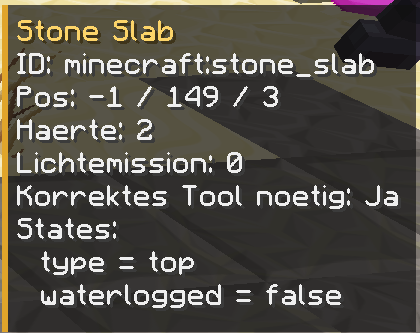
When looking at a block, Block Inspector Deluxe can display:
-
🧱 Block ID
-
📍 Exact block coordinates
-
⛏️ Block hardness
-
💡 Light value
-
🛠️ Whether the correct tool is required
-
⚙️ Block states and properties
Block states can provide additional information depending on the block, such as orientation, age, level and other Minecraft block properties.
🖥️ Movable HUD
The Block Inspector HUD can be repositioned directly in-game.
Default controls
I – Toggle Block Inspector on/off
O – Enter or leave HUD move mode
Arrow Keys – Move the HUD
Shift + Arrow Keys – Move the HUD faster
R – Reset the HUD position
Your settings and HUD position are saved automatically.
All keybindings can also be changed through Minecraft's normal controls menu.
💻 Client-Side Only
Block Inspector Deluxe runs entirely on the client.
✅ Works on multiplayer servers
✅ No server-side installation required
✅ Does not modify blocks or gameplay
✅ No additional server permissions required
Simply install it on your Minecraft client and use it.
📦 Requirements
-
Minecraft: 1.21.11
-
Mod Loader: Fabric
-
Fabric Loader: 0.18.0 or newer
-
Fabric API: 0.141.3 or newer
-
Java: 21 or newer
🌍 Languages
-
🇬🇧 English
-
🇩🇪 Deutsch
🛡️ Lightweight by Design
Block Inspector Deluxe focuses on doing one job without unnecessary extras.
The information is displayed only while playing and looking at a valid block, keeping the mod lightweight and unobtrusive.
📜 License
All Rights Reserved
🏷️ About
Developed by ClipCraftStudios
🇩🇪 Deutsch
🔍 Block Inspector Deluxe
Sieh sofort, was vor dir liegt.
Block Inspector Deluxe ist eine leichte clientseitige Fabric-Mod, die dir direkt im Spiel nützliche Informationen über den Block anzeigt, den du gerade anschaust.
Keine Befehle. Keine Serverinstallation. Einfach einen Block ansehen und die Informationen direkt im HUD erhalten.
✨ Funktionen
Beim Anschauen eines Blocks können unter anderem folgende Informationen angezeigt werden:
-
🧱 Block-ID
-
📍 Exakte Blockkoordinaten
-
⛏️ Blockhärte
-
💡 Lichtwert
-
🛠️ Ob das korrekte Werkzeug benötigt wird
-
⚙️ Block States und Eigenschaften
Die Block States können je nach Block zusätzliche Informationen wie Ausrichtung, Alter, Level und weitere Minecraft-interne Eigenschaften anzeigen.
🖥️ Verschiebbares HUD
Das HUD des Block Inspectors kann direkt im Spiel verschoben werden.
Standard-Tasten
I – Block Inspector ein-/ausschalten
O – Verschiebemodus starten oder beenden
Pfeiltasten – HUD verschieben
Shift + Pfeiltasten – HUD schneller verschieben
R – HUD-Position zurücksetzen
Die Einstellungen und die Position des HUDs werden gespeichert.
Die Tasten können außerdem ganz normal über die Minecraft-Tastenbelegung geändert werden.
💻 Nur clientseitig
Block Inspector Deluxe läuft vollständig auf deinem Minecraft-Client.
✅ Funktioniert auf Multiplayer-Servern
✅ Keine Installation auf dem Server erforderlich
✅ Verändert keine Blöcke oder Spielmechaniken
✅ Keine zusätzlichen Serverrechte erforderlich
Einfach auf dem eigenen Client installieren und loslegen.
📦 Voraussetzungen
-
Minecraft: 1.21.11
-
Mod Loader: Fabric
-
Fabric Loader: 0.18.0 oder neuer
-
Fabric API: 0.141.3 oder neuer
-
Java: 21 oder neuer
🌍 Sprachen
-
🇬🇧 English
-
🇩🇪 Deutsch
🛡️ Bewusst schlank gehalten
Block Inspector Deluxe konzentriert sich auf eine Aufgabe und verzichtet auf unnötigen Ballast.
Die Informationen erscheinen direkt im Spiel, während du einen Block anschaust, und bleiben dabei kompakt und unaufdringlich.
📜 Lizenz
All Rights Reserved
Entwickelt von ClipCraftStudios
The Block Inspector Deluxe Team