Bigfoot: Into the Woods
- By
A legendary cryptid lurking in the forests and mountains, growing more dangerous with each encounter.
Support me and get a MC Server!
Create your game server with 

Bigfoot: Into the Woods adds two new monster to your world. Bigfoot will appear in forests and the Yeti in snow biomes. Both work almost the same with just a few differences. Beforehand, they initially ignore the player, but when a player kills animals in these biomes, it increases the probability of making these creatures aggressive. Bigfoot will watch the player first, but the yeti attacks directly. After further killing of animals, bigfoot will also become aggressive. Both creatures are strong and can withstand a lot, and if they get hungry, they will eat the player too...
● A mod made by Zcoper
● Mod created with MCreator!
● Requires Geckolib:
GeckoLib 1.19.2 Version
GeckoLib 1.19.4 Version
GeckoLib 1.20.1 Version
● Visit my Discord Server!
https://discord.gg/akP56NtmVQ
● Important FaQ
► [OLD] What is my console spaming?
Most mobs use special spawning conditions, which means that these mobs can only appear under certain conditions. If the spawning conditions work, this spam is created in the console.
► [OLD] Why are Mobs not spawning?
Spawning Conditions determine which conditions must be met in order to spawn certain mobs. Some mobs only spawn above Y level 60. Some below. Most mobs can only spawn in the overworld than in other dimensions.
► Why are features missing in different versions?
It is recommended to play the newest versions of higher minecraft versions.
Not all features of MCreator available or the same in different versions.
For example: Version 1.19.2 doesn't have the feature of shield, better structure generation or custom villagers, but Version 1.20.1 does have them.
► How can I reset my kills and the phase of bigfoot?
If you kill an animal in a forest or snow biome, your counter goes one up.
With 8 kills, the second phase of bigfoot is active. With 16 kills, the third phase of bigfoot is active.
You can reset those counts with the command /reset_kills to reset your kill count to 0.
You can also change the number of the gamerule "bigfootPhase" to 0, 1 or 2.
► How can I disable despawning for Bigfoot and the Yeti?
Bigfoot and the Yeti despawn if there is no player within 100 blocks.
You can disable this by setting the gamerule "bigfootDespawn" to false.
► How can I disable Bigfoot and Yeti breaking blocks?
Bigfoot and the Yeti can break blocks like glass, wood or leaves when aggressive.
You can disable this by setting the gamerule "MobGriefing" to false
► Which Item do I need for the Bigfoot and Yeti Easter Egg?
Bigfoot and Yeti have an Easter Egg when a player right clicks them with a cake. After that, Bigfoot or the Yeti will change their look and are neutral now unless a player provokes them, or they are hungry. This easter egg comes from the Bigfoot and Yeti AI Vlog Videos.
► How can I prevent the hunger of Bigfoot and Yeti?
Bigfoot and Yeti will sooner or later be hungry. If this happens, they will target most likely animals but can also target the player. If they kill any entity, they will eat them and get saturation for 10 minutes or sometimes longer.
If the Easter Egg version of Bigfoot and Yeti are hungry, they will even target the player if they are hungry. You can prevent this by giving them animals or monsters. You can also give them certaint items to prevent their hunger:
- Red Mushrooms
- Brown Mushrooms
- Steak
- Cooked Porkchop
- Carrots
- Baked Potatoes
- Apples
- Honey
- Cookies
- Melon
- Cooked Chicken
- Cooked Mutton
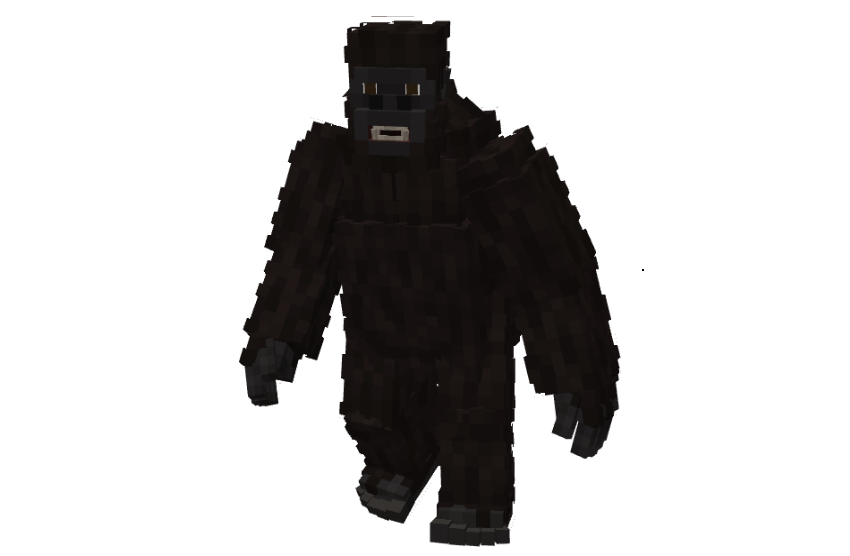
Bigfoot
Bigfoot is a large humanoid cryptid that spawns in forest biomes. It can turn invisible during night in forest biomes when a player is further than 20 blocks away, leaving behind footprints and ambient sounds to signal its presence. It hunts nearby animals to satisfy its hunger and attacks with heavy blows that slow its victims. Bigfoot has multiple phases. In Phase 1, it avoids nearby players and consume animals. If a player kills 8 animals in forest biomes or snow biomes or harms Bigfoot, Phase 2 begins, causing it to stalk players more closely, coming within 20 blocks before fleeing. If a player kills 8 more animals in forests, bigfoot will enter phase 3, where it becomes fully hostile. In this state, it has high health, speed, and damage, can throw rocks, leap forward, and break fragile blocks such as wood and glass. If its health drops below 40, Bigfoot enters a rage, gaining strength, speed, and resistance, though it may also flee when under 30 health.
As an easter egg, players can right click Bigfoot with a cake to trigger the Bigfoot AI Vlog variant, which does not despawn and fights hostile monsters, but will attack players and animals if hungry or provoked. Feeding it certain foods like steak, mushrooms, or honey grants it regeneration and saturation. If the Yeti Easter Egg is nearby, it will get strength, resistance This easter egg variant can also speak a few voicelines of the bigfoot ai videos.
● Show all Creatures
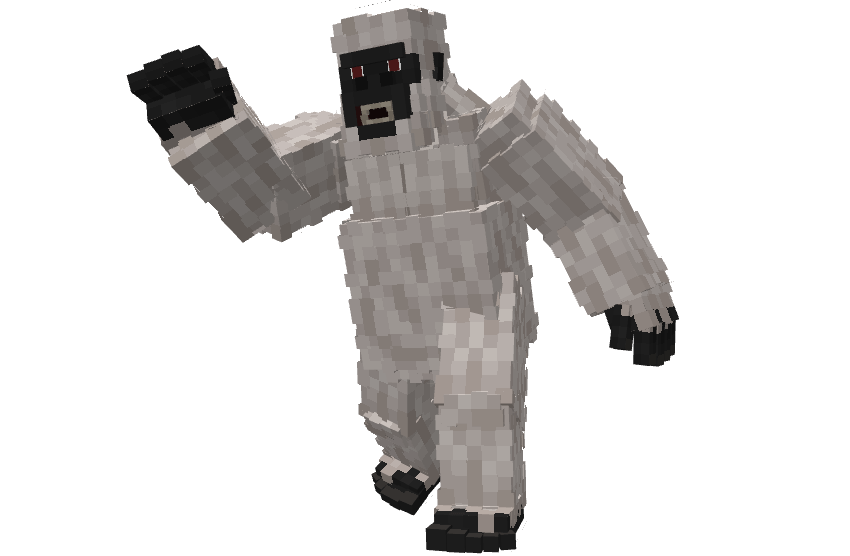
Yeti
The Yeti is the arctic counterpart of Bigfoot, spawning in snowy biomes. The Yeti does not leave footprints but behaves similarly in hunger, eating nearby animals to sustain itself. The phases also work for the yeti but unlike bigfoot, the yeti already turns hostile in phase 2. During snowfall in snow biomes, the yeti gets stronger and will turn invisible if a player isn't within a 15 block radius. It has high health, speed, and damage, can throw rocks, leap forward, and break fragile blocks such as wood and glass. If its health drops below 40, the Yeti enters a rage, gaining strength, speed, and resistance, though it may also flee when under 30 health.
Similar to bigfoot, if you give the Yeti a cake, it will trigger the Yeti AI Vlog Variant as an easter egg. It works just like the Bigfoot Easter Egg. If the Bigfoot Easter Egg is nearby, it will get strength, resistance and hunts monsters, but if it gets hungry, it will also target players or animals. This easter egg variant can also speak a few voicelines of the yeti ai videos.
● Mods Origins:
https://en.wikipedia.org/wiki/Bigfoot
● Config File not inculed.
● You are all allowed to use this mod in your modpacks!
● Do not port my mods without permission!
● Check out my other Mods:
https://www.curseforge.com/members/zcoperfy/projects
Bigfoot: Into the Woods Team

Owner