promotional bannermobile promotional banner

Big Sign Writer

Allows for easy writing of large multi-line characters on signs!

A client-side utility mod that eases inputting text onto signs that forms larger letters! Just turn the toggle on in the sign editing UI, and type as normal! Each large character is made up of smaller, normal Unicode characters from the vanilla Minecraft font, allowing this mod to work on most servers.

Font resource packs may cause issues.


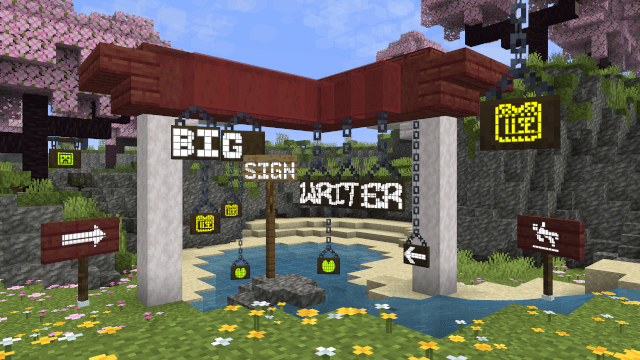
'BIG SIGN WRITER' written across several signs in large text


A button is added to the sign editing GUI to switch between large letter typing and normal. This button's position can be changed in the config file. (config/bigsignwriter/config.json)

The default fonts have large characters for all uppercase letters, all numbers, and a few additional symbols. Each character can be modified, and new fonts can be added in the 'fonts' folder. (config/bigsignwriter/fonts/)


Configuration


The config and font files are loaded once at runtime, and are reloaded every time you hit the 'Reload' button in the sign editing screen. 


config/bigsignwriter/config.json

Contains coordinates for where to place this mod's buttons in the sign edit gui, offset from the center of the screen.

Also contains defaultCharacterSeparator, which sets the default separator string to place between characters, and is a single space by default. May be overridden by fonts.

These settings can be modified in-game when YACL (and Mod Menu for the Fabric version) are installed.


config/bigsignwriter/fonts/

Three fonts are bundled in by default: default.json, retro.json and sharp.json. These contain a "name":"" field, an optional "characterSeparator":"" field, which can override which character(s) to use in between letters, and a "characters":{} field containing every large character and the normal character they represent. You may add additional characters, as long as what you want replaced is a single, type-able character. You may also add new fonts as jsons inside config/bigsignwriter/fonts/.

When editing/creating large characters, it is important that each line is the exact same width to maintain alignment. Different fonts will have different widths for different characters, so it is a good idea to make these directly inside Minecraft, and then copy each line into the config file.

The default 'T' is a good example, the top line is 3 blocks, which are 9 pixels wide each, making for a total of 27 pixels. Each subsequent line has one block, then on both sides of the block there is 1 space (4 pixels wide), and 1 "no-break space" (5 pixels wide), bringing the total in line at 27.

To check that your alignment is good, I like to copy three blocks ███ onto both sides of each line, then modify each line until all the blocks are in line with each other.

A massively helpful tool to aid in this process is Symbol Chat, which adds a menu where you can filter every available Unicode character by their width, among other things.


The Big Sign Writer Team

profile avatar
  • 4
    Followers
  • 5
    Projects
  • 63.1K
    Downloads

More from chililisoupView all

  • Condiments project image

    Condiments

    • 11.8K
    • Mods

    A variety of Vanilla+ features to add some extra flavor to your modded Minecraft game!

    • 11.8K
    • April 9, 2026
    • Mods
    • +2
  • Creative Crafting Menus project image

    Creative Crafting Menus

    • 1.0K
    • Mods

    A creative mode QoL mod adding easily accessible crafting menus modified for better creative mode use

    • 1.0K
    • March 26, 2026
    • Mods
  • Carpet: NeoForged project image

    Carpet: NeoForged

    • 35.2K
    • Mods

    Unofficial Carpet Mod port for NeoForge

    • 35.2K
    • October 27, 2025
    • Mods
    • +2
  • Create Waxed Outlines project image

    Create Waxed Outlines

    • 266
    • Resource Packs

    Visual waxed copper for Create, to be used with the Vanilla Tweaks resource pack.

    • 266
    • July 13, 2025
    • Resource Packs
    • +1
  • Condiments project image

    Condiments

    • 11.8K
    • Mods

    A variety of Vanilla+ features to add some extra flavor to your modded Minecraft game!

    • 11.8K
    • April 9, 2026
    • Mods
    • +2
  • Creative Crafting Menus project image

    Creative Crafting Menus

    • 1.0K
    • Mods

    A creative mode QoL mod adding easily accessible crafting menus modified for better creative mode use

    • 1.0K
    • March 26, 2026
    • Mods
  • Carpet: NeoForged project image

    Carpet: NeoForged

    • 35.2K
    • Mods

    Unofficial Carpet Mod port for NeoForge

    • 35.2K
    • October 27, 2025
    • Mods
    • +2
  • Create Waxed Outlines project image

    Create Waxed Outlines

    • 266
    • Resource Packs

    Visual waxed copper for Create, to be used with the Vanilla Tweaks resource pack.

    • 266
    • July 13, 2025
    • Resource Packs
    • +1