BetterInterFace
- By
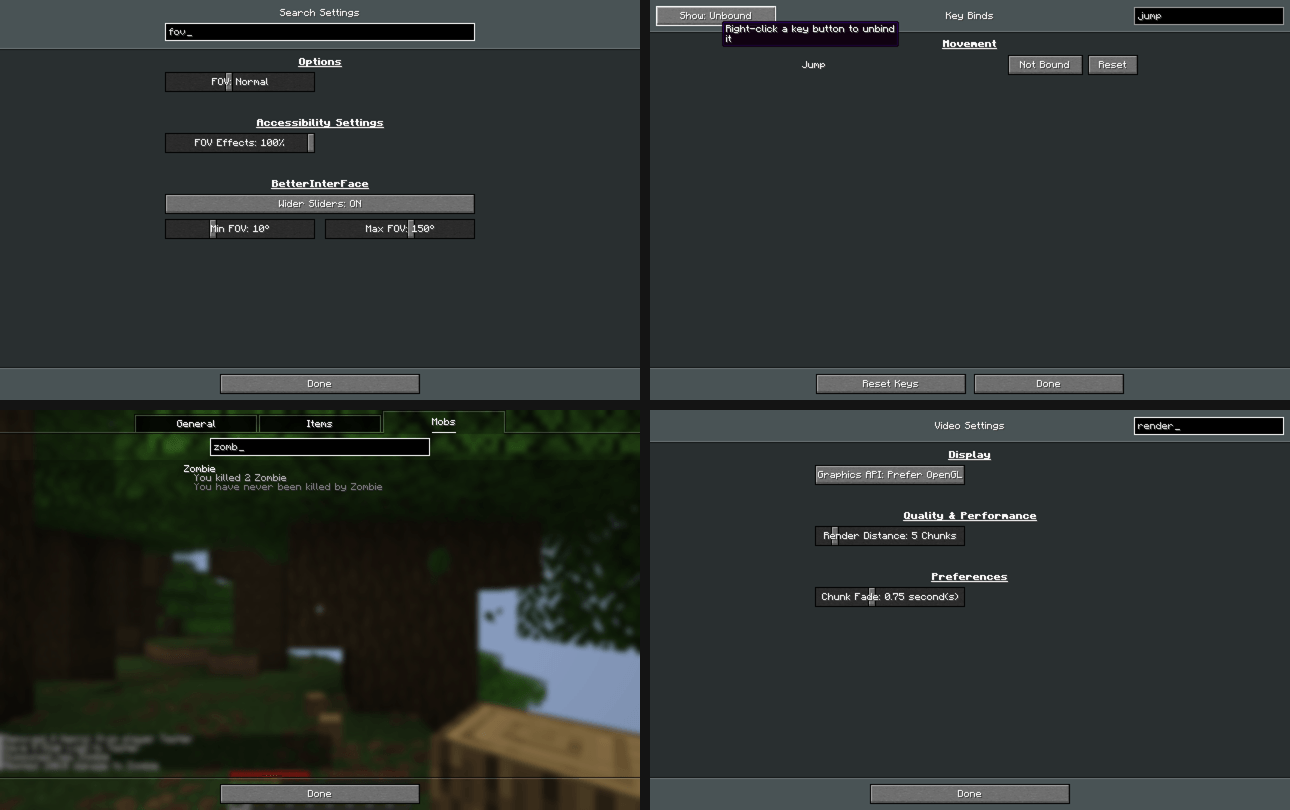
Search in Statistics, Key Binds and all settings, wider sliders, right click to reset or unbind.
betterinterface-1.0.0-preview.png
Description
BetterInterFace
A client-side mod that adds search to the places where Minecraft doesn't have it and makes the settings more flexible.
Search in Statistics
A search box under the General / Items / Mobs tabs. One search filters all three tabs:
- General stats are found by name.
- Items and mobs are found by name or by ID (for example
oak_log). - Column sorting in Items still works while a filter is active.
Key Binds
- Search by action name, category or by the key itself (type
Qto see everything bound to Q). - Show: All / Conflicts / Changed / Unbound filter button.
- Right click a key button to unbind it.
Search in Settings
- Every settings screen (Video, Sound, Chat, Controls, Accessibility and other mods' screens built the same way) gets a search box that leaves only the matching options.
- The main Options screen gets a search over all settings at once. The results are grouped by screen and include matching key binds. You can change settings right in the results.
- Right click a setting to reset it to its default.
- Type to search: if no text field is focused, just start typing.
Wider sliders
| Setting | Vanilla | With the mod (default) | Max limit in the mod settings |
|---|---|---|---|
| Brightness | 0–100% | 0–500% | up to 1500% |
| FOV | 30–110 | 10–150 | 1–179 |
| Mouse Sensitivity | 0–200% | 0–400% | up to 1000% |
| Entity Distance | 50–500% | 25–1000% | up to 2000% |
Values outside the vanilla range are saved in options.txt and survive a restart. If you remove the mod, the game resets them to normal values.
Settings
Gear button next to the search box in the Options screen, or Mod Menu → BetterInterFace.
Every feature can be turned off, and the slider limits can be changed there. Config file: config/betterinterface.json.
Requirements
- Minecraft 26.3, Fabric Loader 0.19+, Fabric API
- Client only, not needed on the server
- Mod Menu is optional
The mod's code was written with the help of AI (Claude by Anthropic).
BetterInterFace Team