Better Party X Tensura: Reincarnated
- By
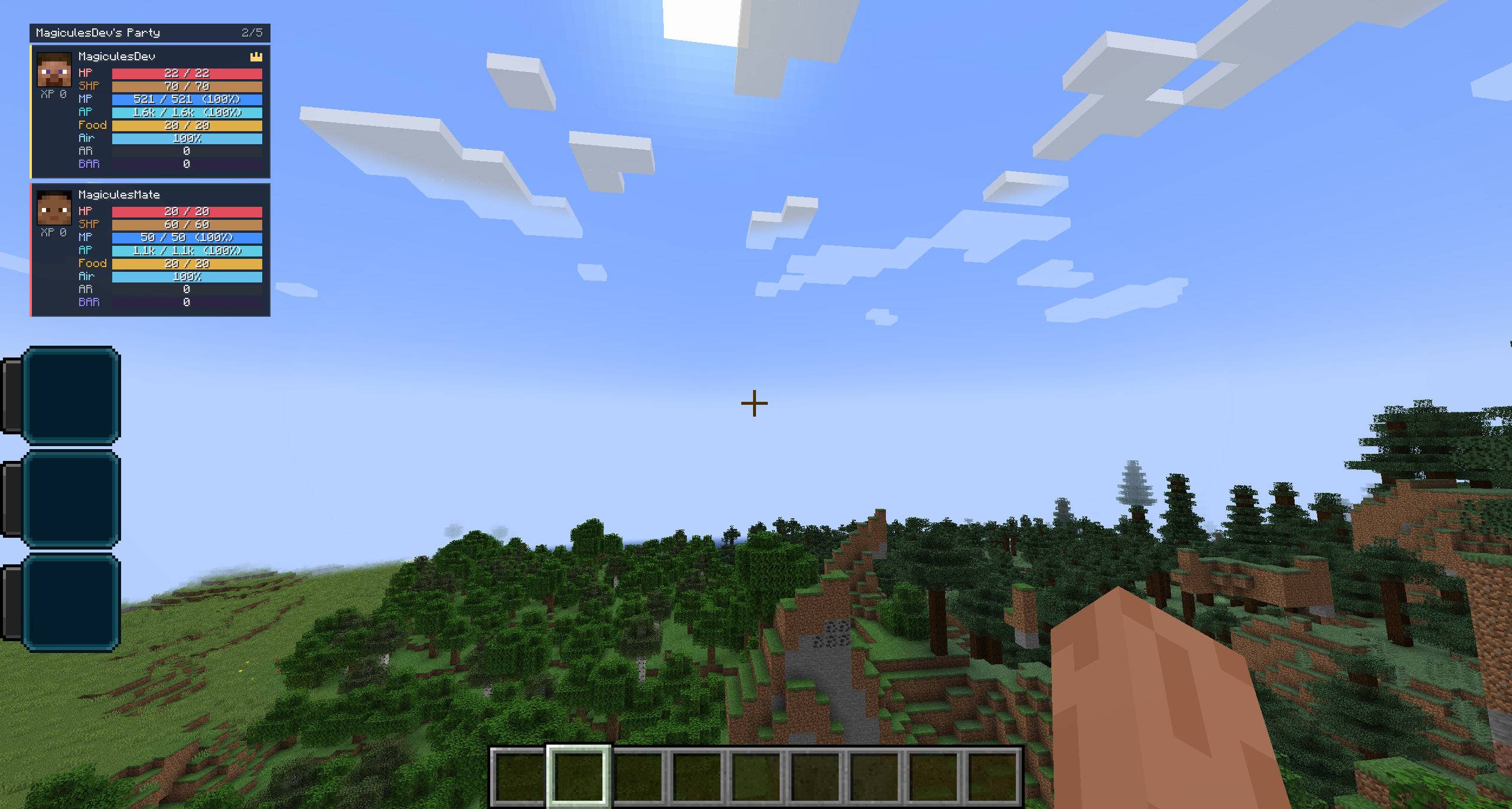
Add customizable Tensura RPG cards to Better Party’s live HUD. Track Magicules, spiritual health, aura, barriers, and mount stats. Set separate layouts for yourself and teammates, preview changes live, and enable low-MP alerts.
HUD
Description
Better Party X Tensura Reincarnated
Connect Better Party with Tensura: Reincarnated and track Magicules, spiritual health, aura, and more directly in your party HUD.
The Tensura: RPG Cards style gives each party member a customizable card. See who is running low on Magicules, check your teammates’ spiritual health, and track your mount’s health while riding.
Better Party manages the group and shares resource updates with party members. Each player can customize how the cards look on their own screen.
Main Features
- Track live Tensura and Minecraft resources on Better Party member cards.
- Configure separate layouts for your own card and your teammates’ cards.
- Highlight low Magicules with a configurable threshold and warning color.
- Preview your layout with examples for mounted players, offline teammates, and high XP levels.
- Automatically switch to the Tensura HUD style when you join a party.
- Hide native Tensura indicators already shown on your own RPG card.
- Customize the HUD in English or German.
Party HUD Information
- Magicules (MP)
- Spiritual health (SHP)
- Aura (AP)
- Multilayer barrier count
- Health, hunger, air supply, and armor
- Health and spiritual health of living mounts
Mount rows appear while a party member is riding a living mount and disappear after dismounting.
Independent Display Settings
Choose which rows appear and arrange them separately for your own card and your teammates’ cards. For example, keep health and hunger on your own card while showing only Magicules, spiritual health, and aura for teammates.
Open Better Party → Personal Settings → Tensura: Party HUD to edit both profiles. The live preview updates as you make changes, and the add-on saves your preferences automatically.
Magicules Display and Low MP Warnings
Display Magicules as a bar, a current and maximum value, a percentage, or any combination of the three. Enable compact numbers to show large values as 125k or 1.5M.
When a party member’s Magicules reach or fall below your chosen percentage, their card can highlight the resource with your warning color and a ! MP marker. You can also set the Magicules row to appear only while a warning is active.
Automatic HUD Switching
Tensura: RPG Cards can activate automatically when you join a party. Better Party restores your previous HUD style when you leave or disconnect. You can also select the Tensura style manually.
Native Tensura HUD
Enable Hide Tensura HUD to hide native indicators when your own RPG card displays the corresponding resources. Tensura’s status display stays visible during Severance damage or an active race cooldown.
Credits and Links
Made by MrStilu2k6
If you find a bug or have an idea for an improvement, leave a comment on the project page. If you enjoy the add-on and want to support my work, you can leave a tip through PayPal.
Better Party X Tensura: Reincarnated Team

Owner