Better AE2
- By
Adds a searchable AE2 network sidebar to container screens while carrying a usable wireless terminal.
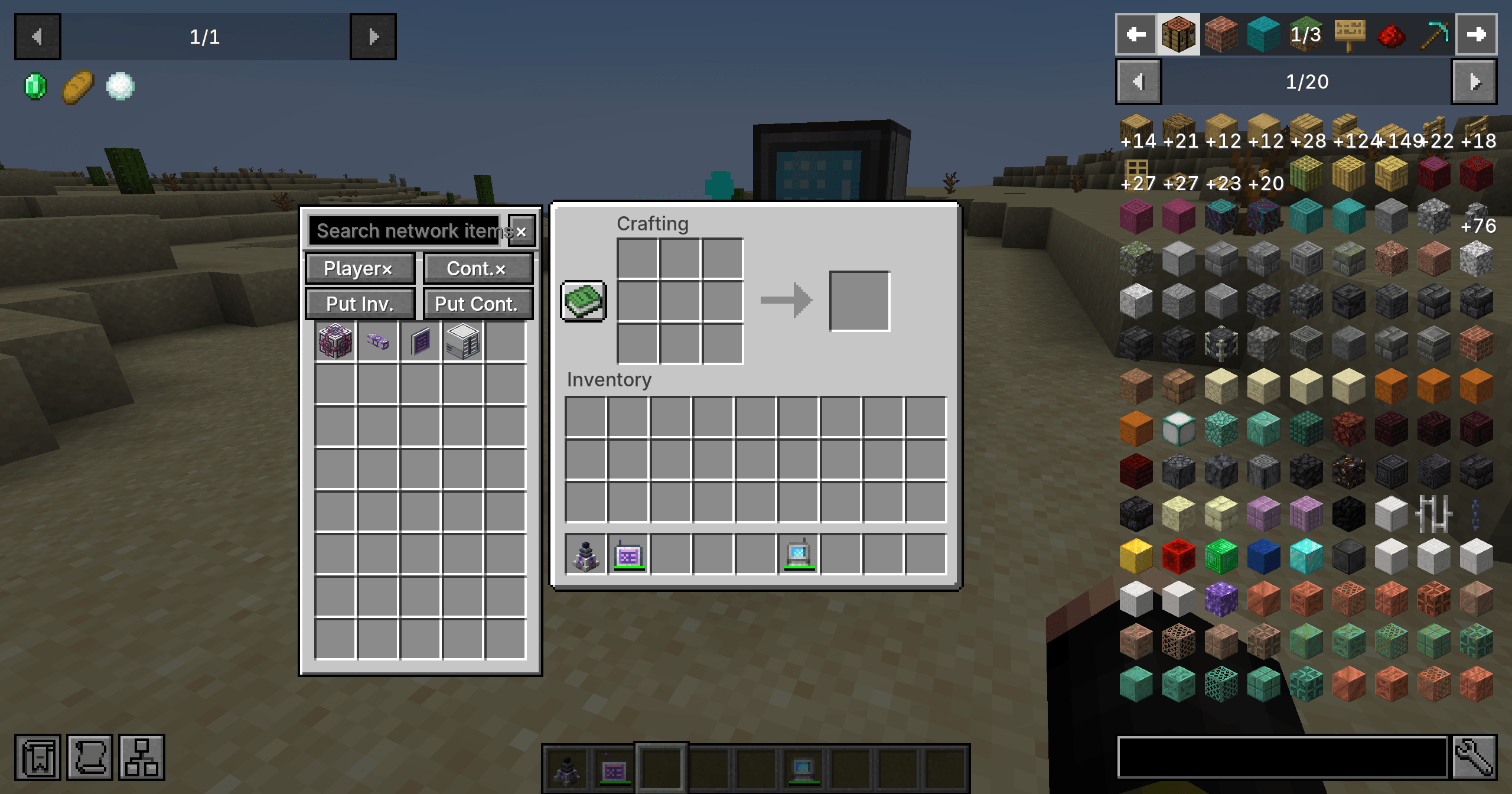
Browse ME network items alongside a vanilla crafting screen while carrying a usable AE2 wireless terminal.
Description
Better AE2
Access your ME network from the inventory and container screens you already use. Carry a usable AE2 wireless terminal, open a container, and the searchable storage sidebar is ready to help.
Inspired by Better Beyond Dimensions, with the same convenient sidebar workflow adapted to Applied Energistics 2.
Features
- Searchable network storage: browse items beside your inventory, crafting table, chest, and other supported container screens.
- Quick transfers: withdraw items or deposit held stacks without opening a separate terminal screen.
- Independent Shift-click controls: choose whether player inventory slots and container slots send items into the network.
- One-click deposits: deposit the main inventory or container contents. The inventory action leaves the hotbar alone.
- Terminal protection: wireless terminals are excluded from network deposits, so your access item will not disappear into storage.
- AE2 access rules: only a linked, usable terminal enables the sidebar. AE2's native network, range, access, and power checks still apply.
- Curios support, optional: terminals can stay in the inventory or be worn in a Curios slot. Curios is not required.
- Immediate refresh: picking up the terminal hides the sidebar; putting it back restores it without reopening the UI.
- Vanilla-style interface: familiar recessed slots, searchable items, and configurable sidebar placement and visibility.
- Optional JEI integration: recipe interactions are supported when JEI is present.
Controls
Use the Player and Cont. buttons to toggle Shift-click routing. Put Inv. deposits your main inventory, and Put Cont. deposits the open container.
The container-deposit key defaults to Z. Inventory deposit is unbound by default; assign it in Minecraft's Controls menu.
Client settings are stored in config/better_ae2-settings.json.
Requirements
- Minecraft 1.20.1 / Forge with Applied Energistics 2 15.4+.
- Minecraft 1.21.1 / NeoForge with Applied Energistics 2 19.2+.
- Install Better AE2 and AE2 on both the client and server.
- Curios and JEI are optional.
Better AE2 is an independent addon and is not an official Applied Energistics 2 release.
Links
中文说明
把 AE2 网络侧边栏带到背包与容器界面:搜索网络物品、快速存取、独立开关玩家/容器 Shift-click、一键存背包与容器。
仅在持有或佩戴已链接且可用的无线终端时启用,遵循 AE2 原生可用性与能量检查。拿起终端隐藏侧边栏,放回后立即恢复。 存背包会保留快捷栏,所有网络存入操作都会保护无线终端自身。Curios 饰品栏兼容为可选功能,无需强制安装 Curios。
支持 Forge 1.20.1 与 NeoForge 1.21.1,客户端与服务端均需安装本模组和 AE2。
Better AE2 Team


Owner